Browser Interface
approvedby jason-lieb
Allows you to interact with the browser.
Obsidian Browser Interface Plugin
An obsidian plugin that pairs with a chrome extension to manage your tabs in obsidian.
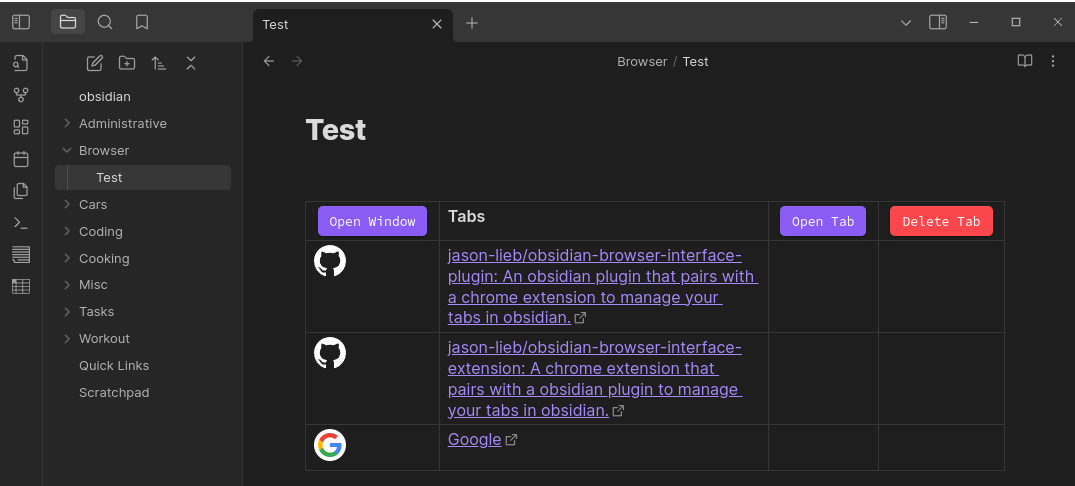
This plugin displays the tabs saved from the chrome extension and creates buttons to reopen and delete tabs.
The Obsidian Browser Interface Plugin is dependent on the Meta Bind plugin. Also it is highly recommended to pair this plugin with the Advanced Tables plugin.
If there is interest in a firefox-supported extension, one might be created in the future.
Installation
-
Install from community plugins in Obsidian settings.
-
Install the chrome extension from the chrome web store.
-
If you are using chromium or brave, enable these 3 flags at chrome://flags or brave://flags, respectively.
-
#file-system-access-api
-
#file-system-access-persistant-permission
-
#file-system-observer
- Set the directory in obsidian plugin settings and in the extension.
Limitations
This plugin currently only has the essential functions. The Open Tab and Delete Tab work by clicking on the row of the desired tab and then clicking the associated button. Also, the buttons don't work in reading mode from a limitation from obsidian.
Screenshot
For plugin developers
Search results and similarity scores are powered by semantic analysis of your plugin's README. If your plugin isn't appearing for searches you'd expect, try updating your README to clearly describe your plugin's purpose, features, and use cases.