Buildian
approvedby YuChenSSR
Forked from YishenTu/claudian
Unofficial Obsidian bridge for Grok Build, Cursor Agent, Factory Droid, Amp code and provider-backed coding agents. - This plugin has not been manually reviewed by Obsidian staff.
Buildian



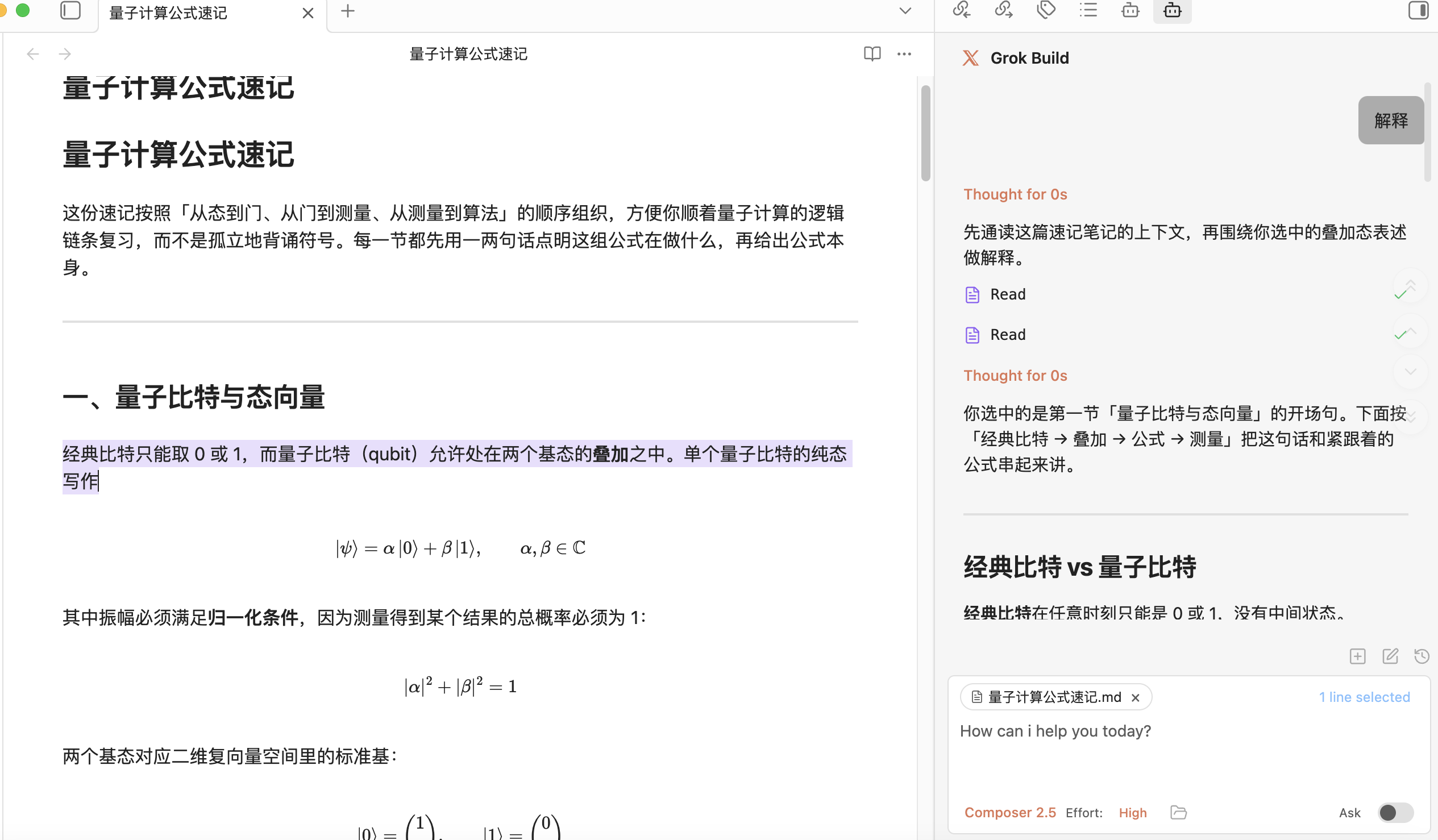
Buildian is an unofficial Obsidian plugin that connects your vault to ACP coding agents, including the xAI Grok Build CLI, Cursor Agent, and Factory Droid. This project is based on Claudian and modified to adapt Claudian's agent workflow for provider-backed coding CLIs.
Buildian is not affiliated with, endorsed by, or sponsored by xAI, Cursor, Anysphere, or Factory.
Features & Usage
Open the Buildian chat sidebar from the ribbon icon or command palette. Select text and use the hotkey for inline edit. The CLI runs with your vault as its working directory, so it can read, write, edit, and search files in your vault.
Inline Edit — Select text or start at the cursor position + hotkey to edit directly in notes with word-level diff preview.
Slash Commands & Skills — Type / or $ for reusable prompt templates or Skills from user- and vault-level scopes.
@mention - Type @ to mention anything you want the agent to work with, vault files, subagents, MCP servers, or files in external directories.
Plan Mode — Toggle via Shift+Tab. The agent explores and designs before implementing, then presents a plan for approval.
Instruction Mode (#) — Refined custom instructions added from the chat input.
Image Attachments — Paste or drop images into the chat input. Whether the model can actually see the image depends on the selected model's vision support. For Factory Droid BYOK custom models, the model must support vision and must not be marked noImageSupport: true in ~/.factory/settings.json.
MCP Servers — The runtime manages MCP through its own CLI-native configuration.
Multi-Tab & Conversations — Multiple chat tabs, conversation history, fork, resume, and compact.
Requirements
- Grok CLI installed and authenticated with
grok login, Cursor Agent installed and authenticated withcursor-agent login, or Droid CLI installed and authenticated through the Droid browser login flow. - Obsidian v1.7.2+
- Desktop only (macOS, Linux, Windows)
Installation
From GitHub Release
- Download
main.js,manifest.json, andstyles.cssfrom the latest release - Create a folder called
buildianin your vault's plugins folder:/path/to/vault/.obsidian/plugins/buildian/ - Copy the downloaded files into the
buildianfolder - Enable the plugin in Obsidian:
- Settings → Community plugins → Enable "Buildian"
From source (development)
-
Clone this repository into your vault's plugins folder:
cd /path/to/vault/.obsidian/plugins git clone https://github.com/YuChenSSR/buildian.git buildian cd buildian -
Install dependencies and build:
npm install npm run build -
Enable the plugin in Obsidian:
- Settings → Community plugins → Enable "Buildian"
Development
# Watch mode
npm run dev

# Production build
npm run build
Privacy & Data Use
- Sent to API: Your input, attached files, images, and tool call outputs are sent through the selected provider CLI according to that CLI's behavior and your account/API configuration.
- Local storage: Buildian settings and session metadata are stored in
vault/.buildian/. - Environment variables: Provider subprocesses inherit the Obsidian process environment plus any variables you configure in the plugin. This is needed for CLI authentication, proxies, certificates, and PATH resolution.
- Device-specific paths: Per-device CLI paths use an opaque local key stored in browser local storage, not your system hostname.
- Background activity: This plugin does not run telemetry beacons. UI polling timers read local Obsidian/editor selection state only. Network activity is limited to explicit runtime work, configured MCP endpoints, and CLI calls needed to answer your requests.
Troubleshooting
Grok CLI not found
If you encounter spawn grok ENOENT or Grok CLI not found, the plugin can't auto-detect your Grok installation.
Solution: Leave the setting empty first so the plugin can auto-detect Grok. If auto-detection fails, find your CLI path and set it in Settings → Buildian → CLI path.
| Platform | Command | Example Path |
|---|---|---|
| macOS/Linux | which grok | /Users/you/.grok/bin/grok |
| Windows (native) | where.exe grok | C:\Users\you\.grok\bin\grok.exe |
Alternative: Add your Node.js bin directory to PATH in Settings → Environment → Custom variables.
Cursor Agent CLI not found
If you enable Cursor Agent and encounter spawn cursor-agent ENOENT, the plugin can't auto-detect your Cursor Agent installation.
Solution: Leave the Cursor Agent CLI path setting empty first so the plugin can auto-detect cursor-agent. If auto-detection fails, find your CLI path and set it in Settings → Buildian → Cursor Agent → CLI path.
| Platform | Command | Example Path |
|---|---|---|
| macOS/Linux | which cursor-agent | /Users/you/.local/bin/cursor-agent |
| Windows (native) | where.exe cursor-agent | C:\Users\you\.local\bin\cursor-agent.exe |
Droid CLI not found
If you enable Droid and encounter spawn droid ENOENT, the plugin can't auto-detect your Droid installation.
Solution: Leave the Droid CLI path setting empty first so the plugin can auto-detect droid. If auto-detection fails, find your CLI path and set it in Settings -> Buildian -> Droid -> CLI path. Droid authentication should use the browser login flow; run droid once in a regular terminal if the ACP login prompt does not appear in Obsidian.
| Platform | Command | Example Path |
|---|---|---|
| macOS/Linux | which droid | /Users/you/.local/bin/droid |
| Windows (native) | where.exe droid | C:\Users\you\.local\bin\droid.exe |
Can't see Grok Build model / can't connect to xAI
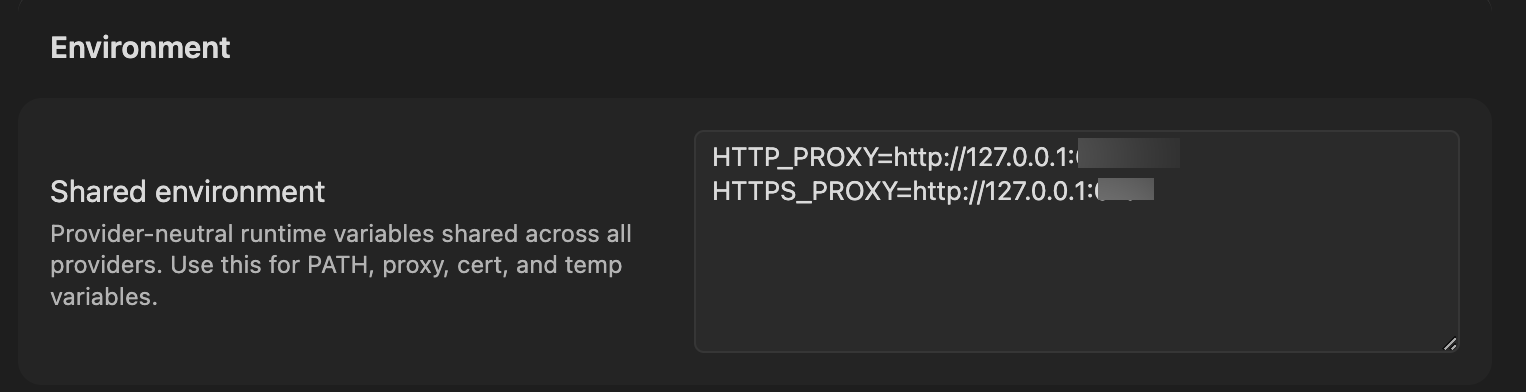
If the Grok Build model doesn't appear or the CLI can't reach xAI, your network may require a proxy to access xAI. Configure proxy environment variables in Settings → Environment → Shared environment:
HTTP_PROXY=http://127.0.0.1:<port>
HTTPS_PROXY=http://127.0.0.1:<port>
Replace <port> with the port of your local proxy (e.g. Clash, V2Ray, or any HTTP proxy on your machine). Restart Obsidian after changing the values so the CLI subprocess picks them up.
npm CLI and Node.js not in same directory
If using a shell-managed CLI, check whether grok is visible to GUI apps:
which grok
If different, GUI apps like Obsidian may not find Node.js.
Solutions:
- Install native binary (recommended)
- Add Node.js path to Settings → Environment:
PATH=/path/to/node/bin
If you have a feature request or run into any bugs, please submit a GitHub issue.
Architecture
src/
├── main.ts                      # Plugin entry point
├── app/                         # Shared defaults and plugin-level storage
├── core/                        # Provider-neutral runtime, registry, and type contracts
│   ├── runtime/                 # ChatRuntime interface and approval types
│   ├── providers/               # Provider registry and workspace services
│   ├── auxiliary/               # Shared provider auxiliary services
│   ├── bootstrap/               # Plugin bootstrap wiring
│   ├── security/                # Approval utilities
│   └── ...                      # commands, mcp, prompt, storage, tools, types
├── providers/
│   ├── cursor/                  # Cursor Agent ACP adaptor
│   ├── droid/                   # Factory Droid ACP adaptor
│   ├── claude/                  # Claude SDK adaptor, prompt encoding, storage, MCP, plugins
│   ├── codex/                   # Codex app-server adaptor, JSON-RPC transport, JSONL history
│   ├── opencode/                # Opencode adaptor
│   ├── pi/                      # Pi RPC adaptor, model discovery, JSONL history
│   └── acp/                     # Agent Client Protocol shared transport
├── features/
│   ├── chat/                    # Sidebar chat: tabs, controllers, renderers
│   ├── inline-edit/             # Inline edit modal and provider-backed edit services
│   └── settings/                # Settings shell with provider tabs
├── shared/                      # Reusable UI components and modals
├── i18n/                        # Internationalization (10 locales)
├── types/                       # Shared ambient types
├── utils/                       # Cross-cutting utilities
└── style/                       # Modular CSS
Roadmap
- Grok Build CLI provider integration
- Cursor Agent ACP provider integration
- Factory Droid ACP provider integration
- Local install path separated from Claudian
- More runtime testing across platforms
License
Licensed under the MIT License.
Star History
Acknowledgments
For plugin developers
Search results and similarity scores are powered by semantic analysis of your plugin's README. If your plugin isn't appearing for searches you'd expect, try updating your README to clearly describe your plugin's purpose, features, and use cases.