Cadence
approvedby wesswart77
A workspace for working life: Home command centre, CRM, PRM, Planner with reminders, rich projects, Reports, and CSV import. Markdown source-of-truth, no server required. - This plugin has not been manually reviewed by Obsidian staff.
Cadence — a workspace for working life
A unified Obsidian plugin for CRM, PRM, project management, daily planning, and reminders — all on top of plain markdown. No server, no sync service, no lock-in. Your vault stays your vault.
Why Cadence
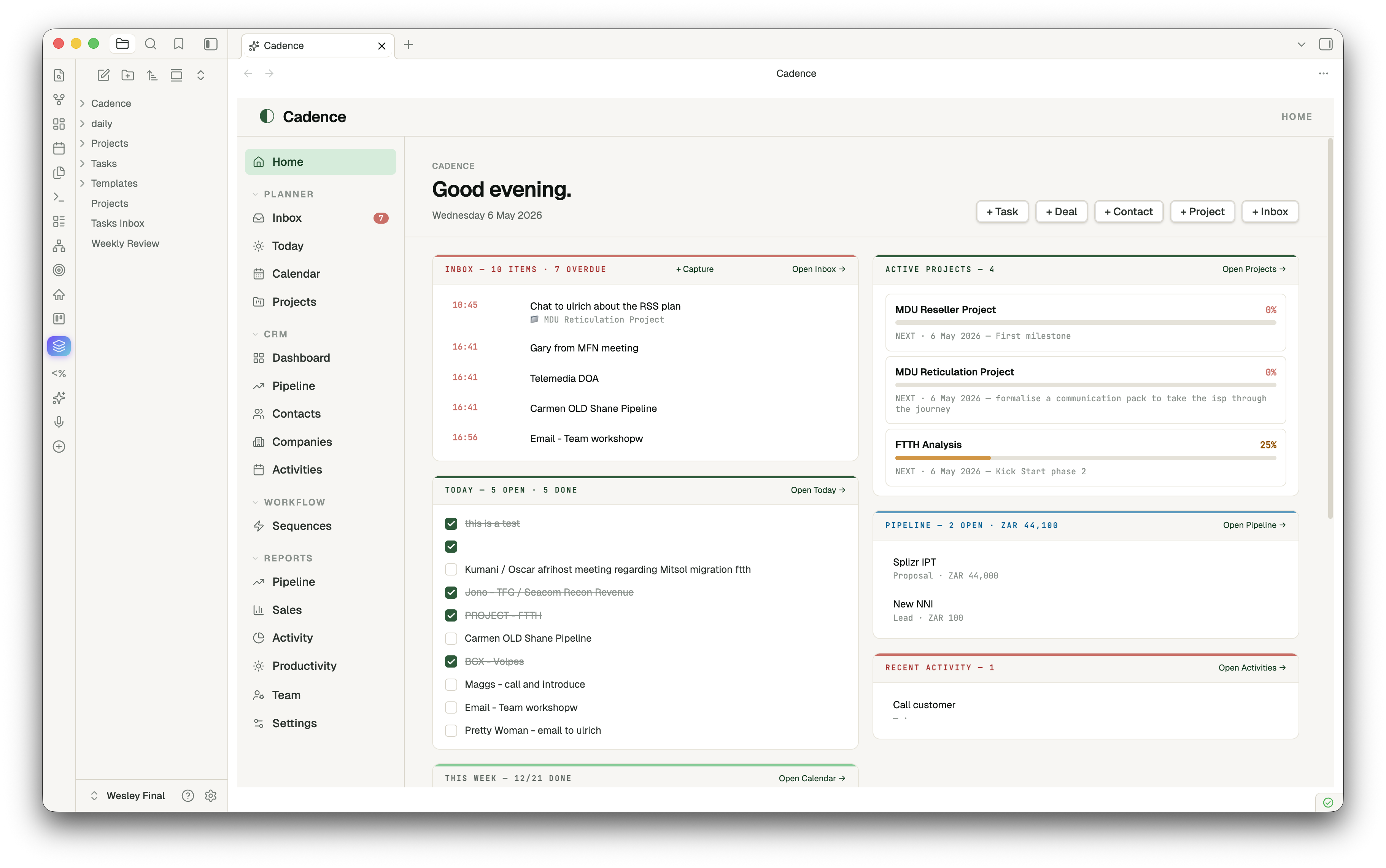
Most "second brain" plugins do one thing well. Cadence is the opposite: a coherent workspace that brings together the surfaces a working person actually moves between every day — today's tasks, the week ahead, deals in flight, contacts, projects, recurring reminders — and presents them in a single tab with one familiar nav.
- Markdown is the source of truth. Every contact, deal, project, activity is a
.mdfile with frontmatter. Tasks, Dataview, Templater all keep working. Move to a different vault tomorrow — your data goes with you. - One tab, many surfaces. A left rail lets you flip between Home → Today → Pipeline → Contacts → Projects → Inbox → Reports without ever leaving the Cadence tab.
- Module toggles. Turn off CRM, PRM or Planner if you only want some of it.
- Reminders that fire. A small Inbox + capture modal + ticker = real notifications, not just a tag on a note.
Features
Home — your command centre
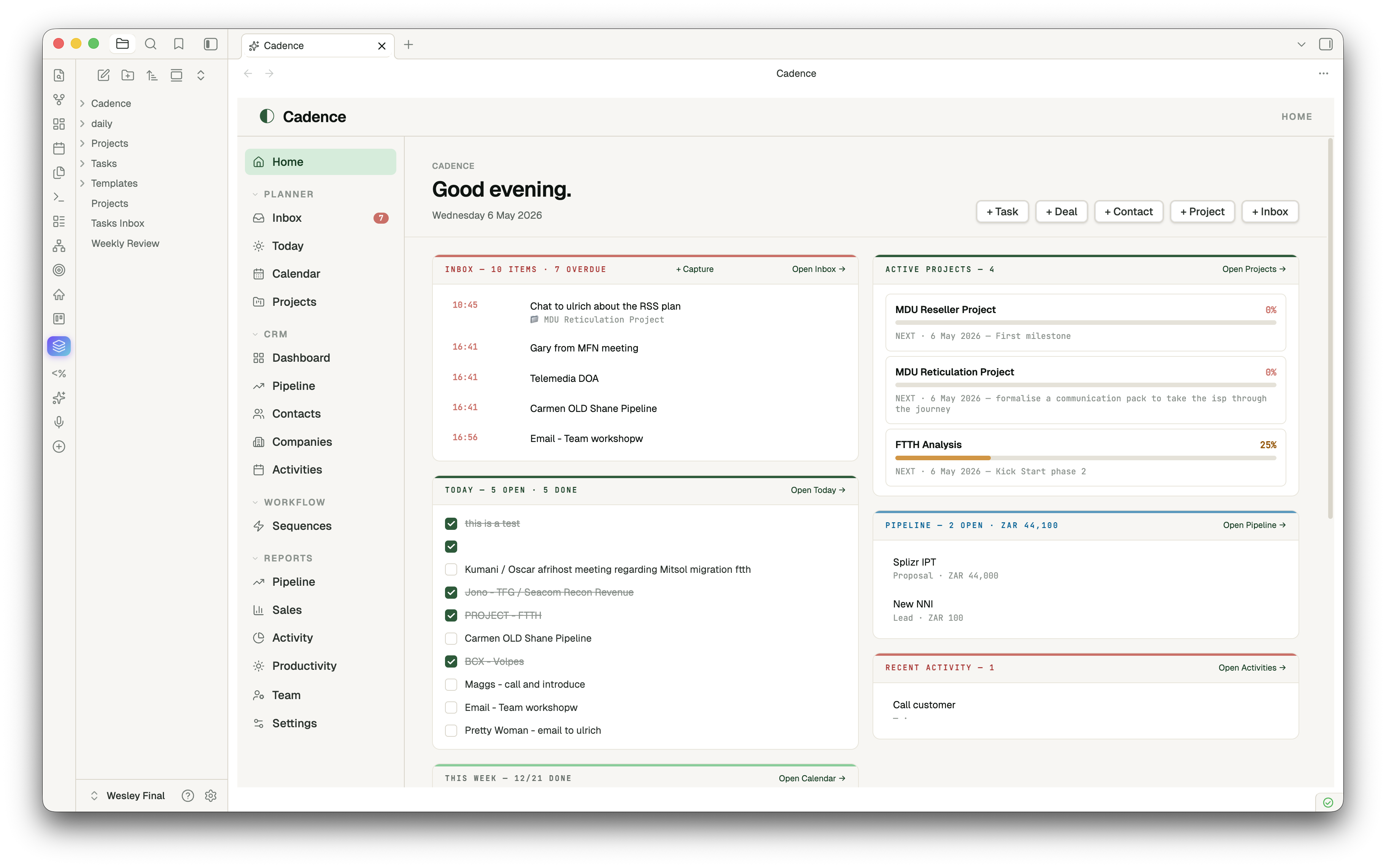
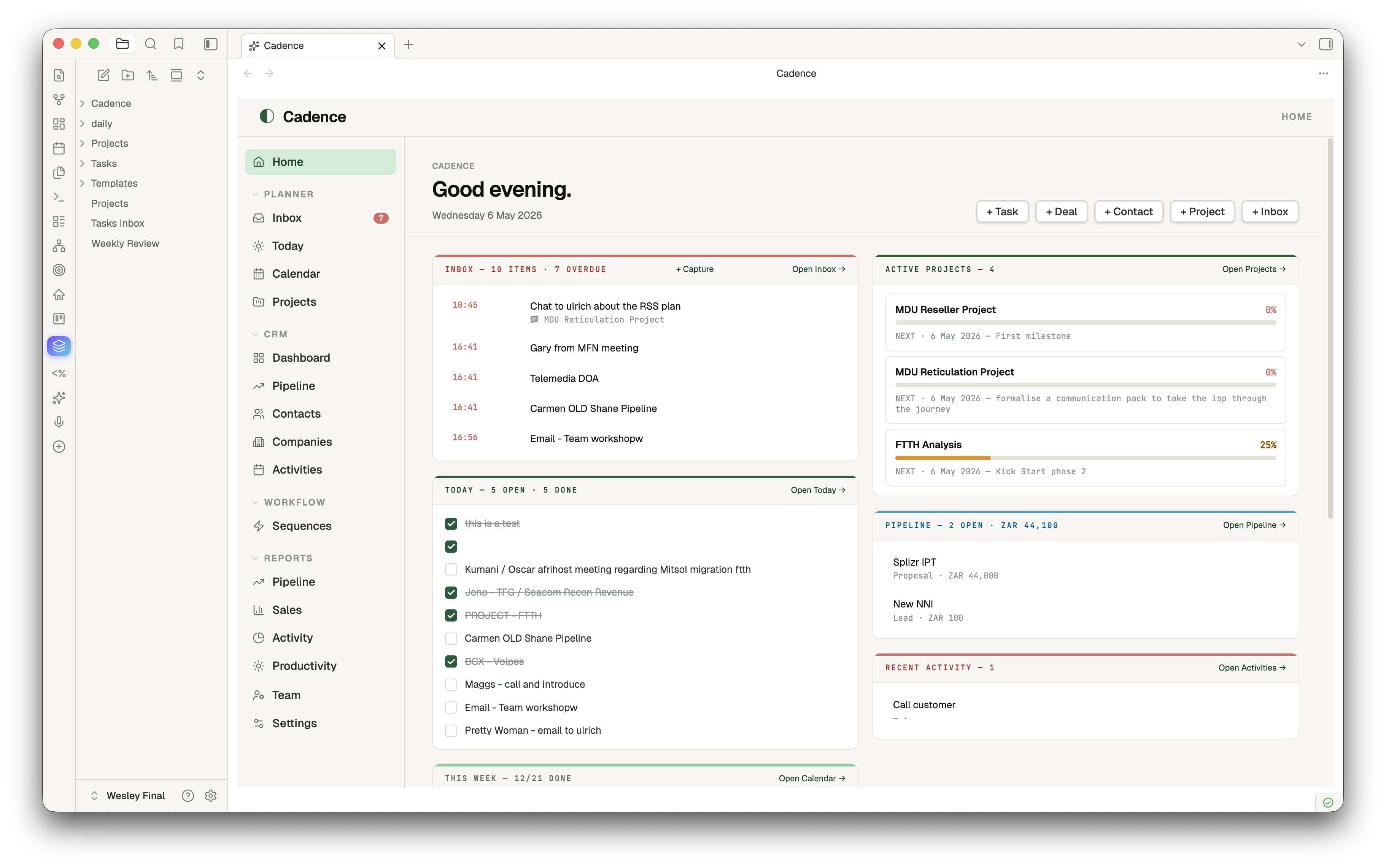
Two-column dashboard: today's tasks (tickable inline) · this week's progress · upcoming deadlines · partners due for follow-up · top active projects with milestone progress · pipeline at a glance · recent activity. Optional "open on Obsidian startup" + Homepage plugin compatible.
Planner
- Today — diary view of today's daily note with quick-add task and autosaving journal
- Calendar (week) — Mon–Sun grid across daily notes; tick any task from any day
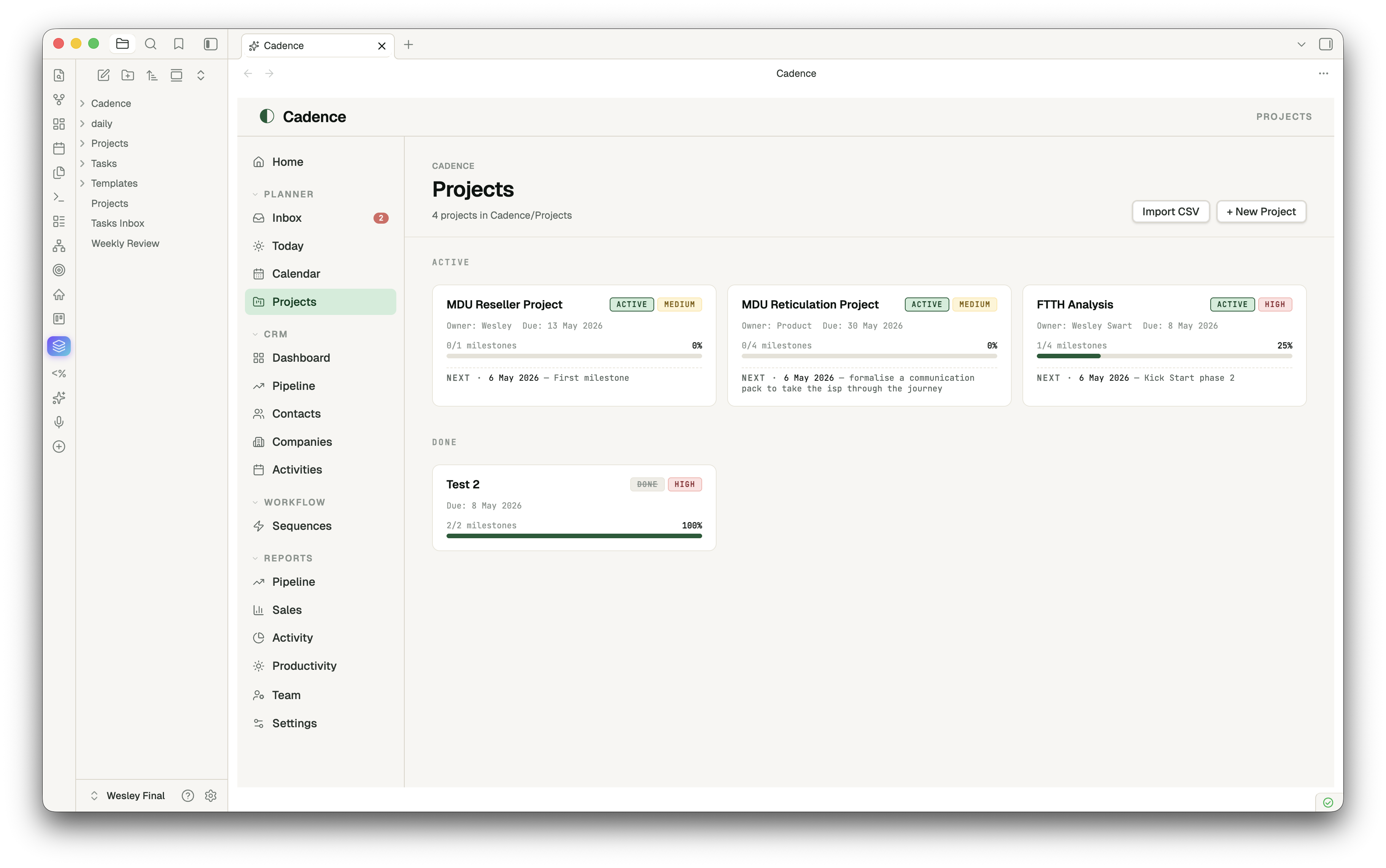
- Projects — status-grouped card grid with milestone progress and next-up dates
- Inbox — universal capture + reminders; items grouped by Now / Today / This Week / Later
CRM
- Dashboard — pipeline-by-stage bars, hot deals (top by value), stale deals (no edits in 14+ days), recent activity, customer base mini-stats
- Pipeline — kanban board across deal stages; drag-and-drop a card to update its
stagefrontmatter; Won column gets a soft emerald tint - Contacts / Companies / Activities — sortable list views with rich frontmatter editing
PRM
Partners · Registrations · Commissions · Leads · Certifications · Analytics — same entity-list pattern, in their own folders, with status enums and Reports that aggregate across them.
Project Management
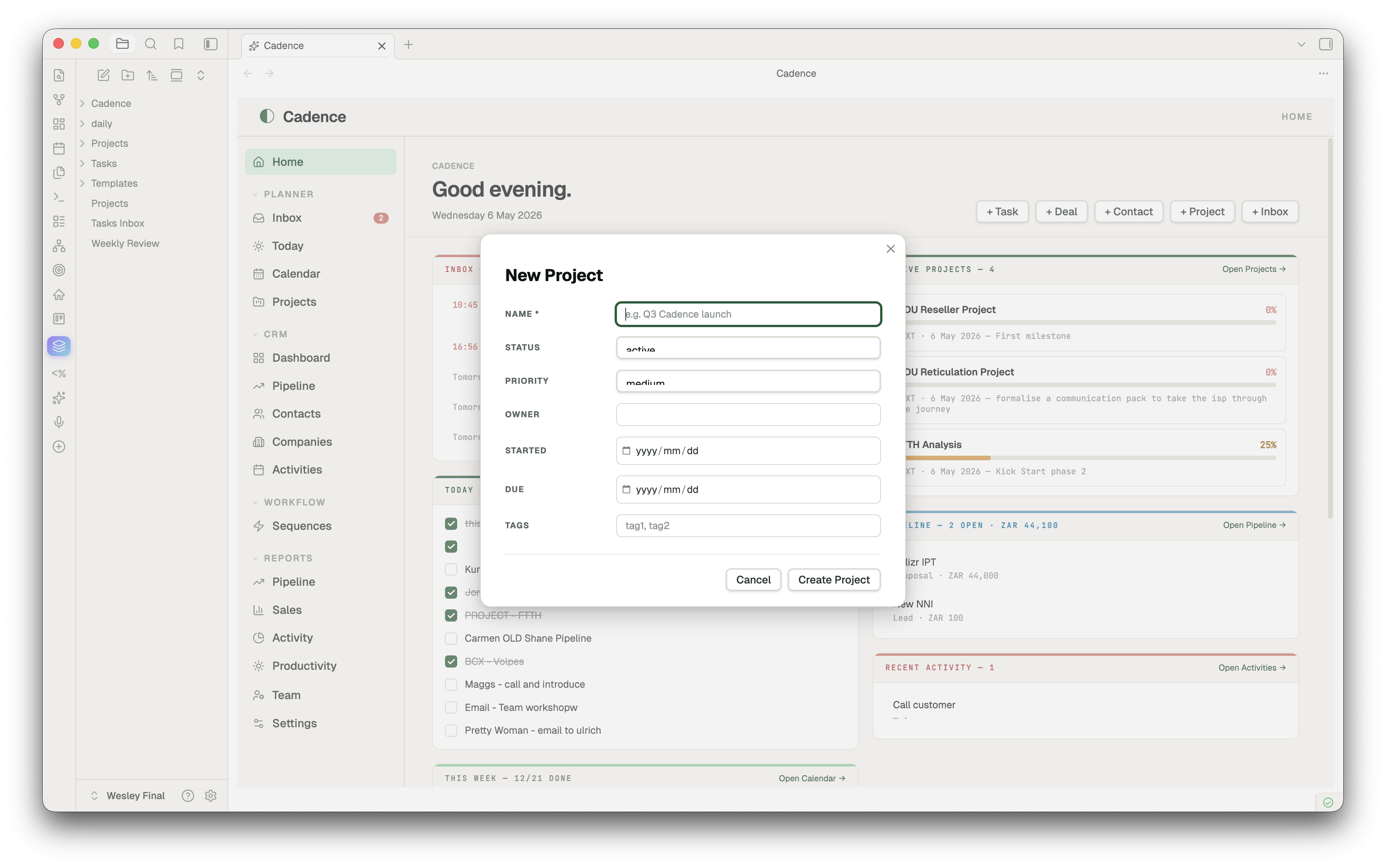
Click a project, get a real PM surface — not a markdown editor. Hero with status/priority pills, owner, due date, color-banded progress bar. Left column: tickable milestones (date + title + delete on hover) and tasks with + Add buttons. Right column: Brief, Scope, Risks, Stakeholders, Notes — all autosaving textareas writing back to their H2 sections. Open as note for full body editing in Obsidian's editor.
Reminders
Quick-capture with Cmd+Shift+I → modal with text, optional datetime, optional repeat (daily/weekly). The plugin ticks every 30 seconds and fires due reminders as in-app notices (and optionally desktop notifications). Snooze 15m / 1h / tomorrow on any reminder. The nav badge shows live overdue count.
Reports
Pipeline · Sales · Partners · Activity · Productivity (over your daily notes — completion %, streaks, journal volume, 14-day done-tasks bar chart).
New entity capture
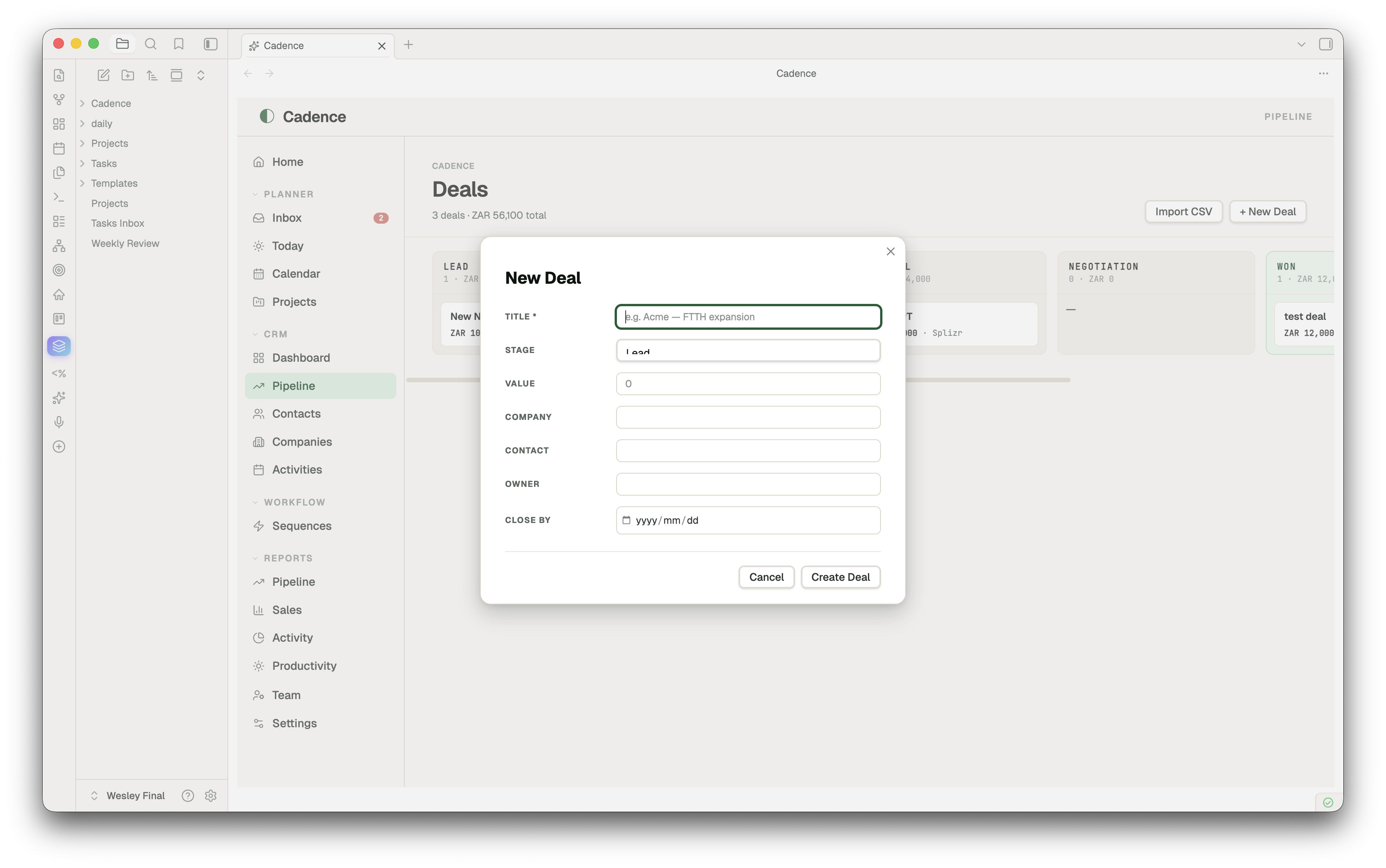
A clean two-column modal for every entity type — type-aware widgets (date pickers, dropdowns for stage/status/priority/tier/type), smart defaults, smart placeholders, primary field marked required. Enter to submit, Esc to cancel.
CSV import
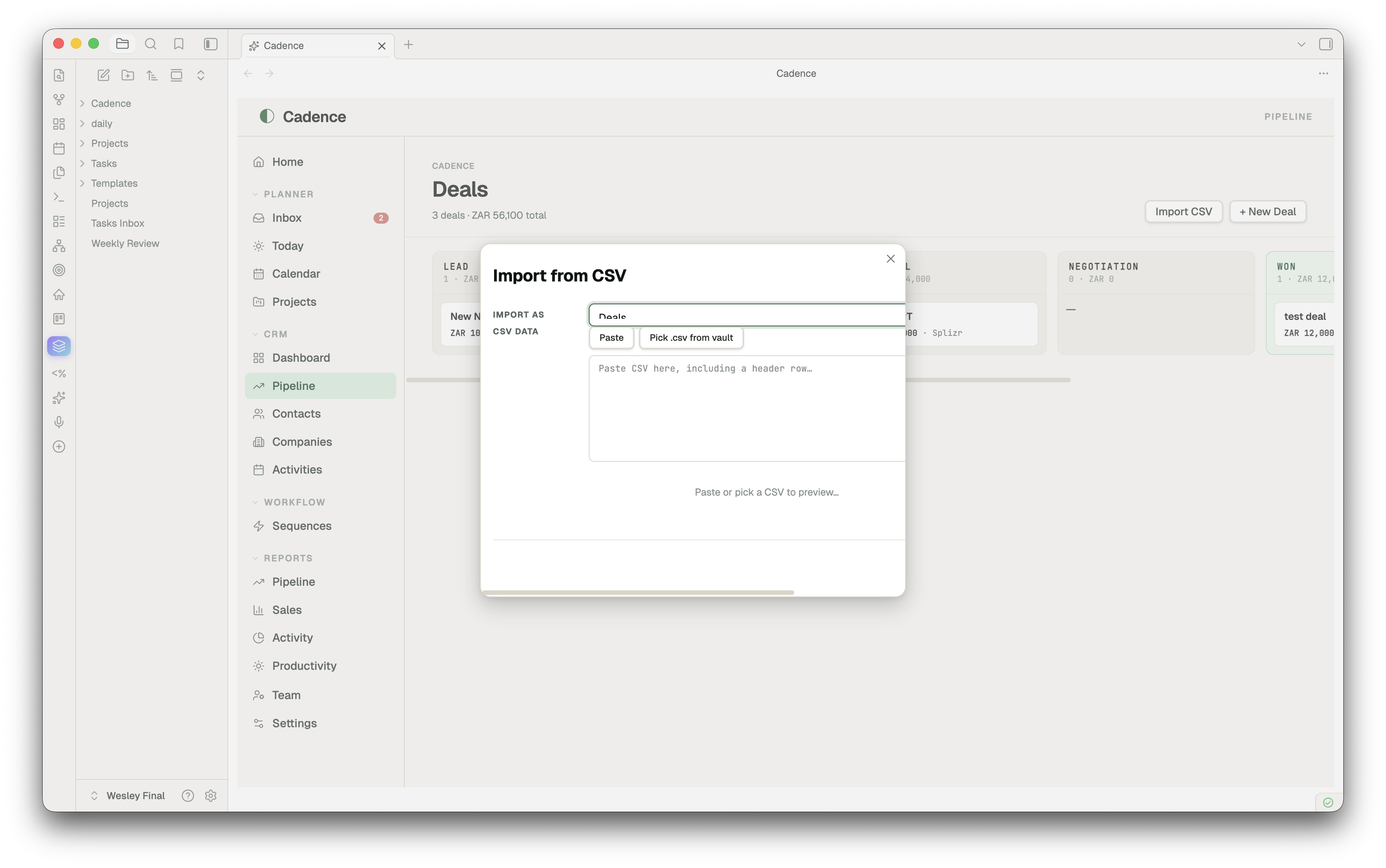
Bring an entire client list, pipeline, or partner roster in from a spreadsheet. Run Cadence: Import from CSV (or hit "Import CSV" on any list view) → pick a .csv from your vault or paste raw text → Cadence auto-maps columns to entity fields by name (with synonyms — Email, email, Email Address all map to email). Override any mapping, see a sample of the first two rows, then import. Each row becomes one markdown file with frontmatter populated.
Install
Community plugin store (once approved)
- Settings → Community plugins → Browse
- Search "Cadence"
- Install → Enable
Manual install (works today)
- Download
main.js,manifest.json,styles.cssfrom the latest release - Drop them into
<your-vault>/.obsidian/plugins/cadence-planner/ - Settings → Community plugins → Reload → Enable Cadence
Quick start
- Open the app — Click the ✨ sparkles icon in the left ribbon, or run Open Cadence from the command palette
- Capture a deal — CRM → Pipeline →
+ New Deal→ fill in title, stage, value → Create - Capture a contact — CRM → Contacts →
+ New Contact - Plan a project — Planner → Projects →
+ New Project→ click into it → tick milestones, fill in Brief - Set a reminder —
Cmd+Shift+I→ "Call John" → Remind me → +1h → Capture. Wait. The notification fires. - Make Cadence your homepage — Settings → Cadence → toggle "Open Cadence on Obsidian startup"
Cadence creates folders on demand: Cadence/Contacts/, Cadence/Pipeline/, Cadence/Partners/, etc. Move them anywhere afterwards — change paths in Settings if you do.
Configuration
Settings → Cadence:
- Modules — Toggle Planner / CRM / PRM. Disabled modules disappear from the nav and from dependent Reports.
- Reminders — Desktop notifications (opt-in, requests permission), clear completed.
- Currency — USD default; ZAR, EUR, GBP, AUD, CAD, CHF, JPY, INR, BRL, AED.
- App — Open on startup, default tab, week starts on, daily-note folder, tasks/journal headings.
Customizing Entity Properties
Cadence lets you define custom frontmatter properties for any of your core entities (Contact, Company, Project, Deal, Activity, Partner, etc.) to model your specific business workflows directly inside Obsidian.
Settings → Cadence → Custom Entities Properties:
1. Custom Property Types
text— Standard text input field.multitext— Chip-based multi-select tag input.enum— Dropdown menu with custom option lists.date— Native calendar date selector.tags— Tag chips synced directly with Obsidian's global tag index.currency— Automated financial values formatted according to your selected active currency.
2. Autocomplete & Suggestion Sources
List properties (multitext) can pull autocomplete suggestions dynamically from:
folder:Path/To/Folder— Dynamically scans the specified vault folder. Suggests existing note basenames (e.g.folder:Cadence/Contactsmaps contacts).history— Scans your existing notes to suggest any values previously entered. Saves values as plain-text lists instead of Obsidian wikilinks.tags— Pulls tags directly from Obsidian's global cache.none— Simple custom list inputs without suggestions.
3. Background Entity Auto-Creation
When a property has a suggestion source pointing to a vault folder (e.g. folder:Cadence/Contacts or folder:Cadence/Shared), Cadence automatically creates the referenced note in the background when you assign a new name. It formats the link as a native Obsidian [[Wikilink]] and populates the frontmatter immediately, saving manual overhead.
4. Loop-Safe Bidirectional Sync
Core relationships (like Project ↔ Contact) are bidirectionally synchronized between frontmatter sheets in a loop-safe manner:
- Assigning a contact to a project's
ownerproperty automatically adds the project to that contact'sprojectproperty. - Symmetric Removals: Clearing a project from a contact's sheet or a contact from a project's properties instantly dissociates them on both sides.
- Physical Deletion Sync: Deleting a Project note entirely triggers a vault-wide background cleanup that removes all stale references from your Contacts' frontmatter automatically.
5. Drag-and-Drop Reordering & System Locks
- Visual Reordering: Use the grab handle (
⋮⋮) to drag-and-drop properties to rearrange their visual layout order inside detail sheets and lists. - System Locks (
🔒) : Critical properties required for Cadence's system engines (such as the Primary field, Type, or Status) are secured. Reordering attempts that shift a locked field from its original index are safely rejected to preserve layout integrity.
6. Interactive & Configurable Kanban Board Grouping
- Dynamic Grouping Selector: Any Kanban view displays a stylish "Group columns by" selector in the filters bar. You can dynamically group your board columns by any
enum,text,multitext, ortagsproperty. - On-the-Fly Column Extraction: When grouping by a list/text property (such as
project), Cadence scans all entity files to extract and clean unique values (stripping Obsidian brackets) to build your board columns automatically. - Smart Drag-and-Drop Drops: Moving cards between dynamically grouped columns updates list-based frontmatter properties (handling wikilinks and plain text list items appropriately).
7. Custom Dashboards & Analytics Widgets
- Cross-Module Analytics: Custom dashboard charts can be added to the bottom of the Projects Dashboard, CRM Dashboard (Deals), and PRM Dashboard (Partners).
- Flexible Visualization: Supports visualizing any property in Donut, Bar, KPI Grid, or Simple List layout, featuring full drag-and-drop status counters and segment alignment.
Templates & Dynamic Section Blocks
Cadence goes beyond standard properties by giving you a visual layout and H2 section editor for each of your entities:
- Entity Templates (
Cadence/Templates/) — Every entity has a template file (e.g.Cadence/Templates/project.mdorCadence/Templates/contact.md). These templates define the visual markdown structure of any newly created item, including standard H2 sections (like## Notes,## Scope,## Bio). You can easily reset any template to default or customize it in the Templates Dashboard (Settings→Templates). - Drag-and-Drop Section Reordering — In the Templates Dashboard, you can visually drag-and-drop the dynamic H2 sections of any template to rearrange their layout order. Moving cards reorders the H2 blocks inside the markdown template file automatically.
- Dynamic Markdown Blocks Rendering — Inside any entity detail page (e.g., a specific Project sheet), H2 headers with custom tags like
#notesare parsed and rendered as premium cards with rich markdown previews. Any links inside these markdown cards are fully clickable, automatically opening target entities or wiki-links inside Obsidian. - Live Side-by-Side Editing — Click the edit button (file icon) on any block to open it in a split pane to the right to edit natively using full Live Preview and auto-complete in Obsidian, with real-time dynamic refresh as you type.
- Dynamic Cross-References Table/Kanban — You can link related entities directly (e.g., showing all Contacts related to a Company, or all Deals belonging to a Project). In the template, tags like
#cross-contact-company-tableor#cross-deal-company-kanbanautomatically query, render, and filter related items inside tables or interactive Kanban boards within the sheet!
TaskNotes Integration
For advanced task management, Cadence natively integrates with the popular TaskNotes community plugin.
- Seamless Toggle — Switch from Cadence's native daily-note task manager to TaskNotes anytime via Settings → Cadence → Task management system dropdown.
- Unified Interface — When active, your TaskNotes folders and task files (
TaskNotes/Tasks/...) are displayed inline throughout Cadence, including in the Today planner sheet and within individual projects. - Bi-directional Sync — Checking tasks off inside Cadence instantly updates the frontmatter of your TaskNotes files (
status: done↔status: open) and vice versa, in real time!
Hotkeys
| Action | Shortcut |
|---|---|
| Open Cadence | (assignable, no default) |
| Quick capture (with optional reminder) | Cmd+Shift+I (Ctrl+Shift+I on Windows/Linux) |
| Open Cadence — Home | (assignable) |
| Open Cadence — Today | (assignable) |
| Open Cadence — Calendar | (assignable) |
| Open Cadence — Pipeline | (assignable) |
| Open Cadence — Inbox | (assignable) |
| Import from CSV | (assignable) |
| New today entry (creates if missing) | (assignable) |
Bind your favourites under Settings → Hotkeys → search "Cadence".
How the data is stored
your-vault/
  daily/                          ← daily notes (your existing setup)
    2026-05-05.md
  Cadence/
    Contacts/Jane Smith.md
    Companies/Acme.md
    Pipeline/Acme — FTTH expansion.md
    Partners/Distribution Co.md
    Activities/Discovery call with Jane.md
    Projects/Q3 launch.md
    ...
Each entity is plain markdown with YAML frontmatter — readable, editable, scriptable, portable. Cadence's views are just rich lenses over these files; everything you do in the UI writes back to them.
Companion theme
A matching Cadence theme is available separately for vaults that want a fully-tuned visual system (warm paper surfaces, emerald accents, Geist + JetBrains Mono typography). The plugin works with any Obsidian theme; the Cadence theme is purely cosmetic.
Roadmap
- Drag-to-reorder milestones in Project Detail
- Linked entities (project ↔ deal ↔ contact pickers with fuzzy search)
- Time-blocked Calendar (drag tasks onto today's hour grid)
- Pomodoro / focus timer linked to a reminder
- Optional sync to a Cadence web instance (the API setting is the placeholder for this)
Development
git clone https://github.com/wesswart77/obsidian-cadence
cd obsidian-cadence
# Plugin is plain JS, no build step. Drop main.js + manifest.json + styles.css
# into <vault>/.obsidian/plugins/cadence-planner/ to test.
PRs welcome. For bug reports, please include your Obsidian version, OS, and a minimal vault to reproduce.
Support
If Cadence saves you time or makes your day a bit smoother, a coffee keeps the dev nights going. ☕

Or via the heart icon next to Cadence in Obsidian's community plugin browser once you have it installed.
License
MIT © Wesley Swart
For plugin developers
Search results and similarity scores are powered by semantic analysis of your plugin's README. If your plugin isn't appearing for searches you'd expect, try updating your README to clearly describe your plugin's purpose, features, and use cases.