Calm Tasks
approvedby Sungi Kim
A clean Task Workspace with nested tasks, Agenda, groups, and saved filters. - This plugin has not been manually reviewed by Obsidian staff.
Calm Tasks
English · 한국어
A quiet task workspace that collects Markdown tasks from across your Obsidian vault.
See the website for a detailed introduction.
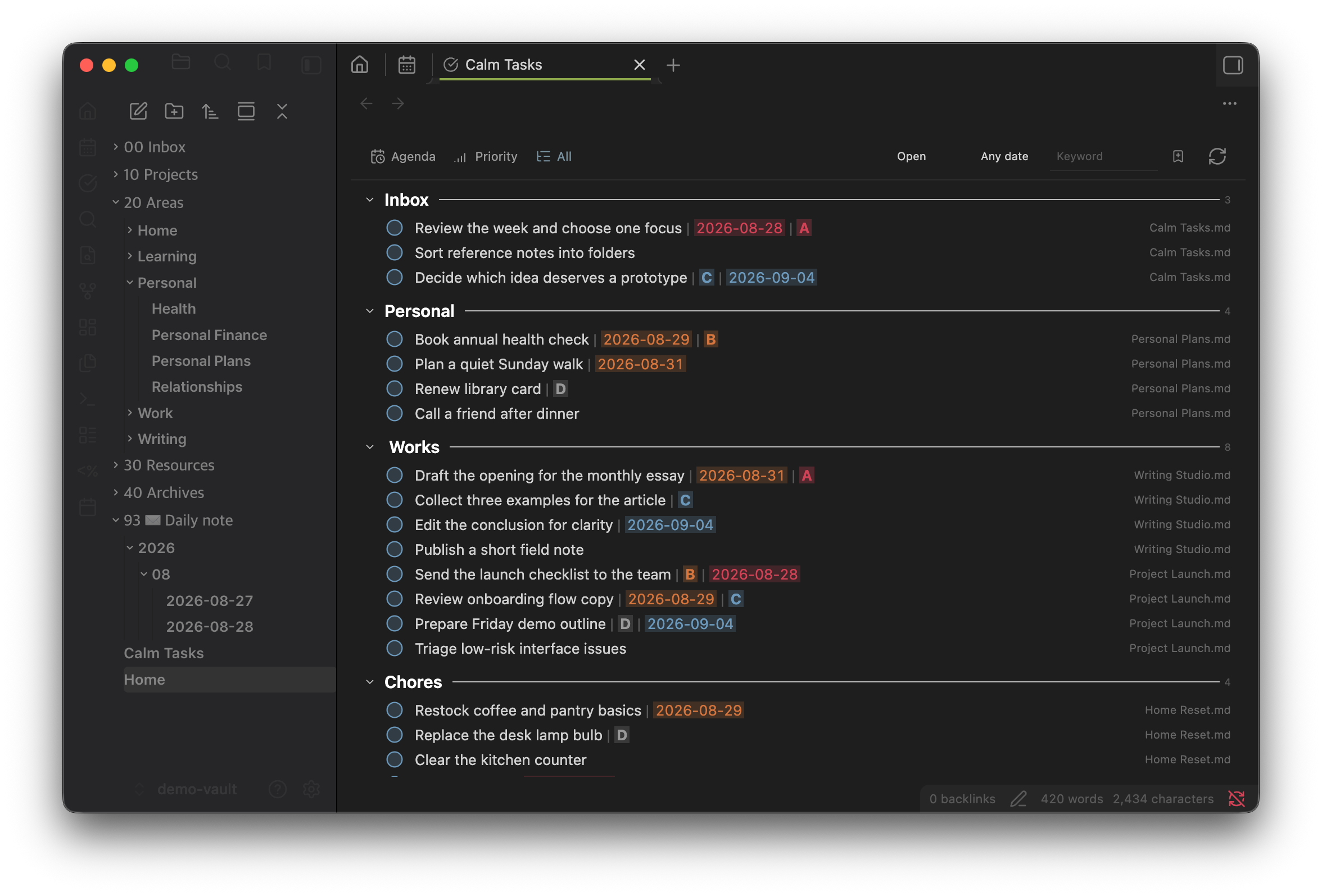
Calm Tasks borrows the plain-text spirit of Org mode, with a smaller syntax designed for Obsidian. Your Markdown files remain the source of truth, while the dedicated workspace gives you a clear way to organize and review them.
Features
- Collect tasks written across multiple Markdown files into one workspace.
- Browse them by Agenda, Priority, or custom groups in All.
- Create, edit, complete, reorder, group, and multi-select tasks.
- Drag tasks or use context menus and configurable keyboard shortcuts.
- Filter by status, date, tag, and keyword; save combinations as Smart Filters.
- Search instantly after a short typing pause, including Korean IME input.
- Edit a selected task in the optional bottom or right-side Details panel.
- Color dates and priorities automatically in ordinary Markdown notes as well as the workspace.
- Keep completed tasks visible until the configurable daily archive time.
- Adjust spacing, line height, and task metadata colors.
Deleting a custom group does not delete its tasks; they return to Inbox.
Task syntax
Ordinary Markdown checkboxes work as-is:
- [ ] Prepare the launch brief
- [x] Book the room
Dates and priorities can use the compact Calm Tasks notation:
- [ ] Prepare the launch brief | 2026-09-03 | A
- [ ] Review the backlog | B
- [ ] Book an appointment | B | 2026-09-05
Priority ranges from A to D. Date and priority may appear in either order. Common Obsidian Tasks metadata such as 📅, 🛫, 🔁, and priority emojis is also recognized and preserved.
Recognized dates and priorities are colorized automatically when these tasks appear in regular Markdown notes.
Basic controls
| Action | Control |
|---|---|
| Edit | Click the task title |
| Add the next task | Press Enter while editing |
| Complete or reopen | Click the circle |
| Select a range | Shift-click in All |
| Reorder | Drag or run the move up/down commands |
| Move to a group | Right-click a task or drag it |
| Manage a group | Double-click or right-click its title |
| Clear selection | Click an empty area, tab, or filter |
The move commands can be assigned to any hotkeys in Obsidian. On macOS, Control+Command+↑/↓ is recognized while editing a task.
Daily Notes
Tasks in Daily Notes are collected like tasks in any other Markdown file. If you move unfinished tasks between notes named YYYY-MM-DD.md, the optional Preserve Daily Note placement setting can retain their All-view group and order. This setting is off by default.
Installation
BRAT
Install BRAT, run BRAT: Add a beta plugin for testing, and paste this repository's URL.
Manual
Download main.js, manifest.json, and styles.css from the release and copy them to:
<vault>/.obsidian/plugins/calm-tasks/
Reload Obsidian and enable Calm Tasks under Settings → Community plugins. New workspace tasks are written to Calm Tasks.md in the vault root by default.
Theme compatibility
Calm Tasks was built and tested primarily with the Minimal theme. For theme-specific adjustments, use Obsidian's standard CSS snippets.
License
Calm Tasks is free to use. Modified or derivative versions may be used non-commercially, but commercial use, sale, or paid distribution of them requires prior permission. See LICENSE.
Support
If Calm Tasks helps you stay organized, a small coffee helps keep its development going.

For plugin developers
Search results and similarity scores are powered by semantic analysis of your plugin's README. If your plugin isn't appearing for searches you'd expect, try updating your README to clearly describe your plugin's purpose, features, and use cases.