Canvas Layer Order
approvedby fengzhe
PowerPoint-style layer controls for Canvas: bring cards to front, send to back, move forward/backward, and preserve layer order when focusing overlapping cards. - This plugin has not been manually reviewed by Obsidian staff.
Canvas Layer Order
Canvas Layer Order adds PowerPoint-style layer controls to Obsidian Canvas, making it easier to work with overlapping cards.
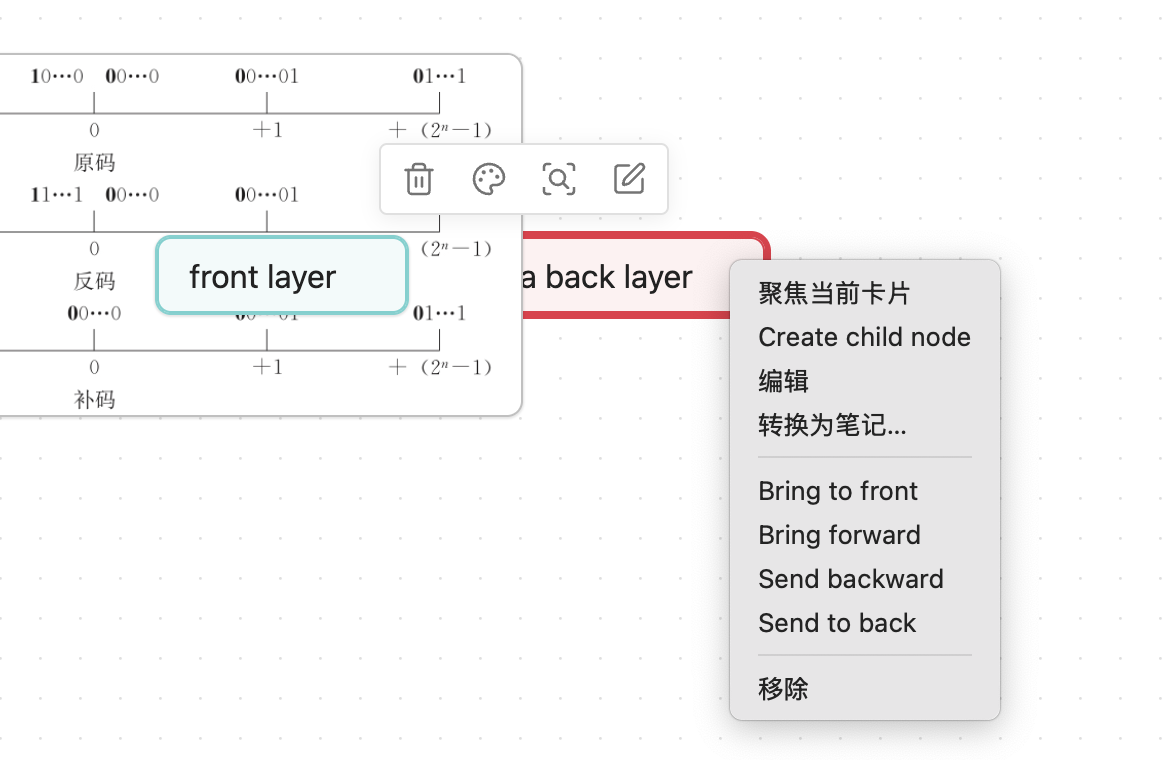
Obsidian Canvas stores cards in the nodes array of a .canvas JSON file. In overlapping areas, cards that appear later in that array render above cards that appear earlier. This plugin changes layer order by moving the selected card inside that array.
Features
- Bring a Canvas card to front
- Send a Canvas card to back
- Bring a Canvas card forward by one layer
- Send a Canvas card backward by one layer
- Optional focus behavior that keeps the saved layer order visible when a card is focused
Usage
Canvas: Bring selected card to frontCanvas: Send selected card to backCanvas: Bring selected card forwardCanvas: Send selected card backward
These commands can be used from the command palette or assigned to hotkeys. They are also available from the Canvas card context menu in supported Obsidian versions.
Focus Behavior
Obsidian may temporarily lift a focused Canvas card above nearby cards. Enable Preserve layer order when focusing cards in this plugin's settings to keep the visual stack aligned with the saved Canvas node order.
Manual Installation
Copy these files into your vault's plugin folder:
<vault>/.obsidian/plugins/canvas-layer-order/
Required files:
main.jsmanifest.jsonstyles.css
Then reload Obsidian and enable Canvas Layer Order in Community plugins.
Development
npm install
npm run dev
To create a production build:
npm run build
Release files for Obsidian community plugins:
main.jsmanifest.jsonstyles.css
Notes
Canvas internals are not part of Obsidian's public plugin API. This plugin keeps those assumptions isolated in a small part of the codebase so future Obsidian changes are easier to adapt to.
For plugin developers
Search results and similarity scores are powered by semantic analysis of your plugin's README. If your plugin isn't appearing for searches you'd expect, try updating your README to clearly describe your plugin's purpose, features, and use cases.