ChatGPT MD
approvedby bramses
A seamless integration of ChatGPT, OpenRouter.ai and local LLMs via Ollama into your notes.
ChatGPT MD
Your AI writing companion, living inside Obsidian.
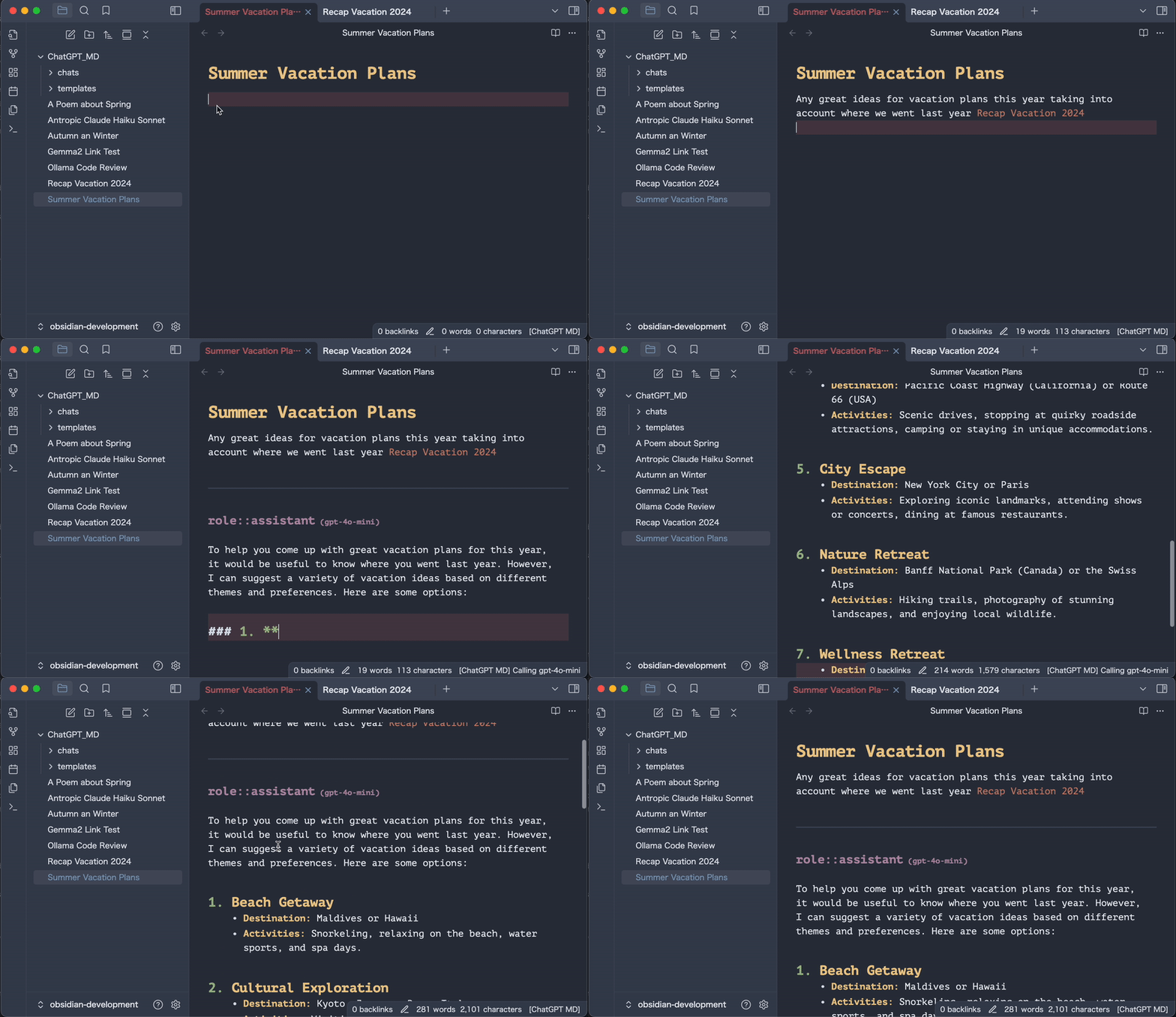
Chat with AI directly in your notes. Reference your other notes with [[wiki links]]. Keep everything in your vault—where it belongs.
✨ What's New
Official Obsidian Guidelines (v3.3) — Cleaner theming, sentence-case UI, honest compatibility requirements, and a bundle that plays by Obsidian's official rules.
Provider Reliability (v3.2) — Updated provider integrations, safer tool calling, and more reliable model selection and streaming across cloud and local providers.
Agents (v3.1) — Create AI personas like a writing coach, code reviewer, or brainstorming partner. Apply them to any note instantly.
Tool Calling (v3.0) — Let AI search your vault, read your notes, and browse the web. You approve everything. Your data, your control.
🚀 Get Started in 30 Seconds
Requirements: Obsidian 1.11.4 or newer (needed for secure key storage) and an API key from any supported provider — or a free, private local setup via Ollama/LM Studio.
- Install — Settings → Community Plugins → Browse → Search "ChatGPT MD"
- Add API key — Settings → ChatGPT MD → Paste your key (OpenAI, Anthropic, or OpenRouter)
- Chat — Press
Cmd+P→ Type "ChatGPT MD: Chat"
That's it. You're now chatting with AI in your notes.
💡 Set a hotkey and thank me later: Settings → Hotkeys → Search "ChatGPT MD: Chat" → Press Cmd+J
💰 Free & Private AI
Don't want API costs? Don't want your notes leaving your computer?
Ollama and LM Studio run AI locally on your machine. Completely free. Completely private.
Ollama (Recommended)
# Install from ollama.ai, then:
ollama pull llama3.2    # Download a model
ollama list               # See what you have
In your note:
---
model: ollama@llama3.2
---
LM Studio
- Download from lmstudio.ai
- Load a model in the app
- Start the Local Server
- Use
model: lmstudio@your-model
🎯 What You Can Do
Chat About Anything
Write a question, get an answer. Simple.
user:: What makes a good daily note?

assistant:: Great daily notes are:
- **Specific** — "Had coffee with Sarah" not "Met a friend"
- **Actionable** — Include next steps or open questions
- **Connected** — Link to related ideas and people
Reference Your Other Notes
This is where it gets magical. Use [[wiki links]] and AI reads those notes too:
user:: Based on my [[Meeting Notes]] and [[Project Ideas]],
what should I focus on this week?
AI reads your linked notes and gives you a contextual answer. No more copy-pasting context.
Create AI Agents
Make AI personas for different tasks:
# agents/WritingCoach.md
---
model: openai@gpt-4.1-mini
temperature: 0.8
---
You are a supportive writing coach. Help the user:
- Clarify their ideas with questions
- Suggest improvements without being harsh
- Celebrate their progress
Apply with "Choose Agent" command. Switch between agents instantly.
Let AI Search Your Vault
Enable in Settings → Tool Calling. Then:
user:: What have I written about machine learning?
AI: "I'd like to search your vault." You: Approve ✓ AI: "Found 5 notes. Here's what you've written..." You: Select what to share ✓
You're always in control. AI only sees what you approve.
🔌 AI Providers
| Provider | Why Use It | Cost |
|---|---|---|
| OpenAI | Reliable, GPT-4 | Pay per use |
| Anthropic | Claude, great for long docs | Pay per use |
| Gemini | Google's models | Pay per use |
| OpenRouter | Access to ALL models | Pay per use |
| Z.AI | GLM models | Pay per use |
| Ollama | Local, private | Free |
| LM Studio | Local, private | Free |
Model prefix examples:
- OpenAI:
openai@gpt-4.1-mini(unprefixed OpenAI model IDs also work) - Anthropic:
anthropic@claude-sonnet-4-20250514 - Gemini:
gemini@gemini-2.5-flash-lite - OpenRouter:
openrouter@openai/gpt-4.1-mini - Local:
ollama@llama3.2orlmstudio@model-name
OpenAI search-preview models such as openai@gpt-4o-mini-search-preview are supported through OpenAI's chat-completions endpoint.
⚙️ Commands
| Command | What It Does |
|---|---|
| Chat | The main event. Send message, get AI response |
| Select Model | Switch between models/providers |
| Choose Agent | Apply an AI persona to current note |
| Create Agent | Make a new agent (manual or AI-generated) |
| Infer Title | Auto-generate title from conversation |
| Clear Chat | Start fresh, keep settings |
| Stop Streaming | Cancel a long response |
⚙️ Settings
In Your Notes (Frontmatter)
---
model: openai@gpt-4.1-mini # Which AI to use
temperature: 0.7         # Creativity (0-2)
max_tokens: 4096         # Response length
system_commands:        # Give AI a role
  - You are a helpful assistant
agent: WritingCoach      # Apply an agent by name
---
Global Defaults (Settings → ChatGPT MD)
- API Keys — One secure Obsidian credential per cloud provider (with legacy text fields on older Obsidian versions)
- Default Model — Which AI to use by default
- Folders — Where to save chats, templates, agents
- Stream Mode — See responses appear word by word
Priority: Note settings beat Agent settings beat Global settings beat default chat frontmatter/provider defaults
❓ Common Questions
Q: How do I actually use this?
A: Open any note. Write something. Press Cmd+P, type "chat", hit Enter. Watch AI respond in your note.
Q: Can I use my existing notes?
A: Yes! Just add a frontmatter block at the top with your settings, then use [[wiki links]] to reference other notes.
Q: Which local model should I use?
A: llama3.2 is great for general use. deepseek-r1:7b for reasoning. Try a few and see what works for you.
Q: Is my data private?
A: With OpenAI/Anthropic, your messages go to their servers. With Ollama/LM Studio, everything stays on your computer. Your choice.
Q: What's an "agent"?
A: A reusable AI persona. Like having different experts on call—writing coach for drafts, code reviewer for programming, researcher for learning.
🔒 Privacy
With cloud providers (OpenAI, Anthropic, etc.):
- Your messages are sent to their servers
- They may use messages to improve services (check their policies)
With local AI (Ollama, LM Studio):
- Everything stays on your computer
- No internet required
- Completely private
Credentials:
- When both Obsidian SecretStorage and its native secret control are available, provider and web-search keys are stored as vault-local Obsidian credentials; plugin data contains only opaque references.
- Existing plaintext keys migrate automatically on plugin load. Failed migrations retain a usable plaintext key and retry on the next load or settings-tab opening.
- If a valid secure credential and plaintext copy coexist, settings explains the risk and offers an explicit Delete insecure copy action. The copy is retained if saving fails.
- Replacing or clearing a selection removes only this plugin's reference. Old credentials remain available for management in Obsidian.
- Older or partially capable Obsidian versions keep the legacy plaintext controls and behavior. After migrating and then downgrading, re-enter keys because secure references are never sent as credentials.
Always:
- Chat messages and automatically expanded
[[linked notes]]are sent to the selected provider - AI tools require approval before execution, and vault/web search results must be selected before sharing
- Custom web-search endpoints receive your query and any configured bearer credential
- No tracking from this plugin
See SECURITY.md for vulnerability reporting and the full data model.
🛠️ For Developers
git clone https://github.com/bramses/chatgpt-md.git
cd chatgpt-md
npm install
npm run dev
Project structure:
src/
├── Commands/     # User actions
├── Services/     # AI providers, adapters, tools
├── Views/        # UI, modals
├── Utilities/    # Pure functions (tested)
└── core/         # Dependency injection
Contributions welcome! Fork → Branch → PR.
🧪 Beta Testing
Want the latest features? Use BRAT:
- Install BRAT plugin
- Add
bramses/chatgpt-mdas beta plugin - Select "latest version"
Test beta versions in a separate vault.
👋 About
Bram Adams made this. He writes at bramadams.dev and builds Your Commonbase.
Deniz Okcu keeps it running. Say hi on Bluesky.
Happy note-taking! 📝
For plugin developers
Search results and similarity scores are powered by semantic analysis of your plugin's README. If your plugin isn't appearing for searches you'd expect, try updating your README to clearly describe your plugin's purpose, features, and use cases.