Cited
approvedby notenerd
Ask a research question about your vault and get an answer with grounded, claim-grouped citations -- no external account, uses your local claude CLI. - This plugin has not been manually reviewed by Obsidian staff.
Cited
Ask a question about your vault and get an answer you can actually trust, because you can see exactly where every claim came from. No external account, no vault contents sent to a third-party API — it runs your own claude CLI locally, read-only, against your own vault.
The problem this solves: an LLM answer that just asserts things is a black box. Cited instead derives its citations from Claude's actual tool-call transcript (every Read/Grep it ran and what came back), not from Claude self-reporting its sources in prose — so a hallucinated citation is structurally impossible. If a claim can't be backed by a real tool call, it doesn't get a citation.
This makes Cited a natural fit for researchers and anyone working out of a research vault or research repo — literature notes, interview transcripts, primary sources, lab notebooks — where "where did this claim come from" isn't a nice-to-have, it's the whole point. Folder scoping (below) means a researcher can point a question at just one project's notes instead of an entire vault spanning several, and "Export to note" turns an answer straight into a real, footnoted research note with a sources section, ready to cite from.
Screenshots
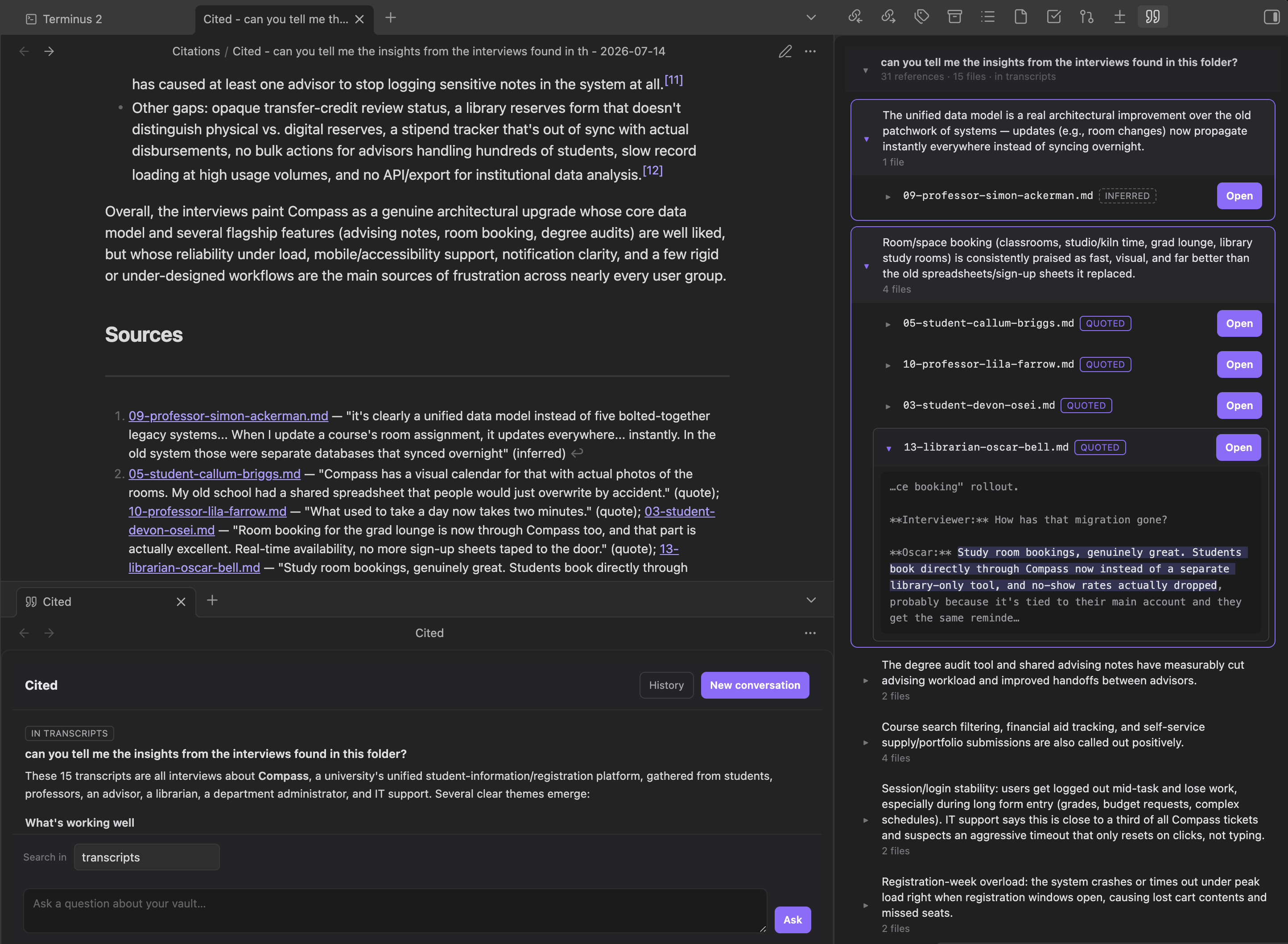
| Exported note (footnoted, with Sources) alongside the claim-grouped citations panel |
|---|
 |
Features
- Two panels, one workflow — a chat panel (ask questions, see answers) and a sources panel (browse citations), stacked together in the right sidebar. Ask a question in one, see it broken down in the other.
- Claim-grouped citations, not a flat file list — the sources panel is organized by claim (a specific assertion in the answer), since one claim can be backed by several files at once; a flat per-file list would hide that. Each claim expands to its contributing files, each file expands to the exact highlighted excerpt.
- Quote vs. inferred, labeled separately — a citation is either an exact substring pulled from the file (
quoted) or a paraphrase Claude is inferring from what it read (inferred); the panel badges each one so you know which kind of trust to place in it. - Per-question folder scoping — a "Search in" field above the chat input (with Obsidian's own folder autocomplete) narrows a single question to one folder and its subfolders instead of the whole vault; leave it blank to search everywhere. This is an execution-level restriction, not just a prompt request:
claudeis spawned with its working directory set to that folder, so Glob/Grep's own default search root is already confined to it — no tokens spent reading files outside scope just to discard their citations afterward. It isn't a hard filesystem sandbox (an explicit absolute path could still escape it), so any citation from outside the folder is also dropped as a backstop, the same way an unverified citation is. Each turn remembers its own scope (shown as a badge in both panels), so you can widen or narrow between questions in the same conversation. - Inline citation markers — click a highlighted claim in the chat answer to jump to and expand the same claim in the sources panel.
- Staleness detection — if you edit a file after Cited cited it, every citation pointing at that file gets flagged
⚠ source changed(no attempt to re-locate the text — just an honest "this may be out of date" flag). - Export to note — turn any answer into a real Obsidian note: the answer body with each claim followed by a proper
[^1]-style footnote and a trailing "Sources" section with[[wikilinks]]to the cited files. - Conversation history — start a new conversation any time; past ones are archived (up to 50, oldest dropped first past that) and reopenable from a history picker, resuming with the same underlying Claude session so follow-ups still have context. Individual conversations can be deleted one at a time from that picker, or all at once from Settings — both require confirmation, since neither has an undo path.
- Configurable search depth — a settings slider bounds how many agentic search/read round trips (
claude's own--max-turns) one question is allowed, trading thoroughness on a large vault against latency/cost. - Live search progress — while a question is running, a progress bar and status line ("Turn 3 of 8 — Reading note.md") update in real time as the
stream-jsontranscript streams in, instead of a static "searching…" message with no sense of how long it'll take or whether it's stuck.
Commands
| Command | Default hotkey |
|---|---|
| Ask about your vault | — |
The ribbon icon ("Open Cited") does the same thing. Both panels can also be configured to auto-open on launch (Settings → Open on launch), independently of each other.
How it works
Asking a question spawns claude -p <question> --allowedTools "Read,Grep,Glob" --disallowedTools "Bash" --output-format stream-json, with its working directory set to the vault root (or the requested scope folder — see "Per-question folder scoping" above). Claude searches the vault itself (agentic, not a fixed retrieval step) and the plugin captures the full stream-json event log, not just the final answer. Each line is also inspected as it streams in (not just once the process exits) to drive the live progress bar — one assistant event per turn, with a short label describing whatever tool call is in it.
That transcript is parsed into a list of exactly which files were opened via Read/Grep and what text came back (src/claude/queryVault.ts). Claude's structured answer (question → claims → per-claim citations) is then cross-validated against that transcript (src/claude/parseAnswer.ts), one citation at a time:
- File never actually opened → the citation is dropped entirely. Claiming a source that was never
ReadorGrep-matched is structurally impossible to get past this check, since the check has nothing to do with what Claude says it looked at. - File was opened, but the claimed excerpt isn't a verbatim substring of what came back → the citation is kept but demoted to
inferredwith no highlight location, rather than shown as a trustworthyquotedmatch.
This guards citations, not the answer's prose as a whole — a sentence with no claim/citation attached at all can still appear in the answer text; it just won't be backed by anything in the sources panel, which is itself the signal that it's ungrounded.
Follow-up questions pass --resume <session_id> (captured from the first turn's system init event) so the conversation carries real context across turns, not just repeated one-shot queries.
Read-only by design: --allowedTools is scoped to Read,Grep,Glob and Bash is explicitly denied on top of that (belt-and-suspenders — an allowlist alone was observed letting a Bash call through in one edge case during manual testing). Cited never writes to your vault except when you explicitly click "Export to note".
Requirements
- Desktop only (needs direct filesystem access via Obsidian's
FileSystemAdapter). - The
claudeCLI installed and logged in. Auto-detected via a login-shellPATHlookup (same approach as Terminus), since Obsidian launched from Finder/Dock often inherits a minimalPATH. - v1 scope is text/markdown files only — no PDFs, images, or canvases.
Development
npm install
npm run dev    # unminified build with inline sourcemaps
npm run build  # typecheck + minified production build
The build bundles src/main.ts into main.js with esbuild; styles.css is a plain hand-written stylesheet (not generated). Copy (or symlink) the plugin folder into <vault>/.obsidian/plugins/cited/ and enable it in Settings → Community plugins.
Layout
| Path | Role |
|---|---|
src/main.ts | Plugin entry: lifecycle, commands, panel layout, settings persistence |
src/settings.ts | Settings tab (max search turns, export folder, open-on-launch, clear history) + settings type/defaults |
src/views/ChatView.ts | Chat panel: ask questions, render answers, inline citation markers |
src/views/CitedView.ts | Sources panel: claim-grouped, expandable citation list |
src/state/ConversationStore.ts | Live/archived conversation state, persistence, staleness flagging |
src/claude/claudeBin.ts | Resolves the claude binary (login-shell PATH lookup + fallbacks) |
src/claude/queryVault.ts | Spawns claude -p, parses the stream-json tool-call transcript |
src/claude/parseAnswer.ts | Parses Claude's structured answer, cross-validates citations against the transcript |
src/citations/markers.ts | Locates claim spans in answer text; builds inline DOM markers and footnoted-markdown export |
src/ui/FolderSuggest.ts | Folder autocomplete for the chat panel's per-question scope field |
src/export/exportToNote.ts | Turns one turn into a new note with footnotes + a Sources section |
src/modals/ConversationHistoryModal.ts | Archived-conversation picker, with per-row delete |
src/modals/ConfirmModal.ts | Generic yes/no confirmation, used ahead of history deletion |
src/util/stripMarkdown.ts | Plain-text rendering of claim text in the sources panel |
src/model.ts | Core types: Citation, Claim, CitedAnswer, Conversation |
License
MIT — see LICENSE.
For plugin developers
Search results and similarity scores are powered by semantic analysis of your plugin's README. If your plugin isn't appearing for searches you'd expect, try updating your README to clearly describe your plugin's purpose, features, and use cases.