by kafaw
Self-hosted vault sync across devices. Real-time per-keystroke, conflict-safe offline edits, mirrors notes, attachments, folders, and settings.
Cloud Relay
Self-hosted, real-time vault synchronization for Obsidian. Mirrors notes, attachments, folders, and vault settings across your devices through your own server.
[!NOTE] Cloud Relay requires a companion server, DB Cloud Relay, that you host yourself. No accounts, no third-party cloud.
Features
- Real-time sync — edits propagate per-keystroke over WebSocket
- Offline-safe — edits made offline merge without conflicts; genuine same-section conflicts show a side-by-side picker (keep local, keep remote, or combine)
- Full vault mirror — notes, attachments (images/PDF), empty folders, themes, snippets, and selected
.obsidiansettings - Fast setup — first device creates the vault, additional devices join with a single invite link
- Recovery tools — per-device "Restore from server" and server-side "Reset vault"
Screenshots
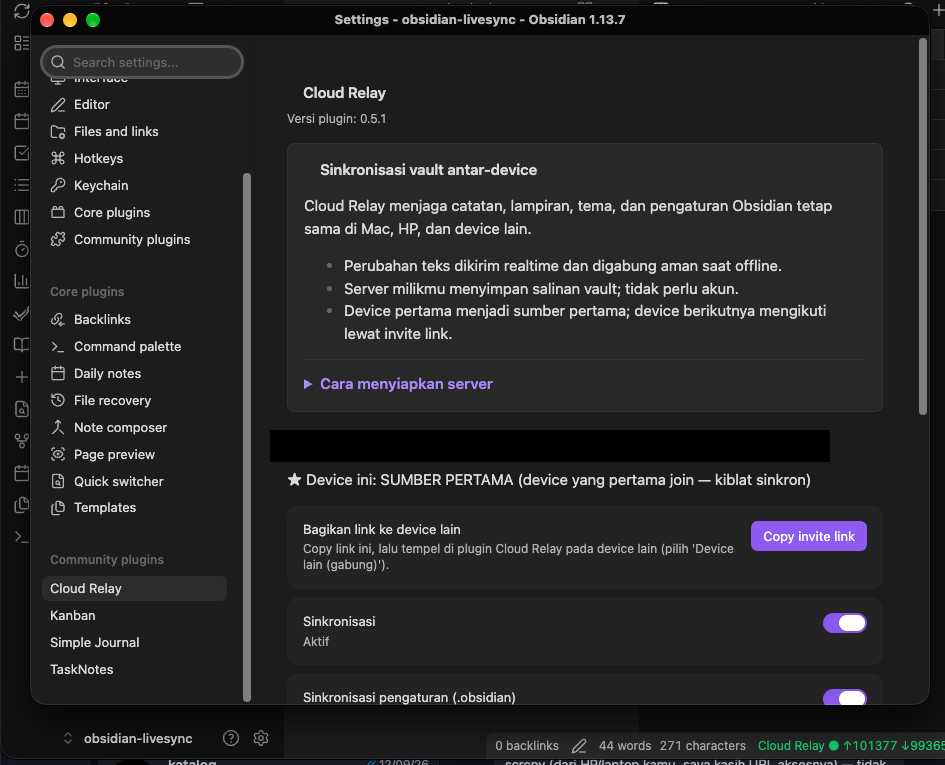
Setup and status panel. When two devices edit the same section offline, a picker offers: keep this device's version, keep the other device's version, or combine both.
Getting started
1. Run the server (once, on any Linux box)
git clone https://github.com/enl69/db-cloud-relay.git
cd db-cloud-relay
docker compose up -d
Then point a tunnel (e.g. Cloudflare Tunnel) at localhost:1111 and grab the ADMIN_TOKEN from the logs:
docker compose logs | grep ADMIN_TOKEN
2. First device (e.g. your Mac)
- Install the plugin and open Settings → Cloud Relay
- Choose Device pertama (first device)
- Enter your Server URL and the Admin token
- Click Create vault — status bar turns green
3. Additional devices
- On the first device: Copy invite link
- On the new device: choose Device lain (gabung), paste the link
- Review the server summary (note count, last update), then either:
- Ikuti device pertama (ganti total) — wipe local and mirror 100% from the first device
- Gabungkan — merge local notes into the sync
[!IMPORTANT] Do not run Cloud Relay alongside another sync plugin (Obsidian Sync, Self-hosted LiveSync, iCloud) on the same vault.
Installing the plugin
- Beta (recommended for now): install BRAT, then Add beta plugin →
enl69/cloud-relay - Manual: download
main.js,manifest.json,styles.cssfrom the latest release into<vault>/.obsidian/plugins/cloud-relay/
Security notes
- All traffic should go over HTTPS (e.g. via Cloudflare Tunnel)
- No end-to-end encryption: your server operator (you) can read vault contents
- Each vault has an unguessable ID + token; the invite link is a capability — treat it like a key
Development
See DEVELOPMENT.md for architecture, protocol, invariants, incident history, and the test suite (npm test, npm run e2e).
License
For plugin developers
Search results and similarity scores are powered by semantic analysis of your plugin's README. If your plugin isn't appearing for searches you'd expect, try updating your README to clearly describe your plugin's purpose, features, and use cases.