Code Emitter
approvedby mokeyish
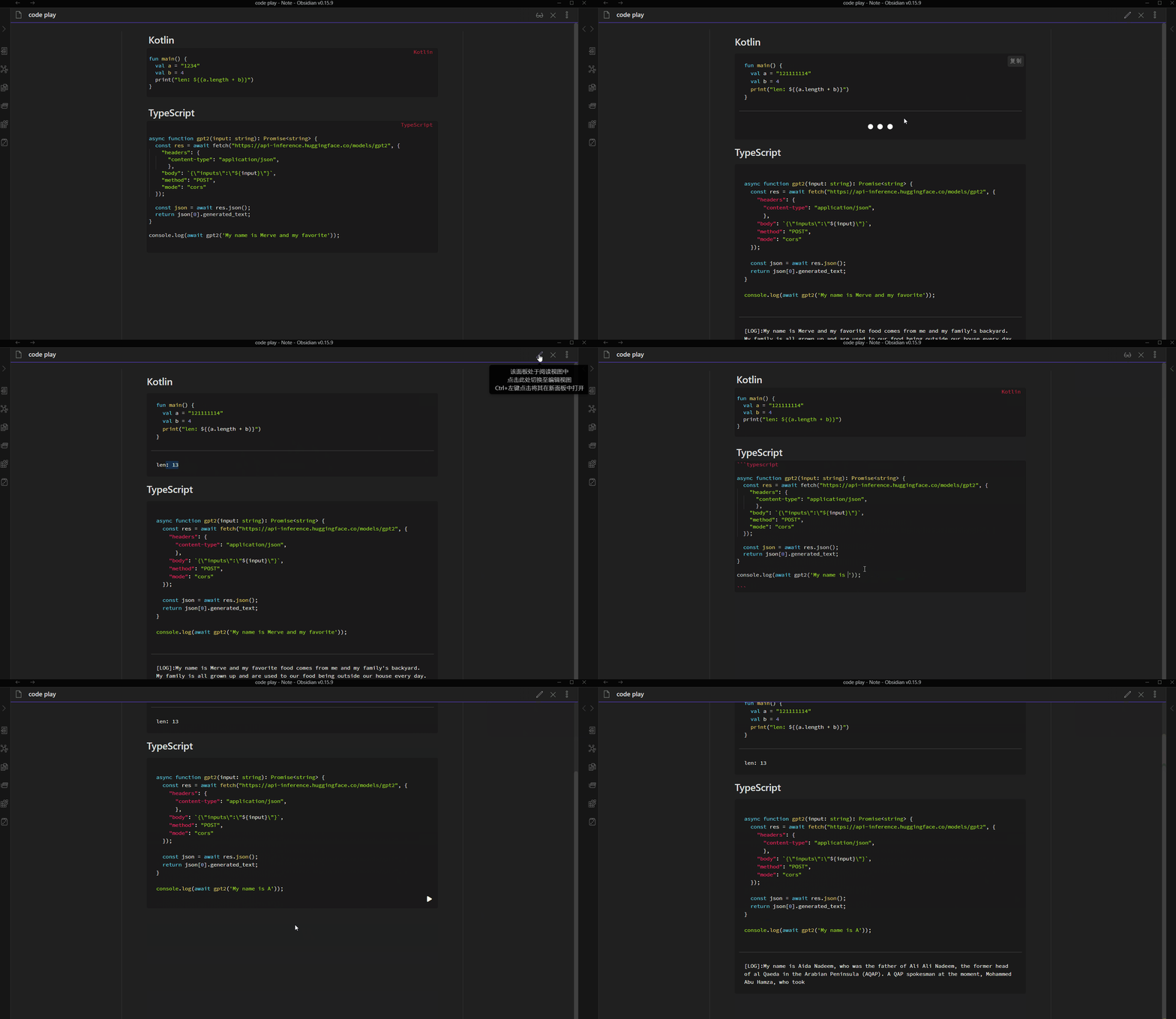
Allow code blocks to be executed interactively in a sandbox like Jupyter notebooks. Supported language Rust, Kotlin, Python, JavaScript, TypeScript, etc.
Obsidian Code Emitter


This plugin allows code blocks to be executed interactively like in Jupyter Notebooks. It has no external environment requirements (such as system installations of compilers), because code execution works via local sandboxes using JavaScript or WebAssembly technology, or network requests to online Playgrounds. This means it can support all platforms supported by Obsidian.
Supports all Obsidian supported platforms, including:
- Windows
- macOS
- Linux
- Android
- iOS
Supported languages:
| Language | Provider |
|---|---|
| C/C++ | Sololearn |
| C# | Sololearn |
| Go | Sololearn |
| Haskell | https://play.haskell.org |
| HTML & CSS | Shadow DOM |
| Java | Sololearn |
| JavaScript | JS Sandbox (qiankun) |
| Kotlin | https://play.kotlinlang.org |
| Python | WebAssembly (Pyodide) |
| R | Sololearn |
| Rust | https://play.rust-lang.org |
| Swift | Sololearn |
| TypeScript | TypeScript Compiler + JS Sandbox |
| V | https://play.vosca.dev/ |
| Wenyan | Wenyan Compiler + JS Sandbox |
[!NOTE]
OnlyPython,TypeScript, andJavaScriptare run in a local sandbox (JS/WebAssembly). Others will send code to third-party website to evaluate the results (e.g.: https://play.kotlinlang.org, https://play.rust-lang.org). Please take care to avoid sending your potentially-sensitive source code.
Ads: You might like my other plugins 🤪
Installation
- Search
Code Emitterin the Community plugins section of Obsidian, and install it.
Examples
Python
Install numpy through micropip. All available packages are listed here (search for whl).
Using numpy
import micropip
await micropip.install('numpy')
import numpy as np
a = np.random.rand(3,2)
b = np.random.rand(2,5)

print(a@b)
Using matplotlib
import micropip
await micropip.install('matplotlib')

import matplotlib.pyplot as plt

fig, ax = plt.subplots()             # Create a figure containing a single Axes.
ax.plot([1, 2, 3, 4], [1, 4, 2, 3])  # Plot some data on the Axes.
plt.show()                           # Show the figure.
HTML & CSS
<div><span class="h">Hello</span><span class="w">world</span></div>

<style>
.h {
  color: red;
}
.w {
  color: green;
}
</style>
Any languages that support CORS
Here is the example to support Ruby.
const url = 'https://api2.sololearn.com/v2/codeplayground/v2/compile';

const runCode = async (code: string, lang: 'cpp' | 'go' | 'c' | 'java' | 'cs' | 'swift' | 'rb') => {
  const header = {
    'User-Agent': 'Obsidian Code Emitter/0.1.0 (If this is not allowed, please let me know)',
    'Accept': 'application/json, text/plain, */*',
    'Accept-Language': 'en-US',
    'Content-Type': 'application/json',
  };

  const res = await fetch(url, {
    'headers': header,
    'body': JSON.stringify({
      'code': code,
      'codeId': null,
      'input': '',
      'language': lang
    }),
    'method': 'POST',
  });
  return (await res.json()) as {
    success: boolean,
    errors: string[],
    data: {
      sourceCode: number,
      status: number,
      errorCode: number,
      output: string,
      date: string,
      language: string,
      input: string,
    }
  };
};

const ruby_code = `
puts "Hello World12"
`;


console.log((await runCode(ruby_code, 'rb')).data.output);
License
This plugin sandbox contains codes from https://github.com/umijs/qiankun, which is licensed under
- MIT license (LICENSE-MIT or http://opensource.org/licenses/MIT)
And other codes is licensed under
- GPL-3.0 license (LICENSE-GPL-3.0 or https://opensource.org/licenses/GPL-3.0)
For plugin developers
Search results and similarity scores are powered by semantic analysis of your plugin's README. If your plugin isn't appearing for searches you'd expect, try updating your README to clearly describe your plugin's purpose, features, and use cases.