Color Preview
approvedby stephanteig
Render color swatches from hex codes with RGB, CMYK, and PMS data. Includes palette blocks, inline dot previews, click-to-edit, and multiple insertion methods. - This plugin has not been manually reviewed by Obsidian staff.
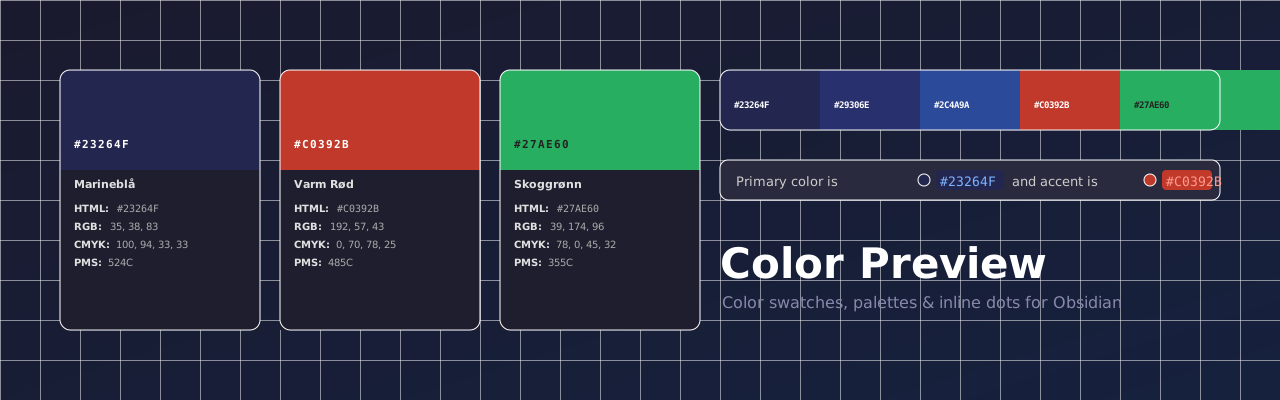



Color Preview turns raw hex codes into beautiful, interactive color cards inside your Obsidian notes — perfect for brand guidelines, design systems, and color documentation.
Features
- Color cards — visual swatch with hex, RGB, CMYK, and PMS displayed below
- Palette blocks — display a whole brand palette as a horizontal strip of swatches
- Inline dot previews — small color dots appear automatically next to any hex code in your notes
- Click swatch to edit — tap any swatch to open the color picker and update the hex in place
- Click to copy — tap any value (HTML / RGB / CMYK) to instantly copy it to clipboard
- Auto-calculated values — if only a hex is provided, RGB and CMYK are approximated automatically
- Multiple insertion methods — ribbon icon,
/colorslash command, paste detection, command palette, and more - PDF / DOCX safe — the underlying markdown stays readable as plain text when exported
Color Card
Write a color fenced code block with any combination of fields:
```color
name: Marineblå
hex: #23264F
rgb: 35, 38, 83
cmyk: 100, 94, 33, 33
pms: 524C
```
Only
hexis required. Ifrgborcmykare omitted, approximate values are calculated automatically and shown in italic.
Minimal example — hex only
```color
hex: #27AE60
```
RGB and CMYK are derived from the hex and marked with ~ to indicate they are approximate.
Palette Block
Show an entire brand palette as a side-by-side strip. Click any swatch to copy its hex.
```palette
#23264F Marineblå
#29306E Mellomblå
#2C4A9A Blå
#FFFFFF Hvit
#1A1A1A Kull
```
Each line accepts either #hex name or name: #hex format.
Inline Dot Previews
Hex codes anywhere in your notes automatically get a small color dot — no extra syntax needed.
The primary color is `#23264F` and the accent is `#C0392B`.
Plain text works too: background is #F2F2F2.
Inserting Colors
| Method | How |
|---|---|
| Ribbon icon | Click the palette icon in the left sidebar |
/color | Type /color in any note for a 4-option dropdown |
| Paste detection | Paste a bare #RRGGBB → choose Insert as block or Insert as text |
| Command: color picker | Color Preview: Insert color (color picker) |
| Command: type hex | Color Preview: Insert color (type hex) |
| Command: from clipboard | Color Preview: Insert color from clipboard |
| Command: empty template | Color Preview: Insert empty color block |
| Command: convert | Select old-format color text → Color Preview: Convert selection to color block |
Editing Colors
Click any color swatch to open the color picker and update the hex: value in the note directly — no manual editing needed. Works in both Live Preview and Reading view.
On mobile, tapping the swatch opens a hex input modal pre-filled with the current color.
Installation
Community Plugin Browser (once approved)
- Open Settings → Community plugins
- Disable Restricted mode if prompted
- Click Browse and search for Color Preview
- Click Install → Enable
Manual
- Download
main.js,manifest.json, andstyles.cssfrom the latest release - Copy them into
<vault>/.obsidian/plugins/color-preview/ - Reload Obsidian and enable the plugin under Settings → Community plugins
Settings
| Setting | Default | Description |
|---|---|---|
| Swatch height | 80px | Height of the color rectangle |
| Max card width | 320px | Maximum width of the color card |
| Show color name | On | Whether to display the name field in the card |
Screenshots
Add screenshots to the
assets/folder and update the paths below.
| Color cards | Palette block |
|---|---|
 |  |
| Inline dots | Color picker |
|---|---|
 |  |
License
MIT © Stephan Teig
For plugin developers
Search results and similarity scores are powered by semantic analysis of your plugin's README. If your plugin isn't appearing for searches you'd expect, try updating your README to clearly describe your plugin's purpose, features, and use cases.