by NotAVirus
Show a color swatch in your notes. Click to copy, or convert between color formats.
Copy Color
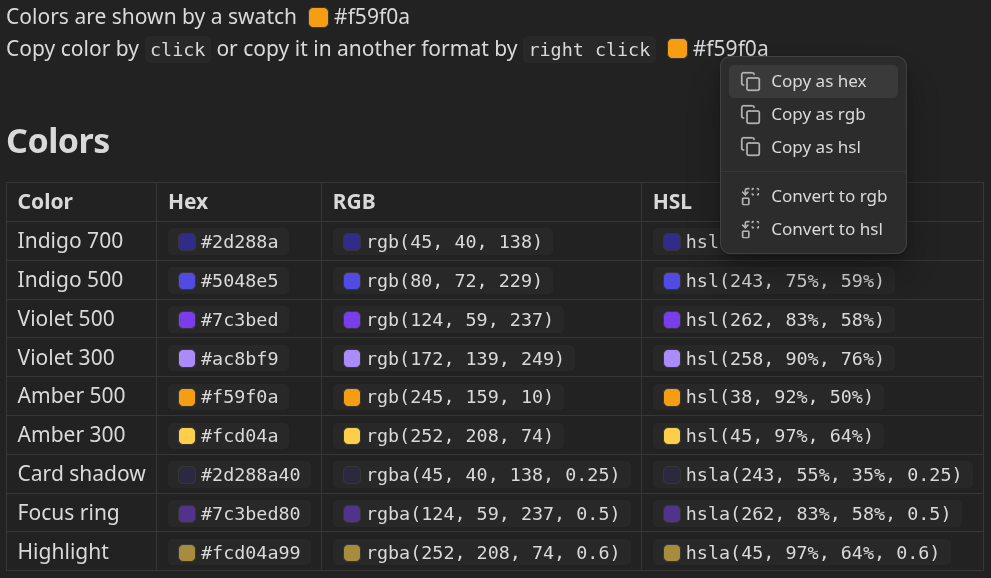
See the colors in your notes, and copy or convert them with one click.
Write a color code like #ff8800 or rgb(255, 136, 0) in a note, and Copy Color shows a small swatch of that color next to it. Handy for design notes, palettes and style guides.
Installation
- In Obsidian, open Settings > Community plugins.
- Turn on community plugins if they're off, then select Browse.
- Search for Copy Color, then select Install and Enable.
Usage
- See the color: color codes get a swatch in Reading view and Live Preview, with a few exceptions.
- Copy it: click or tap a code to copy it as written.
- Copy it in another format: right click and choose hex, rgb or hsl (desktop only).
- Convert it in the note: in Live Preview, right click a color and choose Convert to.
- Convert many at once: in Live Preview, use the command palette (Convert colors to hex, to rgb or to hsl) or right click a selection.
While your cursor is on a color in Live Preview, you see the plain text, so you can edit it as usual.
Hex codes and tags
Obsidian reads a bare #ff8800 as a tag. To get a swatch, put it in backticks or add a backslash:
The button is `#ff8800` and the border is \#ff8800.
Hex codes made only of digits, like #123456, aren't tags, so they work as is, and so do rgb() and hsl(). For the same reason, converting to hex outside backticks writes \#ff8800.
Supported colors
| Format | Example |
|---|---|
| Hex | #ff8800 |
| Hex with alpha | #ff880080 |
| RGB | rgb(255, 136, 0) or rgb(255 136 0) |
| RGB with alpha | rgba(255, 136, 0, 0.5) or rgb(255 136 0 / 50%) |
| HSL | hsl(32, 100%, 50%) or hsl(32 100% 50%) |
| HSL with alpha | hsla(32, 100%, 50%, 0.5) or hsl(32 100% 50% / 50%) |
Short hex codes like #abc aren't supported, because they are too easily confused with tags.
When a color gets no swatch
- It's attached to other text, as in
color:#ff8800or"#ff8800". Punctuation right after it is fine. - It's in a code block, math or front matter.
- It's inside formatting: bold, italics, highlights, strikethrough, links, comments or inline HTML.
- You're in Source mode.
Privacy
Copy Color only writes to your clipboard when you click or tap a color or choose a copy option. It never reads your clipboard, uses the network or collects data.
License
For plugin developers
Search results and similarity scores are powered by semantic analysis of your plugin's README. If your plugin isn't appearing for searches you'd expect, try updating your README to clearly describe your plugin's purpose, features, and use cases.