CryptoPad
approvedby CryptoPad
Encrypt and decrypt text efficiently using keyboard shortcuts - This plugin has not been manually reviewed by Obsidian staff.
↓ 106 downloadsUpdated 2mo agoMIT
🔐 CryptoPad — Obsidian Plugin
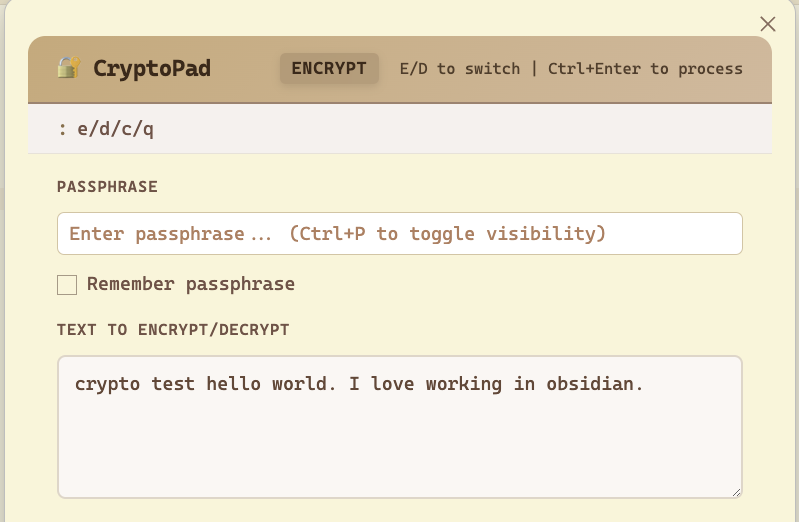
Encrypt and decrypt text inline using a keyboard shortcut. Powered by AES-GCM + PBKDF2 via the Web Crypto API. Everything runs client-side — nothing is sent anywhere.
Features
- Keyboard shortcuts influenced by vim to efficiently encrypt/decrypt your text
- Encrypt & Decrypt tabs in one modal
- Optional passphrase memory via plugin settings
- Works on desktop and mobile
- AES-256-GCM encryption with your passphrase
- PBKDF2-SHA256 key derivation (200,000 iterations)
- Random salt + IV per encryption — every ciphertext is unique
Installation
From source (development)
- Clone / copy this folder into your vault under
.obsidian/plugins/cryptopad/ - Run:
npm install npm run build - In Obsidian: Settings → Community Plugins → enable CryptoPad
Manual install (pre-built)
- Copy
manifest.json,main.js, andstyles.cssinto.obsidian/plugins/cryptopad/ - Reload Obsidian and enable the plugin in Community Plugins
Usage
| Action | How |
|---|---|
| Open CryptoPad | Ctrl+Shift+E (Windows/Linux) / Cmd+Shift+E (Mac) |
| Encrypt | Type text → enter passphrase → click Encrypt |
| Decrypt | Switch to Decrypt tab → paste ciphertext → enter passphrase → click Decrypt |
| Copy result | Click 📋 Copy |
| Quick action | Ctrl+Enter / Cmd+Enter while focused in the textarea |
| Close modal | Escape |
Customizing the Shortcut
Go to Settings → Hotkeys, search "CryptoPad", and set your preferred key combination.
Security Notes
- Passphrase is never transmitted — all operations are local
- If "Remember passphrase" is enabled, it's stored via Obsidian's
saveData()in the plugin's data file inside your vault - Each encryption generates a fresh random 16-byte salt and 12-byte IV
- Output format:
base64(salt[16] || iv[12] || ciphertext) - AES-GCM provides both confidentiality and integrity
Technical Details
| Property | Value |
|---|---|
| Cipher | AES-256-GCM |
| Key derivation | PBKDF2-SHA256 |
| Iterations | 200,000 |
| Salt | 16 bytes random |
| IV | 12 bytes random |
| Output encoding | Base64 |
License
MIT
For plugin developers
Search results and similarity scores are powered by semantic analysis of your plugin's README. If your plugin isn't appearing for searches you'd expect, try updating your README to clearly describe your plugin's purpose, features, and use cases.