by DoHyun
Automate daily note carryover, aging warnings, drop, archive, monthly summary, and timeline visualization.
Obsidian Daily Note Manager
Automates the daily-note task lifecycle in Obsidian: carry, warn, drop, archive.
- Yesterday's unfinished tasks land in today's "Carried over" section
- Each carried task shows how many days it's been open
- Days 3–4: 🟠 / 🔴 warnings appear
- Day 5+: task moves to the month's drop document
- Completed tasks log into the monthly summary
- Ribbon calendar icon: this month's Gantt chart
What a daily note looks like
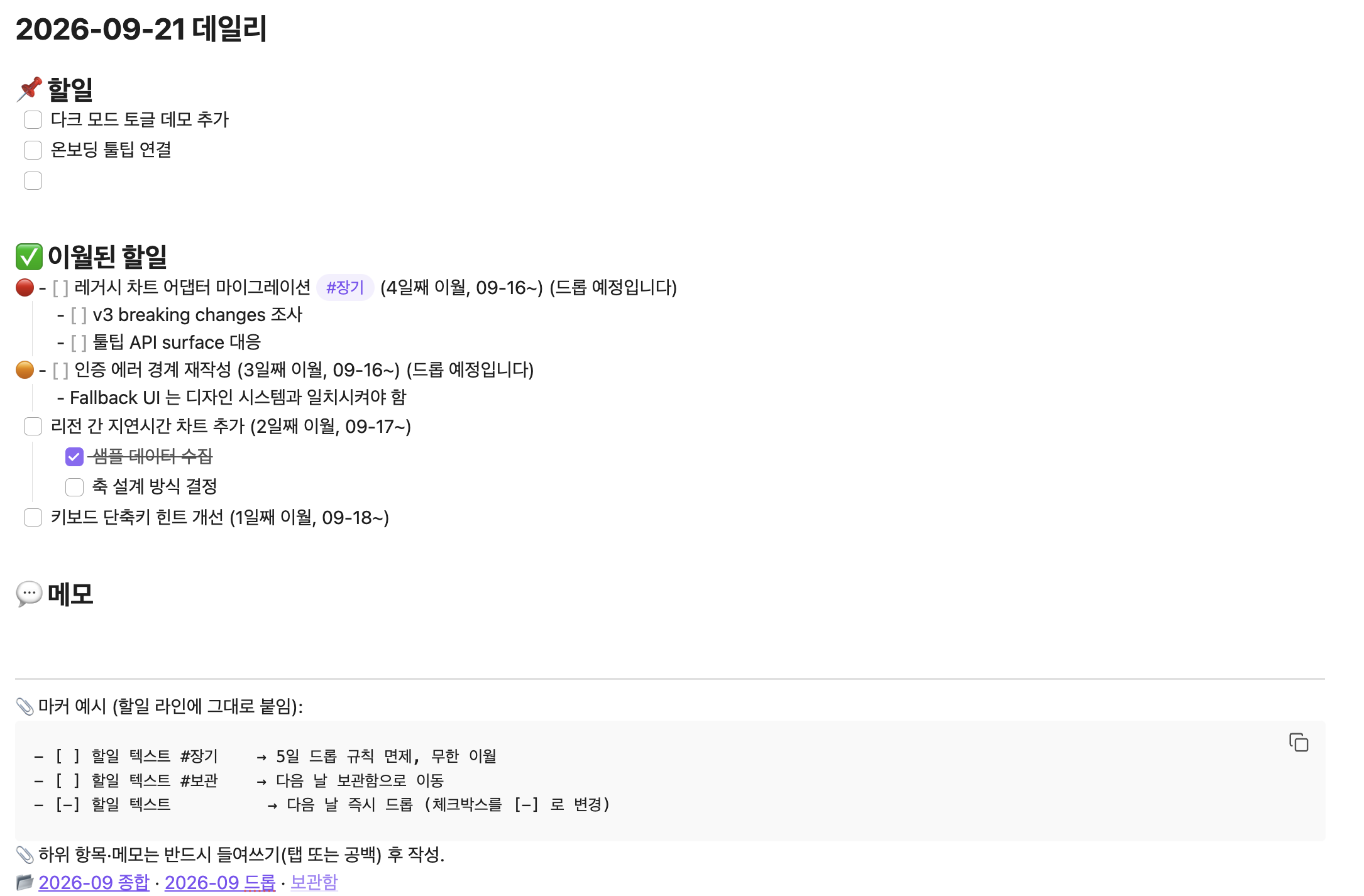
Yesterday (March 19) had these tasks:
## 📌 할일
- [ ] Clean up the API response schema
- [x] PR review
Today's note is generated automatically like this:
## 📌 할일

## ✅ 이월된 할일
- [ ] Clean up the API response schema (2일째 이월, 03-19~)

## 💬 메모
What happens next to each task:
- Days 3–4: prefix flips to 🟠 / 🔴 with a "will be dropped soon" note
- Day 5+: task disappears from today's note → moves to
2026-03 드롭.md - The completed "PR review": logged in
2026-03 종합.mdfor month-end review
Drop and completion logs are written to the month of the event date (when the drop or completion actually happened), not the month the task first appeared. A task started on 2026-02-26 and dropped on 2026-03-04 lands in 2026-03 드롭.md.
Overriding the policy
Three markers on a task line change how it's handled:
#장기— never dropped, keeps carrying over. Use for long-running project items.#보관— on the next run, moves to보관함.md. Use for reference items you want to keep without marking complete or cancelled.- [-]— dropped immediately. Use for tasks you decided not to do.
Timeline view
Left ribbon → calendar icon → this month's Gantt chart.
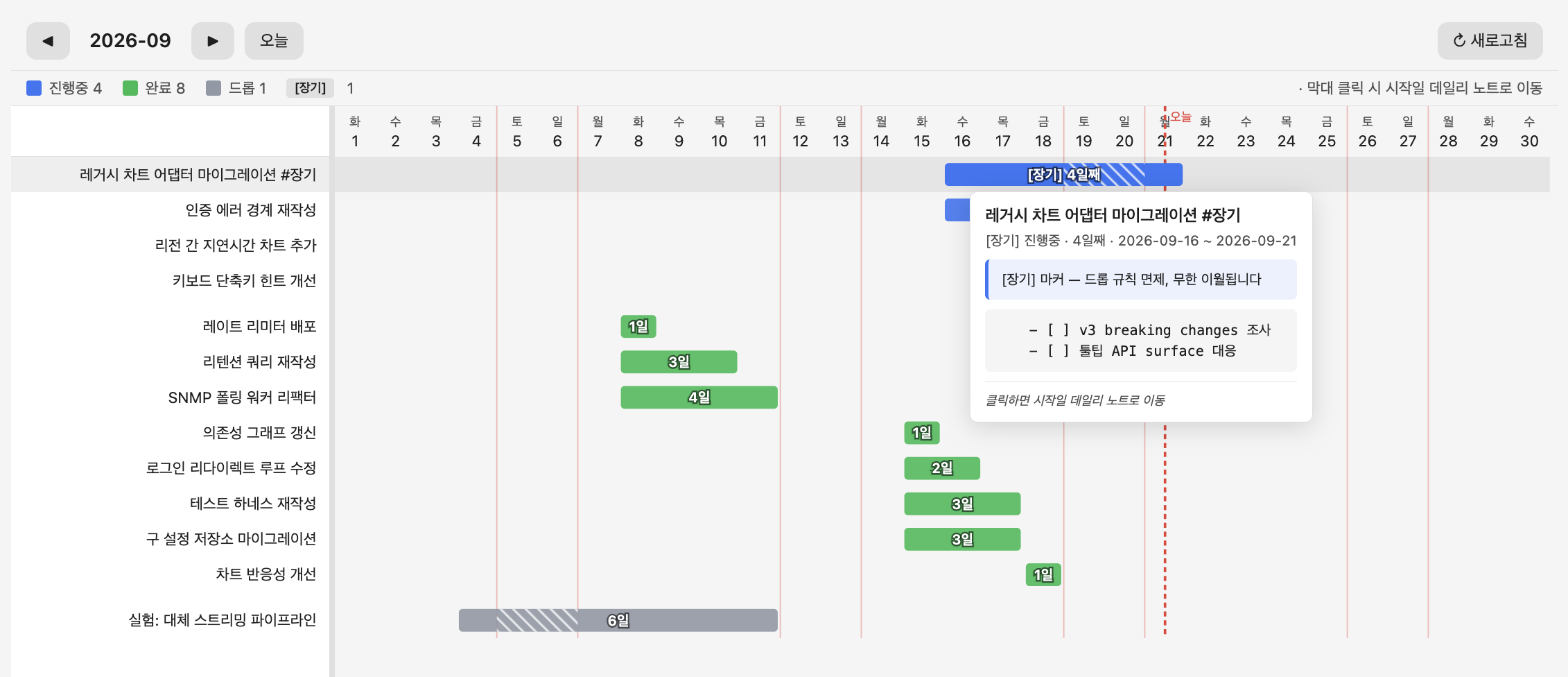
- Bar colors: blue in-progress / green complete / gray dropped
- Click a bar → jump to the daily note where the task first appeared
- Weekend dividers and a today marker on the axis
- Hover a bar → tooltip with the full task text and its subtasks/notes
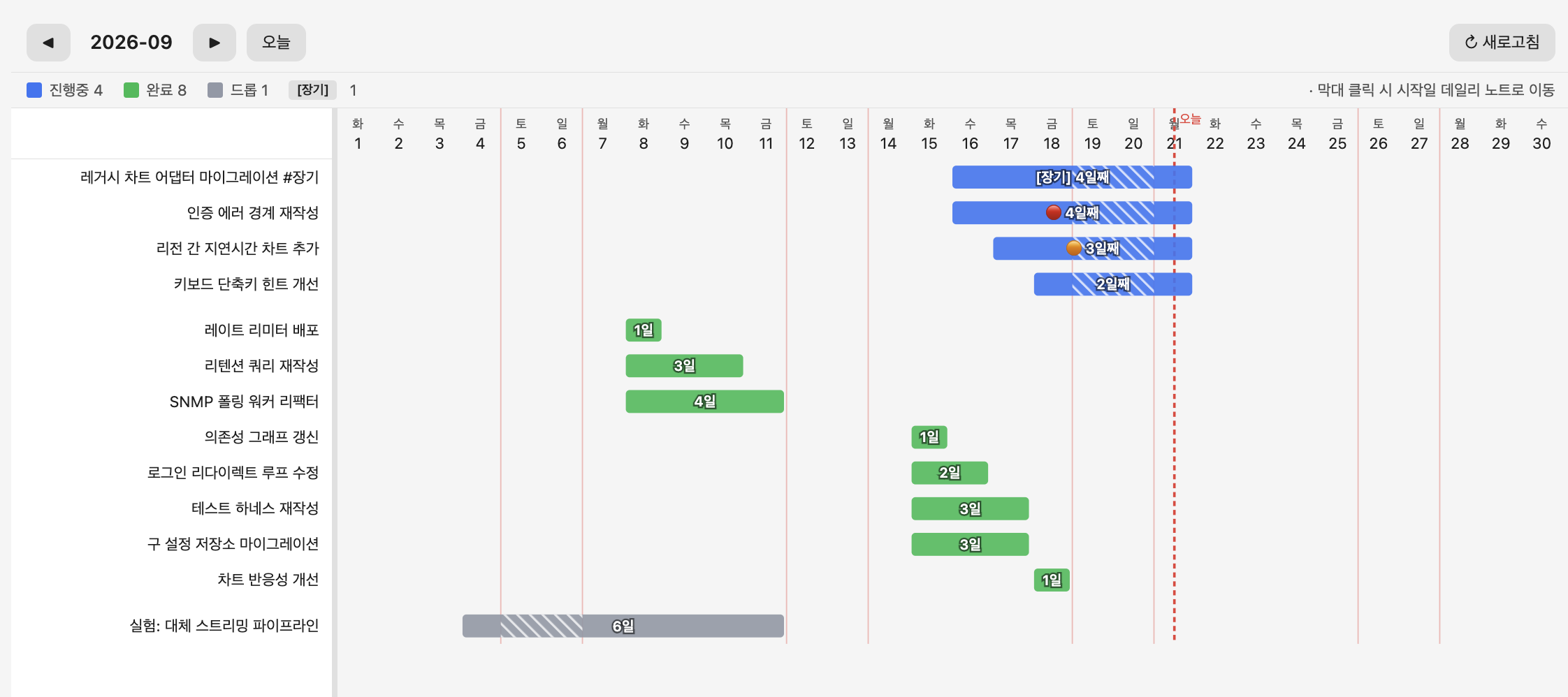
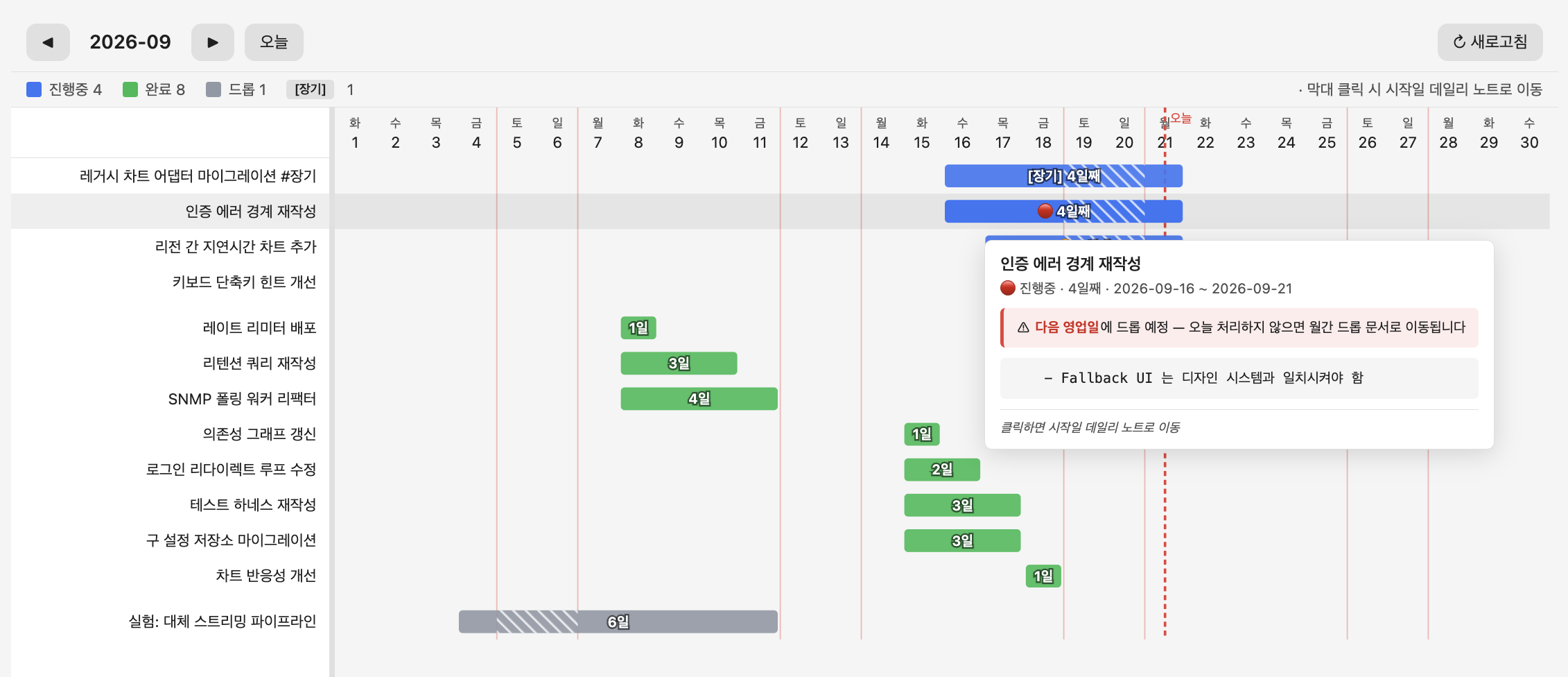
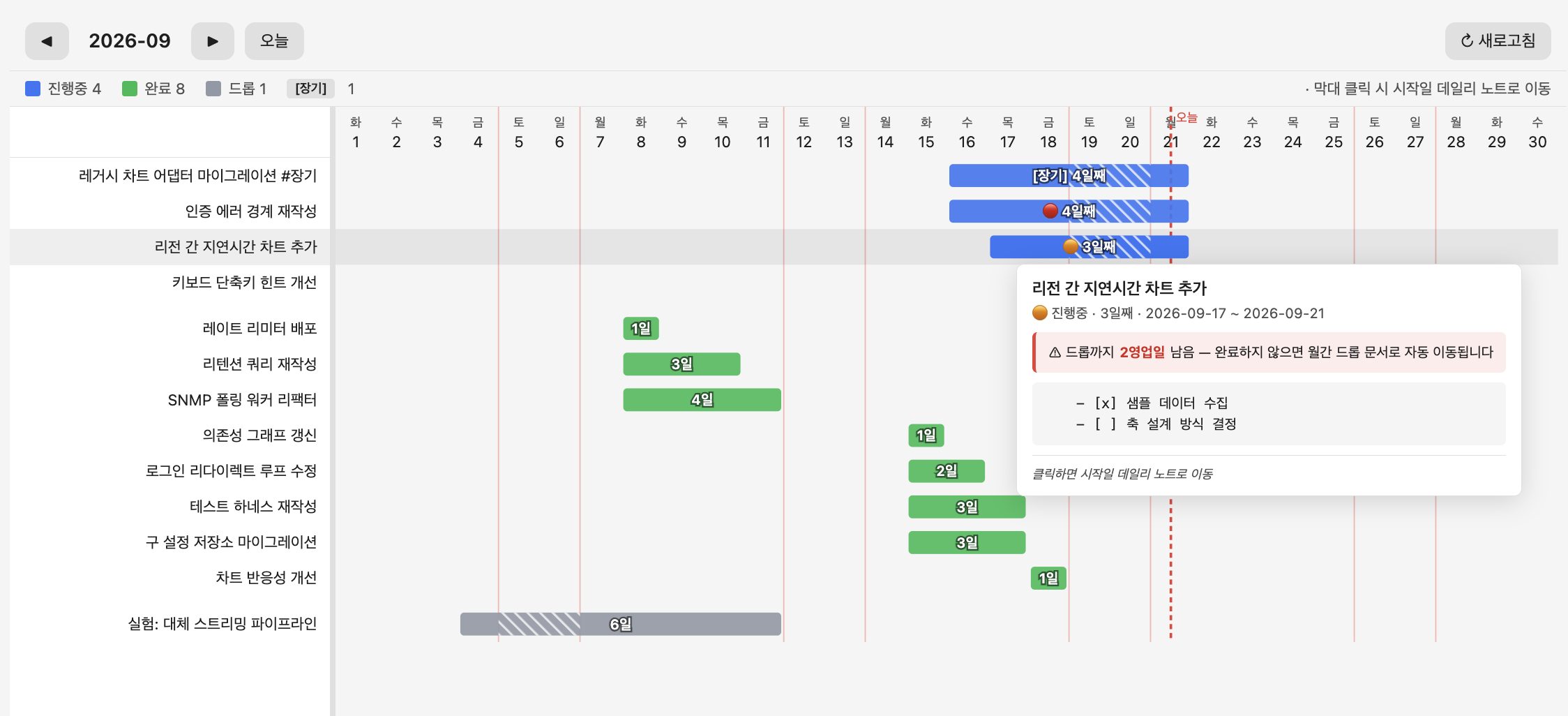
Hover a bar for the full task details, subtasks, and drop countdown:
| Red — drops next business day | Orange — with countdown | Long-term — exempt |
|---|---|---|
 |  |  |
The monthly summary document also embeds a Mermaid Gantt snapshot that refreshes each day.
- View it from Reading mode without opening the custom view
- Renders on mobile
Folder layout
Files the plugin creates and manages:
Notes/
└── 2026-03/
    ├── 4주차/
    │   ├── 📅 2026-03-19.md
    │   └── 📅 2026-03-20.md
    ├── 2026-03 종합.md
    └── 2026-03 드롭.md
보관함.md
- Weeks start on Monday. The week containing day 1 is week 1.
- New month/year folders are created automatically.
When it runs
- While Obsidian is open: checks every 60 seconds whether today's note exists
- After a gap (Obsidian was closed for days): only today's note is created — no notes for the days in between. Carryover counts and drops are still calculated as if a note had existed for every business day in the gap, and the last note is always picked up no matter how long ago it was
Install
Beta via BRAT
- Install BRAT from community plugins.
- Open the BRAT ribbon icon → "Add Beta Plugin" → paste
KiimDoHyun/obsidian-daily-note-manager. - Enable "Daily Note Manager" under Settings → Community plugins.
Manual
Download main.js, manifest.json, and styles.css from the Releases page and drop them into .obsidian/plugins/daily-note-manager/ inside your vault.
Settings
Under Settings → Community plugins → Daily Note Manager:
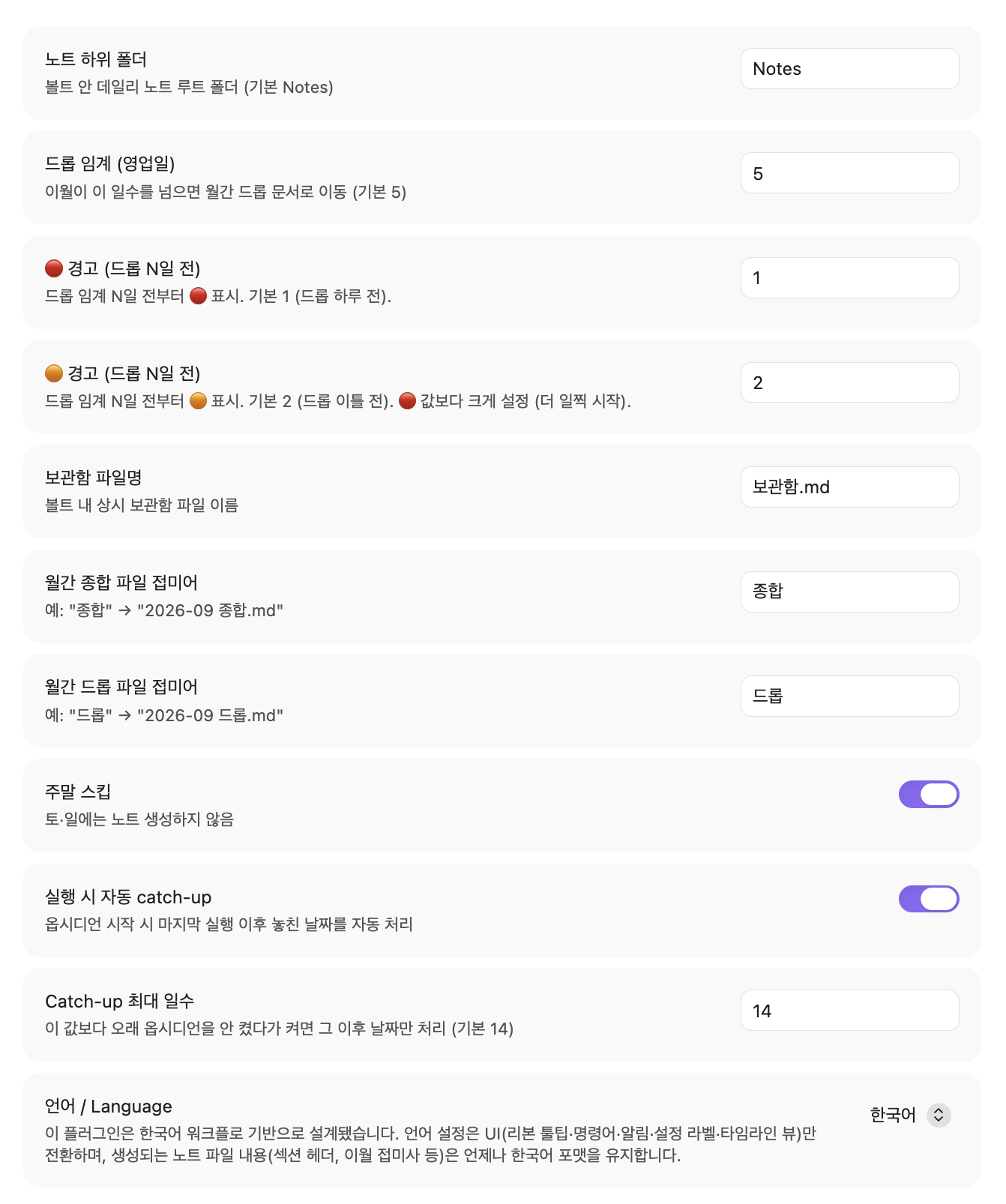
- Notes subfolder (default
Notes) - Drop threshold in business days (default 5)
- 🔴 warning starts N business days before drop (default 1 → day before drop)
- 🟠 warning starts N business days before drop (default 2 → two days before drop)
- Offsets scale with the drop threshold: if you change drop to 7, warnings shift to day 5/6 automatically
- Skip weekend on/off
- Language / 언어 — UI language (ribbon, commands, notices, settings labels, timeline view). Note file contents (section headers, carryover suffixes, monthly summary, etc.) always stay in Korean format regardless of this setting.
Commands
From the command palette (Cmd/Ctrl+P):
- Create today's note
- Dry-run today's actions (no file writes)
- Force regenerate a specific date
- Recompute this month's summary header
- Refresh this month's timeline section
- Open timeline view
- Environment diagnostics
When this plugin isn't a good fit
This plugin assumes daily notes are your task ledger. If that's not how you work:
- You keep long-running project tasks in daily notes — you'd need to tag every one with
#장기. Query-based tools like Tasks fit better. - Files moving on their own makes you uneasy — drop and archive actually move files. If you only want carryover, Rollover Daily Todos is lighter.
- You manage tasks in project notes rather than daily notes.
Development
See CONTRIBUTING.md.
License
MIT
한국어
옵시디언 데일리 노트의 할일 라이프사이클(이월·경고·드롭·보관)을 자동화하는 플러그인.
- 어제 미완료 할일 → 오늘 노트의 "이월된 할일" 자리로 이동
- 이월된 항목: 며칠째 붙들고 있는지 숫자로 표시
- 3~4일째: 🟠 / 🔴 경고 마커
- 5영업일 초과: 그 달의 드롭 문서로 자동 이동
- 완료 항목: 월간 종합 문서에 로그로 축적
- 리본 달력 아이콘: 이번 달 간트 차트
실제 노트는 이렇게 생깁니다
어제 3월 19일 노트에 이런 항목이 남아 있었다고 하자.
## 📌 할일
- [ ] API 응답 스키마 정리
- [x] PR 리뷰
오늘 자동으로 만들어지는 3월 20일 노트는 이렇게 보인다.
## 📌 할일

## ✅ 이월된 할일
- [ ] API 응답 스키마 정리 (2일째 이월, 03-19~)

## 💬 메모
각 항목의 이후 처리:
- 3~4일째: 앞에 🟠 / 🔴 마커 + "드롭 예정입니다" 경고
- 5영업일 초과: 오늘 노트에서 사라짐 →
2026-03 드롭.md로 이동 - 완료된 "PR 리뷰":
2026-03 종합.md에 기록 → 월말 회고 자료
드롭·완료 로그는 이벤트가 발생한 날(종료일) 기준으로 해당 월 문서에 남는다. 항목이 처음 만들어진 달이 아니다. 2026-02-26 에 시작해 2026-03-04 에 드롭된 항목은 2026-03 드롭.md 로 간다.
자동 처리에 개입하고 싶을 때
기본 정책을 덮어쓰는 마커 세 개.
#장기— 며칠이 지나도 드롭되지 않는다. 오래 걸리는 프로젝트 항목에 붙인다.#보관— 다음 날 노트를 만들 때보관함.md로 옮겨진다. 완료도 취소도 아닌, 참고용으로 남기고 싶은 항목에 쓴다.- [-]— 즉시 드롭 처리한다. 하려다 접은 항목을 이월 대상에서 뺄 때.
타임라인 뷰
좌측 리본 → 달력 아이콘 → 이번 달 간트 차트.
- 막대 색: 진행 중 파랑 / 완료 초록 / 드롭 회색
- 막대 클릭 → 해당 항목이 처음 등장한 데일리 노트로 이동
- 주말은 세로선, 오늘은 별도 마커
- 막대에 마우스 hover → 하위 항목·메모까지 상세 툴팁
막대에 hover 하면 전체 이름·하위 항목·드롭 카운트다운 확인:
| 🔴 (다음 영업일 드롭) | 🟠 (카운트다운) | [장기] (면제) |
|---|---|---|
| | |
월간 종합 문서에도 Mermaid 간트 스냅샷이 매일 자동 갱신된다.
- 별도 뷰 없이 종합 문서 스크롤로 확인
- 모바일에서도 렌더링
폴더 구조
플러그인이 만들고 관리하는 파일들.
Notes/
└── 2026-03/
    ├── 4주차/
    │   ├── 📅 2026-03-19.md
    │   └── 📅 2026-03-20.md
    ├── 2026-03 종합.md
    └── 2026-03 드롭.md
보관함.md
- 주차는 월요일 기준. 그 달의 1일이 포함된 주가 1주차.
- 월/년이 바뀌면 새 폴더가 자동 생성.
언제 실행되나
- 옵시디언 실행 중: 60초마다 오늘 노트 존재 여부 확인
- 며칠 만에 다시 열었을 때: 그 사이 날짜의 노트는 만들지 않고 오늘 노트만 생성. 이월 일수와 드롭은 그 사이 영업일마다 노트가 있었던 것처럼 계산하며, 마지막 노트는 얼마나 오래됐든 이어받음
설치
BRAT (베타)
- 커뮤니티 플러그인에서 BRAT 설치·활성화.
- 좌측 리본의 BRAT 아이콘 → "Add Beta Plugin" →
KiimDoHyun/obsidian-daily-note-manager입력. - 설정 → 커뮤니티 플러그인에서 "Daily Note Manager" 활성화.
수동 설치
Releases에서 main.js, manifest.json, styles.css를 받아 볼트의 .obsidian/plugins/daily-note-manager/에 넣는다.
설정
설정 → 커뮤니티 플러그인 → Daily Note Manager.
- 노트 하위 폴더 (기본
Notes) - 드롭 임계일 (기본 5영업일)
- 🔴 경고 시작: 드롭 N일 전 (기본 1 → 드롭 하루 전)
- 🟠 경고 시작: 드롭 N일 전 (기본 2 → 드롭 이틀 전)
- 드롭 임계일이 변경되면 경고 시점도 자동으로 따라감 (드롭 7일이면 5·6일째부터 경고)
- 주말 스킵 여부
- 언어 / Language — UI(리본·명령·알림·설정 라벨·타임라인 뷰) 언어. 노트 파일 내용(섹션 헤더·이월 접미사·월간 종합 등)은 이 설정과 무관하게 항상 한국어 포맷.
명령어
명령어 팔레트(Cmd/Ctrl+P).
- 오늘 노트 생성
- 오늘 실행 결과 미리보기 (dry-run)
- 특정 날짜 강제 재생성
- 이번 달 종합 재계산
- 이번 달 타임라인 새로고침
- 타임라인 뷰 열기
- 환경 진단
이 플러그인이 안 맞는 경우
데일리 노트를 태스크 장부처럼 쓰는 워크플로를 전제한다.
- 장기 프로젝트 항목을 데일리 노트에 그대로 두는 스타일 —
#장기를 매번 붙여야 해서 번거롭다. Tasks처럼 쿼리 기반 도구가 더 맞다. - 파일이 자동으로 이동하는 게 불안한 경우 — 드롭·보관 동작이 실제 파일을 옮긴다. 이월만 원한다면 Rollover Daily Todos가 더 가볍다.
- 데일리 노트가 아니라 프로젝트 노트 중심으로 태스크를 관리하는 경우.
개발
개발 환경, 소스 구조, 릴리스 절차는 CONTRIBUTING.md 참조.
라이선스
MIT.
For plugin developers
Search results and similarity scores are powered by semantic analysis of your plugin's README. If your plugin isn't appearing for searches you'd expect, try updating your README to clearly describe your plugin's purpose, features, and use cases.