by kaka
Daily notes with dynamic directory paths, template rendering, task carry-over, and section-level confirmation.
Daily Report
An Obsidian plugin that extends the native Daily Notes plugin with:
- Dynamic directory paths - Generate daily note folders using Luxon date formats
- Template rendering - Use templates with date placeholders
- Task carry-over - Automatically carry over incomplete tasks from yesterday
- Section-level confirmation - Confirm whether requirements are closed even when all tasks are done
Installation
- Copy the
obsidian-daily-reportfolder to your vault's.obsidian/plugins/directory - Enable the plugin in Obsidian (Settings > Third-party plugins > Community plugins > Enable Daily Report)
- Configure the plugin settings (directory format, filename format, template path)
Configuration
Daily Path Format
Uses Luxon date format strings with / to separate directory levels:
YYYY/MM/[W]WW/MMDD
Example: 2026/09/[W]39/0922 → creates 2026/09/第39周/0922.md
Common formats:
YYYY- 4-digit yearMM- Month (01-12)DD- Day (01-31)WW- Week number (01-53)GGGG- ISO yearcccc- Weekday name (Monday, Tuesday...)[text]- Literal text in square brackets
Template Path
Path to the template file in your vault, e.g.:
Templates/Daily Report.md
Date Placeholders
Templates support three date placeholder formats:
| Format | Example | Output |
|---|---|---|
**date:FORMAT** | **date:YYYY-MM-DD** | 2024-01-15 |
${date:FORMAT} | ${date:cccc} | Monday |
{{date:FORMAT}} | {{date:GGGG-[W]WW}} | 2024-[W]03 |
Options
- Confirm before create - Show confirmation modal before creating daily note
- Delete completed tasks - Remove completed tasks (
- [x]) from yesterday's note when carrying over
Template Structure
The plugin uses a hierarchical template structure:
## Fixed Section (template, daily)
  ### Specific Requirement (may carry over)
    #### Sub-task/Item (clear boundary)
      - Content...
      - [ ] Optional task marker
Section Levels
| Level | Purpose | Carry-over |
|---|---|---|
## | Fixed template sections | Never carried over |
### | Specific requirements | May carry over |
#### | Sub-tasks/Items | Part of parent section |
Status Markers
Mark section status with HTML comments or strikethrough:
| Status | Marker | Carry-over |
|---|---|---|
| Pending (in progress) | <!-- req-status: pending --> or no marker | Yes |
| Verifying (verifying) | <!-- req-status: verifying --> | Yes |
| Done (completed) | ~~Title~~ or <!-- req-status: done --> | No |
| Cancelled (dropped) | <!-- req-status: cancelled --> | No |
Note: Strikethrough (~~title~~) can only represent "done", not "cancelled". Use HTML comment for cancelled.
Auto-completion
If all #### sub-tasks under a ### requirement are completed, the requirement is automatically marked as done and not carried over.
Usage
Create Today's Daily Report
- Open command palette (Ctrl/Cmd+P)
- Type "Create today's daily report"
- Press Enter
Workflow
Create Today's Daily Report
  │
  ├─ Read template → Render date placeholders → Generate today's note
  │
  ├─ Read yesterday's note
  │    │
  │    ├─ Parse sections and sub-tasks
  │    │
  │    └─ Check section status
  │         │
  │         ├─ All #### done → Auto-mark as done, skip
  │         ├─ Has pending #### → Ask user for confirmation
  │         ├─ Already done/cancelled → Skip
  │         └─ Show confirmation modal
  │
  ├─ Apply status decisions to yesterday's note
  │
  ├─ Carry over pending sections to today's note
  │
  └─ Save and open today's note
Carry-over Rules
- Sections with
doneorcancelledstatus: Not carried over - Sections with
pendingorverifyingstatus:- All
####sub-tasks completed → Auto-mark as done, not carried over - Has incomplete
####sub-tasks → Carried over
- All
- Section matching:
- If today's template has matching section: Insert under that section
- If no matching section: Append to end of note
Status Flow
                    ┌─────────────────────────────────────┐
                    │                                     │
                    ▼                                     │
              ┌──────────┐    ┌──────────┐    ┌──────────┐
              │ Pending  │───▶│ Verifying│───▶│   Done   │
              │(进行中)  │◀───│ (验证中)  │◀───│ (已完成)  │
              └──────────┘    └──────────┘    └──────────┘
                    │              │                │
                    │              │                │
                    ▼              ▼                │
              ┌──────────┐    ┌──────────┐          │
              │Cancelled │    │Cancelled │          │
              │(已取消)  │    │ (已取消)  │          │
              └──────────┘    └──────────┘          │
                    │                                     │
                    └─────────────────────────────────────┘
All statuses can be switched back and forth.
Example Templates
Default Template (English)
# Daily Report - **date:YYYY-MM-DD**

## feature

### item-1

- [ ] task-1
- [ ] task-2

### item-2

- [ ] task-1
- [ ] task-2

## bugfix

### item-1

- [ ] task-1
- [ ] task-2

## summary

### item-1

- content
Example Template (Chinese)
# 日报 - **date:YYYY-MM-DD**

## 今日AI

### item-1

- [ ] 任务1
- [ ] 任务2

### item-2

- [ ] 任务1
- [ ] 任务2

## 外部支持

### item-1

- [ ] 任务1
- [ ] 任务2

### item-2

- [ ] 任务1
- [ ] 任务2

## 重要迭代

### item-1

- [ ] 任务1
- [ ] 任务2

### item-2

- [ ] 任务1
- [ ] 任务2

## 待修复的问题

### item-1

- [ ] 任务1
- [ ] 任务2

### item-2

- [ ] 任务1
- [ ] 任务2

## 每日总结

### item-1

- 内容
Plugin Settings Screenshot
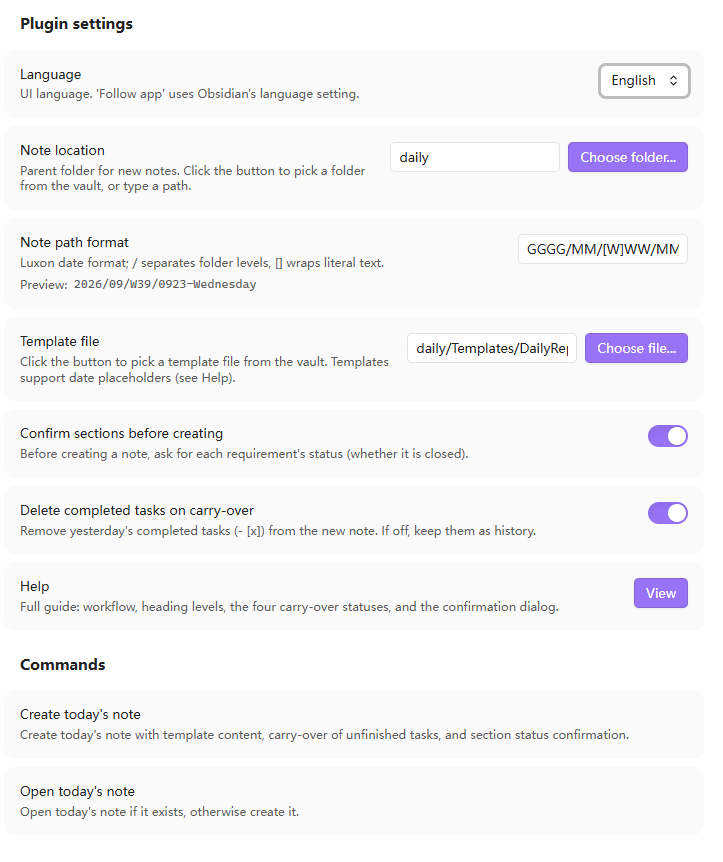
Settings page showing daily path format, template path, and options
Development
# Install dependencies
pnpm install

# Development mode (watch)
pnpm dev

# Production build
pnpm build

# Type check
pnpm typecheck

# Run tests
pnpm test

# Lint
pnpm lint
Dependencies
obsidian- Obsidian plugin API (dev reference only)luxon- Date handling (bundled with Obsidian, no extra install needed)esbuild- Build tooltypescript- Type safety
License
MIT
For plugin developers
Search results and similarity scores are powered by semantic analysis of your plugin's README. If your plugin isn't appearing for searches you'd expect, try updating your README to clearly describe your plugin's purpose, features, and use cases.