by yujia
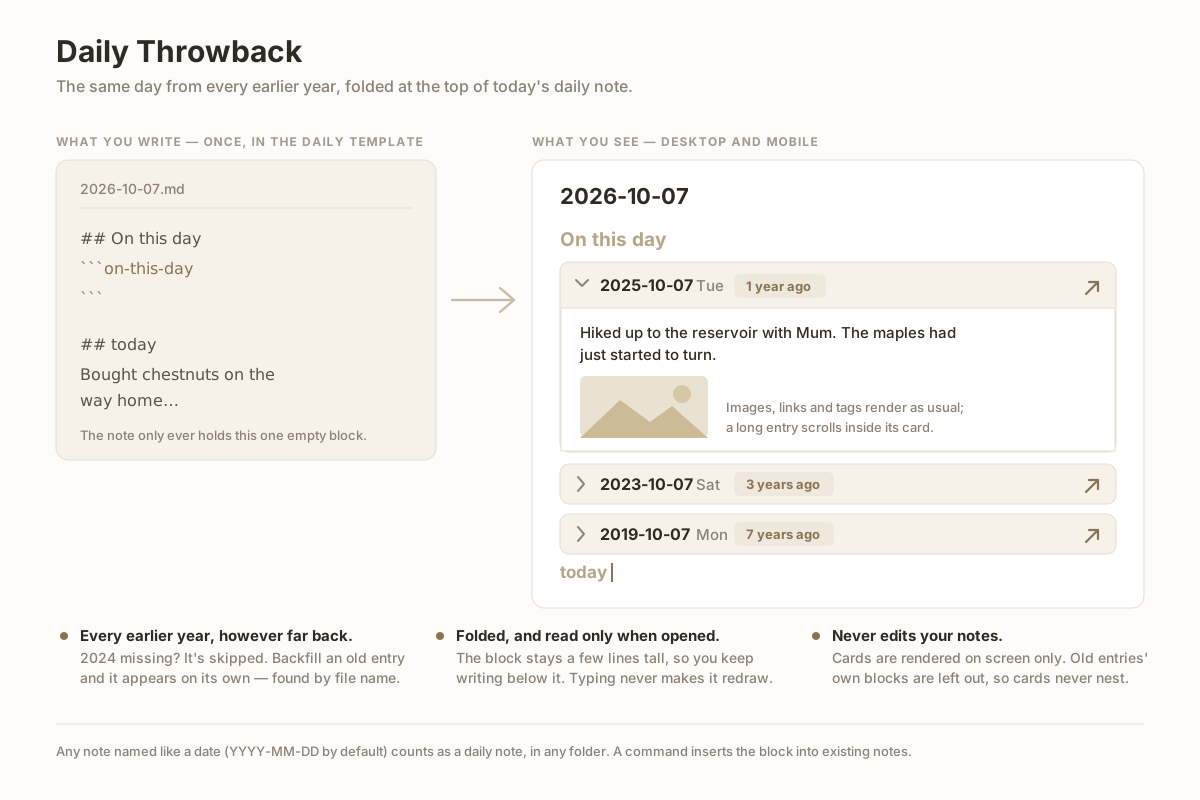
Show the same day from every earlier year at the top of a daily note, as folding cards with the full entry inside. Never edits your notes.
Daily Throwback
Show the same day from every earlier year at the top of your daily note — one folding card per year, with the full entry inside. Works on desktop and mobile, and never edits your notes.
Usage
Put this code block where you want the cards, usually at the top of your daily note template:
## On this day
```on-this-day
```

## today
Open any daily note and the block lists the entries for the same month and day from every earlier year, newest first: 1 year ago, 3 years ago, 7 years ago… Years with no entry are skipped. Notes you backfill later show up on their own, because the list is looked up each time the note opens; the note itself only ever holds that one empty block.
For notes written before you added it to the template, run the command Insert the On this day block into this note. It puts the block after the front matter (or under an existing On this day heading) and adds a ## today heading if the note has none. Running it twice does nothing.
The block also answers to the name 往年今日.
Cards
- Cards start folded, so the block stays a few lines tall and you keep writing below it. An old entry is only read and rendered when you open its card.
- Inside a card the entry renders as usual: images, links, tags, tables. Long entries scroll inside the card instead of pushing today's writing down.
- The arrow button opens that day's note. Links inside a card resolve relative to the old note.
- Front matter, the old note's own On this day block and its
## todayheading are left out, so cards never nest. - Typing in today's note never makes the block redraw. Editing an old entry elsewhere refreshes its card if it is open.
Which notes count
Any Markdown file whose name parses as a date in the configured format (YYYY-MM-DD by default), in any folder. Weekly notes like 2026-01-W05 and names that merely start with a date do not count. February 29 lines up with other leap years only.
Settings
| Setting | Default | |
|---|---|---|
| Date format | YYYY-MM-DD | Moment.js format of daily note file names. Folders in the format are ignored. |
| Folder | empty (whole vault) | Only look for daily notes inside this folder and its subfolders. |
| Expand the most recent entry | off | Open the newest card automatically. |
Notes
- Nothing is written to your notes except by the insert command, which you run yourself. No network access is used.
- In Live Preview, Obsidian's own "edit block" button is hidden on this block so it doesn't cover the cards; use the arrow keys or Source mode to reach the block's source.
- If the plugin is disabled, the block shows up as an empty code block. Delete it or re-enable the plugin.
- The interface follows Obsidian's own language setting: Chinese when the app is in Chinese, English everywhere else.
Installing
Community plugins → Browse → search for Daily Throwback.
Manually: download main.js, manifest.json and styles.css from the latest release into <vault>/.obsidian/plugins/daily-throwback/, then enable it in Settings.
Development
npm install
npm run dev     # watch build into main.js
npm test        # smoke test against a stubbed Obsidian API
npm run build   # production build
Releases are built by GitHub Actions from a version tag and signed with build provenance.
License
MIT
For plugin developers
Search results and similarity scores are powered by semantic analysis of your plugin's README. If your plugin isn't appearing for searches you'd expect, try updating your README to clearly describe your plugin's purpose, features, and use cases.