Diary Navigator
unlistedby polotreetion
Navigate through your diary with charts, memory recall, and writing analytics.
Updated 5mo ago
所有工作(代码,README,发布)均由Deepseek完成
Diary Navigator
Navigate through your diary with beautiful charts, memory recall, and writing analytics for Obsidian.
🧭 Features
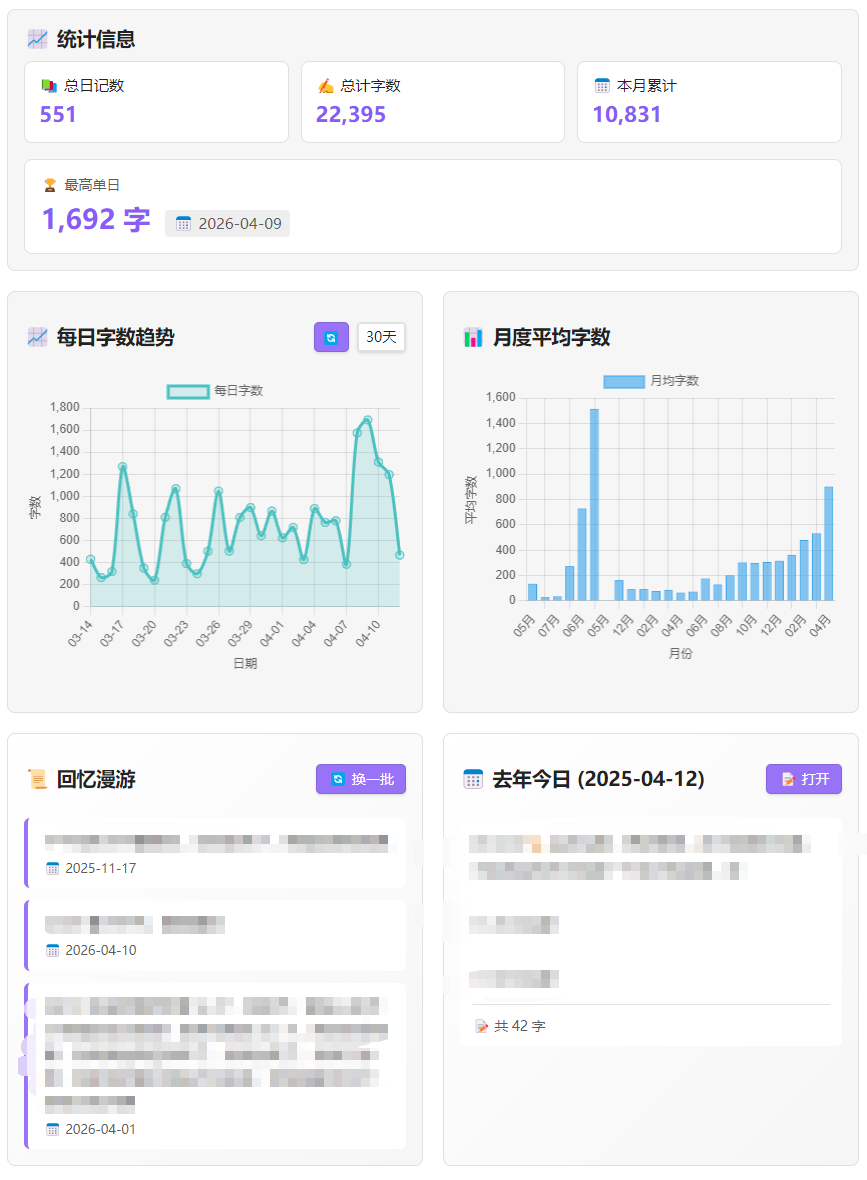
- Daily Writing Chart - Line chart showing your daily writing volume
- Monthly Averages - Bar chart displaying monthly writing trends
- Memory Recall - Random excerpts from your past diaries
- On This Day - View what you wrote exactly one year ago
- Statistics Dashboard - Total entries, total words, monthly accumulation
- Quick Navigation - Click any chart point to jump to that diary entry
- Flexible Date Range - View 7, 14, 30, 60, or 90 days of data
📸 Screenshots
📦 Installation
From Obsidian Community Plugins
- Open Obsidian Settings
- Go to Community Plugins
- Search for
Diary Navigator\ - Click Install
- Enable the plugin
Manual Installation
- Download the latest release from Releases
- Extract the files to your vault's .obsidian/plugins/diary-navigator/\
- Enable the plugin in Obsidian Settings
⚙️ Configuration
- Go to Settings → Diary Navigator
- Set your diary folder name (default: \日记)
- Ensure your diary files are named in \YYYY-MM-DD.md\ format
🎯 Usage
- Click the 🧭 compass icon in the left ribbon
- Or use Command Palette (\Ctrl+P) and search \打开日记导航器\
- Select date range from the dropdown in the daily chart
- Click on chart points to jump to specific diary entries
- Click \换一批\ to refresh random memories
- Click on any memory excerpt to open the corresponding diary
🤝 Support
If you find this plugin useful:
- ⭐ Star this repository
- 🐛 Report issues on GitHub Issues
- ☕ Buy me a coffee
📄 License
MIT License - see LICENSE file for details.
For plugin developers
Search results and similarity scores are powered by semantic analysis of your plugin's README. If your plugin isn't appearing for searches you'd expect, try updating your README to clearly describe your plugin's purpose, features, and use cases.