Doneut
approvedby prajwal aka prawmathean
Displays a live progress ring next to headings that contain checkboxes. Fully customisable : colours, size, stroke, animation speed, and more. - This plugin has not been manually reviewed by Obsidian staff.
Doneut
A Simple progress circle for your Obsidian headings.
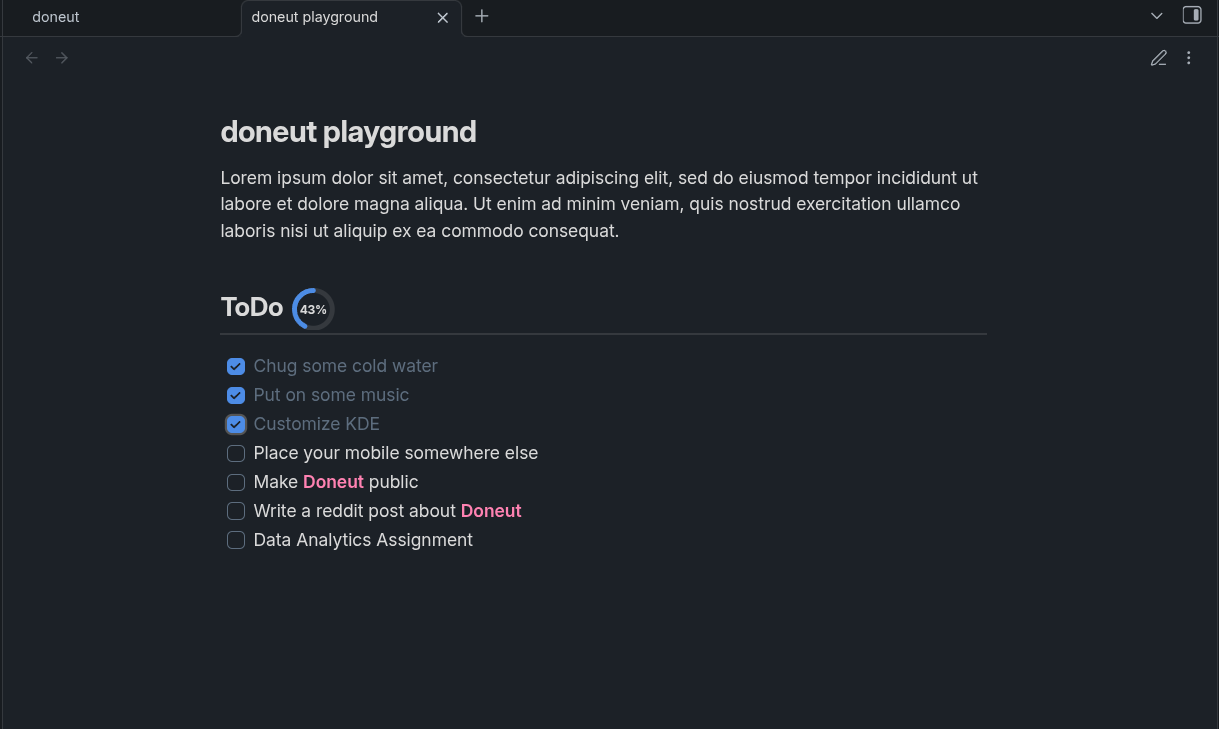
Doneut automatically places a small SVG progress ring next to any heading that has checkboxes underneath it. Check something off - the ring updates instantly, right inside Reading View. If you Hit 100%, you'll get a confetti burst. 🎉
How it works
- Write a heading (
## My Tasks). - Add checkboxes under it (
- [ ] Do the thing). - Doneut draws a progress ring right next to the heading title.
- Every time you tick a checkbox, the ring fills up in real time.
It works out of the box. No configurations needed.
Features
- Live progress rings — SVG rings rendered inline next to headings, updating dynamically as you check/uncheck items.
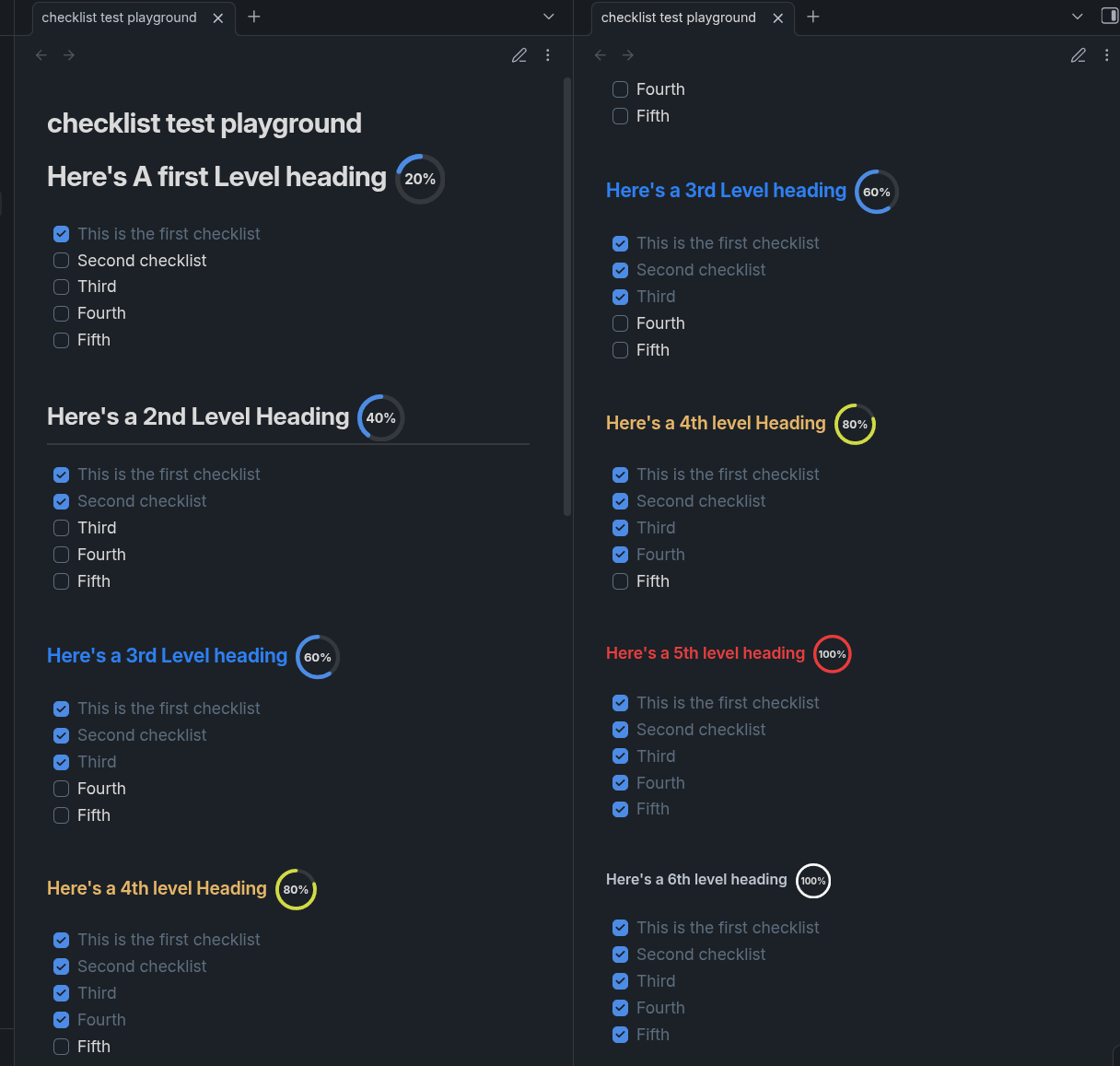
- Proportional sizing — rings scale down automatically for deeper heading levels (H1 is biggest, H6 is smallest).
- Fully customisable — every visual detail is exposed in Settings:
- Ring base size and per-level size scaling
- Stroke width and per-level scaling
- Track color (background ring)
- Progress / fill color
- Stroke linecap (
round,flat,square) - Fill animation duration
- Percentage label (show/hide, font size, per-level scaling, color)
- Confetti on completion (toggle)
- Per heading-level toggles (H1–H6)
- Choose color per heading (color of the progressCircle)
- Live settings preview — see your ring update in the settings panel as you tweak values.
- Theme-aware defaults — when no custom color is set, the ring uses your Obsidian theme's accent and border colors automatically.
- Works on desktop and mobile.
Screenshots
Installation
From the Community Plugin list (recommended)
- Open Obsidian → Settings → Community plugins.
- Disable Safe mode if prompted.
- Click Browse, search for Doneut, and install.
- Enable the plugin.
Manual install
- Download
main.js,manifest.json, andstyles.cssfrom the latest release. - Copy the three files into your vault at:
<YourVault>/.obsidian/plugins/doneut/ - Reload Obsidian and enable Doneut under Settings → Community plugins.
Settings
Open Settings → Doneut to customise the plugin. A live preview ring updates as you change values.
| Setting | Description |
|---|---|
| Enable plugin | Master toggle — turns all rings on or off. |
| Confetti on completion | Plays a confetti burst when a heading hits 100%. |
| Base ring size (H1) | Diameter (px) of the ring next to an H1 heading. |
| Size decrease per level | How many px smaller each deeper heading's ring gets. |
| Stroke width (H1) | Track/arc thickness (px) for H1. |
| Stroke decrease per level | How much thinner the stroke gets for deeper headings. |
| Track color | Background ring color. Reset button restores theme default. |
| Progress color | Fill/arc color. Reset button restores theme accent. |
| Stroke linecap | Shape of the arc ends: Round, Flat, or Square. |
| Animation duration | How long (ms) the fill transition plays. |
| Show percentage text | Toggle the % label inside the ring. |
| Font size (H1) | Base label font size for H1. |
| Font size decrease per level | How much smaller the label gets for deeper headings. |
| Text color | Label color. Reset button restores theme default. |
| H1–H6 toggles | Choose exactly which heading levels show a ring. |
| Reset to defaults | Wipes all customisation back to factory defaults. |
Releasing a new version
- Bump
versioninmanifest.json(SemVer) and updateminAppVersionif needed. - Add the new version to
versions.json:{ "1.0.1": "1.4.0" } - Run
npm version patch(orminor/major) — this syncspackage.jsonand stages the changed files automatically. - Push a tag matching the version (no
vprefix):git tag 1.0.1 git push origin 1.0.1 - The GitHub Actions release workflow will build and create a draft release automatically. Review it, then publish.
Development
# Clone
git clone https://github.com/prajwal-56/doneut
cd doneut

# Install dependencies (Node 18+ required)
npm install

# Watch mode (auto-recompiles on save)
npm run dev

# Production build
npm run build

# Lint
npm run lint
Copy main.js, manifest.json, and styles.css into your vault's plugin folder to test locally.
Contributing
Issues and pull requests are welcome at github.com/prajwal-56/doneut.
Please keep pull requests focused and add a description of what changed and why. Feel free to fork and do anything with it 🙌🏻.
Support
If you liked any of my works , feel free to buy me a coffee or support me

License
0-BSD — do whatever you want with it.
For plugin developers
Search results and similarity scores are powered by semantic analysis of your plugin's README. If your plugin isn't appearing for searches you'd expect, try updating your README to clearly describe your plugin's purpose, features, and use cases.