DuckDB and MotherDuck
approvedby Mehdi Ouazza
Query files and cloud data with DuckDB SQL inside notes. Freeze results inline as markdown. Optional MotherDuck for cloud compute. - This plugin has not been manually reviewed by Obsidian staff.
DuckDB & MotherDuck for Obsidian
Bring external data into your Obsidian notes via DuckDB SQL, then freeze the results as a plain markdown table so you and any agent reading the vault see query + result as one document.
Works entirely offline with local DuckDB WASM. Add a MotherDuck token to query your cloud data alongside, picking per code block which connection to use.
- Query files in your vault or over the web: read a CSV/Parquet/JSON sitting next to your note (
read_csv('data/sales.csv')) or any remote URL. Plus Excel, Iceberg, Delta, geospatial — anything DuckDB reads. - Cache results inline as markdown: freeze the query output right under the SQL so the note becomes a self-contained document, readable in any editor.
- Scheduled refresh: pick a daily or weekly cadence per note; the plugin re-runs the queries automatically while Obsidian is open.
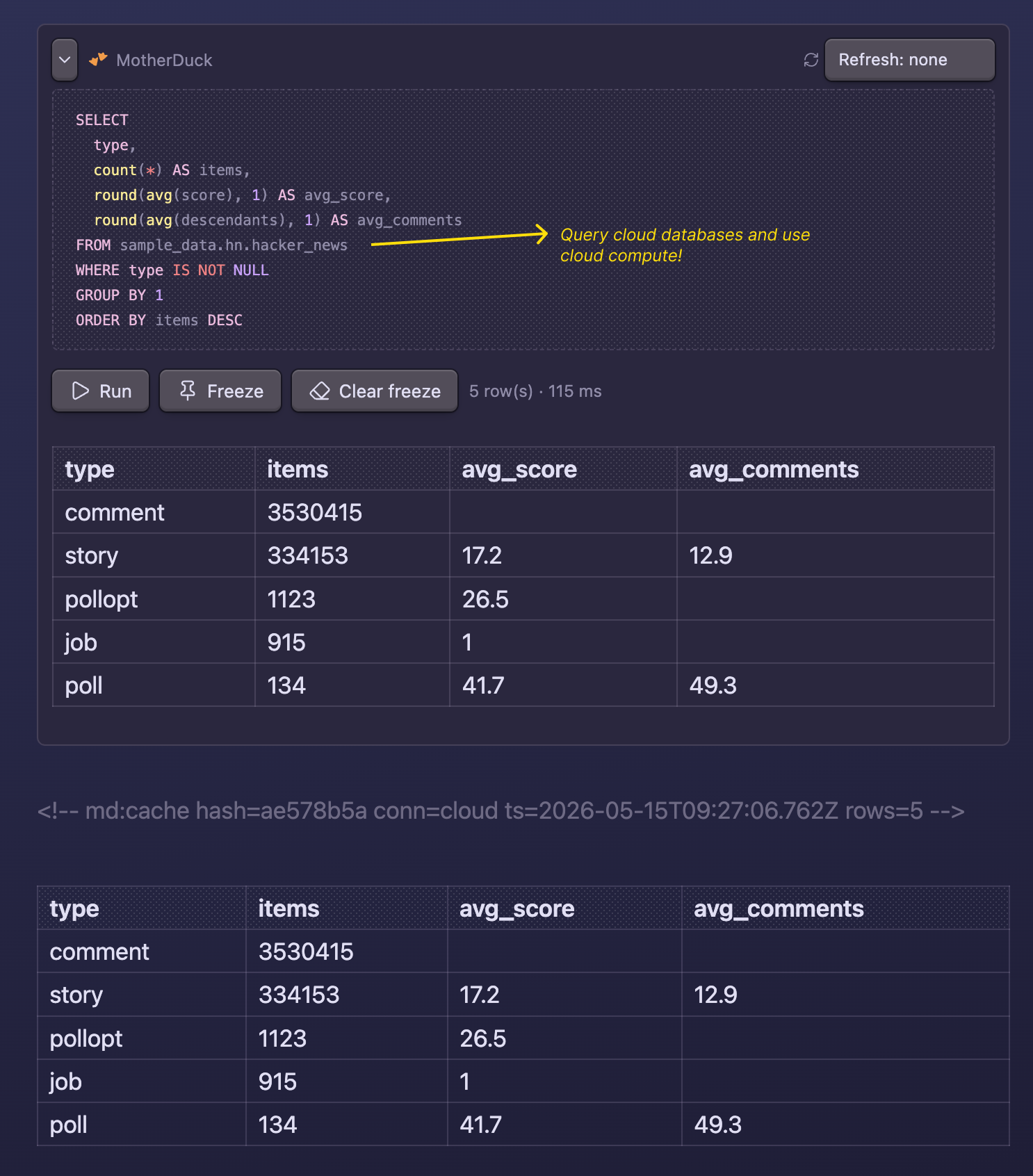
- MotherDuck for cloud data and compute: add a token to query cloud databases or push heavy SQL onto MotherDuck instead of your laptop.
Quick start
Install via Community plugins (see Install), then paste this block into any note:
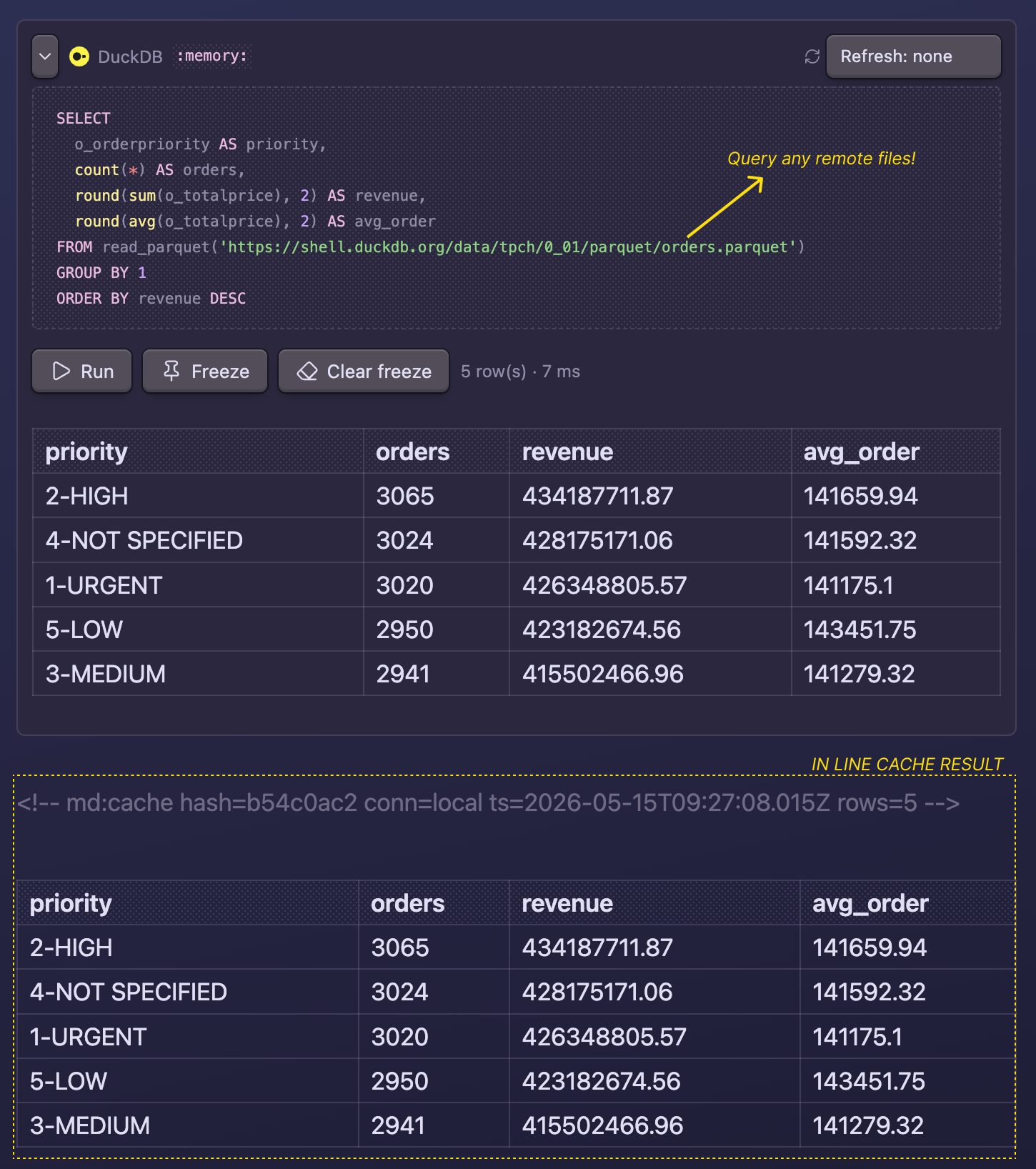
```duckdb
SELECT
  o_orderpriority AS priority,
  count(*) AS orders,
  round(sum(o_totalprice), 2) AS revenue
FROM read_parquet('https://shell.duckdb.org/data/tpch/0_01/parquet/orders.parquet')
GROUP BY 1
ORDER BY revenue DESC
```
For more demo items, check the demo markdown page.
In reading mode the block becomes a SQL panel with Run / Freeze / Clear freeze buttons. Hit Freeze and the result drops in as a markdown table right under the SQL, bracketed by sentinel comments so the next refresh knows what to replace.
Add a MotherDuck token in Settings to enable motherduck blocks against cloud databases or heavier compute:
Reading files from your vault
A duckdb block can read data files stored in your vault — drop a CSV/Parquet/JSON next to your note and query it by name:
```duckdb
SELECT country, count(*) AS cities FROM read_csv('data/cities.csv') GROUP BY 1
```
The plugin reads the file through Obsidian's vault API (so it also works on mobile, unlike the absolute-path DuckDB-file setting) and hands the bytes to the local engine before the query runs. Paths resolve relative to the note first, then the vault root. Supported across read_csv, read_parquet, read_json, read_ndjson (and their _auto variants), plus bare FROM 'file.parquet'.
Limits worth knowing:
- The referenced files are loaded into memory in the Obsidian process while the query runs. There's a combined size cap — Settings → Max local query data (default 1024 MB); above it the query is refused before any file is read, because exhausting memory can crash the window. For larger data, read it over a URL (
https://…, range-read by httpfs, nothing held whole) or push it to MotherDuck. - Globs (
data/*.csv) and absolute paths outside the vault aren't handled by the vault bridge. Use a URL for those, or the read-only DuckDB file path setting for an on-disk.duckdbdatabase. - Cloud (
motherduck) blocks don't read vault files — that would mean uploading. Keep local files onduckdb.
Why this and not Dataview?
Dataview is the go-to plugin for querying the vault itself — your frontmatter, tags, and links across notes. This plugin solves the opposite problem: pulling external data (CSV, Parquet, JSON, Excel, Iceberg, Delta, geospatial files, plus your MotherDuck cloud) into a note via DuckDB SQL, and joining across them when you want.
- Use Dataview for "list every note tagged #project, sorted by created date."
- Use this for "the latest revenue numbers from my warehouse, joined with a local expenses CSV."
Output is regular markdown wrapped in sentinel comments — so it diffs cleanly in git, renders in any editor (Neovim, VS Code, mobile previews), and stays readable to agents reading the vault.
When to use it
- Embedding live numbers in a blog draft (e.g.
SELECT count(*) FROM read_parquet('events.parquet')). - Quick exploration of a CSV/Parquet/Excel file in your data folder without leaving Obsidian.
- Snapshotting a MotherDuck query into a weekly report note (with scheduled refresh).
- Joining a local file (e.g. expenses CSV) with cloud tables in MotherDuck.
Freeze format
```motherduck
SELECT brand, SUM(revenue) FROM sales GROUP BY 1 ORDER BY 2 DESC LIMIT 10
```
<!-- md:cache hash=a3f847b2 conn=cloud ts=2026-04-24T14:22:00Z rows=10 -->

| brand | sum(revenue) |
| ----- | ------------ |
| acme  | 42000        |
| ...   | ...          |

<!-- md:cache-end -->
The sentinel carries a query hash, connection, timestamp, and row count. Refresh and freeze replace the sentinel block below the query in place.
Connections
Each block picks its backend via the fence type. Both connections can be configured at once and used side-by-side in the same note.
| Fence | Backend | Needs token | Reaches cloud |
|---|---|---|---|
```duckdb | @duckdb/duckdb-wasm | no | no |
```motherduck | @motherduck/wasm-client | yes | yes |
Local DuckDB has three sub-modes, set via the Path to local DuckDB file setting:
:memory:(default), ephemeral in-memory database. Reset on every Obsidian restart.- A bare filename like
notes.duckdbfor a persistent database in browser-managed storage (Origin Private File System). Survives Obsidian restart, full read/write, lives outside your vault. - An absolute path like
/Users/you/data.duckdborC:\Users\you\data.duckdbto query an existing.duckdbfile from disk. Read-only: writes succeed inside the worker but don't persist back to the file.
Install
One click: Add to Obsidian — opens the plugin page directly in Obsidian. Then hit Install and Enable.
Or manually:
- In Obsidian, open Settings → Community plugins → Browse.
- Search for DuckDB and MotherDuck and click Install, then Enable.
That's it for the standard path. Obsidian's update channel handles new releases automatically.
Manual (from source)
- Clone this repo.
npm install && npm run build, producesmain.js.- Copy
main.js,manifest.json, andstyles.cssinto<your-vault>/.obsidian/plugins/duckdb-motherduck/. - In Obsidian: Settings → Community plugins → enable DuckDB and MotherDuck.
Commands
From the command palette:
- Refresh all queries in this note: re-runs every block in the current note.
- Refresh query at cursor: re-runs and re-freezes only the block the cursor is on. Bind a hotkey under Settings → Hotkeys for fast iteration.
- Freeze query at cursor: alias of Refresh query at cursor, kept for users who think of it as the first-time freeze action.
- Clear freeze at cursor: removes the frozen result below the SQL block at the cursor (matches the Clear freeze button in the rendered panel).
- Reset DuckDB / MotherDuck connections: drops both connections; useful after changing the path or token.
Settings
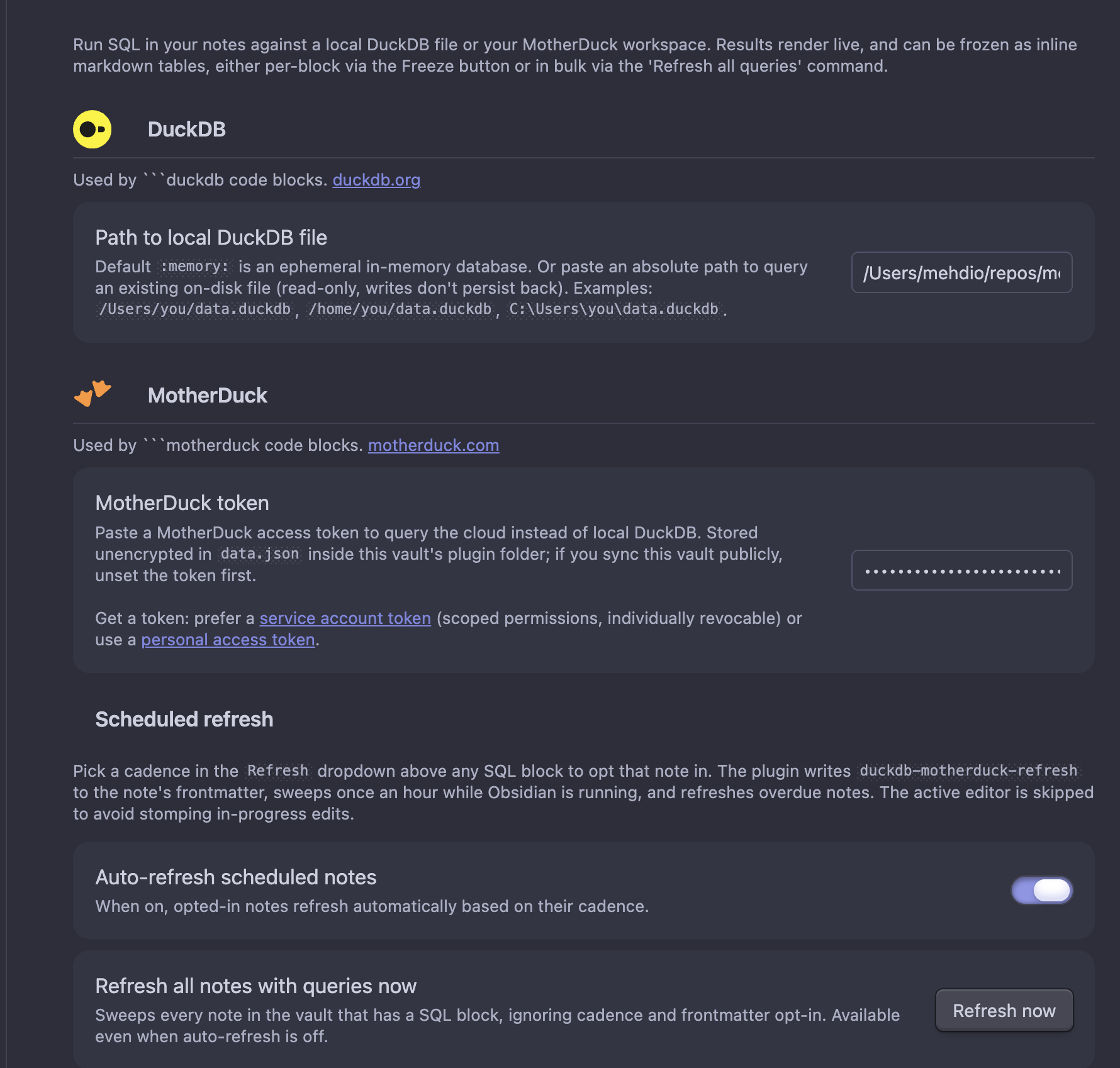
- DuckDB → Path to local DuckDB file:
:memory:(default), an OPFS bare filename, or an absolute file path. See Connections above. - MotherDuck → Token: optional. Stored plaintext in the plugin's
data.json(see Security below). Prefer a service account token for scoped, individually revocable access; or a personal access token for quick experimentation. - Scheduled refresh: see the next section.
- General → Row cap: max rows rendered inline or written into a frozen table. The runtime stops scanning at
rowCap + 1rows and discards the rest, so heavy queries (FROM 'huge.csv') don't materialize 40k rows in WASM heap just to throw 39 900 of them away. A truncation notice is appended if more rows existed. - General → Cell character cap: max characters per cell in rendered and frozen tables; longer values are truncated with an ellipsis. Hover a truncated cell in the live result to see the full value. Default
80. - DuckDB → Max local query data (MB): cap on the combined vault files a
duckdbquery will load into memory (default1024). Above it the query is refused before reading any file — see Reading files from your vault. Set0to disable the limit (you accept the out-of-memory risk).
Scheduled refresh
Pick a cadence in the Refresh dropdown above any SQL block to opt that note in for auto-refresh. The plugin writes a duckdb-motherduck-refresh: daily | weekly property to the note's frontmatter:
---
duckdb-motherduck-refresh: daily
duckdb-motherduck-refresh-last: 2026-05-04T10:30:00Z   # plugin-managed
---
While Obsidian is running and the Auto-refresh scheduled notes toggle is on, the plugin sweeps once an hour. Notes whose last - now exceeds their cadence get their frozen tables re-materialized. The active editor is skipped to avoid stomping in-progress edits.
After each sweep finishes, if Reset connections after each scheduled refresh is enabled (default on), the plugin terminates the DuckDB and MotherDuck WASM workers to free memory. The next interactive query pays a ~1–2 s init cost; in exchange, you don't carry materialized result sets between sweeps.
If a note errors three sweeps in a row with every block failing (zero blocks refreshed, errors recorded), the plugin auto-strips its duckdb-motherduck-refresh frontmatter so the hourly sweep stops poking it. Partial failures (some blocks succeed, some error) do not count — a working block keeps the schedule alive. Auto-unschedule events are written to the activity log.
The settings page also has:
- A Refresh now button: forces a sweep of every note in the vault that has a SQL block, regardless of cadence or frontmatter opt-in. Useful before reading a dashboard, or for one-shot refreshes.
- An Unschedule all button: strips
duckdb-motherduck-refresh(and the plugin-managed-lasttimestamp) from every note's frontmatter. Use to bulk-disable auto-refresh after experimenting, or to free up the hourly sweep before running heavy queries. - An Activity log showing the last 100 refresh attempts (timestamp, trigger, path, blocks refreshed, first error message if any). Click a path to open the note. Clear log wipes history.
Plugin API
The same code path the Refresh button uses is exposed for agents and external triggers:
app.plugins.getPlugin('duckdb-motherduck').api.refreshFile(path): re-runs every block in the note, returns the refresh count.app.plugins.getPlugin('duckdb-motherduck').api.runQuery(sql, connection?): runs ad-hoc SQL.connectionis"local"or"cloud", defaults to"local".
Wired into a shell via the official Obsidian CLI:
obsidian eval code="app.plugins.getPlugin('duckdb-motherduck').api.refreshFile('path/to/note.md')"
Drop that into a cron, a Claude Code skill, or any agent that has shell access.
Build from source
npm install
npm test         # automated unit tests for parser/cache/table helpers
npm run build     # production bundle, main.js
npm run dev       # watch mode, rebuilds on save
main.js ends up around 2 MB because the local DuckDB WASM worker script is bundled inline. The .wasm binary itself is fetched from jsDelivr at runtime (see Remote assets).
Network access
The plugin makes network calls only in response to actions you take. There is no telemetry, no analytics, no calls to motherduck.com or any third-party for any reason other than fulfilling a SQL query or fetching a WASM runtime you triggered.
Concretely:
| When | What | Where | Sends |
|---|---|---|---|
First time a duckdb block runs | DuckDB WASM binary (~7 MB gzipped), once, then browser-cached | https://cdn.jsdelivr.net/npm/@duckdb/duckdb-wasm@<version>/dist/duckdb-eh.wasm | nothing — public CDN GET |
First time a motherduck block runs | MotherDuck WASM extension + DuckDB worker bundle | https://app.motherduck.com/duckdb-wasm-assets/<version>/ | nothing — public assets GET |
Every motherduck block run (including scheduled refresh) | Your SQL query and your token | Your MotherDuck workspace | your SQL + your token |
| Scheduled refresh sweep (when enabled) | An hourly sweep checks frontmatter-opted-in notes and re-runs their blocks. Only motherduck blocks make network calls; duckdb blocks stay local. The sweep itself does no network I/O — it walks the vault and triggers blocks. | Same as the row above (only motherduck blocks touch the network) | Same as above |
Scheduled refresh is off by default and opted into per-note via the Refresh: daily/weekly dropdown above any SQL block, which writes duckdb-motherduck-refresh: daily|weekly to that note's frontmatter. Toggle it off globally in Settings → Auto-refresh scheduled notes.
Requirements
- Obsidian 1.5+
- Desktop (tested on macOS; Windows/Linux expected to work, end-to-end testing pending). On mobile:
:memory:and OPFS modes should work; absolute-path mode requires Node integration not available on mobile. - Internet connection on first use (to download wasm assets).
Security
The MotherDuck token, if set, is stored plaintext in <vault>/.obsidian/plugins/duckdb-motherduck/data.json. Don't commit that file. Don't sync your vault publicly with a token in it. Keychain integration isn't implemented; this matches the Obsidian-plugin-ecosystem norm (no plugin SDK API for encrypted secrets, no native deps shipped via the community store).
Queries run locally (duckdb blocks) or against your MotherDuck account (motherduck blocks). No telemetry is sent by the plugin.
Known limitations
- No mobile validation, the architecture should work in mobile Obsidian for
:memory:and OPFS modes (vault-file reads use the cross-platform vault API and should work on mobile too), but hasn't been tested on iOS/Android. Absolute-path mode requires Node integration which isn't available on mobile. - Vault-file reads are size-capped and in-memory: referenced files are loaded into the renderer while the query runs, so queries above the combined Max local query data limit are refused. Globs and absolute paths outside the vault aren't supported through the vault bridge — use a URL or MotherDuck. See Reading files from your vault.
- Read-only for on-disk files, pointing at a real
.duckdbfile lets you query it, but writes (CREATE/INSERT/UPDATE) succeed only inside the worker and don't persist back to the file. - Scheduled refresh runs only while Obsidian is open. If you want notes refreshed while your laptop is asleep or Obsidian is closed, you need an external trigger (e.g. cron + the Obsidian CLI calling the plugin's API).
- No keychain integration for the MotherDuck token, stored plaintext in
data.json. See Security.
License
MIT. See LICENSE.
For plugin developers
Search results and similarity scores are powered by semantic analysis of your plugin's README. If your plugin isn't appearing for searches you'd expect, try updating your README to clearly describe your plugin's purpose, features, and use cases.