by dingzy53
Number display equations only when they are linked, and show those links as equation numbers in reading view, live preview, and PDF export.
Equation Refs




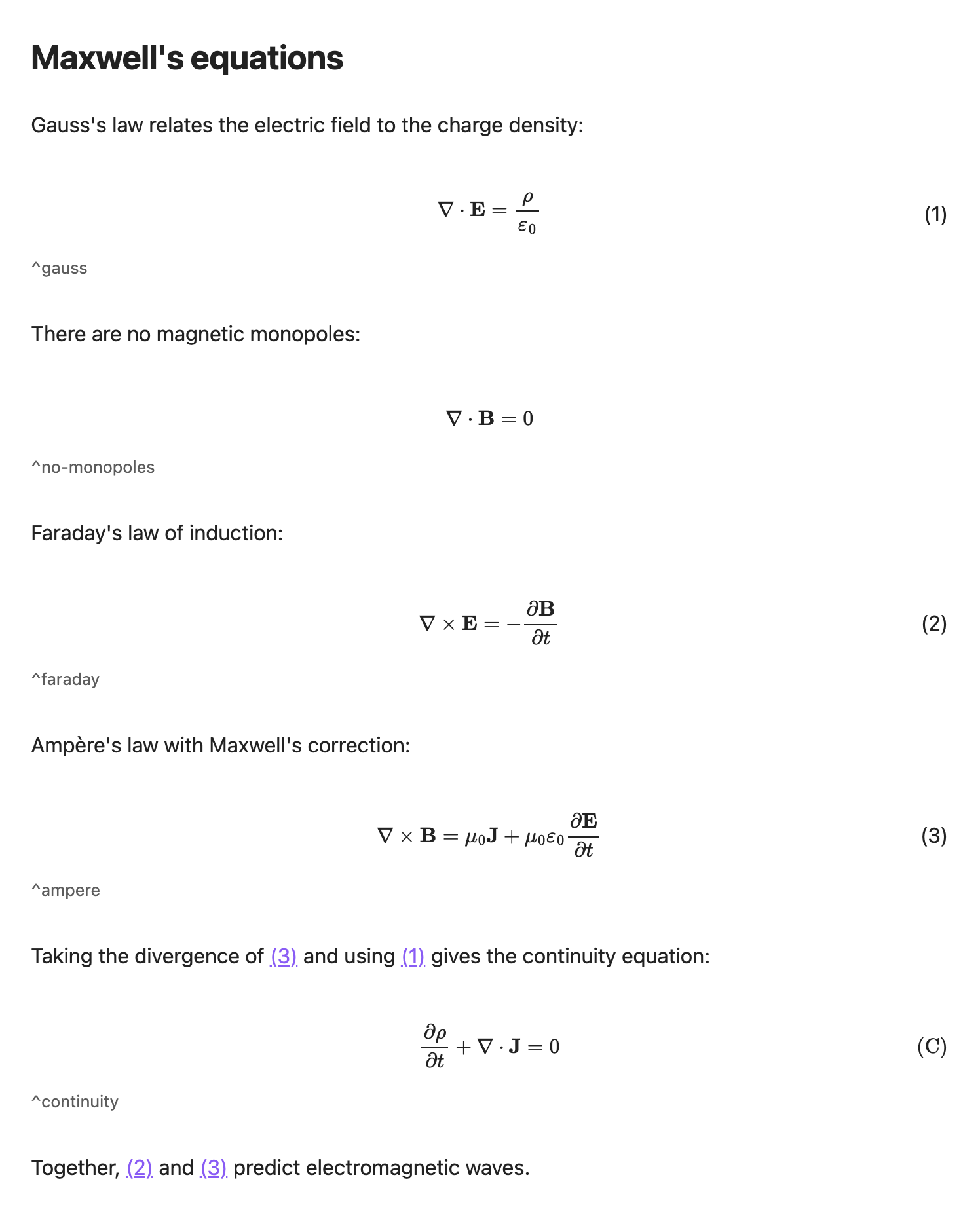
Number display equations in Obsidian only when you link to them, and show the links as the numbers, like LaTeX's \eqref.
Features
- Works in Reading view, Live Preview, embeds and PDF export.
- Uses Obsidian's own block links (
[[note#^label]]). No new syntax, and your notes are never modified. - Zero runtime dependencies. You don't need MathLinks or any other plugin.
- Numbers are drawn with CSS, so MathJax doesn't re-render as you type or scroll.
Requirements
- Obsidian 1.13.0 or newer, on desktop or mobile.
Installation
From the community directory (recommended)
- Open Settings → Community plugins and turn on community plugins if asked.
- Select Browse, search for Equation Refs, then select Install and Enable.
You can also open the plugin's page: community.obsidian.md/plugins/equation-refs.
Manually
- Download
main.js,manifest.jsonandstyles.cssfrom the latest release. - In Settings → Community plugins, select the folder icon next to Installed plugins. This opens
<vault>/.obsidian/plugins/. - Create a folder named
equation-refsthere and put the three files in it. - Select the reload icon next to Installed plugins, then enable Equation Refs.
Beta versions: install BRAT and add dingzy53/obsidian-equation-refs.
Update or remove: select Check for updates or Uninstall in Settings → Community plugins.
Usage
Give a display equation a block ID, then link to it:
$$
\nabla \cdot \mathbf{E} = \frac{\rho}{\varepsilon_0}
$$
^gauss

By [[#^gauss]], …                      → By (1), …
See [[Maxwell#^gauss]] for details.    → See Maxwell (1) for details.
See [[Maxwell#^gauss|Gauss's law]].    → aliased links are left unchanged
You don't have to type the ID yourself. Type [[Maxwell#^, and Obsidian's link suggestions list the note's blocks and create the ^id for you.
In Live Preview, a reference shows its number until you move the cursor into it. Then it shows the raw link so you can edit it. Click a reference to open it, and Ctrl/Cmd-hover to preview it.
Numbering rules
- An equation gets a number only if at least one link anywhere in the vault points to it. A link from the same note counts. Embeds (
![[…]]) don't count, because they aren't references. - Numbers are 1, 2, 3, … in document order, counting only numbered equations. The count restarts in each note.
\tag{x}is respected. References show(x), and the equation doesn't use up a number.\notagor\nonumberkeeps an equation unnumbered even if it is linked.- In Live Preview, a same-note
[[#^id]]with no equation number shows as#^idinstead of blank text. - Adding or removing a link anywhere updates the numbers in open notes automatically.
Settings
| Setting | Default | Placeholders |
|---|---|---|
| Same-note reference format | ({n}) | {n} is the number |
| Other-note reference format | {note} ({n}) | {n} is the number, {note} is the note name |
Example: set the other-note format to {note}, eq. ({n}) to get Maxwell, eq. (1).
Styling
Override these CSS variables in a snippet:
body {
	--eqref-number-font: var(--font-text);
	--eqref-number-color: var(--text-normal);
	--eqref-number-size: var(--font-text-size);
	--eqref-number-gutter: 3em; /* space kept free on both sides of a numbered equation */
}
Numbered equations have the class eqref-numbered, and the number is in their data-eq-number attribute. Formatted links have the class eqref-link.
Privacy and security
- No network access, and no files outside the vault.
- Notes are only read, never changed: numbers exist only on screen and in exported PDFs.
Limitations
- Only top-level
$$blocks are numbered. Equations inside callouts, block quotes or lists aren't. - Each
$$block gets one number. There's no per-line numbering inalign; use\tag{}by hand if you need it. - Numbers restart in each note. There are no chapter prefixes.
- Links in Canvas files aren't counted.
Similar plugins
Equation Citator, Latex Equation References, Auto Equation Numbering and Equation Ordinal use LaTeX-style \label/\ref syntax or write numbers into your files. Equation Refs instead uses Obsidian's native block links, numbers only the equations you link to, and never edits your notes.
Development
npm install
npm run dev     # rebuild main.js on change
npm run build   # type-check and production build
npm run lint    # eslint with eslint-plugin-obsidianmd (the rules the community review uses)
npm test        # unit tests for src/core
test-vault/ has example notes. Open it as a vault and link the build output into test-vault/.obsidian/plugins/equation-refs/. See PLAN.md for the design.
Credits
Inspired by LaTeX-like Theorem & Equation Referencer (formerly Math Booster) by Ryota Ushio, released under the MIT License. Equation Refs reimplements only its equation-numbering and referencing idea, from scratch. Thank you for the original work.
License
MIT © 2026 Ding Zheng Yuan
For plugin developers
Search results and similarity scores are powered by semantic analysis of your plugin's README. If your plugin isn't appearing for searches you'd expect, try updating your README to clearly describe your plugin's purpose, features, and use cases.