by pymym213
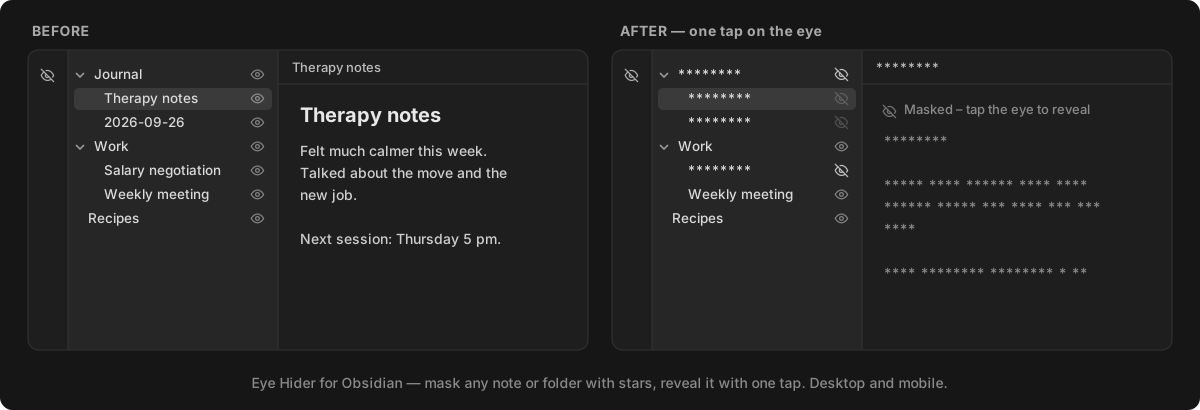
Eye button next to every note and folder to mask its name and content with stars (*). A ribbon eye reveals or masks everything at once.
★ 1 stars↓ 44 downloadsUpdated 15d agoMIT
Eye Hider
An Obsidian plugin that masks notes and folders with stars (********) at the tap of an eye.
Features
- Eye button next to every note and folder in the file explorer. Tap it to mask the item's name; masking a folder masks everything inside it.
- Masked notes show stars instead of text when opened. Word lengths and line breaks are kept, and the tab title and header are starred too. Tap the eye at the top of the note to reveal it.
- Ribbon eye to reveal or re-mask everything at once.
- Search and quick switcher: masked notes are left out (can be turned off in settings).
- Graph view: masked notes show
********as their label in the graph and local graph. - Works on desktop and mobile. The long-press / right-click menu also has Mask with stars / Unmask.
- Masks follow renames and moves.
- Masks sync with your vault: a masked note gets
masked: truein its properties, and a masked folder gets a hidden.maskedfile. Any sync tool that copies your notes (Google Drive, Syncthing, Git, iCloud...) carries the masks to your other devices.
Installation
Manual
- Download
main.js,manifest.jsonandstyles.cssfrom the latest release. - Put them in
<your vault>/.obsidian/plugins/eye-hider/. - In Obsidian: Settings → Community plugins, reload, and enable Eye Hider.
With BRAT
Add this repository in the BRAT plugin.
Limitations
- This is a visual privacy screen, not encryption: files stay in plain text on disk.
- A masked note can't be edited until it is revealed.
- Embeds (
![[note]]) and link text pointing to a masked note are not masked. - Hiding from search, the quick switcher and graph labels uses Obsidian internals and may stop working after an Obsidian update (masking in the explorer and notes is unaffected).
- Folder masks use a hidden
.maskedfile. Sync tools that skip hidden files (such as Obsidian Sync) won't carry folder masks; note masks sync everywhere. - Masks on non-Markdown files (PDF, images) are stored in the plugin settings of each vault.
- Reveal everything is per device.
License
For plugin developers
Search results and similarity scores are powered by semantic analysis of your plugin's README. If your plugin isn't appearing for searches you'd expect, try updating your README to clearly describe your plugin's purpose, features, and use cases.