by markcrobbins
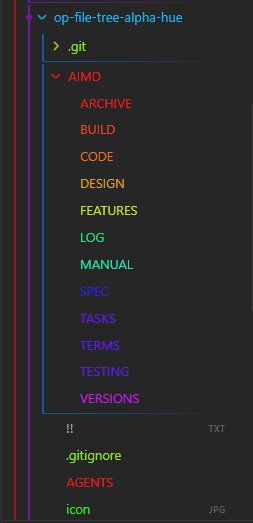
Colors file explorer items according to their first alphabetical character using custom data attributes and muted resting color states.
↓ 106 downloadsUpdated 3mo agoMIT
title: README
File Tree Alpha Hue
Colors file explorer items according to their first alphabetical character using custom data attributes and muted resting color states.


📑 AI Primary Files
- 🔹 AGENTS.md
- 🔹 ARCHIVE.md
- 🔹 BUILD.md
- 🔹 CODE.md
- 🔹 DESIGN.md
- 🔹 FEATURES.md
- 🔹 LOG.md
- 🔹 MANUAL.md
- 🔸 README.md
- 🔹 SPEC.md
- 🔹 TASKS.md
- 🔹 TERMS.md
- 🔹 TESTING.md
- 🔹 VERSIONS.md
🔍 Table of Contents
- [[#🎯 Project Abstract & Core Value]] ^toc-abstract
- [[#🛠️ Technology Stack at a Glance]] ^toc-stack
- [[#🗺️ Project Layout Blueprint]] ^toc-blueprint
- [[#⚡ Quick Start for AI Developers]] ^toc-quickstart
- [[#Go to...]] ^toc-goto
🎯 Project Abstract & Core Value
[[#^toc-abstract|TOC]]
- An efficient Obsidian desktop plugin that scans file explorer navigation items, matches their first alphabetical character via regex, and stamps them with matching data attributes (
data-alpha-char). This builds a dynamic, high-performance UI stylesheet layer that colors folders and markdown files across a 360-degree HSL hue spectrum without incurring DOM layout reflow penalties.
🛠️ Technology Stack at a Glance
[[#^toc-stack|TOC]]
- Target Operating System: Cross-platform (Windows, macOS, Linux desktop targets running Obsidian)
- Core Languages & Runtimes: JavaScript (CommonJS modules format), Node.js runtime environment API, HTML5 DOM API
- Integrations: Obsidian API (
Plugin,debounce, workspace layout event hooks), DOMMutationObserverEngine
🗺️ Project Layout Blueprint
[[#^toc-blueprint|TOC]]
AGENTS.md➔ System prompts and operational boundaries for AI teammates.AIMD/ARCHIVE.md➔ Scriptorium for scrapped ideas and sunset components.AIMD/BUILD.md➔ Compiler pipelines, flags, and packaging steps.AIMD/CODE.md➔ Syntax style guidelines and error-handling mandates.AIMD/DESIGN.md➔ Structural topology, design patterns, and data flows.AIMD/FEATURES.md➔ Capability matrices and functional product roadmap.AIMD/LOG.md➔ Chronological audit trail of development decisions.AIMD/MANUAL.md➔ Installation, user runbooks, and diagnostic workflows.README.md➔ Primary entry point and structural system abstract.AIMD/SPEC.md➔ Technical constraints, parameters, and protocol definitions.AIMD/TASKS.md➔ Dynamic task board and backlog management queue.AIMD/TERMS.md➔ Technical glossary, definitions, and vocabulary indexes.AIMD/TESTING.md➔ Automation suites, edge cases, and QA assertion routines.AIMD/VERSIONS.md➔ Change trackers and version milestone evolution lists.
⚡ Quick Start for AI Developers
[[#^toc-quickstart|TOC]]
1. Verify Environment
node -v && npm -v
2. Compile & Run Tests
npm install && npm run build
🚀 Go to...
[[#^toc-goto|TOC]]
- 🔹 AGENTS.md
- 🔹 ARCHIVE.md
- 🔹 BUILD.md
- 🔹 CODE.md
- 🔹 DESIGN.md
- 🔹 FEATURES.md
- 🔹 LOG.md
- 🔹 MANUAL.md
- 🔸 README.md
- 🔹 SPEC.md
- 🔹 TASKS.md
- 🔹 TERMS.md
- 🔹 TESTING.md
- 🔹 VERSIONS.md
For plugin developers
Search results and similarity scores are powered by semantic analysis of your plugin's README. If your plugin isn't appearing for searches you'd expect, try updating your README to clearly describe your plugin's purpose, features, and use cases.