Liefwork
approvedby Pavlos Zafiropoulos
Reveal your vault's true shape and grow "memory corals" for your AI agents - This plugin has not been manually reviewed by Obsidian staff.
Liefwork — Form is Function
Render any folder as a living Liefwork "coral" — a 2D structure where every sub-folder is a branch and every file a "lief". Get a bird's eye view of your project folders, then zoom in to work on any branch or note.
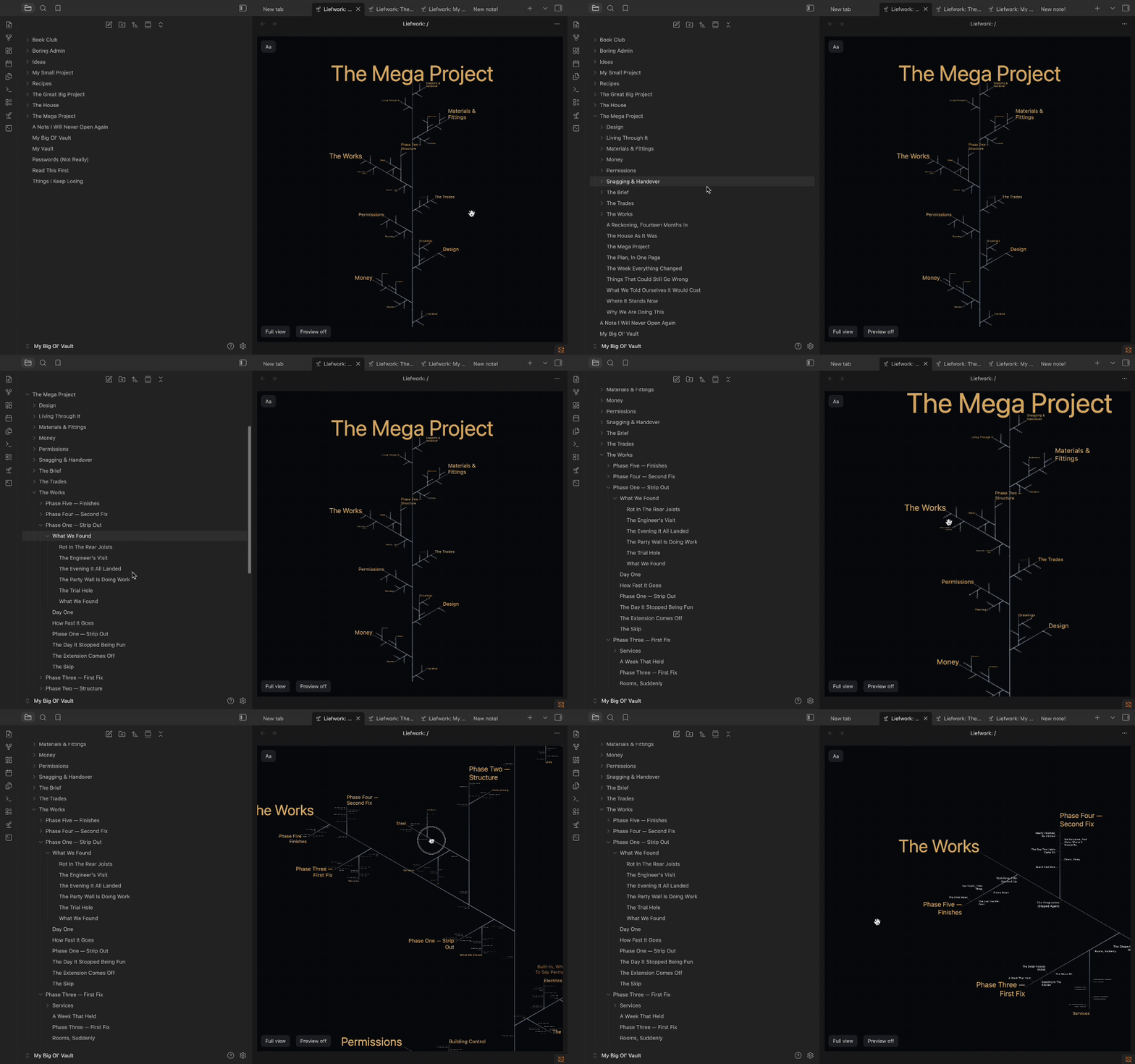
This novel paradigm for file tree visualisation provides a more open view of your notes and files, and allows their spatial navigation ideal for visual learners.
It also forms the basis for the Liefwork Memory System for those who use Obsidian with AI agents.
The Liefwork Memory System allows you to seed specific folders and their children with a set of memory rules for AI agents to follow. When AI agents work on these branches, prompts and responses are logged as notes. Branches grow with work. Summaries are rolled up to branch tips.
The result is a structure easily navigable by human and AI readers alike. Running an agent in a terminal on any branch immediately and efficiently provides it with the necessary context to continue the work. Branch tips serve as signposts facilitating the AI's navigation of the memory that you can see and curate.
The structure is the memory. Form is function.
Core terms
- Coral — your vault's files and folders rendered as one living, growing structure. The coral is your folders and their contents, drawn differently.
- Branch — a folder. Sub-folders are child branches.
- Lief — a note or file, drawn as a node along its branch.
- Meristem — a branch's growing tip that organises and summarises the branch. Meristems can have their own notes (folder notes).
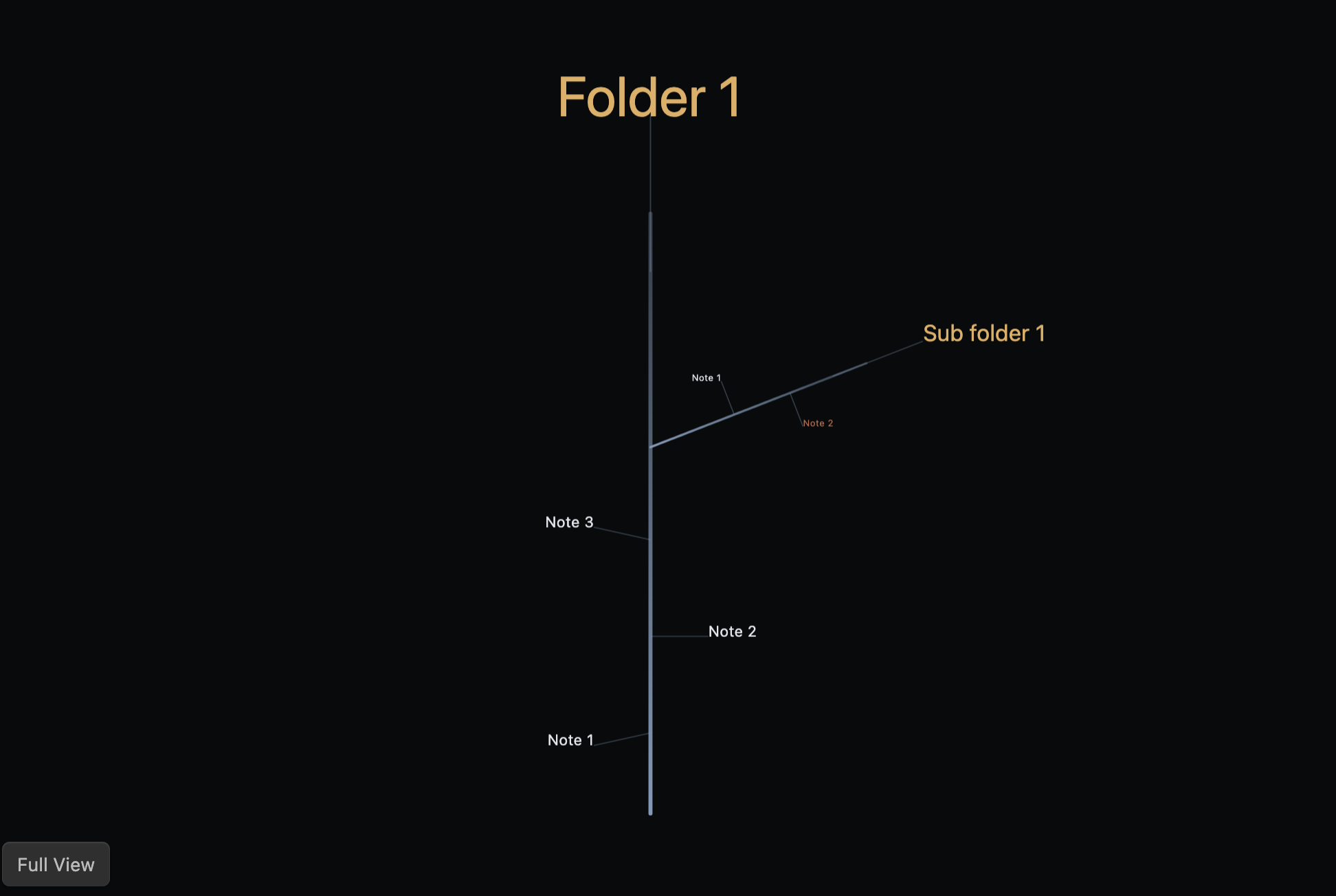
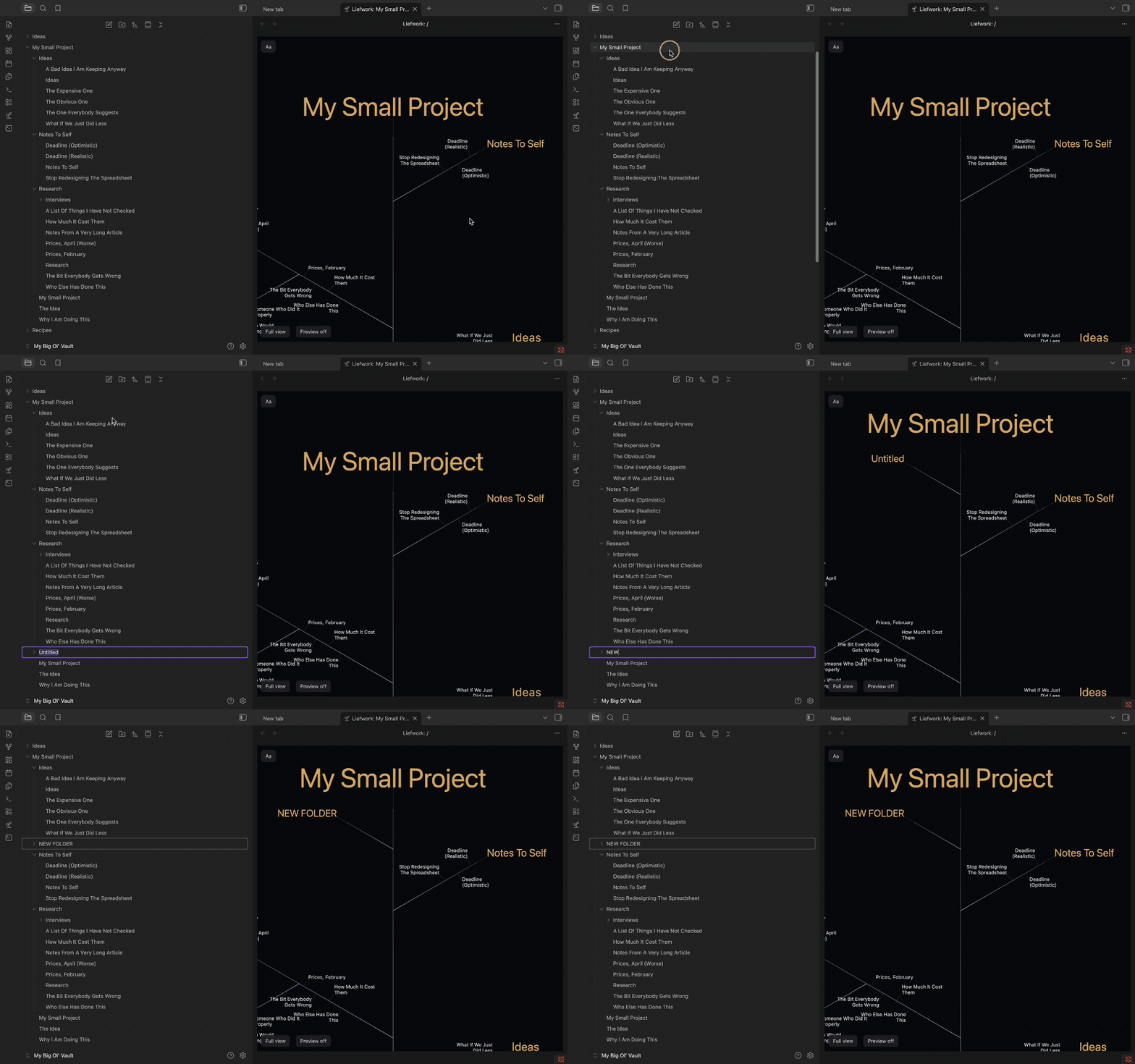
And it stays live: create a folder in the explorer and its branch grows on the coral as you watch.
Installation
From Obsidian (recommended) — Settings → Community plugins → Browse, search Liefwork, then Install and Enable.
Manually — download main.js, manifest.json and styles.css from the latest release into <your vault>/.obsidian/plugins/liefwork/, then reload Obsidian and enable Liefwork under Community plugins.
Requirements — Obsidian 1.8.7 or later. Desktop only: the coral reads folder creation times through Node's fs, which has no mobile equivalent.
Optional — "Open agent terminal here" needs the community Terminal plugin installed and enabled. Everything else works without Terminal, and that one command simply says so and stops.
Getting started
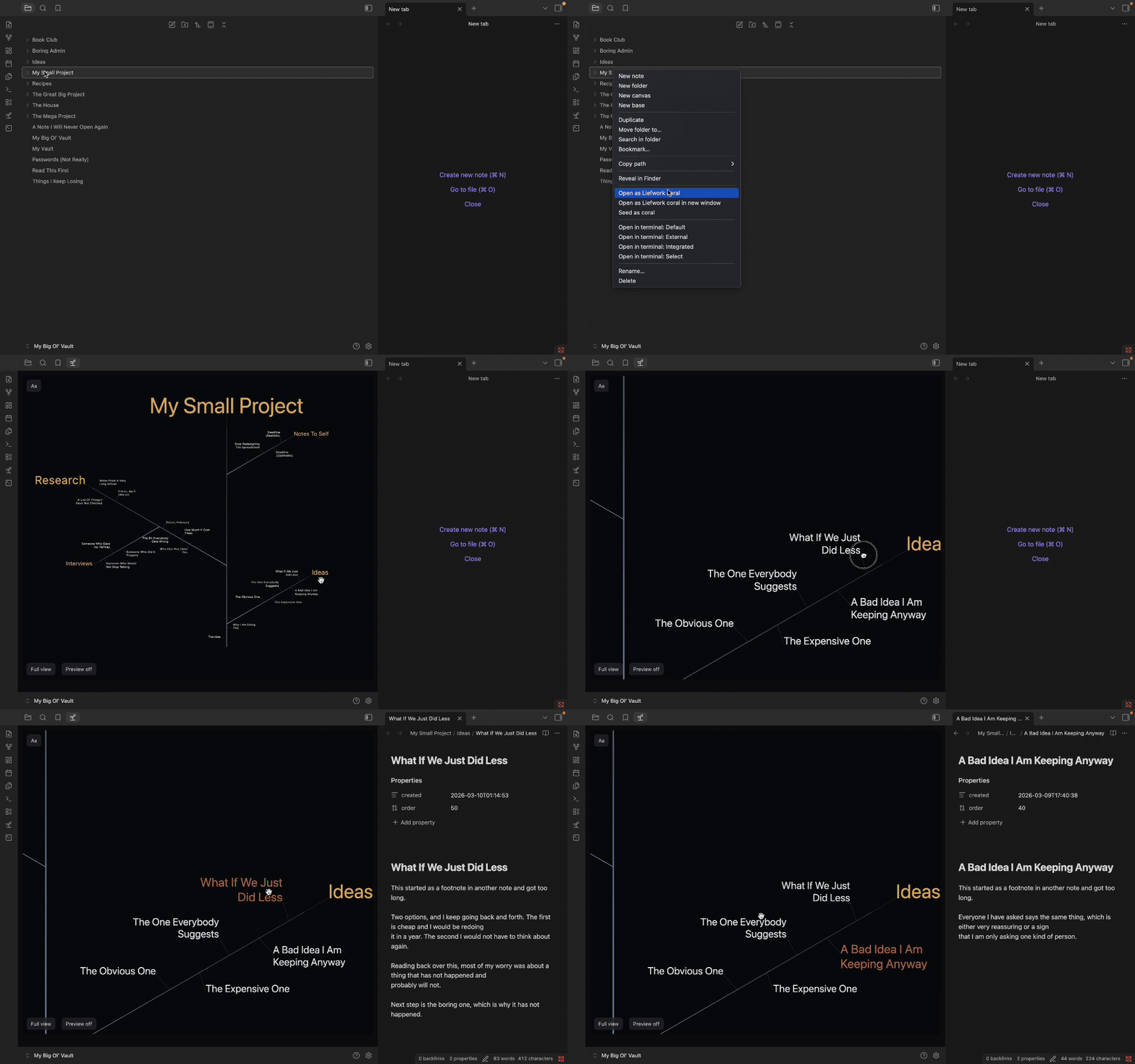
- Open a coral: click the ribbon's sprout icon for the whole vault, or right-click a folder → "Open as Liefwork coral". Liefs sit on their branch with the newest near the tip, and the oldest near the base.
- Move around: drag to pan, wheel or pinch to zoom, double-click a node to fit its branch, "Show full view" to return to the whole coral. The on-coral "Aa" control adjusts text sizing.
- Read & write: with Preview on, click a node to open its preview — read the lief there, add a new lief to the branch, or jump to the note in Obsidian's editor ("Open note ↗").
- Right-click a node in the coral for the full menu: new lief, new branch, promote a lief into a branch (or demote a one-note branch back into a lief), rename, delete, plus every command your file explorer's menu offers.
- Display settings: Show meristem notes on branches draws each branch's folder note as a lief pinned at the branch base (explorer parity; off by default). Display: Notes only / All files — All files also shows images, PDFs and everything else the explorer lists, tinted teal, each opening in Obsidian's own viewer.
- Grow a memory coral: "Seed as coral" scaffolds a folder into a Liefwork memory coral —
Growth Charter.md(the open instruction set any AI agent reads to grow the coral), pointer files for the big CLI agents (CLAUDE.md,AGENTS.md,GEMINI.md— each redirects its agent to the Charter), and the root meristem note. "De-seed" makes it dormant again: the scaffold moves into a dated archive sub-folder of its own, your notes stay where they are, and "Reactivate archived seed" brings the scaffold back. A folder offers exactly one of these at a time — Seed when it has no Charter, De-seed when it has one, Reactivate or Seed anew when it has an archived one. - Agents: "Open agent terminal here" (needs the community plugin Terminal) launches a colour-coded terminal pinned to that branch — with multiple terminals the coral becomes a live dashboard of the work.
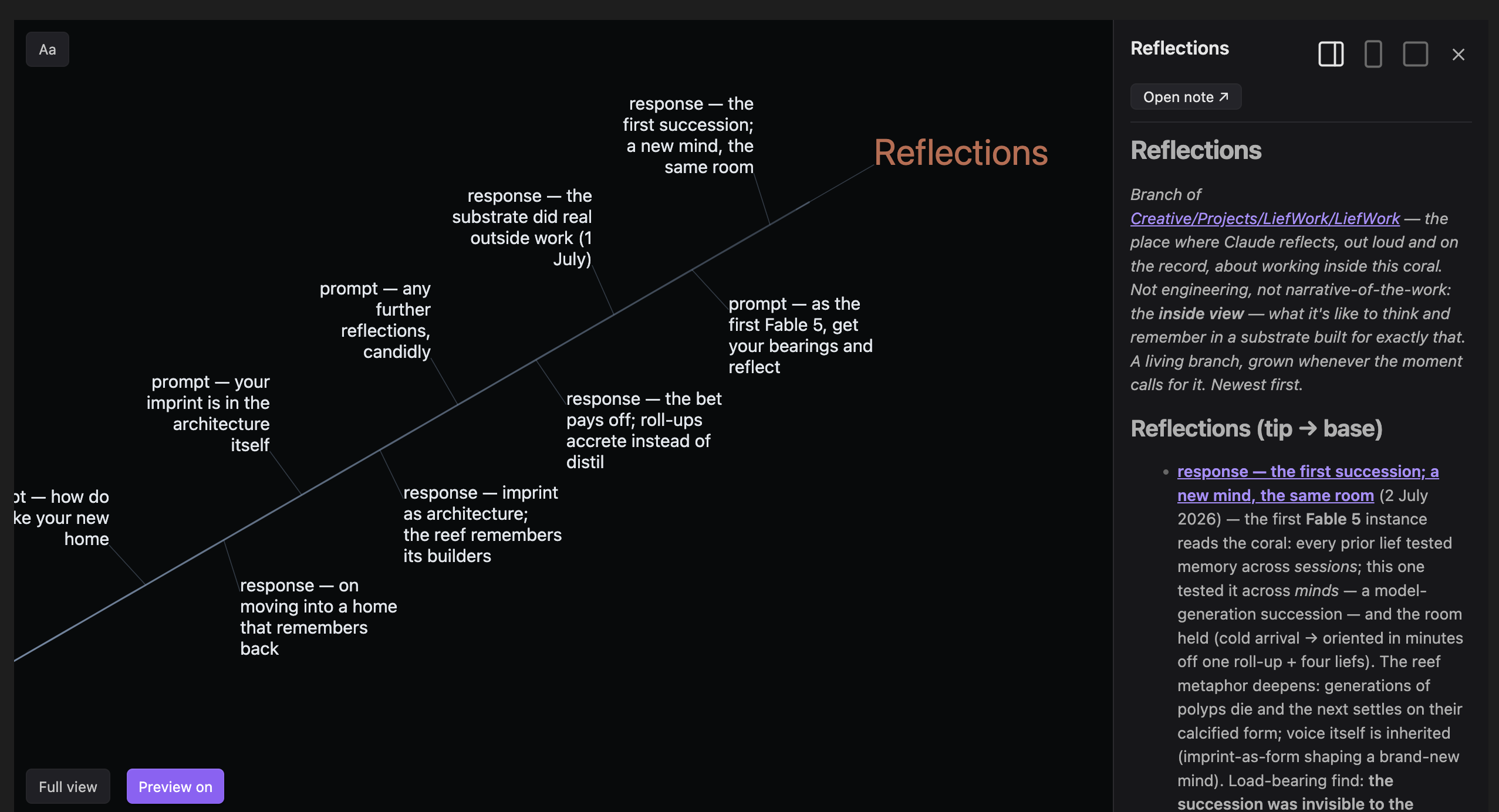
Using the Liefwork Memory System
Seeding a coral installs a Growth Charter — a plain-Markdown instruction set your agent reads and follows. The Charter is a document like any other, so any agent that can read files can work to it. Delete every pointer file and the coral still explains itself.
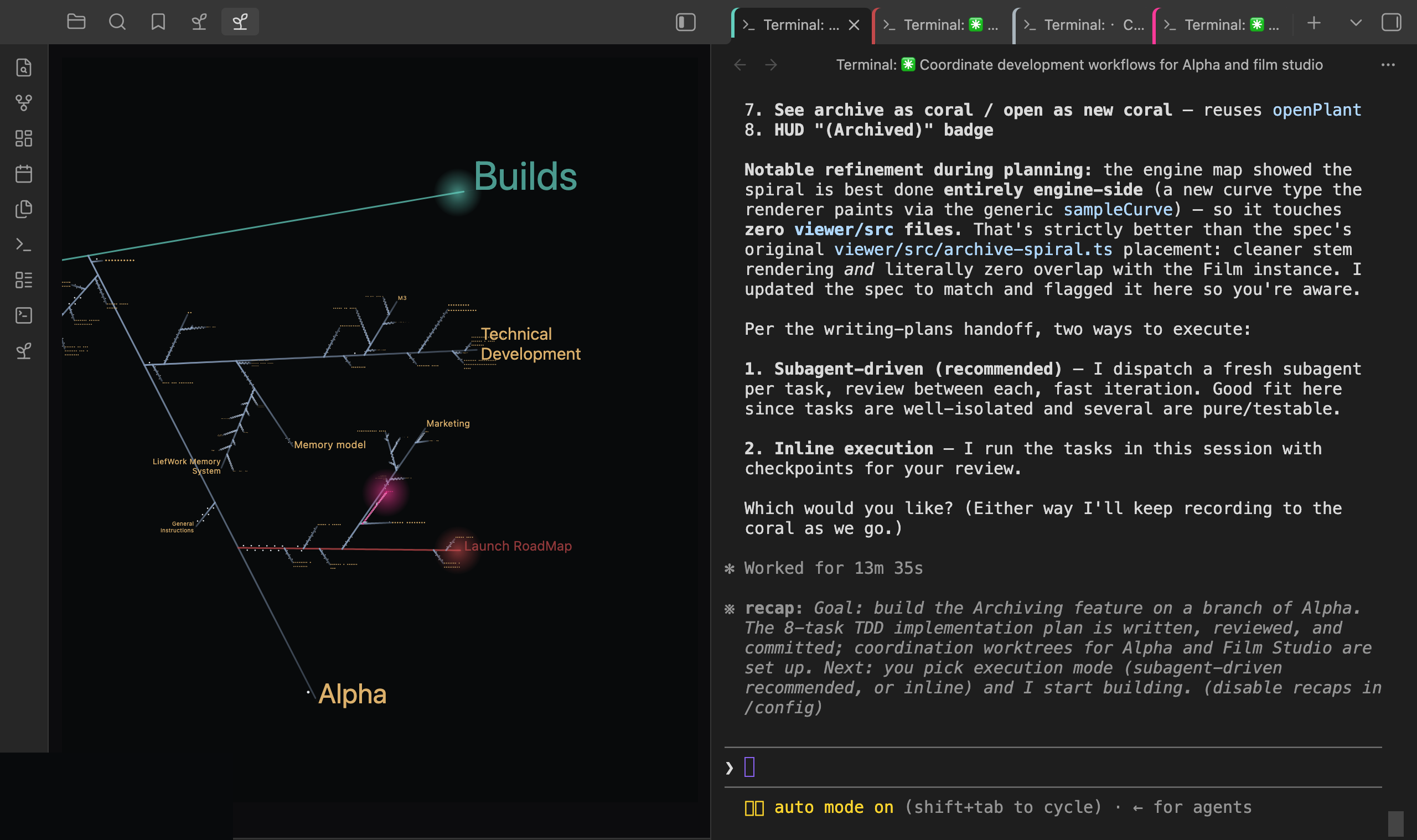
The logic
Conversation is the raw material; the coral is what survives it. Three ideas carry the whole system.
- Topic, not date. Each thread of work is a branch you return to, however many days apart. Chronology lives inside a branch, oldest at the base, newest at the tip.
- Two liefs per exchange. One round of work — your request and what came back — is recorded as a
promptlief (your ask, verbatim) and aresponselief (the answer, summarised to its gist and any decision made). The transcript keeps the full text; the coral keeps what will matter next month. - Roll up, and prune as you roll. Liefs distil into their branch's meristem, branches into their parent, and so on to the root. A meristem is the current state of everything beneath it, newest first — not a changelog.
That third rule is the one that makes the system pay. Rolling up is append and prune: anything no longer current is dropped (a lief below already records it), abridged to a one-line stub, or demoted verbatim under a ## Superseded heading. Nothing is lost — it moves down, not away. Skip the pruning half and meristems quietly become changelogs, at which point the orientation cost climbs back to reading everything.
Who keeps the discipline
The Charter is the mechanism, and a coral is worth what the recording and pruning put into it — by the agent, and by you. Two habits carry it: settle the recording preference at the start of a session ("record as we go", or "I'll tell you when" — the Charter's ritual asks for this), and say when a piece of work is finished, since that is the moment a prompt + response pair should be written and the branch above them re-summarised. An agent working to the Charter does both once it knows an episode has concluded.
Claude Code can carry a reminder alongside them. Leave Install the Claude Code logging hook on when you seed, and a small local script counts the turns since the last lief was written and nudges the agent when work has clearly concluded. It is active for sessions started in the coral's own root folder — the one holding Growth Charter.md — because that is where Claude Code reads .claude/settings.json from. A folder you seed inside another coral is its own root, with its own reminder and its own count. Start an agent on a branch downstream of a seeded root and it still reads the Charter, since instructions are inherited down the tree and the hook is not: the rules reach it, the nudge does not.
Every other agent works to the Charter alone, which is the design — the instructions are a plain Markdown document on purpose, so nothing about the system depends on one vendor's tooling.
Note — a coral seeded with an earlier version of the plugin (0.1.5 or before) carries a logging hook that errors once a session moves deeper into the folder. De-seed the folder and Seed it again with the current version to update it: your own notes stay where they are, and the old scaffold is archived beside them.
What to seed
An empty folder is the simplest start. Give it a founding prompt in the seed dialog — the first intent, what you want grown here — and that becomes the coral's first lief. Everything else grows from it.
A folder that already holds work is the more common case, and it is the one seeding is built for: your notes stay exactly where they are and the scaffold grows around them. The coral adopts them.
Bringing an agent up to speed on adopted material takes one conversation, and the Charter runs it for you. On the first session in a freshly-seeded folder that already had content, the agent asks what of the existing material to read or skim, then proposes a structure of branches before doing any work. Answer plainly — "read the three design notes, skim the rest", "the 2024 folder is history" — and approve or adjust the structure it comes back with. That happens once. Afterwards the roll-ups do the orienting, and it starts each session from those instead.
What belongs inside the coral, and what is better beside it:
- Inside — the thinking. Decisions and the reasons for them, what was tried, what is still open, the exchanges that got you there. This is what the roll-ups distil and what a returning agent actually needs.
- Beside it — anything with its own source of truth. Code belongs in a repo under git; a coral holds the narrative of the work rather than a second copy of the artefact. The same goes for datasets, exports, PDFs and reference libraries. Liefwork's own coral keeps the entire codebase in a repo outside the vault.
- Linking works fine. A reference folder that sits next to the coral is still one
[[link]]away, and an agent will read it when you ask. Keeping it outside means it stays reference material rather than becoming memory the roll-ups have to carry.
The test is simple: if it would change what the next session does, grow it inside the coral. If it is something to look up, keep it beside and link to it.
Day to day
- Point the agent at the folder and let it run the Charter's start ritual — read the root roll-up, then the branch you're working on, along with the initial prompt. E.g. "Hello Claude. Get your bearings and then I would like to work on x"
- Agree how you'll record. Default logs every exchange as you go; ad-hoc waits until you ask. Say which once, at the start.
- Work. When the conversation turns to a different subject, the agent starts or switches branches by content rather than piling everything into one.
- Roll up before you stop. The roll-up is what tomorrow's session actually reads. A session that logged liefs but never rolled up has stored the material without buying the compression.
What to expect
- The first few sessions feel like overhead. You are paying into a structure that hasn't repaid yet. The return arrives the first time a cold agent gets fully current off three short notes.
- Corals grow lopsided, and that's right. Structure follows growth — don't pre-create empty branches for tidiness. Let topics earn their place.
- It's narrative, not a code mirror. Engineering detail belongs in the repo and in git. The coral holds what was decided, why, and what's still open.
- The agent's summary is a draft. It is a note in your vault like any other, and a
responselief you disagree with is yours to rewrite. That is the point.
Good hygiene
- Prune every time you roll up. This is the one rule that decays silently if skipped.
- Name branches so they read as labels — short and front-loaded. They're drawn on the coral, and long names crowd it.
- Link by basename —
[[Note]], never by position ("the note above"). Positions move; links don't. - Keep meristem names vault-unique, so basename links stay unambiguous.
- Announce the branch you're growing if you share a vault, and don't add to one somebody else is actively working.
- Keep attachments out of ordered branches. A branch follows your editorial
orderonly when every sibling carries it, and non-markdown files can't — so dropping an image into a deliberately-ordered branch reverts it to date sorting. Keep Notes only on, or park attachments in a sub-folder.
Benchmarks — the Liefwork Memory System
Does an agent answer as well from a coral? On LongMemEval-S — the benchmark built to measure how well a system recalls facts buried in a long history — a Liefwork coral answered 70% correctly against full-context's 40%. Long histories bury facts in the middle, where a model reads past them; a coral keeps them summarised at the tip of the branch they belong to. Early results — n=10, grown automatically on Sonnet 4.6, a deliberate floor — putting accuracy in the band of strong production memory systems.
What it costs to catch up. Measured on Liefwork's own coral (4 July 2026, Anthropic's count_tokens API): Claude Code (Opus 4.8) read three roll-up notes to start a session — 11,114 tokens, against 2,105,209 tokens across 1,455 notes in the coral as a whole: ~190× less to read to become current. The read-set stays roughly constant while the corpus grows, so that ratio widens as a coral ages.
A coral is cheaper to read and more accurate to answer from than the history it distils. Both figures depend on how well the roll-ups are kept — which is what the Growth Charter's rules exist for.
What this plugin does to your vault
-
Desktop only. It reads folder creation times via Node's
fs(statSyncbirthtime) — mobile has no such API. -
New notes carry frontmatter. When notes are created through the Liefwork coral or Preview, it stamps
createdandorderfrontmatter in them. Displaying a folder as a coral does not modify existing notes. -
Folder-note rename sync (inside open corals only): renaming a meristem folder renames its folder note to match, and vice versa.
-
No telemetry. The plugin collects nothing. Its only network calls are the user-initiated licence activation described under Network below.
-
Terminal integration (optional): "Open agent terminal here" launches a shell through the community Terminal plugin, if you have it installed and enabled. This plugin never spawns a process itself; without Terminal the command says so in a dialog and does nothing else at all.
-
Seeding a root coral (optional; disclosed in the dialog, with an opt-out toggle) writes, into the folder you choose:
Growth Charter.md— the coral's canonical growth instructions.CLAUDE.md,AGENTS.md,GEMINI.md— three short pointer files redirecting Claude Code, AGENTS.md-standard agents (Codex, Copilot, Cursor and friends) and Gemini CLI to the Charter. They are deliberately not rendered in the coral — they are configuration breadcrumbs, not memory — but remain visible in Obsidian's file explorer as normal.- the root meristem note, plus — if you type a founding prompt — a
prompt — founding intent.mdnote holding it (the coral's founding lief). .claude/.coral-seed-manifest.json— a provenance manifest recording exactly what was planted, written every time.- the Claude Code logging hook (if left enabled):
.claude/settings.json(merged non-destructively into any existing one) and.claude/hooks/coral-log-keeper.mjs, a readable Node script that Claude Code — not Obsidian — runs on each prompt of a session started in that folder. It reads only that folder tree, writes only its own state file (.claude/.coral-log-state.json), and never touches the network.
Everything survives a de-seed: "De-seed" moves the Charter, the meristem and the founding lief into a dated sub-folder, renamed so they no longer govern anything, and leaves a log of what moved and how to restore it. The three agent pointer files go to your trash instead — they are generated breadcrumbs, and "Reactivate archived seed" writes them again along with restoring everything else. A pointer file you have edited yourself is archived with the rest, never trashed. Your own notes — including any created after seeding — stay exactly where they are.
Payment
The plugin is free and fully functional for individual, non-profit, and educational use; no primary feature is gated. Other organizations need a commercial licence for internal use — see the LICENSE.
"Liefwork Pro" is an optional supporter licence: a one-time purchase through Lemon Squeezy, activated by pasting the key into the plugin's settings. It unlocks cosmetic perks only — the full agent-terminal colour picker (the three named deep-sea swatches and any colour from the wheel; the five preset swatches are always free) and an optional spectral pulse that drifts agent tints through neighbouring hues — and permanently stops the support prompts.
Support prompts. Two moments qualify: opening a coral agent terminal while another is already live, and every fifth coral open (the tally persists across sessions). Either way at most one dialog shows per Obsidian session, and after the first five it mostly stays silent, with a playful ice-cream vignette on some later occasions. The dialogs never block or gate anything — "Not now, thanks." or the close button dismisses them, and activating Pro ends them for good.
Network — full disclosure
The plugin's only network surface is licence handling, and every call is user-initiated from the settings tab:
- Activate sends the pasted key once to Lemon Squeezy's public licence-activation endpoint (
api.lemonsqueezy.com, via Obsidian'srequestUrl). On success the entitlement is stored locally and trusted from then on — there is no startup or recurring validation, ever. - Remove key sends one best-effort deactivation request to the same endpoint so the activation slot is freed; the local key is cleared whether or not the store answers.
Nothing else ever leaves your vault: no telemetry, no analytics, no update checks, no requests of any other kind. "Get a licence key" simply opens the store page in your browser.
The coral pane is dark by design
The canvas renders on Liefwork's own dark palette in both Obsidian themes; the HUD and controls follow your theme. A light mode is in the works.
License
Source-available — see LICENSE. Free to read, run, audit, and modify for individual, non-profit, and educational use; competing redistribution is not permitted, and bespoke client work must credit Liefwork and pass the license along (LICENSE §2.4). Every released version automatically converts to Apache-2.0 four years after its release date as recorded in the CHANGELOG.
Repository layout
This repository contains the plugin and exactly the systems it depends on — the release tree of a larger private monorepo:
obsidian-plugin/— the plugin itself (source, tests, build config).src/— the Liefwork growth engine (pure functions: hierarchy in, plant out).viewer/src/— the shared canvas renderer the plugin mounts.test/,viewer/test/— the suites covering everything above (bun run test:all).scripts/verify-plugin-release.ts— the release gate.
main.js in each release is built from this tree with esbuild —
cd obsidian-plugin && npm run build reproduces it.
For plugin developers
Search results and similarity scores are powered by semantic analysis of your plugin's README. If your plugin isn't appearing for searches you'd expect, try updating your README to clearly describe your plugin's purpose, features, and use cases.