Fingertip Translation
approvedby amos
Translate selected text into your language. Supports Bing Dictionary, Youdao, and MyMemory with built-in pronunciation. - This plugin has not been manually reviewed by Obsidian staff.
★ 5 stars↓ 1,759 downloadsUpdated 1mo ago0BSD
Fingertip Translation
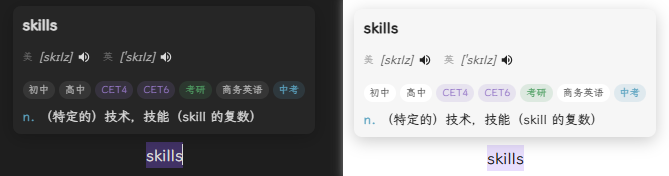
A simple and efficient text translation plugin for Obsidian that supports multiple translation services, trigger modes, and automatic pronunciation.
Features
- Selection Translation - Hold Ctrl and select text to translate, or use direct selection
- Multiple Translation Services - Supports Bing Dictionary, Youdao (automatic Plus/Webpage switching), MyMemory
- Dictionary Format - Bing/Youdao display part of speech and exam categories (CET-4, CET-6, etc.)
- Auto Pronunciation - Automatically plays pronunciation after successful translation (toggleable)
- Multiple Accents - Supports US English and UK English
- Lightweight - No API Key required, works out of the box
- Optional Weave integration - When the Weave memory plugin is enabled, the popover shows 加入复习 to save the looked-up word as a vocabulary card (no audio attachments). If Weave is not installed, the UI is unchanged.
- Official lookup API - Other plugins can call
getOfficialAPI().lookup(term)for dictionary results without opening the popover (used by Weave study UI to expand::fingertip::word::markers).
Installation
Method 1: Development Setup
git clone <repo-url>
cd obsidian-fingertip-translation
npm install
npm run dev
Method 2: Manual Installation
- Download or clone this repository
- Run
npm run buildto compile - Copy
main.js,styles.css, andmanifest.jsonto your vault plugin folder:VaultFolder/.obsidian/plugins/fingertip-translation/ - Enable the plugin in Obsidian settings
Usage
- Select the text you want to translate in a note
- A popover will display the translation result (including phonetic symbols, part of speech, definitions)
- Click the speaker button to manually play pronunciation
- With "Auto Pronunciation" enabled, pronunciation plays automatically after successful translation
- Drag the popover to adjust its position
- Press ESC or click outside to close the popover
Settings
| Option | Description | Default |
|---|---|---|
| Translation Service | Bing Dictionary / Youdao / MyMemory | Youdao |
| Trigger Mode | Ctrl+Select / Direct Select | Ctrl+Select |
| Pronunciation Source | Youdao Audio / Browser TTS | Youdao Audio |
| Auto Pronunciation | Auto play after translation | Off |
| Pronunciation Accent | US English / UK English | US English |
| Show Phonetic | Display phonetic symbols | On |
| Phonetic Mode | Single accent / Both US and UK | Both |
| Show Category | Display CET-4, CET-6, etc. | On |
Tech Stack
- Language: TypeScript
- Bundler: esbuild
- API: Obsidian
requestUrl()(bypasses CORS)
Project Structure
src/
├── main.ts                       # Plugin main entry
├── settings.ts                   # Settings interface
├── tts.ts                        # Pronunciation (Web Speech API)
├── translator-mymemory.ts        # MyMemory Translation API
├── translator-bing.ts            # Bing Dictionary
└── translator-youdao-integrated.ts # Youdao Dictionary (Integrated Plus + Webpage)

styles.css                        # Popover styles
manifest.json                     # Plugin manifest
Translation Services
| Service | Free Quota | API Key | Dictionary Format | Notes |
|---|---|---|---|---|
| Bing Dictionary | Unlimited | Not needed | Part of speech | Recommended |
| Youdao Dictionary | Unlimited | Not needed | Collins/Exam/Category | Auto fallback |
| MyMemory | 1000/day | Not needed | None | - |
Youdao Features:
- Prefers Plus API for richer data
- Auto switches to webpage version when Plus API returns no match
- Displays exam category tags (CET-4, CET-6, Gaokao, IELTS, TOEFL, etc.)
- Shows US/UK accent labels for phonetics
Developer Guide
# Install dependencies
npm install

# Development mode (watch for changes and auto-compile)
npm run dev

# Production build
npm run build
License
BSD-0
References
For plugin developers
Search results and similarity scores are powered by semantic analysis of your plugin's README. If your plugin isn't appearing for searches you'd expect, try updating your README to clearly describe your plugin's purpose, features, and use cases.