by cyanskyfrog
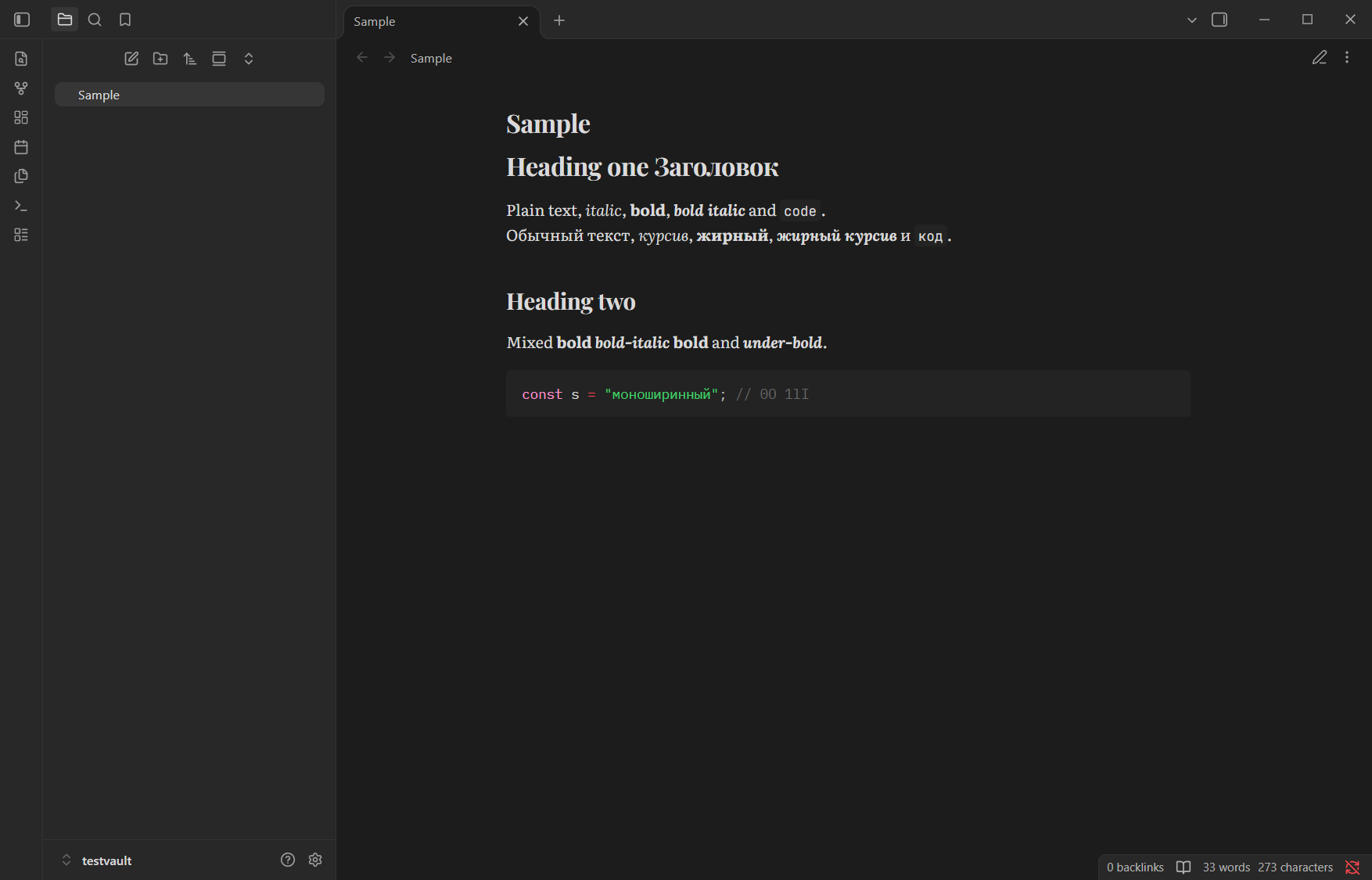
Pick Google Fonts or your own font files and override fonts per area (text, interface, monospace) and per style (bold, italic, headings).
Font Tailor
Change the fonts Obsidian uses, either broadly or one style at a time. Pick from the free Google Fonts catalog or use your own font files.
What it does
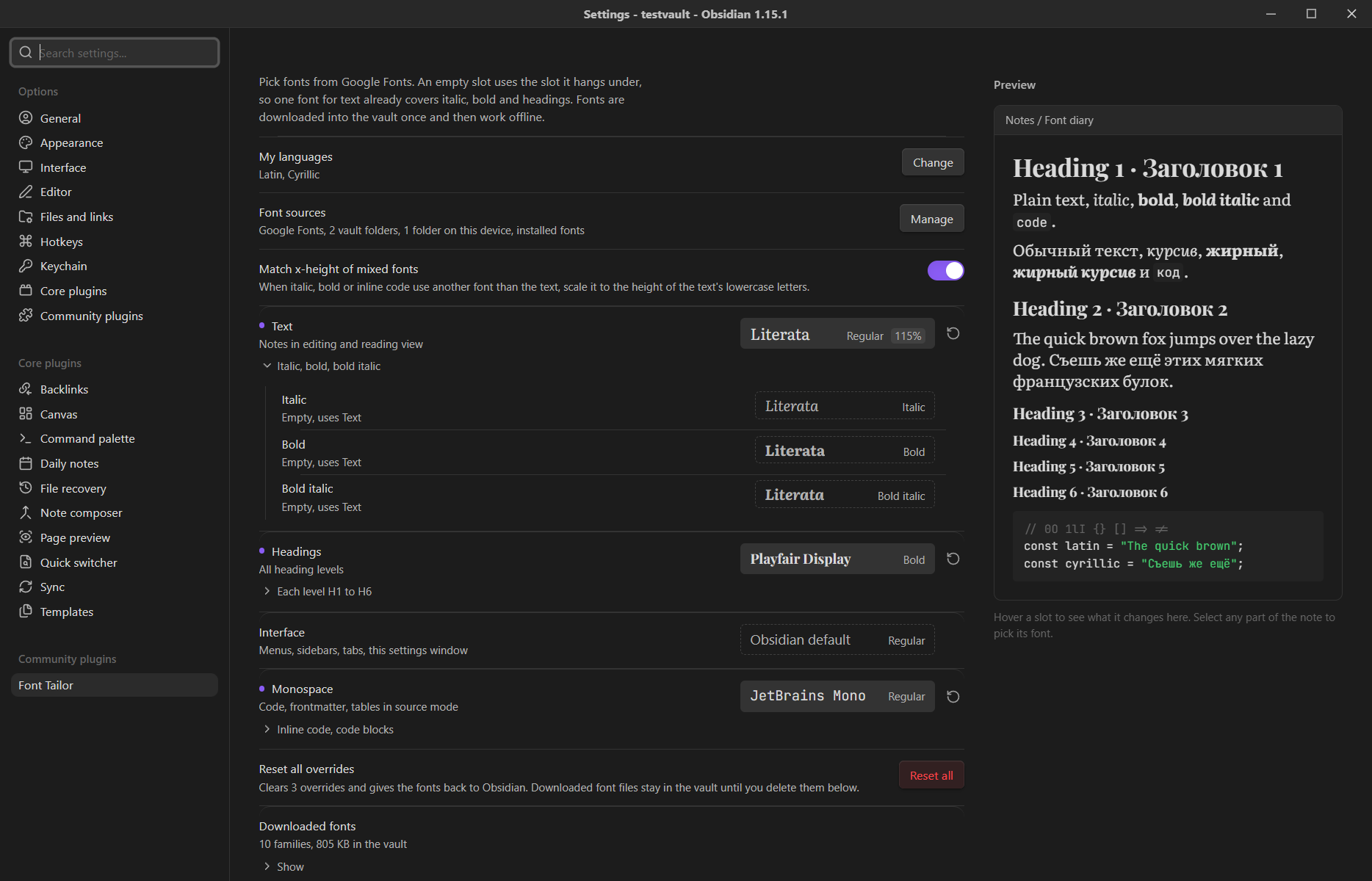
- Broad overrides. Set one font for note text, one for the interface (menus, sidebars, tabs, settings) and one for monospace (code, frontmatter, tables in source mode).
- Per-style overrides. Give italic, bold, bold italic, each heading level H1 to H6, inline code and code blocks their own family, weight and italic.
- Fallback chain. An empty slot uses the slot it hangs under, so one font for text already covers italic, bold and headings. Bold italic uses Bold if Bold is set, otherwise Italic, otherwise Text. Text, Interface and Monospace use Obsidian's own font when empty.
- Live preview. A sample note next to the slots shows every change. Hover a slot to see what it affects, or select part of the note to pick its font.
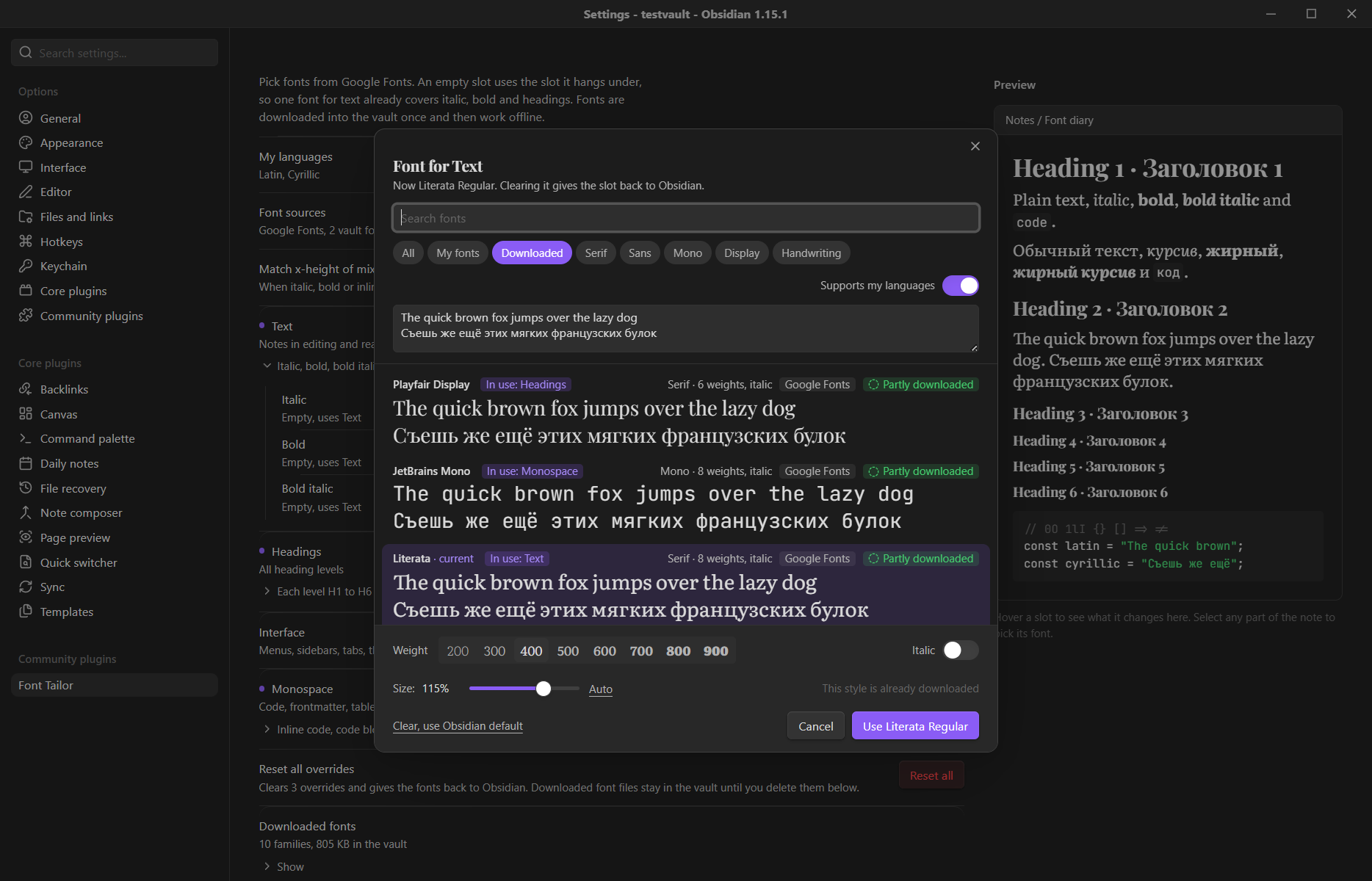
- Google Fonts picker. Search and filter the catalog (serif, sans, mono, display, handwriting), preview each font in your own languages, pick a weight and italic, and see the download size before you apply it. Fonts your slots use come first in every list, labeled with the slots ("In use: Text, Italic"). The Downloaded filter lists the Google fonts already in the vault.
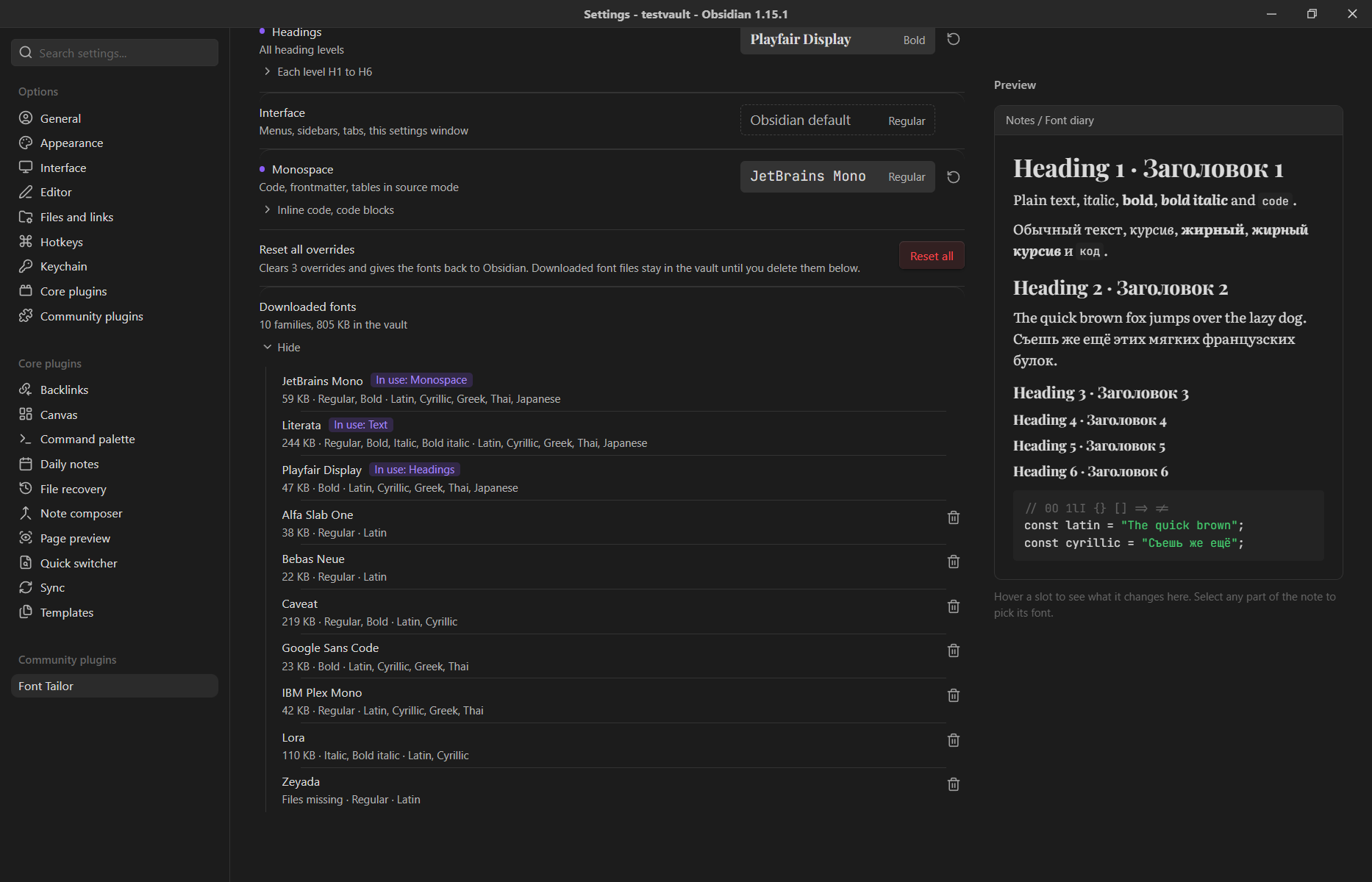
- Downloaded fonts. A collapsed section at the bottom of the settings lists every downloaded Google family: size on disk, the styles and scripts downloaded, and which slots use it. Families no slot uses can be deleted, with Undo.
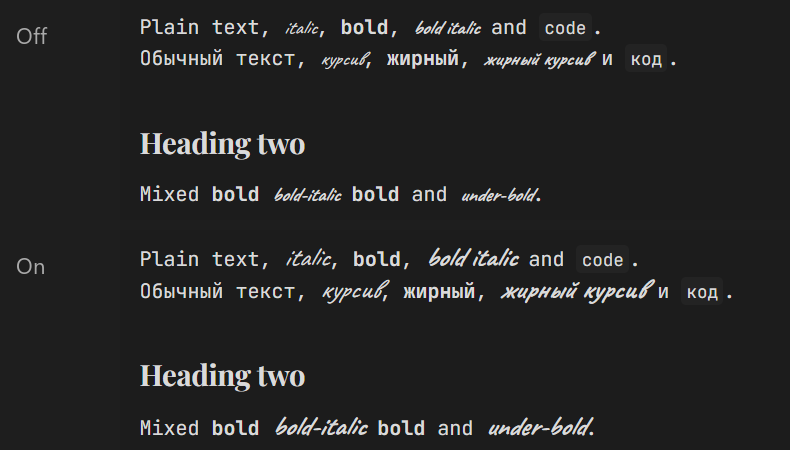
- Matching x-height. When italic, bold, bold italic or inline code use another font than the text, the plugin scales that font so its lowercase letters are as tall as the text's. A handwriting italic next to a monospace text no longer looks tiny. Turn it off with Match x-height of mixed fonts.
- Size per slot. The picker's Size slider (80% to 130%) overrides the automatic size for one slot; Auto returns it to x-height matching. Slots that take their font from it take its size too, unless they set their own. A slot with a manual size shows it next to its style, for example 115%, and its reset clears the size with the font.
- Your languages. Tell the plugin which scripts you write in (Latin, Cyrillic, Greek, CJK, Thai and others). The picker shows a sample line for each, can hide fonts that miss one, and a slot warns when its font lacks a script.
- Your own fonts. Use TTF, OTF, WOFF and WOFF2 files from vault folders, import font files into the vault, and on desktop use folders outside the vault and the fonts installed on your computer.
How to use
- Open Settings → Font Tailor.
- Select Change next to My languages if the defaults (Latin plus the scripts of Obsidian's language and your system languages) are not what you write in.
- Select the font box of a slot (for example Text) to open the picker, choose a font, weight and italic, then select Use. To make the slot larger or smaller, move Size; the notes and the preview follow while you drag.
- To return a slot to its parent, select the reset icon next to it. Reset all clears every override.
Removing an override or disabling the plugin gives the fonts back to Obsidian.
Font sources
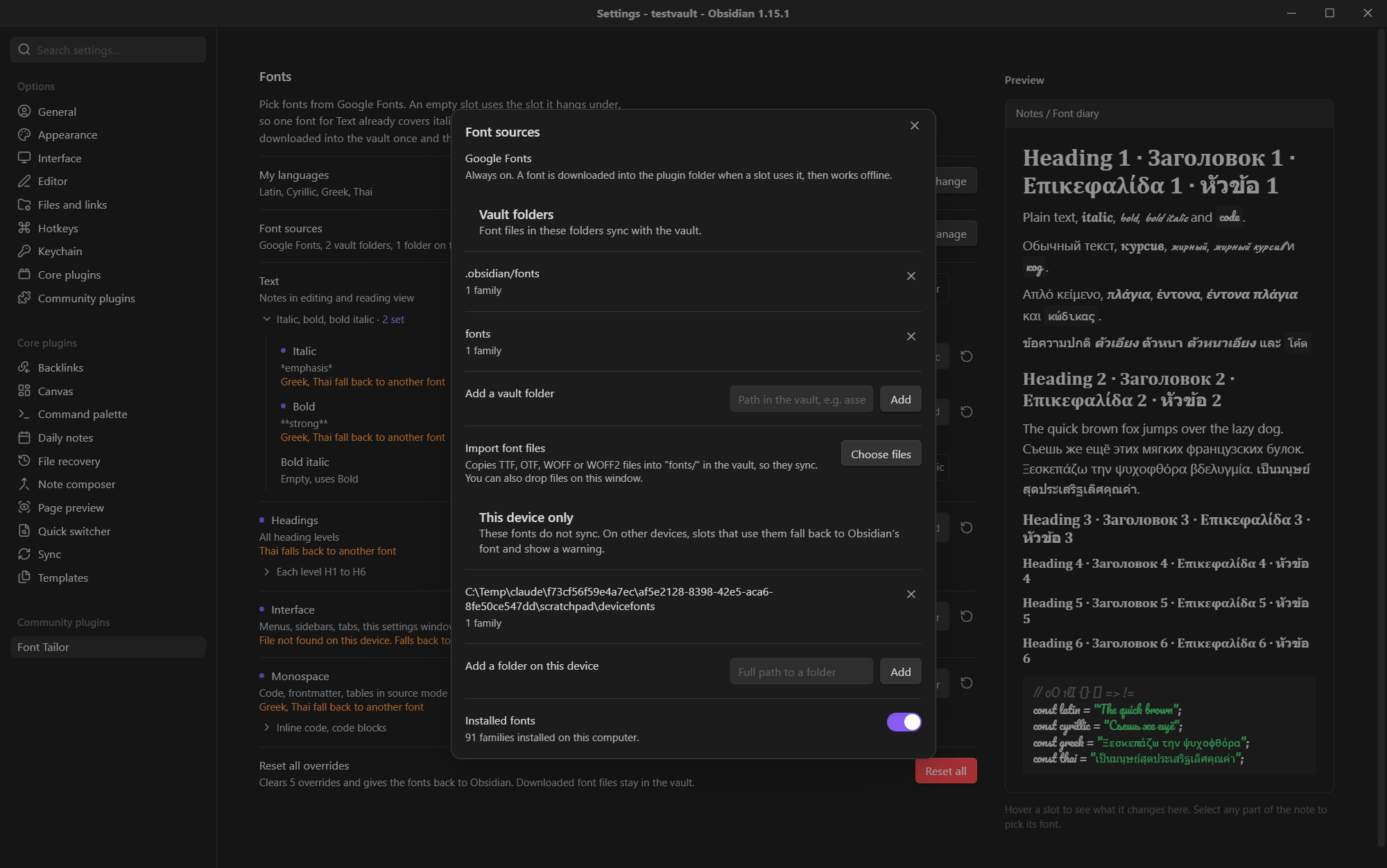
All sources share the same picker (filter My fonts), slots and fallback chain. Open them with Settings → Font Tailor → Font sources → Manage.
- Google Fonts. Always on. A font is downloaded when a slot uses it, then works offline.
- Vault folders. By default
<config folder>/fonts(usually.obsidian/fonts) andfonts/, plus any folders you add. These sync with the vault and work on mobile. - Import font files. Choose or drop TTF, OTF, WOFF or WOFF2 files. They are copied into
fonts/in the vault, so they sync. - Folders on this device (desktop only). Folders outside the vault.
- Installed fonts (desktop only). The fonts installed on the computer.
The plugin reads family, weight, italic and supported scripts from the font's name, OS/2, post and cmap tables (TTF, OTF, TTC, WOFF). Obsidian has no Brotli decoder for WOFF2 tables, so for WOFF2 files the family, weight and italic come from the file name (for example Inter-SemiBoldItalic.woff2) and the scripts are measured in the browser.
Desktop only features
The plugin works on mobile, except for two font sources that need file system access only the desktop app has:
- Folders on this device read font files from folders outside the vault that you add yourself.
- Installed fonts lists the fonts installed on the computer, through the Local Font Access API or, when it is not available, by reading the operating system's font folders (for example
C:\Windows\Fontsand your user font folder on Windows,/Library/Fontsand~/Library/Fontson macOS,/usr/share/fontsand~/.local/share/fontson Linux).
These two sources are the only places the plugin touches files outside the vault. There it lists the folders you added (and the operating system's font folders) and reads font files. It never writes, moves or deletes anything outside the vault. Fonts from them do not sync. On another device, a slot that uses one falls back to Obsidian's font and says why.
Network use
Font Tailor contacts Google Fonts only, and only for the Google Fonts features:
https://fonts.google.com/metadata/fonts: the list of Google Fonts. It is downloaded when you first open the font picker and cached in the plugin folder for 30 days.https://fonts.googleapis.com/css2andhttps://fonts.gstatic.com: font files. While the picker is open, it loads the fonts you browse for the previews and asks for their file sizes. When you apply a font, the plugin downloads the weights and styles your slots use, in the subsets of your languages, and stores them in the vault.
The requests contain only font family names, weights, styles and subsets. Nothing about your vault or notes is sent. There is no telemetry, no account and no API key. Fonts from vault folders, imported files, device folders and installed fonts never use the network. Once a font is downloaded, it works offline.
Files written
<config folder>/plugins/font-tailor/fonts/: downloaded Google Fonts files.<config folder>/plugins/font-tailor/catalog.json: the cached Google Fonts list.<config folder>/plugins/font-tailor/data.json: settings.fonts/in the vault root: font files you import.
<config folder> is usually .obsidian. Downloaded and imported files stay in the vault after you remove an override or disable the plugin. Delete downloaded fonts no slot uses in Settings → Font Tailor → Downloaded fonts; delete imported files by hand.
Manual install
Copy main.js, styles.css and manifest.json from the latest release to <Vault>/.obsidian/plugins/font-tailor/, then enable Font Tailor in Settings → Community plugins.
Development
Needs Node.js 18 or newer (tests need 22.6 or newer).
npm installinstalls dependencies.npm run devrebuildsmain.jsfromsrc/main.tson every change.npm run buildtype-checks and makes a production build.npm run lintruns ESLint with the Obsidian rules.npm testchecks the fallback chain, the font file parser, the "in use" and "downloaded" logic, the size maths, size inheritance and loading settings from 1.0 (test/).
Source map: slots.ts (slot tree, fallback chain, fonts in use, sizes and x-height matching), scripts.ts (writing systems and samples), catalog.ts (font list), fonts.ts (downloads and font faces), fontfile.ts (font table parser), sources.ts and sourcesModal.ts (local font sources), apply.ts (body classes and CSS variables; the selectors are in styles.css), settings.ts, downloads.ts (downloaded fonts section), picker.ts, note.ts (preview).
Releasing
Set minAppVersion in manifest.json if needed, then run npm version patch (or minor, major). It bumps the version in package.json and manifest.json and adds the entry to versions.json. Pushing a tag runs .github/workflows/release.yml, which builds and creates a draft GitHub release with main.js, manifest.json and styles.css.
License
For plugin developers
Search results and similarity scores are powered by semantic analysis of your plugin's README. If your plugin isn't appearing for searches you'd expect, try updating your README to clearly describe your plugin's purpose, features, and use cases.