4D Eisenhower Matrix
approvedby Jaroslav Krčál
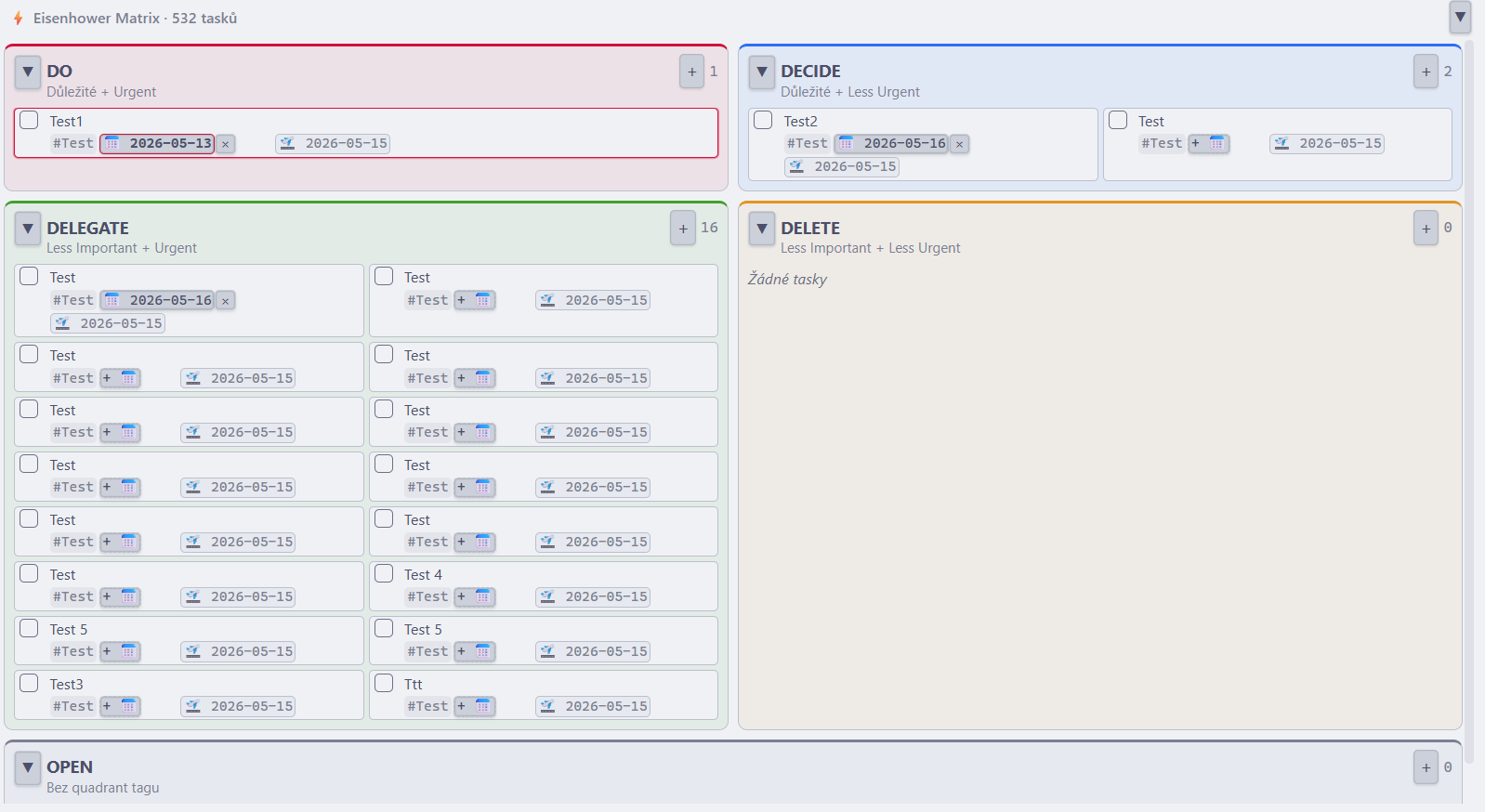
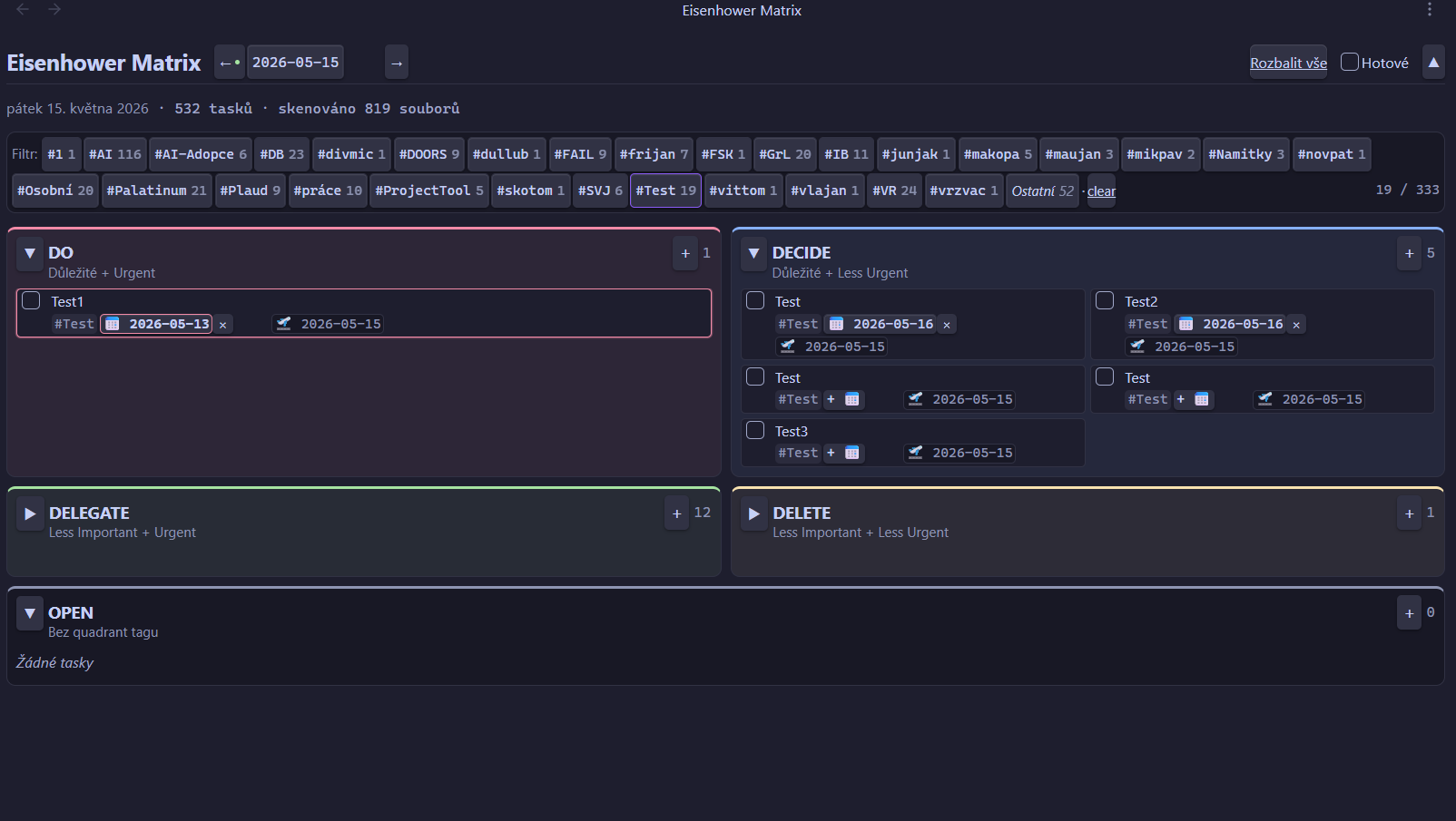
Visualize tasks across your vault in a 5-quadrant Eisenhower matrix (DO / DECIDE / DELEGATE / DELETE / OPEN) + Kanban view. Reads and writes standard task — tags, due/start/done dates, and priority. - This plugin has not been manually reviewed by Obsidian staff.
English · Čeština
4D Eisenhower Matrix — Obsidian plugin
Visualize tasks across your entire vault in a 5-quadrant Eisenhower matrix (DO / DECIDE / DELEGATE / DELETE / OPEN) + Kanban view. Reads and writes Obsidian Tasks syntax — #tags, 📅 due, 🛫 start, ✅ done, priority.
A morning dashboard for deciding what to do now: open it, see tasks split by priority, check off the done ones, add new ones. Markdown files stay the source of truth — the plugin is just a visual layer on top.
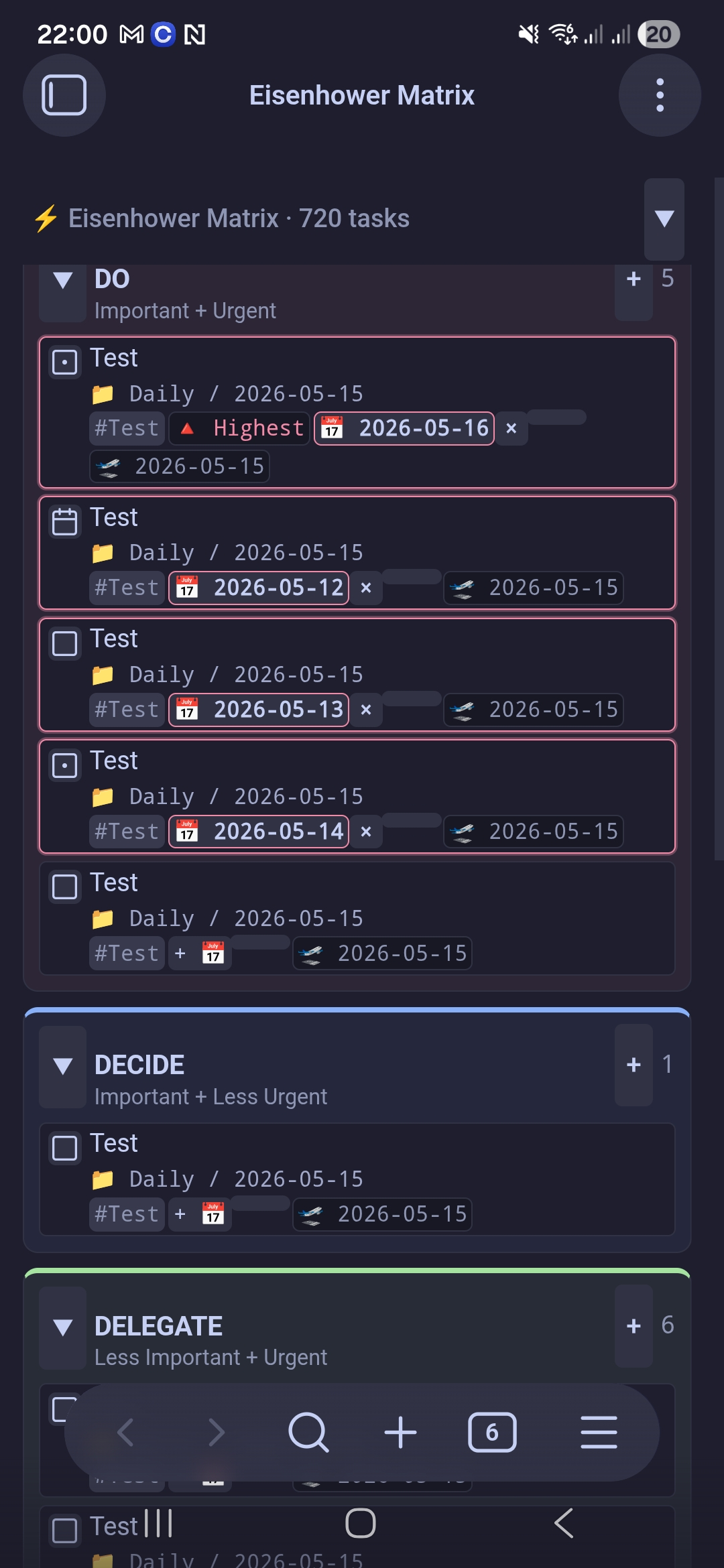
Features
| Feature | What it does |
|---|---|
| 5-quadrant matrix | DO / DECIDE / DELEGATE / DELETE plus a catch-all OPEN. The quadrant is the first #tag after the checkbox (#DO, #DECIDE, #DELEGATE, #DELETE); anything else lands in OPEN. |
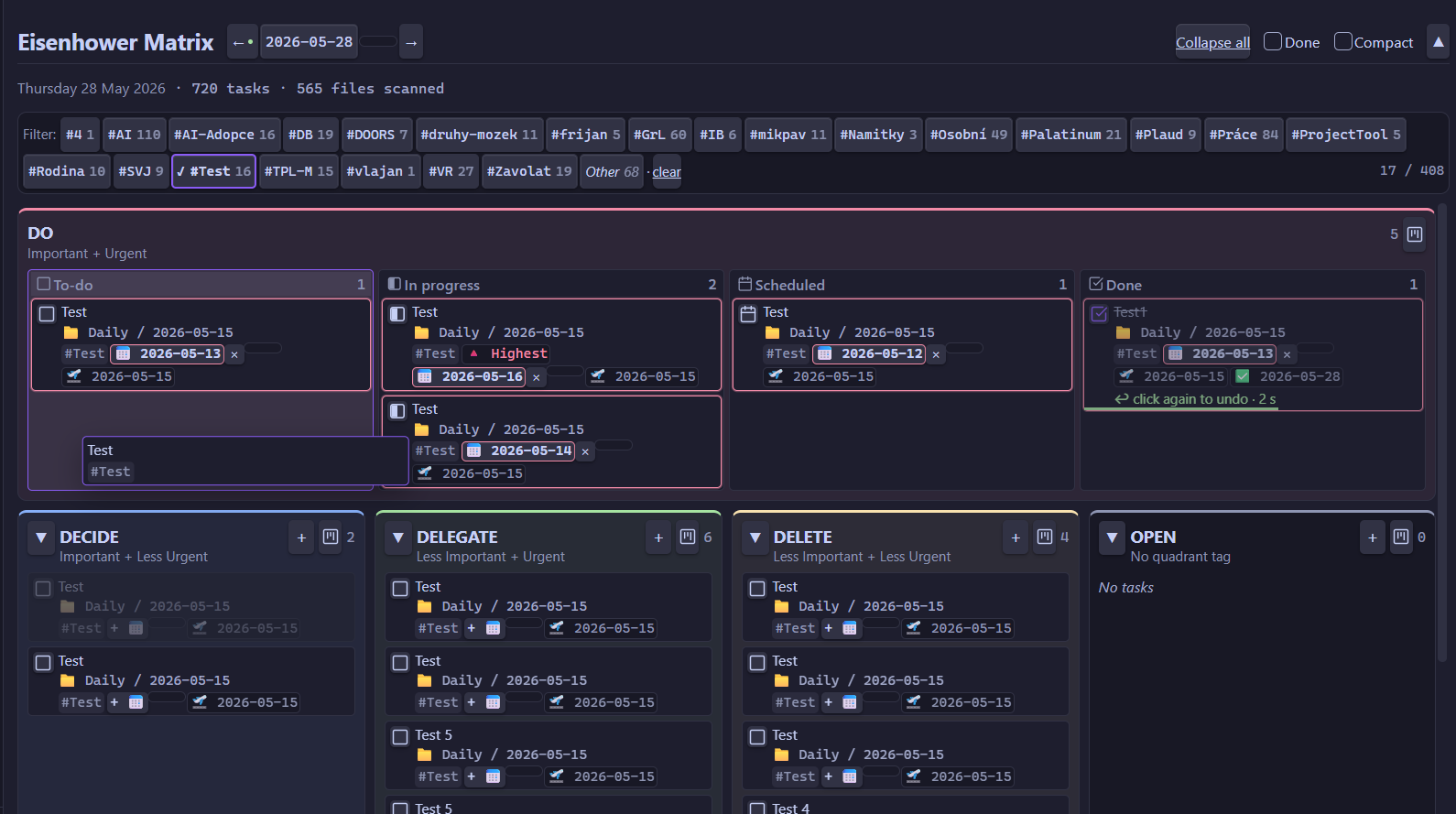
| Kanban view | Expand any quadrant to full width with To-do · In progress · Scheduled · Done status columns. On desktop drag cards between columns to change status, onto another quadrant to move them, or add a task straight into a column. On mobile/tablet the board scrolls horizontally and you change status via the card menu (Mark as…). |
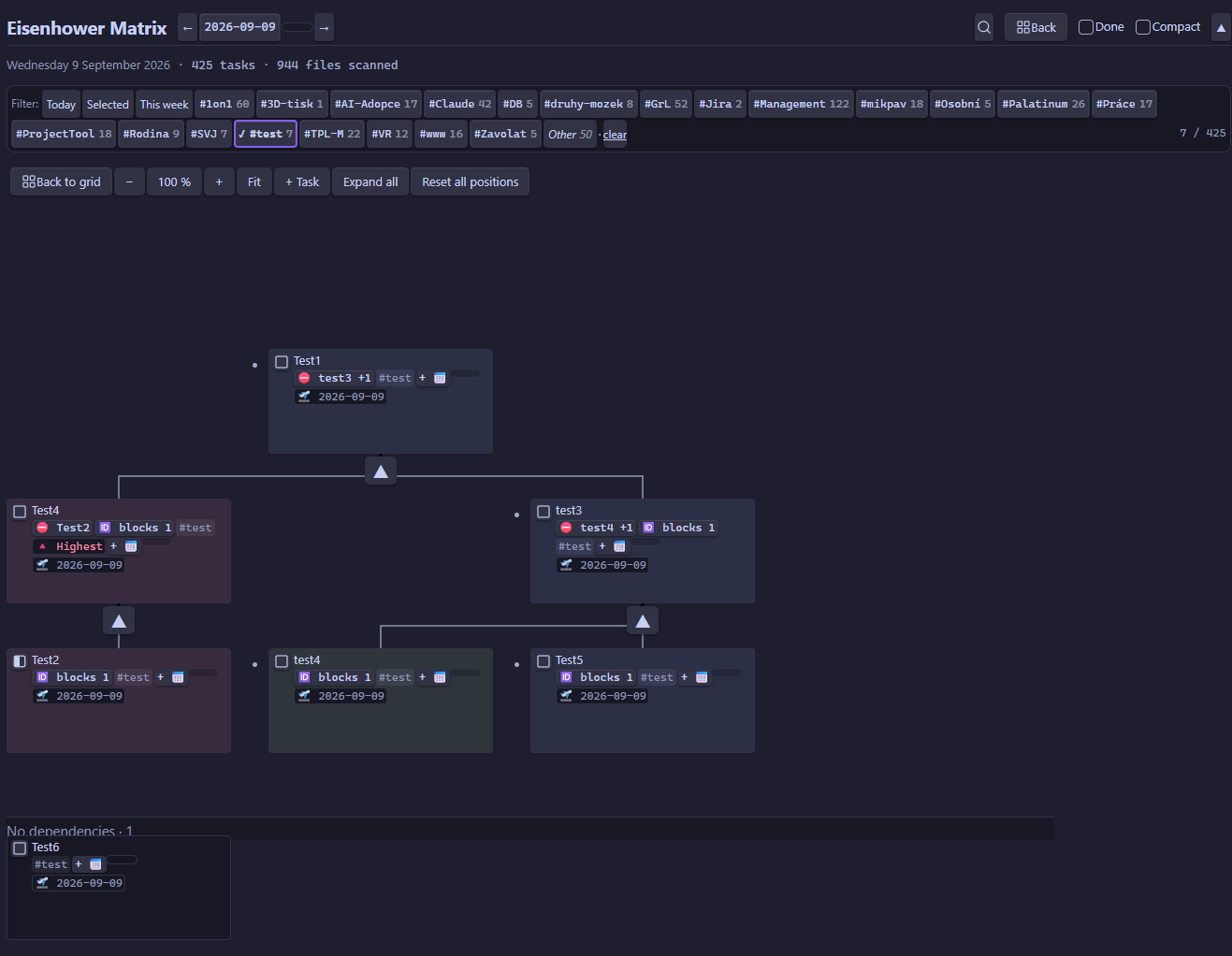
| Dependency graph | Shows goals above their blockers on an orthogonal grid, with unlinked tasks in a separate band. Collapse branches, zoom, and place cards manually on desktop; the first manual move adds an 🆔 while grid coordinates stay in data.json. Mobile provides reading, navigation, menus, and task creation without drag. |
| Cross-vault aggregation | Collects tasks from every .md file in the vault (Dataview-like), not just today's daily note — one board for your whole second brain. |
| 6 task statuses | Things-style [ ] to-do · [/] in progress · [x] done · [-] canceled · [>] forwarded · [<] scheduling. Each card shows a status box; set any state via right-click → Mark as…. |
| Full CRUD | Add (text + tags + due date + priority), edit inline, toggle done, move between quadrants — every change is written straight back to your Markdown. |
| Priority | Obsidian Tasks convention: 🔺 highest · ⏫ high · 🔼 medium · 🔽 low · ⏬ lowest. It's also the manual lever for ordering — raise a priority and the task jumps up. |
| Due / start / done dates | Reads and writes 📅 due, 🛫 start, ✅ done. Overdue tasks are highlighted and float to the top of their quadrant. |
| Markdown in task text | Inline bold, italic, code, #…###### renders the task as a heading. |
| Clickable links | [[wikilinks]] (with #heading / |alias) and [text](url) in the task title are live — click to open the note (resolved relative to the task's file) or the URL; Ctrl/Cmd-click opens in a new pane. Clicks don't trigger drag or edit. Only https:/http:/mailto: URLs open externally — other schemes stay plain text. |
| Tag autocomplete | Suggests existing vault tags as you type, so you don't create near-duplicates. |
| Filter by tag | Context-tag chips in the filter bar (multi-select, OR logic) + a virtual "Other" chip for untagged tasks. |
| Due-date quick filters | Today (overdue + due today), Selected (due exactly on the date picked in the header), and This week (overdue + next 7 days) buttons at the start of the filter bar, set apart in orange. |
| Date navigation | ← / → / calendar / Today, plus a day-cutoff banner offering to jump to today after midnight. |
| Undo grace period | A 3-second window with a green countdown bar after you complete or cancel a task — click again to undo. |
| Compact mode | Header toggle that shrinks every card to two lines (text + priority/due date) for a denser overview. |
| Show / hide done | The "Done" toggle reveals or hides finished tasks ([x] + [-]); the task counter follows the toggle. |
| Task search | The magnifier left of "Collapse all" opens a search box that scans the visible day's tasks (text, tags, source file name), ignoring case and diacritics. It jumps to each hit, expanding a collapsed quadrant or switching the Kanban board if needed, and shows hits that the active filters would otherwise hide. Enter / Shift+Enter (or the ▲ ▼ buttons) walk the hits, Esc closes the box and leaves the last hit visible. |
| Collapsible UI | Collapse individual quadrants or the whole header to free up space — handy on mobile. |
| Deterministic sorting | Within a quadrant: overdue → priority → due date → alphabetical. No accidental drag-reordering. |
| Daily note integration | New tasks go under a configurable section heading; if today's daily note is missing it's created automatically, honoring your core "Daily notes" template ({{date}}, {{title}}, {{time}}). |
| Excluded folders | Point the matrix away from templates, archives or anything you don't want scanned. |
| Task dependencies | Reads Obsidian Tasks 🆔 / ⛔ links, puts prerequisites first, and edits Before this / After this relationships by task name. |
| Desktop & mobile | Works on desktop and Android (isDesktopOnly: false); responsive layout with touch-friendly controls. |
| Theme-aware | Built entirely on Obsidian CSS variables, so it adapts to your light/dark theme and accent colour. |
In graph mode, Hide blocked tasks is ignored because blockers are the graph's structure. Completed blockers follow the existing Done toggle. Manual positions are vault-local and do not transfer between vaults. If creation fails after making a daily note, the empty note can remain.
Installation
Settings → Community plugins → Browse → search "4D Eisenhower Matrix" → Install → Enable.
Then open it via the ribbon icon (grid, in the left sidebar) or the command palette → Open matrix.
Task syntax
The plugin reads/writes standard Obsidian Tasks syntax:
- [ ] #DO #Personal ⏫ 📅 2026-05-20 🛫 2026-05-15 Important call with Alice
- [x] #DECIDE Long-term planning ✅ 2026-05-10
- [ ] task without a quadrant tag  ← lands in the OPEN quadrant
Quadrant tags (the first token after - [ ]):
| Tag | Quadrant | Meaning |
|---|---|---|
#DO | 🔴 DO | Important + Urgent |
#DECIDE | 🔵 DECIDE | Important + Less Urgent |
#DELEGATE | 🟢 DELEGATE | Less Important + Urgent |
#DELETE | 🟡 DELETE | Less Important + Less Urgent |
| (other / none) | ⚫ OPEN | Uncategorized |
Priority (Obsidian Tasks convention):
| Emoji | Level |
|---|---|
| 🔺 | Highest |
| ⏫ | High |
| 🔼 | Medium |
| 🔽 | Low |
| ⏬ | Lowest |
Controls
| Action | How |
|---|---|
| Toggle a task | Click the checkbox · 3 s grace period (click again to undo) |
| Add a task | Click + in the quadrant header → text + #tags + 📅 + ⏫ → Enter |
| Edit a task | Desktop: double-click the card. Mobile: long-press / double-tap → menu → Edit |
| Change due date alone | Click the 📅 badge on the card |
| Move between quadrants | Desktop: drag the card onto the target quadrant. Mobile: long-press / double-tap → menu → "Move to…" |
| Open the source file | Desktop: right-click the card. Mobile: long-press / double-tap. → menu (current pane / new tab / split / window) — the cursor lands on the task's line |
| Filter by tag | Click a chip in the filter bar (multi-select, OR) |
| Due-date quick filter | The Today (overdue + due today) / Selected (due on the date picked in the header) / This week (overdue + next 7 days) buttons at the start of the filter bar |
| Previous / next day | The ← → arrows in the header, the calendar, or "Today" |
| Collapse a quadrant | Click the ▼/▶ arrow next to the quadrant name |
| Collapse the whole header | The ▲ button top-right (handy on mobile) |
| Search tasks | The magnifier left of "Collapse all" → type · Enter / ▼ next hit · Shift+Enter / ▲ previous · Esc / ✕ close (the last hit stays visible) |
| Show completed tasks | The "Done" toggle in the header |
| Compact view | The "Compact" toggle in the header — 2-line cards |
| Set task status | Right-click the card (or the status box) → Mark as… |
| Kanban view | Click the kanban icon in a quadrant header → status columns; click it again to return to the grid. On mobile/tablet the columns scroll horizontally; change a card's status via its menu (Mark as…) |
In-quadrant order
Deterministic — cannot be reordered manually:
- Overdue (📅 < today) — at the top
- Priority desc — 🔺 → ⏫ → 🔼 → 🔽 → ⏬ → no priority
- Due date asc — nearest deadline first
- Alphabetical by text
The manual lever for reordering is priority — set it and the task jumps up.
Task dependencies
The matrix reads 🆔 id and ⛔ id1,id2. Blocked cards are dimmed and link to their prerequisites; tasks that block others link back to them. Edit relationships inline with Before this and After this. Prerequisites sort first within the same quadrant; cross-quadrant dependencies still mark a task as blocked but do not affect ordering.
Missing IDs and cycles display warnings. Completing a blocked task is allowed after confirmation, and completing a prerequisite reports how many tasks became unblocked. Tasks in excluded folders are not indexed, so links to them appear as unknown and do not block or affect sorting.
The parser recognises a named list of Tasks fields (⏳, ➕, 🔁, 🏁, ❌) and preserves them when you edit a task. A new Tasks field has to be added to that list by hand; anything else stays in the task title, where it belongs.
Known limits. Tasks metadata is expected at the end of the line, exactly as Obsidian Tasks writes it. Text placed after a field such as ⏳ or 🔁 is read as that field's value and drops out of the card title, and a ⛔ used decoratively claims the next word as a dependency id. Keep decorative emoji before the metadata, not after it.
Settings
Settings → 4D Eisenhower Matrix:
- Daily folder — where new daily notes are created. Empty = respect the core "Daily notes" plugin config. Override = a custom path (with a folder suggester).
- Daily section heading — the heading in the daily note under which today's tasks are read and added. Default:
# Today. Set it to whatever you use (e.g.# Dnes,## Tasks). - Excluded folders — tasks from these folders are ignored. Default: none — add the folders you want excluded yourself. On Obsidian 1.13+ this is the native list UI (
+opens a folder picker, each row has a delete button); on older versions it's the + / × UI with a folder suggester. - Warn when completing a blocked task — asks for confirmation before closing a blocked task. Default: on.
- Respect task dependencies when sorting — places prerequisites first within each quadrant. Default: on.
- Hide blocked tasks — removes currently blocked tasks from the matrix. If a blocker is itself blocked, both cards can be hidden, so the matrix will not show what the chain is waiting for. Default: off.
On Obsidian 1.13 and later the settings also show up in the search box at the top of the Settings window.
Daily note integration
The plugin looks for a configurable section heading in the daily note (set via Settings → Daily section heading, default # Today). New tasks are inserted under that heading.
If a daily note for the given day doesn't exist and you add the first task, the plugin creates it automatically:
- If the core "Daily notes" plugin has a template configured, it uses that (expanding
{{date}},{{title}},{{time}}). - Otherwise it falls back to a minimal scaffold (frontmatter + the configured section heading).
Mobile
Works on Android (isDesktopOnly: false; iOS untested but should work).
- Long-press or double-tap a card → context menu (Edit · Open file · Move to…)
- Moving between quadrants on mobile is done via the menu ("Move → DECIDE" etc.). Touch-drag is unreliable inside the Obsidian mobile webview, so the menu is used instead — two taps, deterministic.
- Collapsed header (the ▲ button) — frees up vertical space for the matrix.
Roadmap
- Quick-add task via the Command Palette (without opening the view)
- Keyboard shortcuts inside the view (J/K navigation, X toggle, N new task)
- Full moment.js syntax in daily templates (currently only
{{date}}/{{title}}/{{time}})
Missing something? Open an issue.
Known limitations
- Manual ordering across files (one task in a daily note, another in a project) is not supported — the sort is deterministic.
Bugs / contributing
Issues · Pull requests welcome.
Changelog
1.0.37 — Cleanup pass over the findings from Obsidian's plugin review, with no change to how the plugin is used. Both confirmation prompts (resetting graph positions, completing a blocked task) now use an Obsidian modal instead of the browser confirm(), which was showing up in the wrong window in popouts and could be suppressed entirely on mobile; the graph schedules its animation frames on window for the same popout reason. The two !important rules are gone — a card being edited in the graph drops its fixed height at the source, and the mobile rule hiding link ports won on specificity instead. minAppVersion moves to 1.8.7, the release that introduced the Notice API this version uses.
1.0.36 — Added the dependency graph introduced during the 1.0.33 development cycle, now with working task creation and tag suggestions, per-branch expand/collapse controls, the shared completion countdown, centered reset and zoom, scrollbars and canvas panning, a consistent Back control, and roomier compact cards with redundant dependency labels hidden.
1.0.32 — Fixed the search selection being invisible on overdue tasks: the current hit is now marked by an accent outline drawn outside the card, so it shows through the red overdue border (and the dimmed blocked style) instead of losing to it. The red border stays visible, so an overdue hit still reads as overdue.
1.0.31 — Added task search: a magnifier left of "Collapse all" opens a search box that scans the tasks of the day you're looking at — task text, context tags and the source file name — ignoring case and diacritics ("zaloha" finds "Zálohovat"). The view scrolls to each hit and highlights it; a collapsed quadrant expands and the Kanban board switches quadrants on its own so the hit is never hidden, and a hit that the active tag / due / "Done" filters would hide is shown anyway. Enter and Shift+Enter (or the ▲ ▼ buttons, for mobile) step through the hits with a 3/12 counter, Esc or ✕ closes the box and leaves the last hit visible.
1.0.30 — Added Obsidian Tasks dependencies (🆔 / ⛔): dependency-aware ordering, blocker badges and navigation, inline Before this / After this editing, completion warnings, filtering settings, and safe metadata preservation during edits.
1.0.29 — Internal fix, no visible change: the two Obsidian 1.13 APIs used by the new settings tab (SettingTab.update(), ButtonComponent.setDestructive()) are now behind requireApiVersion('1.13.0') guards. They were only ever reached on 1.13+, but a static check can't see that and flagged them against the declared minAppVersion of 1.8.0. Support for older Obsidian versions is unchanged — minAppVersion stays 1.8.0.
Earlier versions
-
1.0.28 — Settings moved to Obsidian's declarative settings API (
getSettingDefinitions). On Obsidian 1.13+ this means the plugin's settings are indexed by the search box at the top of Settings — typing "Excluded folders" or "Daily section heading" now finds them; before, the settings tab was only reachable by scrolling to the plugin. Excluded folders use the native list UI (a+button and a delete button per row), and adding one opens a folder picker. Saving is also serialized and rolled back if the write fails, so a failed save no longer leaves the UI showing a value that disappears after a restart. Obsidian below 1.13 keeps the previous settings tab unchanged —minAppVersionstays 1.8.0. -
1.0.27 — Security hardening + cleanup after a code audit: external links in task titles are now restricted to
https:/http:/mailto:— anything else (file:,javascript:,data:, …) renders as plain text and never opens (checked both at render time and again at open time). Also, tasks with empty text (e.g. a lone- [ ] #DOline) are now hidden from the matrix consistently — previously they showed as "(empty text)" cards when they came from the daily note. -
1.0.26 — Task titles now render clickable links:
[[wikilinks]](including#headingand|aliasforms) and[text](url). Internal links open the note resolved relative to the task's own file; external URLs open in the browser; Ctrl/Cmd-click opens in a new pane. Clicking a link doesn't start a drag or open the editor, so drag-to-move still works. (Requested by Ampa — thanks!) -
1.0.25 — Fixed the date picker jumping by a whole month: navigating months in the calendar (the ↑/↓ arrows) no longer commits the date prematurely — it just shows the next/previous month so you can click the exact day. The native picker's month-navigation
inputevents were being treated as a final selection; the picker now commits only on the realchange(day click). Applies to the header date navigation and every due-date badge. -
1.0.24 — Added a Selected due-date quick filter (between Today and This week): shows tasks due exactly on the date currently picked in the header bar — no overdue, just that one day. Follows the date picker live.
-
1.0.23 — Changed the default Daily section heading from
# Dnesto# Today. Only affects fresh installs / users who never set their own — existing configurations keep their value. -
1.0.22 — Kanban view is now available on mobile and tablet, not just desktop. The status columns scroll horizontally (swipe between them); since touch-drag is unreliable in the Obsidian mobile webview, you change a card's status through its menu (Mark as…) — the card jumps to the matching column.
-
1.0.21 — Lint cleanup for the store review: void-wrapped the async event handlers, switched to
activeDocument/activeWindowfor popout-window compatibility, removed a redundant type assertion, and described the remaining directive comment. No user-facing changes. (Three deprecation recommendations are left as-is — their replacements aren't available atminAppVersion1.8.0.) -
1.0.20 — Store-compliance fixes flagged by Obsidian's automated review: raised
minAppVersionto 1.8.0 (the plugin uses newer vault/workspace APIs), documented the twoeslint-disabledirectives, and madeonunloadsynchronous. -
1.0.19 — Refined the due-filter chips: the selected one now stands out clearly (orange fill + border) while the unselected one is distinguished by orange text only.
-
1.0.18 — Due-date quick filters: Today (overdue + due today) and This week (overdue + next 7 days) buttons at the start of the filter bar, set apart in orange.
-
1.0.13–1.0.17 — Kanban view (desktop): per-quadrant toggle into To-do / In progress / Scheduled / Done status columns, drag to change status or move quadrant, add tasks per column, "Back to grid" button.
-
1.0.7–1.0.12 — Six Things-style task statuses with a custom status box, Markdown headings in task text, half-square "in progress" icon, view controls kept in the collapsed header.
-
1.0.6 — Inline Markdown in task text + compact 2-line card mode.
-
1.0.0 — First release: 5-quadrant matrix, cross-vault aggregation, CRUD, priority, tag autocomplete, filters, dates, grace period, daily-note integration.
License
For plugin developers
Search results and similarity scores are powered by semantic analysis of your plugin's README. If your plugin isn't appearing for searches you'd expect, try updating your README to clearly describe your plugin's purpose, features, and use cases.