Eisenhower Matrix
approvedby oamadorr
Organize your tasks using the Eisenhower Matrix — prioritize by urgency and importance across 4 quadrants. - This plugin has not been manually reviewed by Obsidian staff.
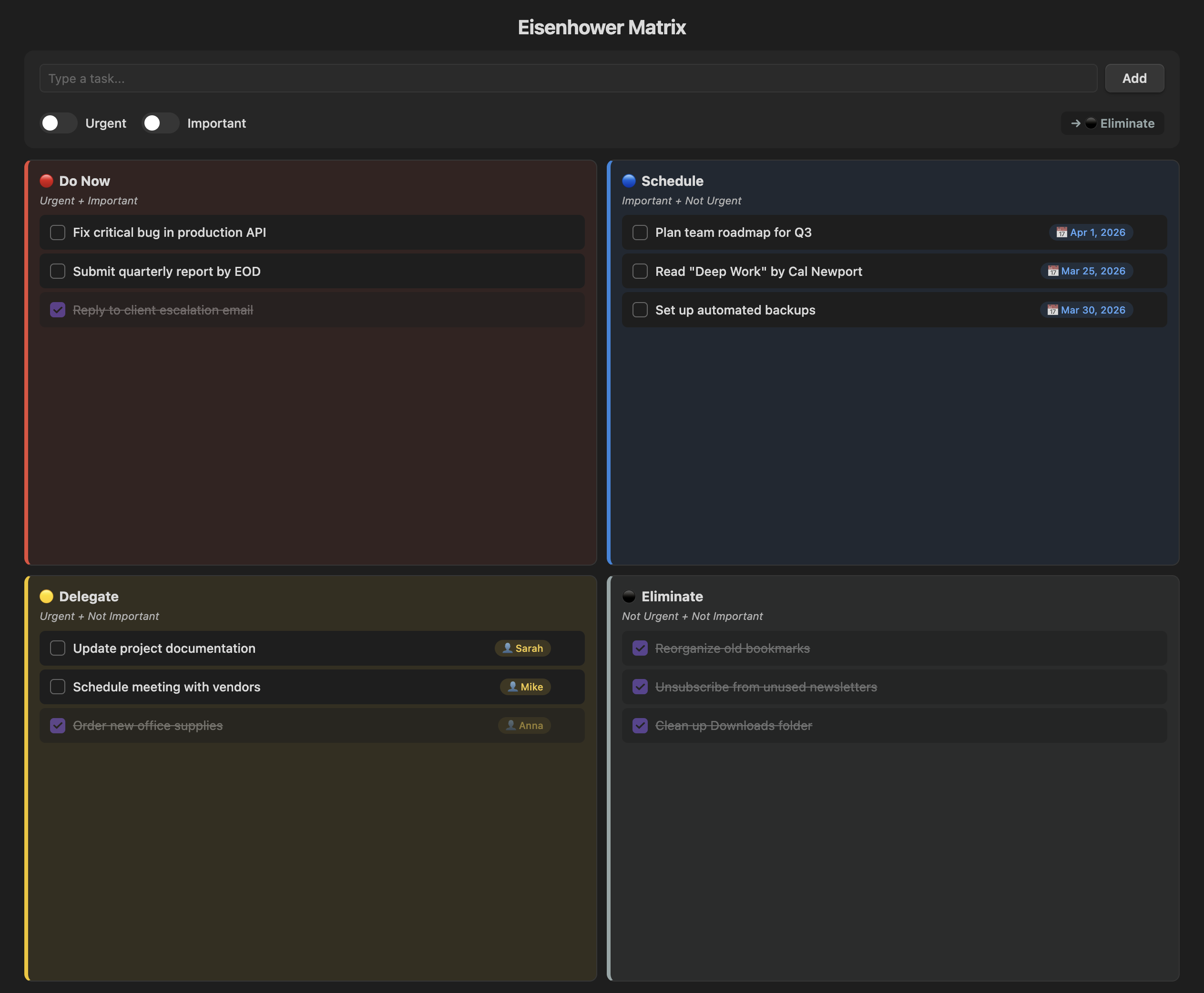
Eisenhower Matrix — Obsidian Plugin
Organize your tasks by urgency and importance using the Eisenhower Matrix — directly inside Obsidian.



Overview
The Eisenhower Matrix (also known as the Urgent-Important Matrix) helps you decide and prioritize tasks by sorting them into four quadrants based on urgency and importance.
| Quadrant | Urgent | Important | Action |
|---|---|---|---|
| 🔴 Do Now | ✅ | ✅ | Execute immediately |
| 🔵 Schedule | ❌ | ✅ | Plan a date |
| 🟡 Delegate | ✅ | ❌ | Assign to someone |
| ⚫ Eliminate | ❌ | ❌ | Drop or defer |
Features
Core
- Toggle-based input — flip the Urgent and Important switches and the task is automatically routed to the correct quadrant
- Smart contextual fields — Schedule tasks prompt for a due date 📅, Delegate tasks prompt for an assignee 👤
- Markdown persistence — all tasks are saved as a readable
Eisenhower Matrix.mdfile in your vault, fully compatible with search, backlinks, and Dataview - Inline editing — click any task text to edit it in place; Enter to save, Escape to cancel
Organization
- Drag & drop — move tasks between quadrants by dragging them
- Reorder within quadrant — drag tasks inside the same quadrant to change priority order
- Hide/show completed — toggle to hide finished tasks and focus on what's pending
- Task counter — each quadrant shows
(pending/total)at a glance - Delete confirmation — clicking ✕ opens a confirmation menu to prevent accidental deletion
Scheduling & Delegation
- Quick date buttons — pick "Tomorrow", "+7 days", or "+30 days" instead of manually selecting a date
- Assignee autocomplete — previously used names appear as clickable chips for quick selection
- Overdue alerts — past-due Schedule tasks are highlighted in red with a ⚠️ badge
- Move with context — moving a task to Schedule or Delegate opens a modal to set the date or assignee
Settings
- Custom data file — choose which markdown file stores your tasks
- Auto-complete Eliminate — tasks added to Eliminate are automatically marked as done
- Responsive layout — works on desktop, tablet, and mobile screens
How to Use
- Click the grid icon in the ribbon (or use the command palette:
Open Eisenhower Matrix) - Type your task in the input field
- Toggle Urgent and/or Important to select the target quadrant
- Click Add or press Enter
- Check off completed tasks ✓, click text to edit, or drag to reorganize
Installation
From Community Plugins (pending approval)
- Open Settings → Community plugins → Browse
- Search for "Eisenhower Matrix"
- Click Install, then Enable
Manual Installation
- Download
main.js,manifest.json, andstyles.cssfrom the latest release - Create a folder
.obsidian/plugins/eisenhower-matrix/in your vault - Copy the 3 files into that folder
- Enable the plugin in Settings → Community plugins
License
MIT — free for personal and commercial use.
Made with ❤️ by Amador Rosa
For plugin developers
Search results and similarity scores are powered by semantic analysis of your plugin's README. If your plugin isn't appearing for searches you'd expect, try updating your README to clearly describe your plugin's purpose, features, and use cases.