by Alex Totolici
Forked from community-archive/obsidian-full-calendar
Keep your calendar in your vault: events as notes, daily notes, ICS and CalDAV calendars, with categories, live previews and keyboard shortcuts. A maintained fork of Full Calendar.
Full Calendar Plus
Keep your calendar in your vault. Every event is a note, so you can write about it, link to it and find it like any other note. Events can also come from daily notes, ICS feeds and CalDAV calendars.
This is a fork of Full Calendar by Davis Haupt.
The original plugin is no longer developed, and its repository is archived. I use it every day, so I keep this fork up to date and add the features I was missing.
A big thank you to Davis Haupt for building Full Calendar, and to everyone who contributed to it. Almost all of this plugin is their work. If it helps you, consider supporting Davis on Ko-fi.
This fork is maintained by Totolici Alexandru. It is not affiliated with the original project.
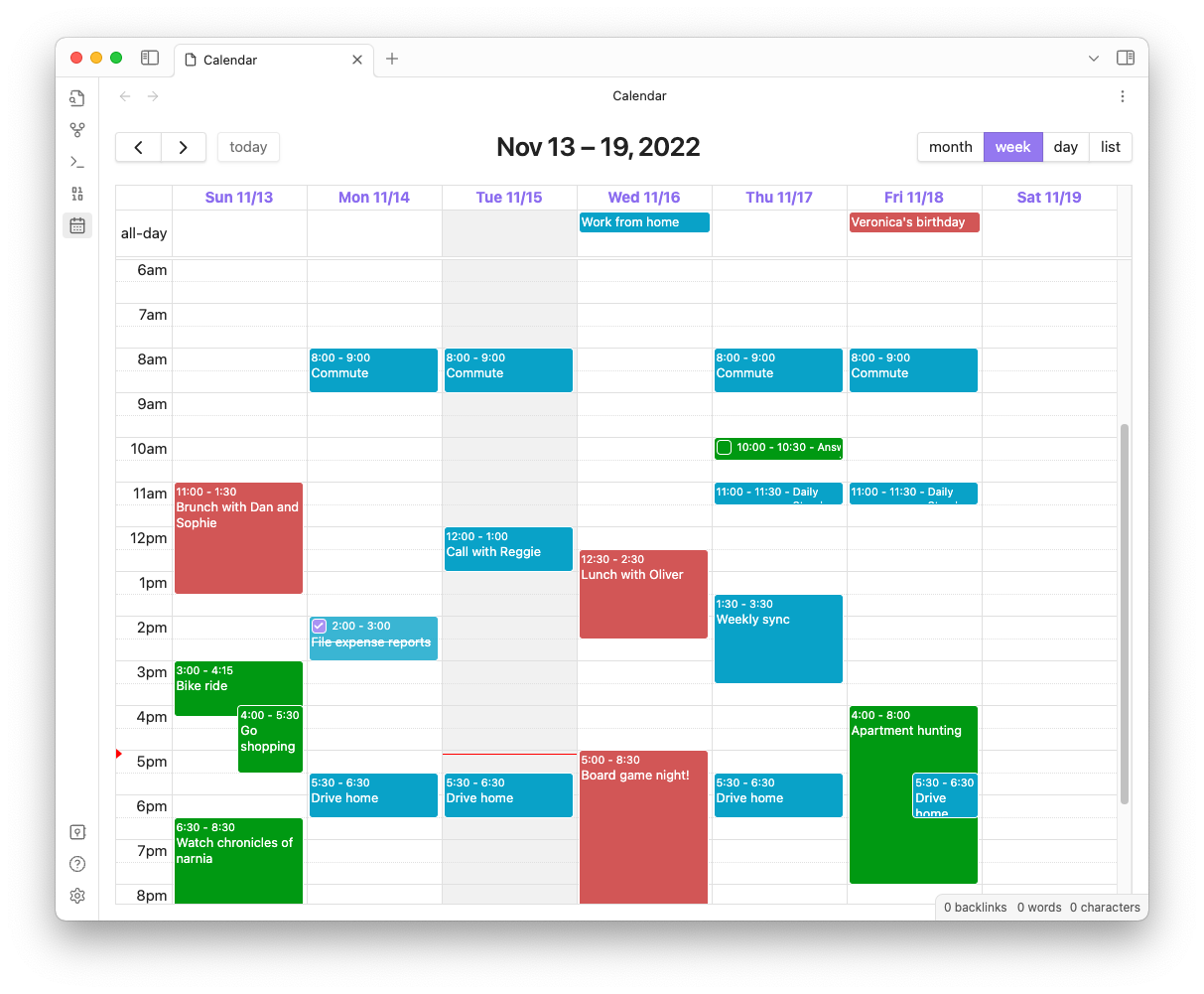
What's new in this fork
Event categories
Create categories with a name and a color in the settings. Give each calendar a default category, and override it per event with a category property. A toolbar button and the Toggle calendar/category colors command switch the event colors between calendar colors and category colors.
Per-event colors
Give any single event its own color with the color picker in the event form. Dragging or resizing an event keeps its color and category.
Live event preview
While you edit an event, a preview of it (👻) shows on the calendar, so you can see where it lands before you save.
Create events on top of other events
Hold Alt (Option on macOS) and drag over the calendar to create a new event, even where other events already are.
Full event text on hover
When an event is too short to show its whole title or time, hover over it to see the full text.
Better event details
- Read-only events, such as events from an ICS feed, open a details panel when you click them.
- The details show the description and location from ICS feeds. Long values wrap.
- The event form has a title that wraps and an icon button that opens the event's note.
Keyboard shortcuts
| Shortcut | Action |
|---|---|
Ctrl+Enter | Save event |
Ctrl+Backspace | Delete event |
Ctrl+[ / Ctrl+] | Move event 15 min earlier / later |
Ctrl+- / Ctrl++ | Change end time by 15 min |
Ctrl+Q to Ctrl+L | Select a calendar (up to 18) |
Ctrl+← / Ctrl+→ | Previous / next period |
Ctrl+↑ / Ctrl+↓ | Switch calendar view |
Open a day's daily note
Click a day header or an empty slot to open that day's daily note. If the note doesn't exist, it is created.
Toolbar
+and−zoom the time grid in and out.↻reloads all calendars.
Tasks plugin integration (experimental)
Show the due dates of your Tasks on the calendar. Turn it on in the settings and pick a color.
Note: this uses an unofficial API of the Tasks plugin. It works only with a forked version of Tasks that has this API. The Tasks plugin from the community store does not have it.
Habit completion on day headers (needs a compatible habit tracker)
With a compatible habit tracker plugin, each day header shows a small pie chart of how many habits you completed that day.
Improvements over the original
- Faster loading. Events load in parallel, and only for the dates on screen.
- Correct ICS time zones. Events from ICS feeds show in your local time zone, including daylight saving time.
- Edit one occurrence of a recurring event. The change is saved as its own event, and that date is skipped in the series. The rest of the series doesn't change.
- Clear file names. Event notes are named
{Title} {Date} {Time}.md. - All-day events found automatically. Events without a time are all-day events.
- Duration on the event. Events longer than 30 minutes show their length, for example
1h 30m. - Auto-refresh. The calendar refreshes every 30 seconds, and reloads its settings when
data.jsonchanges on disk (for example after a sync).
Installation
From the community plugins list
Open Settings → Community plugins → Browse, search for Full Calendar Plus, then install and enable it.
Manually
- Download
main.js,manifest.jsonandstyles.cssfrom the latest release. - Put them in
<your vault>/.obsidian/plugins/full-calendar-plus/. - Reload Obsidian and enable Full Calendar Plus in Settings → Community plugins.
Moving from the original Full Calendar
Full Calendar Plus has a different plugin id, so it doesn't share settings with the original. To keep your calendars:
- Install Full Calendar Plus, but don't enable it yet.
- Copy
data.jsonfrom.obsidian/plugins/obsidian-full-calendar/to.obsidian/plugins/full-calendar-plus/. - Disable the original Full Calendar, then enable Full Calendar Plus.
Your event notes don't change.
Documentation
Most of the original documentation still applies: how to set up calendars, the event frontmatter, daily note events, and ICS and CalDAV calendars.
Credits
- Davis Haupt created Full Calendar, and many contributors improved it.
- The FullCalendar library by Adam Shaw draws the calendar. It is released under the MIT license.
License
For plugin developers
Search results and similarity scores are powered by semantic analysis of your plugin's README. If your plugin isn't appearing for searches you'd expect, try updating your README to clearly describe your plugin's purpose, features, and use cases.