Glance
Glance renders standalone web links as rich, Craft-style cards while keeping the note source as ordinary Markdown.
Part of the marioverse Obsidian plugin suite.
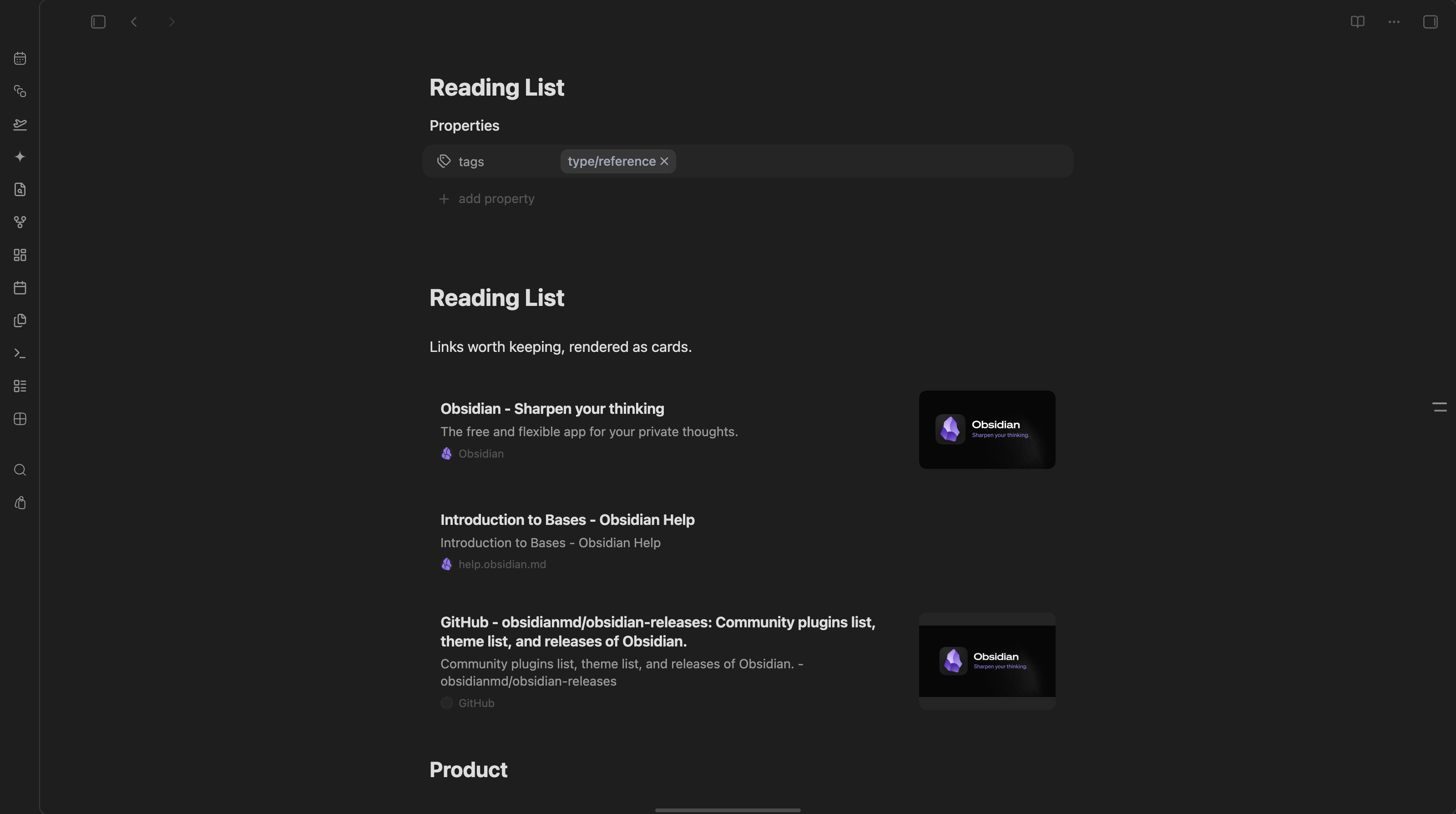
Standalone links, rendered as cards with favicon, domain, and preview image.
What makes it different
- Source-pure rendering: displaying a card never rewrites your Markdown.
- Editable in place: the card's own controls — edit link, card size, task checkbox — write back to the line, and only when you click them.
- Native editing: the card becomes editable Markdown when its line is active.
- Theme-aware: all colors and typography inherit Obsidian theme tokens.
- Local-first: metadata is fetched directly and cached in plugin data.
- Cross-platform: Live Preview and Reading Mode on desktop and mobile.
Usage
Paste an http:// or https:// URL on its own line. Glance fetches Open Graph
metadata and replaces the inactive line with a rich card. Move the cursor into
the line to reveal and edit the original Markdown.
Standard links are supported too:
[Obsidian](https://obsidian.md)
Inline links inside sentences are intentionally left unchanged.
Card controls
Hovering a card reveals its actions: edit the link, copy it, refresh the metadata, switch between expanded and compact, and embed the live page. Editing and resizing are Live Preview only — in Reading mode a card is display-only.
Card size
Cards render at the size set by Default card size in settings. Override a single line by appending a marker:
https://obsidian.md %%glance:compact%%
https://obsidian.md %%glance:expand%%
The card's size toggle writes these for you. %%…%% is an Obsidian comment,
so it never shows in Reading mode. A compact card keeps its image, just
narrower, and drops the description.
Web embed
The embed action (window icon) swaps the card for the live page itself, loaded in an iframe, rather than an unfurled preview:
https://obsidian.md %%glance:embed%%
Toggling it off returns to Default card size. Sites that refuse to render
inside an iframe (X-Frame-Options or a restrictive CSP — most banks, social
networks, and many SaaS apps) show as a blank frame with no way to detect that
in advance; use Open in browser in the card header as the fallback.
Lists and tasks
Links inside bullet, numbered and task items render as cards too:
- https://obsidian.md
- [ ] https://obsidian.md %%glance:compact%%
In Live Preview the card draws the list marker itself — CodeMirror replaces the whole line, so the original bullet or checkbox cannot be left standing — and ticking a card's checkbox rewrites just that one character in the line. In Reading mode Obsidian's own marker and checkbox stay in place.
Commands
- Refresh card under cursor: invalidates metadata for the standalone link on the active line and fetches it again.
- Clear metadata cache: removes all cached previews.
Development
pnpm install
pnpm test
pnpm lint
pnpm typecheck
pnpm build
Privacy
Glance sends a request only to the URL pasted by the user. It does not use a third-party metadata proxy or analytics service. Sites that block direct requests fall back to a domain-only card.
Network use
Glance makes network requests only for standalone web links in your notes:
- Page metadata: when a card is first rendered (or its cache entry has
expired, or you run Refresh card under cursor), Glance sends one
GETrequest to the linked URL with Obsidian'srequestUrlto read its title, description and Open Graph tags. Results are cached in plugin data for the Cache lifetime set in settings. - Images: the card loads the page's preview image and favicon directly
from the URLs the page declares (or
/favicon.icoon the same site). - Web embed: only when you switch a card to embed mode does the live page load in an iframe.
No other servers are contacted, nothing is sent besides the request for the linked page itself, and there is no telemetry.
Try it
See it running in the Obsidianverse sample vault, a small, fictional vault with the whole plugin suite pre-configured.
License
MIT
For plugin developers
Search results and similarity scores are powered by semantic analysis of your plugin's README. If your plugin isn't appearing for searches you'd expect, try updating your README to clearly describe your plugin's purpose, features, and use cases.