Link Preview Cards
unlistedby Obsidian
Turn pasted URLs into clean, clickable link preview cards with title, description, image, and author metadata.

Link Preview Cards
Turn pasted URLs into clean, clickable preview cards in Obsidian.
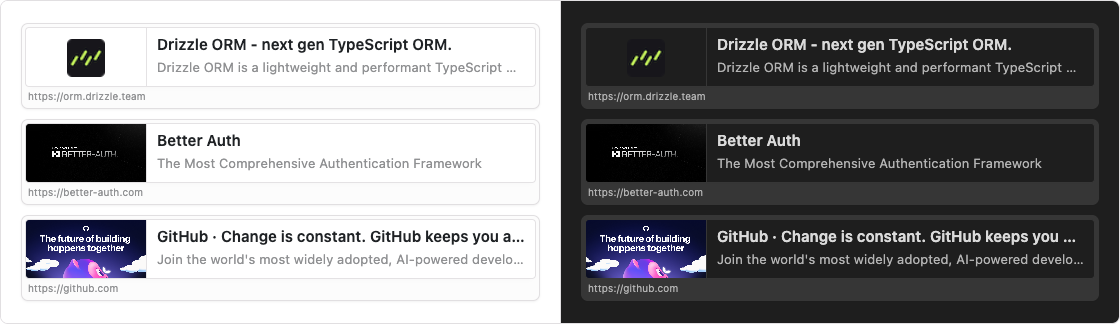
Paste a link and it becomes an Open Graph card.
Install · What it does · Use
What it does
- Paste a URL with nothing selected, and it becomes a preview card.
- Keep Obsidian’s normal paste when text is selected.
- The card uses the page’s Open Graph title, description, and image.
- When a page has no preview image, the card shows the site icon instead.
Install
These steps follow Build a plugin. The plugin is loaded from your vault, so you clone it, build it, then turn it on.
Use a vault you can experiment in. Plugin development can change notes. Create an empty vault if you want a safe place to try this.
1. Download the plugin into your vault
Obsidian looks for plugins in <vault>/.obsidian/plugins/. The folder name has to match the id in manifest.json, which is link-preview-cards.
cd path/to/vault
mkdir -p .obsidian/plugins
cd .obsidian/plugins
git clone https://github.com/ralf-al/Obsidian-Link-Preview-Cards.git link-preview-cards
2. Build the plugin
cd link-preview-cards
npm install
npm run build
That writes main.js, which Obsidian loads together with manifest.json and styles.css.
While you are changing the source, npm run dev rebuilds the plugin as you save.
3. Enable the plugin
- In Obsidian, open Settings.
- In the side menu, select Community plugins.
- Select Turn on community plugins.
- Under Installed plugins, enable Link Preview Cards.
If the plugin is missing from the list, restart Obsidian. Restart again whenever you change manifest.json. After source changes, reload with Command palette → Reload app without saving, or turn the plugin off and on.
Use
Paste a link such as https://orm.drizzle.team into a note, with no text selected. The URL is replaced by a card with the page title, description, image, and address.
For plugin developers
Search results and similarity scores are powered by semantic analysis of your plugin's README. If your plugin isn't appearing for searches you'd expect, try updating your README to clearly describe your plugin's purpose, features, and use cases.