Habitude Checklist
approvedby legott-ai
7-day habit checklist with streaks and weekly review. Markdown-native: habits live in Habitude/Habits.md, daily checks in Habitude/Log/YYYY-MM-DD.md. Free in-app AI coach via your own Gemini API key (BYOK). - This plugin has not been manually reviewed by Obsidian staff.
Habitude Checklist — Obsidian Plugin
A 7-day habit checklist for Obsidian: add habits, tap days to check them off, track streaks and weekly completion rates, and open a weekly review. Markdown-native — your data lives in your vault as plain markdown.
Screenshots
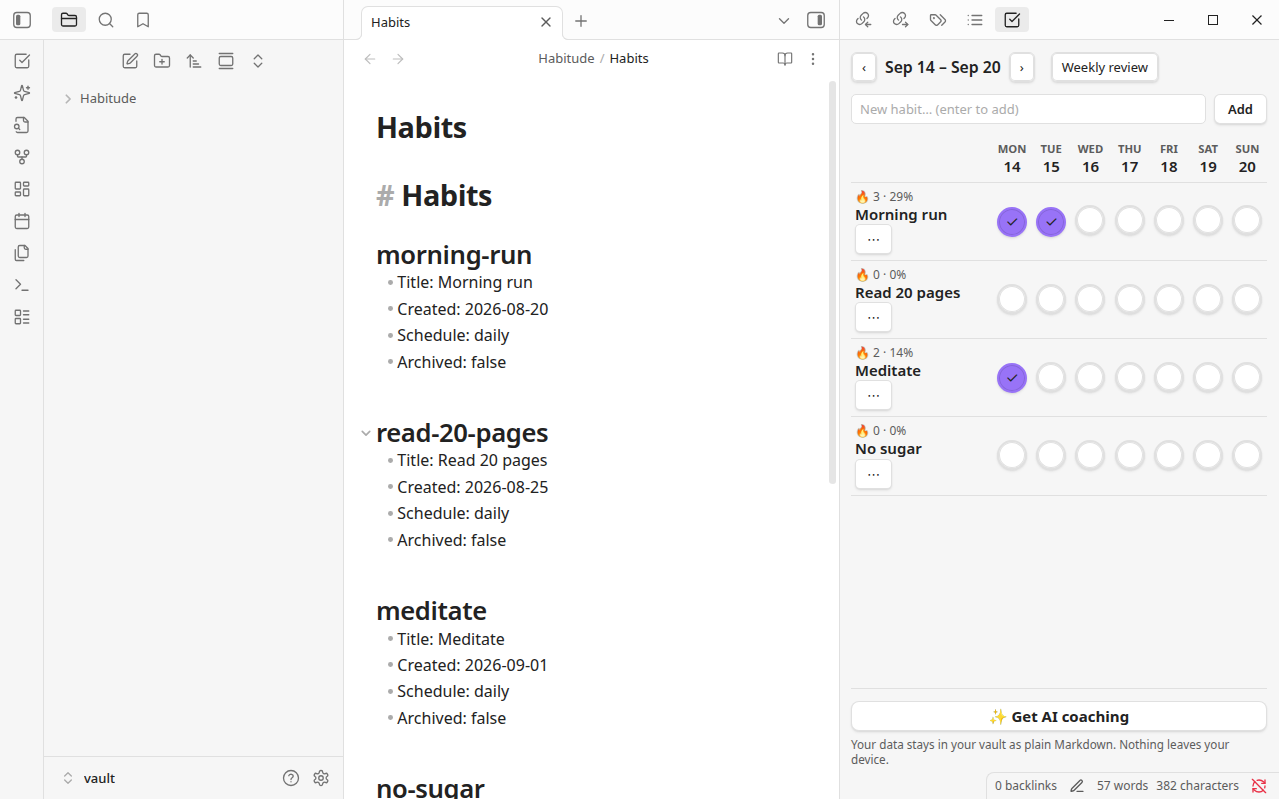
The 7-day checklist grid next to your plain-Markdown habit data. Click a cell to toggle — streaks and weekly rates update live:
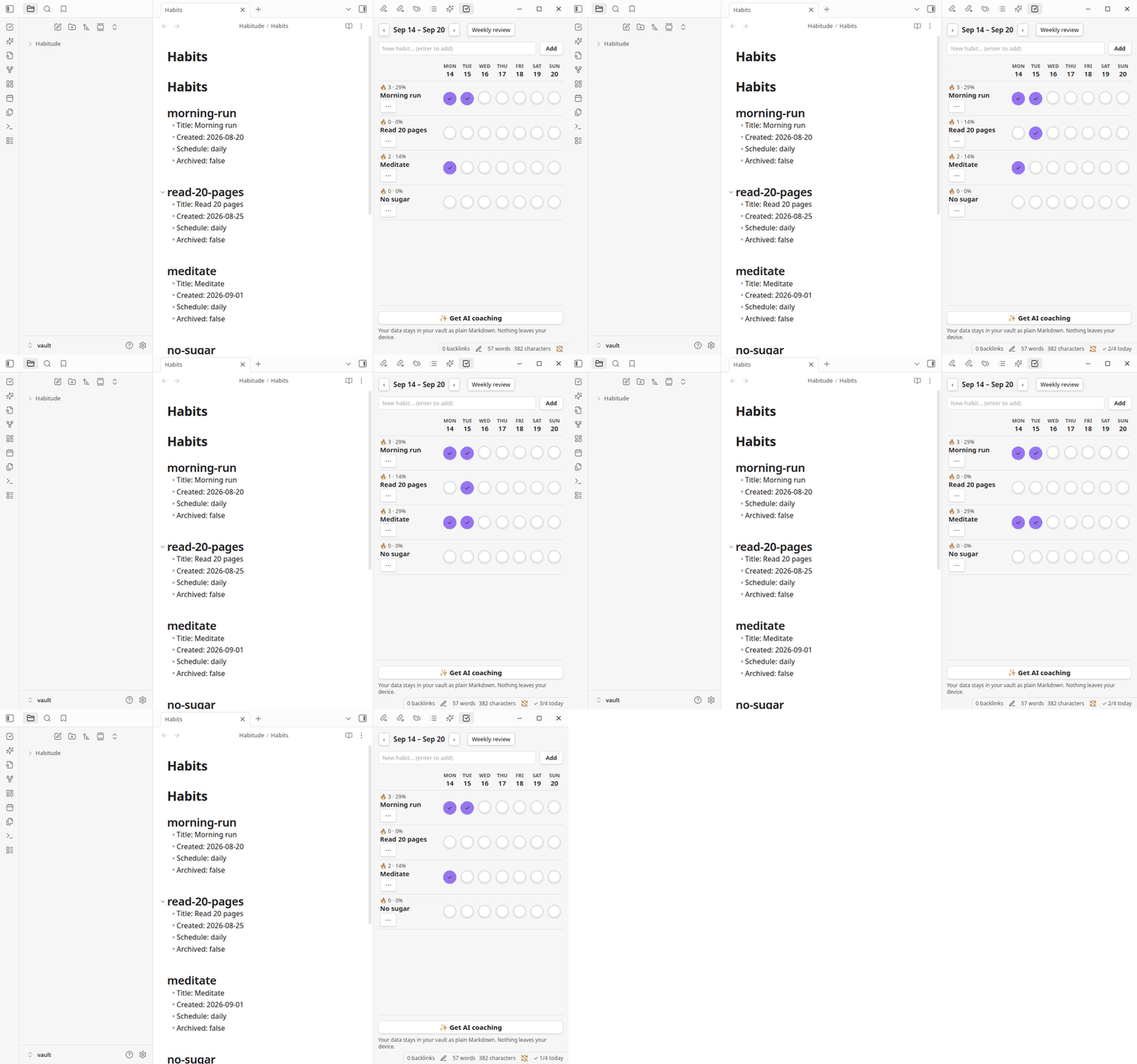
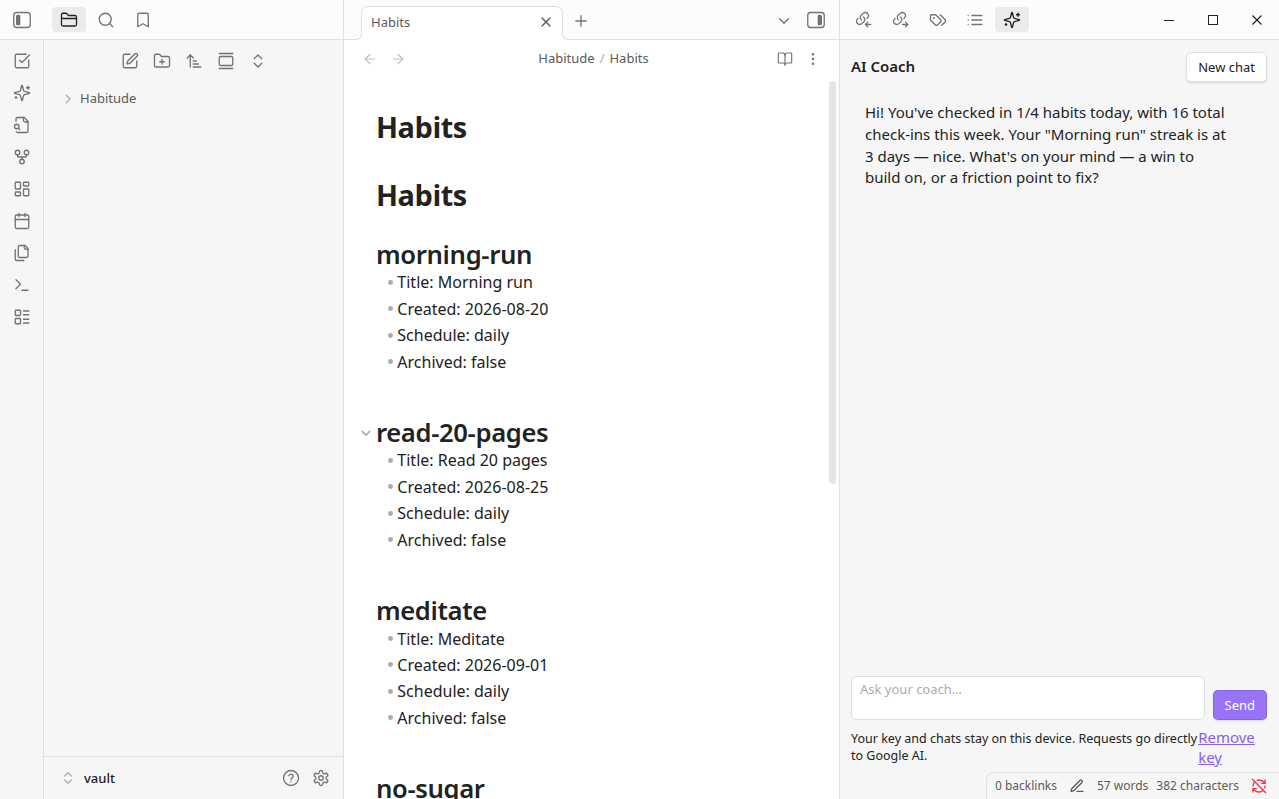
The AI coach greets you with your own stats and chats about your habits — bring your own API key (BYOK): Gemini, OpenAI, Claude, OpenRouter, or a local model via Ollama / LM Studio.
Data layout (in your vault)
Under the configured data folder (default Habitude/):
Habitude/
  Habits.md            # habit registry, one "## <id>" section per habit
  Log/
    2026-09-15.md      # daily log: "- [x] morning-run <!-- Morning run -->"
Both files are human-readable and hand-editable. The plugin re-reads them on every render (and on vault modify events), so edits you make directly in the notes are picked up automatically.
Features
- Checklist view (ribbon icon, or command Open checklist): habits × 7-day grid, click a cell to toggle. Week navigation (‹ ›), per-habit streak (🔥) and weekly %.
- Add habits inline; archive via the ⋯ menu next to the habit name.
- Progress graphs (in the checklist view): per-habit 30-day history strip and trailing 8-week completion bars, rendered locally as SVG — no network involved.
- Share progress (button in the checklist view, opt-in): posts aggregate statistics to
https://habi.sh/api/shareand copies ahttps://habi.sh/s/<id>link. Only runs when you click it. - Weekly review (command Open weekly review or the button in the view): per-habit completion bars, total checks.
- Command Toggle today for a habit: quick toggle from the command palette.
- Status bar: today's progress (
✓ 3/5 today). - AI coach (ribbon icon, or command Open AI coach): chat with a coach that knows your habits — your streaks, weekly rates, and weekday patterns are shared with the model automatically as statistics. Bring your own key (BYOK): Gemini, OpenAI, Claude, OpenRouter, or a local model via Ollama / LM Studio.
- See it in action: coach greeting · checklist demo
- Settings (
Settings → Habitude checklist): data folder, week start day (Mon/Sun), AI provider, API key, model, base URL, coach language. - Get AI coaching footer button: opens
https://habitude.aiin your browser.
Privacy
- Checklist: fully local. Habit tracking never calls any API, opens no connections, and holds no credentials. Your habits live in your vault as plain Markdown.
- Progress graphs: fully local. Rendered in the app from your check data as SVG. No network involved.
- Share progress: explicit opt-in. Only aggregate statistics (habit titles, streaks, completion rates) are ever transmitted — never your note contents. The payload is
{version, pluginVersion, generatedAt, stats: {habits: [{title, streak, weekRate}]}}posted tohttps://habi.sh/api/share; nothing is sent unless you click the button. - Clipboard: write-only, on your tap. The only clipboard access is writing the share link to your clipboard right after you press Share progress; the plugin never reads your clipboard.
- AI coach: opt-in BYOK. The coach only activates if you pick a provider and — for cloud providers — paste your own API key (free tiers exist for Gemini, OpenAI, Anthropic, and OpenRouter). The key is stored only on this device, and requests go directly to the provider you selected — never to Habitude servers. Each message carries your habit statistics (streaks, rates, patterns), never your raw note text. Local providers (Ollama, LM Studio) need no key at all.
- The only other thing that ever leaves Obsidian is you: the Get AI coaching button opens
https://habitude.aiin your browser.
Development
npm install
npm run dev      # watch mode
npm run build    # production: tsc + esbuild → main.js
Manual test install: copy main.js, manifest.json, styles.css into <Vault>/.obsidian/plugins/habitude-checklist/, reload Obsidian, enable under Settings → Community plugins.
Funnel
See FUNNEL.md for how this plugin fits the Habitude acquisition funnel (Stage 0 wedge → connect → digital twin → premium).
For plugin developers
Search results and similarity scores are powered by semantic analysis of your plugin's README. If your plugin isn't appearing for searches you'd expect, try updating your README to clearly describe your plugin's purpose, features, and use cases.