Heading Handler
approvedby Malte Henriksson
Smart heading commands that respect document hierarchy and indentation. - This plugin has not been manually reviewed by Obsidian staff.
Heading Handler
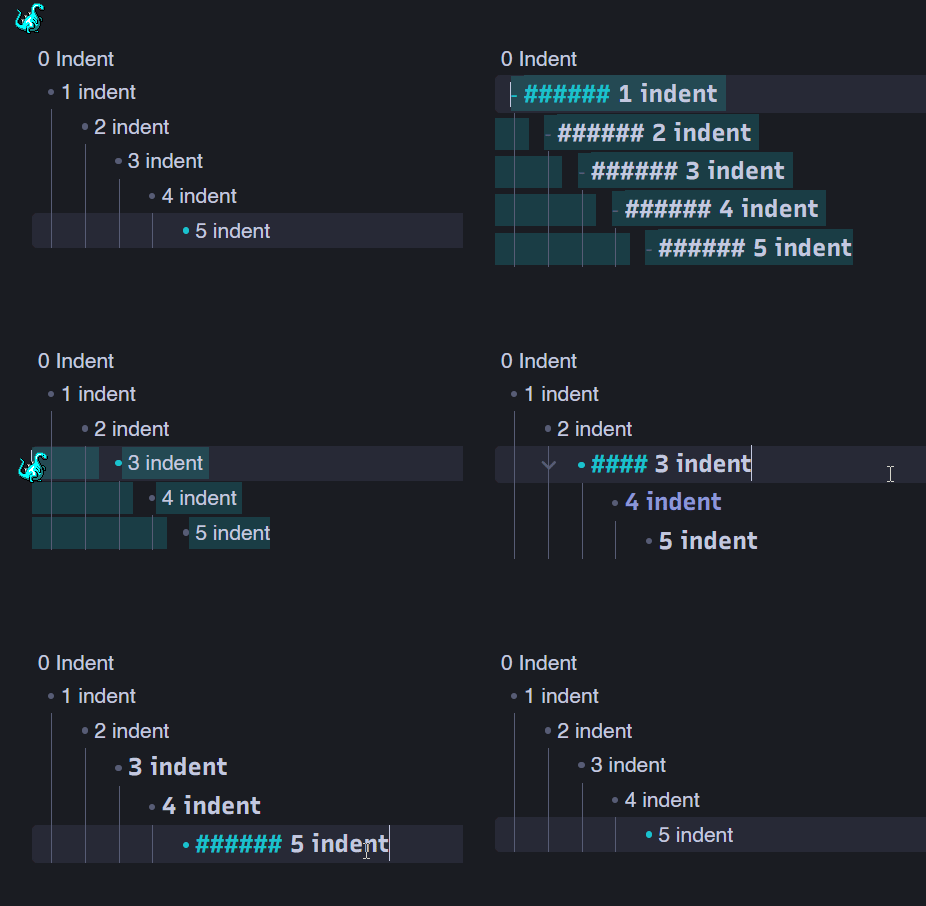
Smart heading commands for Obsidian that respect document hierarchy and indentation.
Features
- Context-aware heading operations - Automatically maintains proper heading hierarchy based on parent headings and indentation levels
- Multi-line selection support - Apply heading changes to multiple lines at once
- Works with unordered lists - Handles headings within
-,*, and+bullet list items - Respects indentation - Ensures nested content maintains appropriate heading levels relative to parents
Commands
Smart Promote Heading
Increases heading level while respecting document structure. If demoting would violate hierarchy (e.g., making a child heading lower than its parent), the heading is clamped to the minimum valid level or removed.
Smart Demote Heading
Decreases heading level intelligently. When a heading reaches its minimum valid level (based on parent + indent), further demotion removes the heading entirely.
Increase Heading at Current Line
Simple increment of heading level (1-6), without hierarchy checks.
Decrease Heading at Current Line
Simple decrement of heading level. Removes heading at level 1.
Remove Heading
Removes the heading from the current line, preserving the text.
How It Works
The plugin analyzes document structure to determine parent-child relationships between lines based on:
- Indentation level - Tab-based nesting
- Heading hierarchy - Parent headings must be lower-numbered than children
- List context - Maintains consistency within plain headings and unordered bullet lists
Minimum heading level = max(indentation_depth + 1, parent_heading + 1)
Examples
# H1 Parent

    ## H2 Child (min: H2)
    	### H3 Grandchild (min: H3)
Demoting H3 → H4 → H5 → H6 → (removed) Promoting (no heading) → H3 → H4 → H5 → H6
Installation
From Obsidian Community Plugins
- Open Settings → Community plugins
- Select Browse and search for "Heading Handler"
- Select Install, then Enable
Manual Installation
- Download
main.jsandmanifest.jsonfrom the latest release - Create folder
<vault>/.obsidian/plugins/heading-handler/ - Copy downloaded files into the folder
- Reload Obsidian and enable the plugin in Settings → Community plugins
Usage Tips
- Assign hotkeys to smart promote/demote for quick heading adjustments
- Use multi-select to restructure entire document sections
- The "repeatable" flag on smart commands allows holding down the hotkey
Development
# Install dependencies
npm install

# Build for development (watch mode)
npm run dev

# Production build
npm run build

# Run tests
npm test
Support
If you find this plugin helpful, consider supporting development:

License
MIT License - see LICENSE file for details
For plugin developers
Search results and similarity scores are powered by semantic analysis of your plugin's README. If your plugin isn't appearing for searches you'd expect, try updating your README to clearly describe your plugin's purpose, features, and use cases.