Heading Shifter
approvedby k4a-l
Easily Shift and Change Markdown headings.


Easily Shift and Change markdown headings.
Why use this plugin
Obsidian links numerous markdown files to form knowledge. Daily rearrangement of links is important to create a good knowledge base.
The following situations often occur in this process.
- Cut out A part of File 1 to an independent File 2 and linked.
- Heading3 in file 1 is changed to Heading1 in file 2
- Incorporated the content of File 3 into a part of File 4
- Heading2 in file 3 is changed to Heading4 in file 4
With this plugin, you can change the Heading size (the number of #) in a batch instead of changing it manually.
How to install
From within Obsidian
You can activate this plugin within Obsidian by doing the following:
- Open Settings > Community plugin
- Make sure
Restricted modeis off - Click Browse
community plugins - Search for
Heading Shifter - Click
Install->Enable
Manual installation
Download directory(includes main.js, manifest.json, styles.css) from the latest release and put them into <vault>/.obsidian/plugins/ folder.
Features
Apply Headings

Commands
| Command | Description | Hotkey |
|---|---|---|
| Apply heading 0 | Change Current line to no heading. | - |
| Apply heading 1~6 | Change Current line to heading 1~6. | - |
It is useful to assign a hotkey such as
Ctrl + 0 ~ 6
Shift Headings
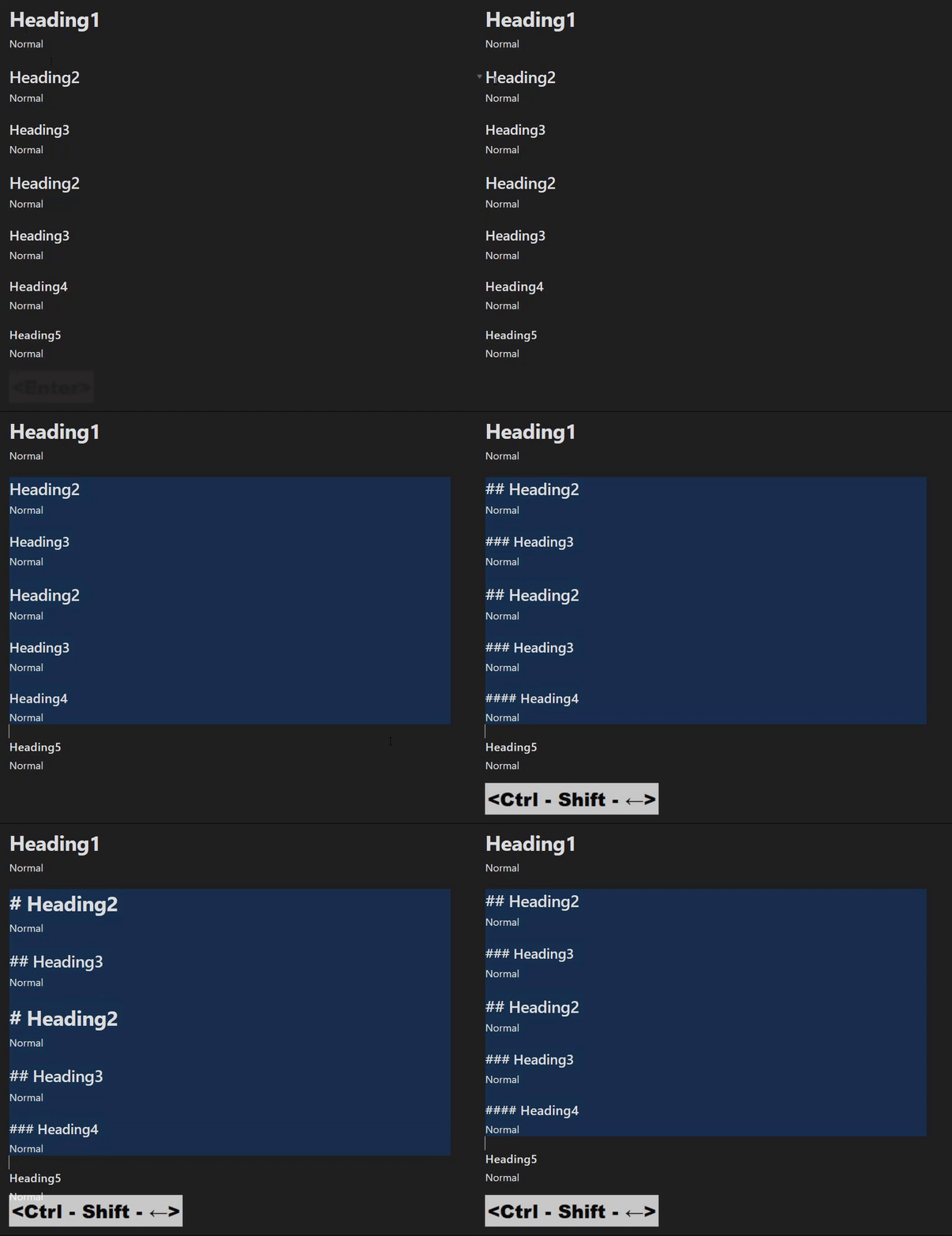
Settings
| Setting | Description | Value(Default) |
|---|---|---|
| Lower limit of heading | The lower heading size that will be decreased by the heading shift | 0~6(1) |
| Enable override tab behavior | If true, Tab execute "Increase headings" and Shift-Tab execute "Decrease headings" [^2] | boolean(false) |
[^2]: May conflict with other plugin behavior
Commands
| Command | Description | Hotkey |
|---|---|---|
| Increase headings | Increase heading of selected lines(with heading) | |
| Increase headings(forced) | Increase heading of selected lines(Even if there is no heading) | |
| Decrease headings | Decrease heading of selected lines(with heading) |
It is useful to assign a hotkey such as
Ctrl + Shift + Left/Right
Increase headingsandIncrease headings(forced)is ineffective if selected lines contains less thanLower limit of heading.Decrease headingsis ineffective if selected lines contains more than heading 6.
Insert Headings
Commands
| Command | Description | Hotkey |
|---|---|---|
| Insert heading at current level | Change current line headings to current level | |
| Insert heading at one level deeper | Change current line headings to current level + 1 | |
| Insert heading at one level higher | Change current line headings to current level - 1 |
Common Settings
Style to remove
This is the toggle between removing or retaining specific style when applying Heading in a "single" row.
Beginning
- or 1.,2.,n. or user defined string(RegExp)
| Before | After(True) | After(False) | |
|---|---|---|---|
- (ul) | - line | ## line | ## - line |
1. (ol) | 1. line | ## line | ## 1. line |
🤔(user defined) | 🤔line | ## line | ## 🤔line |
Surrounding
**, _ , etc... or user defined string(RegExp)
| Before | After(True) | After(False) | |
|---|---|---|---|
**(bold) | **line** | ## line | ## **line** |
_(italic) | _line_ | ## line | ## _line_ |
🤔(user defined) | 🤔line🤔 | ## line | ## 🤔line🤔 |
List behavior
- heading target
    - listA
        - listB
If you call 'Apply heading 2',
Nothing
## heading target
    - listA
        - listB
Subsequent listings will remain in depth and will not have the correct markdown structure.
Outdent to zero
## heading target

- listA
    - listB
Sync with headings
\t\t- ## heading target
\t\t\t- listA
\t\t\t\t- listB
Use Case
Operate headings like an outliner like the following,
## The Festival Myster -> hit "Apply 1"

This is a great document.

### Chapter One -> hit "Insert deeper"

#### Prologue -> hit "Insert deeper"

The sun was setting over the horizon...

#### The Summer Festival -> hit "Insert current"

As the townspeople gathered in the town square...

### Chapter Two -> hit "Insert higher"

#### The Mystery of the Missing Prize -> hit "Insert deeper"

As the summer festival came to a close...
If you want to make headings deeper or higher than 2, use "shift" or "apply".
LoadMap
Nothing specific at this time.
Contribute
Feel free to report issues or request features.
For plugin developers
Search results and similarity scores are powered by semantic analysis of your plugin's README. If your plugin isn't appearing for searches you'd expect, try updating your README to clearly describe your plugin's purpose, features, and use cases.