Headings in Explorer
approvedby patrickchiang
Show headings in the file explorer.
Obsidian Headings in Explorer
This Obsidian plugin makes headings first class concepts in the file explorer and consolidates navigation to a single panel.
It displays headings under documents in the file explorer for easier access. This is intended to combine the view-only features of the core outline plugin directly into the file explorer.
Since it relies on some existing core plugins, it will only work on desktop versions of Obsidian.
Usage
Headings
All headings are automatically put into a clickable hierarchy in the file explorer.
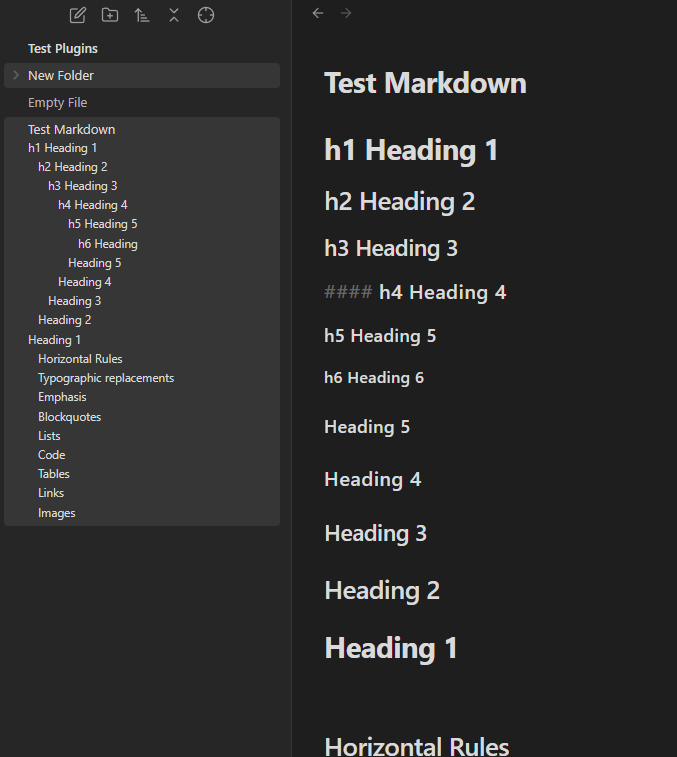
You can configure which levels of headings to include/omit in the settings.
Highlight Location
Highlight Location is a convenience button in the file explorer navbar that mimicks the reveal file location functionality. It will reveal and highlight the heading your cursor is under in the file explorer.
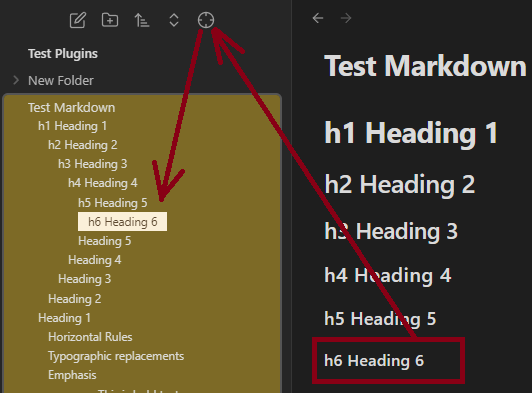
If you have multiple tabs open at the same time, it will take you to the location of the last one you clicked your cursor on.
Installing
Headings in Explorer is in the Community Plugins section of Obsidian’s settings. That is the preferred way of getting this plugin.
You can also install it manually by copying over main.js, styles.css, manifest.json to your vault VaultFolder/.obsidian/plugins/obsidian-headings-in-explorer.
Troubleshooting
If the headings aren't updating, the metadata cache might be outdated. Reloading/restarting the editor can fix it.
If there are problems with the settings or if you've accidentally changed the defaults, resetting to default might fix it.
Advanced Usage
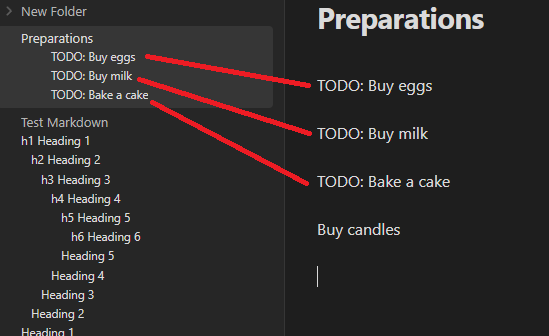
Additional non-heading text can be matched and put into the explorer as well. This is configurable in the settings. By default, entirely bolded lines are considered h7's.
For example, using this regex:
^(TODO:.*)$
You can now match lines that start with TODO: in the files to show up as if they are headings:
The headings in explorer functionality can be toggled with the command "Toggle File Explorer Headings", and you can set a hotkey for the command in your shortcuts menu to expedite the toggle.
Development
- Clone this repo.
- Make sure your NodeJS is at least v16 (
node --version). npm ioryarnto install dependencies.npm run devto start compilation in watch mode.- Feel free to file a pull request with any improvements.
For plugin developers
Search results and similarity scores are powered by semantic analysis of your plugin's README. If your plugin isn't appearing for searches you'd expect, try updating your README to clearly describe your plugin's purpose, features, and use cases.