by sots1689
Lay out Hebrew prose clause by clause (Hx/Dx, mainline/offline) with conjunction, predicate pattern, and discourse-function notes.
Hebrew Discourse Analysis
A clause-by-clause worksheet for text-linguistic discourse analysis of Hebrew prose: narrative (Hx) and direct speech (Dx), mainline and offline, with columns for the conjunction, predicate pattern, discourse function and English. A second tab lays out the story's plot as a flow chart.
It runs two ways:
- In your browser: https://sots1689.github.io/hebrew-da/ (nothing to install).
- As an Obsidian plugin: analyses are saved as
.hdafiles in your vault.
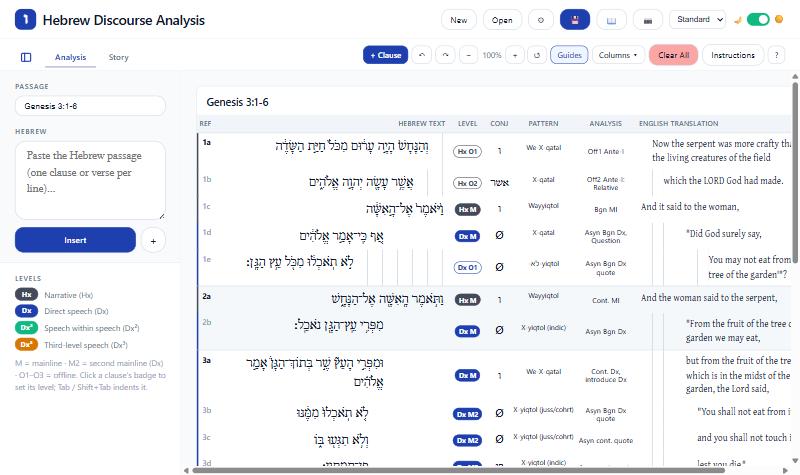
The worksheet
Ref | Hebrew (indented from the right) | Level | Conj | Predicate Pattern | Discourse Analysis | English (indented from the left)
- Levels: Hx M/O1–O3, then Dx M/M2/O1–O3, then Dx² and Dx³ for speech inside speech. Click a clause's badge to set its level.
- Indent is set separately with Tab / Shift+Tab.
- Getting text in: paste Hebrew in the sidebar and click Insert. Verse numbers come from the text, or from the passage reference plus the sof pasuq.
- Editing: Enter splits a clause; Backspace at the start joins it to the one above. Ctrl+Z / Ctrl+Y undo and redo.
- 📖 opens the Function of Communication chart at the section for the clause you're working in.
- Instructions summarizes the method; ? explains the tool.
- 📷 exports the current tab as a PNG.
- Excel import: converts the older 4-column and the newer 9-column "DA Template" workbooks (
.xlsm).
The Story tab
A canvas of plot blocks (verses, title, teaching point, function, characters, location, time, imagery) joined by arrows, which can carry labels. Drag the background or use the mouse wheel to move around, Ctrl+wheel to zoom, and Fit to see everything.
Using the web version
- Your analysis is kept in this browser as you type. It isn't sent anywhere.
- 💾 downloads it as a
.hdafile. Open opens a.hdafile or imports an Excel workbook; you can also drop a file on the page. - New starts an empty analysis. The web version holds one analysis at a time, so download the current one first if you want to keep it.
.hdafiles move freely between the web version and the Obsidian plugin.- It works best on a computer or tablet.
Installing the Obsidian plugin
Once it's listed: Settings → Community plugins → Browse → search "Hebrew Discourse Analysis".
Before then, either:
- install BRAT and add
SotS1689/hebrew-daas a beta plugin, or - download
main.js,manifest.jsonandstyles.cssfrom the latest release into<your vault>/.obsidian/plugins/hebrew-da/, then turn the plugin on in Settings → Community plugins.
Create an analysis with the ו ribbon icon or the command "Hebrew Discourse Analysis: Create new analysis". Use "Import Excel DA workbooks (.xlsm)" to convert old workbooks.
Settings: color theme (Standard, Theme, which follows your Obsidian theme, and five color schemes), light/dark mode, UI size, Hebrew font and size, indent width, indent guides.
The plugin works offline and makes no network requests.
Development
npm install
npm run build     # plugin: main.js (also copied into the author's test vault)
npm run dev       # plugin, watch mode
npm run web       # web version: docs/ (served by GitHub Pages)
npm run harness   # dev/harness.js: the view on a plain page for checks (open dev/index.html)
src/model.ts: data model, levels, verse labels, pattern-to-chart mappingsrc/HDAView.ts: the worksheet view;src/StoryBoard.ts: the Story tabsrc/reference.ts: the Function of Communication chart and instructionssrc/xlsmImport.ts: Excel importerweb/: the web version's page and its stand-in for the Obsidian API
Releasing: see PUBLISHING.md.
License
MIT. Uses html2canvas and JSZip (both MIT).
For plugin developers
Search results and similarity scores are powered by semantic analysis of your plugin's README. If your plugin isn't appearing for searches you'd expect, try updating your README to clearly describe your plugin's purpose, features, and use cases.