Home Launcher
approvedby Soulbits
Replaces new tabs with a custom home page and start page: search names and note contents, add your own launcher buttons, and see recent files and bookmarks. - This plugin has not been manually reviewed by Obsidian staff.
Home Launcher
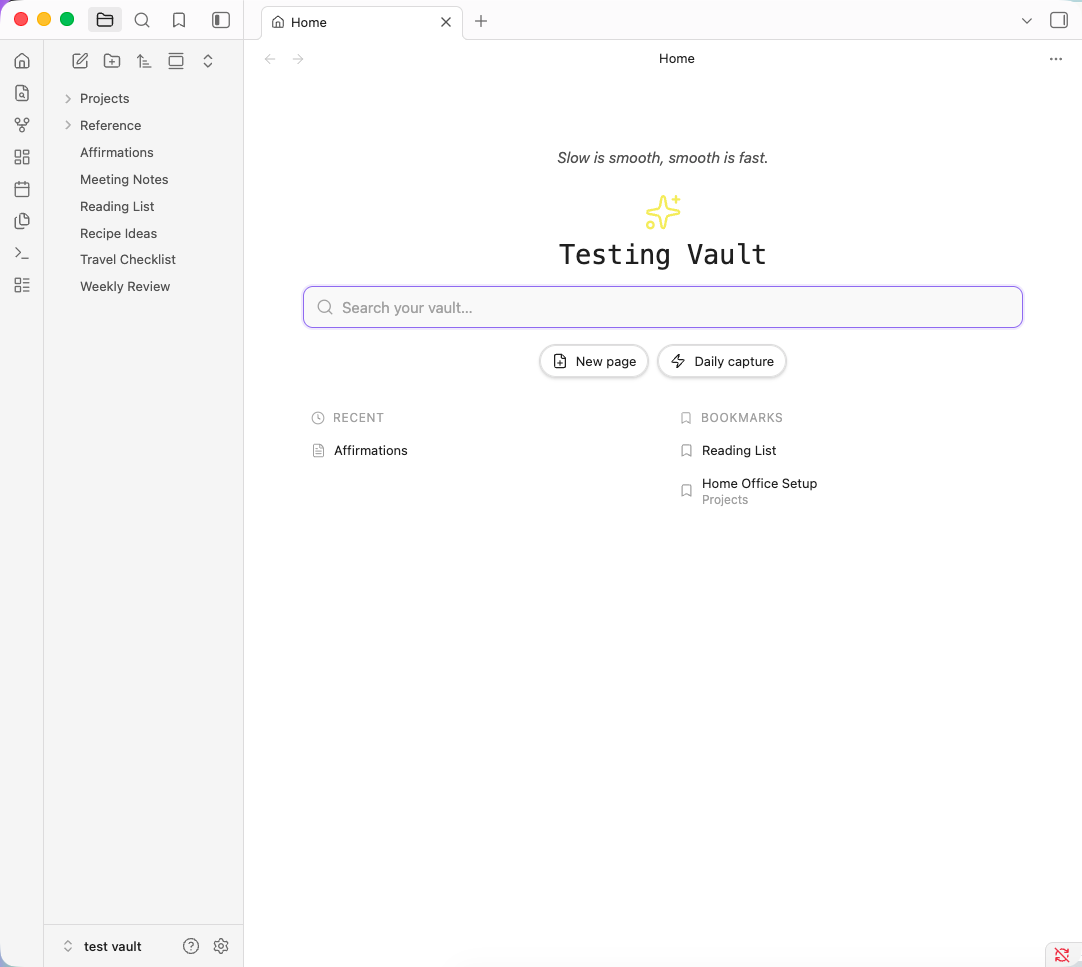
Replaces new tabs in Obsidian with a home page you compose: a fast search across your whole vault, buttons you define yourself, and your recent files and bookmarks.
Why
Most home page plugins give you a fixed set of blocks. Adding a button means waiting for the author, or bolting a second plugin onto the first. Home Launcher treats buttons as data — you add, reorder, hide and configure them in settings, and each one can create a page, run any command, open a file, reveal a folder, run a search, or open a URL.
Features
Search
Home Launcher includes its own built-in search, which is used by default. It matches file names, paths, aliases, headings, tags, and note contents. Every result explains itself: the note's H1, the section heading the match sits under, an excerpt of the matching line, the folder it lives in, and how many times your terms appear.
If you already use the separately installed Omnisearch community plugin, you can choose Omnisearch instead under Search → Search engine. Home Launcher connects to its public API and shows its results in the same search box; it does not include or install Omnisearch.
- Names, aliases, headings and tags resolve instantly from the metadata cache
- Note contents are scanned in the background, so you never wait on a body search to see an obvious filename hit
- Optional unresolved links — select one to create the note
- Built-in search remains self-contained, with no dependency on another search plugin
- Optional Omnisearch provider — use its index and ranking in the same home-page UI
- Keyboard driven:
↑ ↓to navigate,↵to open,Ctrl/Cmd ↵for a new tab,Escto clear
Buttons
Define your own. Each has a label, any Lucide icon, and one action:
| Action | What it does |
|---|---|
| Create new page | Makes and opens a note, optionally in a set folder |
| Quick capture | Appends a line to today's daily note or a file you choose |
| Run a command | Any command in your vault, picked from a dropdown |
| Open a file | Jumps straight to a note |
| Reveal a folder | Shows a folder in the file explorer |
| Run a search | Opens core search with a saved query |
| Open a URL | Any http or https link |
Buttons can be reordered, and hidden without deleting them. Three styles: pill, icon-only, or card grid.
Quick capture
Appends to today's daily note, following your existing Daily Notes settings for folder, date format and template. Optionally targets a named heading, adding entries at the end of that section so they stay in order. Or point it at any single file instead.
Supports {{text}}, {{time}} and {{date}} in the line format.
Quote of the day
Point at a note holding quotes or affirmations and one appears above your title, in italic. One a day, or random on every open — click to step to the next either way.
The file can be written however you like: one per line, - bullets, > blockquotes, or
longer entries separated by a --- rule. Headings and frontmatter are ignored. End a line
with — Author for attribution.
Recent files and bookmarks
Recents are tracked as you open notes. Bookmarks come from Obsidian's core Bookmarks plugin. Both rows support hover preview through the core Page preview plugin, which you can toggle on or off for this plugin specifically under Settings → Page preview.
Settings
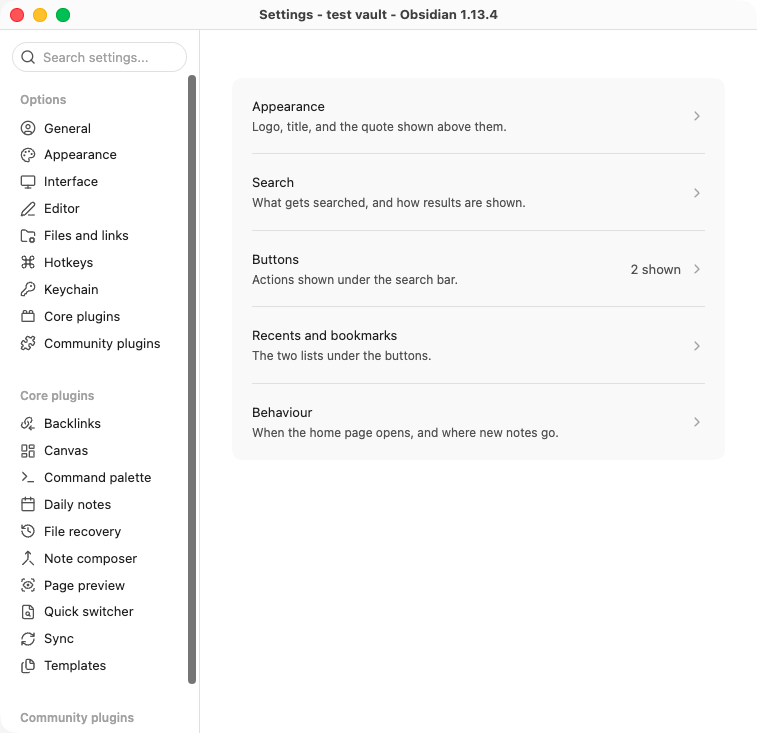
Grouped into five pages — Appearance, Search, Buttons, Recents and bookmarks, Behaviour — rather than one long scroll. Logo, title, colours, fonts, result counts, search scope, startup behaviour and new-tab replacement are all configurable.
Search defaults to Home Launcher's built-in engine. To use the optional Omnisearch provider, install and enable Omnisearch separately, then choose it under Search → Search engine. Home Launcher does not bundle or install Omnisearch; if it is unavailable, search falls back to the built-in engine.
Built on Obsidian's declarative settings API, so every setting is findable from Obsidian's own settings search, and paths use real file and folder pickers instead of typed-out text.
Compatibility
| Your Obsidian | Version you get |
|---|---|
| 1.13.0 and later | 1.2.0 |
| 1.11.0 – 1.12.x | 1.0.2 |
| Older than 1.11 | not supported |
You don't have to pick. Obsidian reads versions.json and installs the newest release your
app can run, so installing from the community browser on 1.12 quietly gets you 1.0.2.
1.0.2 has the same search, buttons, quote, recents and bookmarks. The difference is the settings screen: it uses the older API, so settings don't show up in Obsidian's settings search and paths are typed by hand rather than picked. Everything on the home page itself is identical.
Installation
From the community plugins list
Settings → Community plugins → Browse → search for "Home Launcher" → Install → Enable.
Requires Obsidian 1.13.0 or later.
Manual
Download main.js, manifest.json and styles.css from the
latest release and drop them into
<your vault>/.obsidian/plugins/home-launcher/, then reload Obsidian and enable the plugin.
Development
npm install
npm run dev
npm run dev starts esbuild in watch mode. Set OBSIDIAN_PLUGIN_DIR to build straight into a
vault:
OBSIDIAN_PLUGIN_DIR="/path/to/vault/.obsidian/plugins/home-launcher" npm run build
What it accesses, and why
- Reads your file list. Search has to know what exists, so it enumerates file paths through Obsidian's own vault API. This is what powers matching on names, paths, aliases, headings and tags.
- Reads note contents. Only when content search is on, and only to find your search terms and build the excerpt shown in the result. Large files are skipped to keep typing responsive.
- Writes only when you ask. Creating a page, quick capture, and creating a note from an unresolved link. Nothing is written in the background.
Nothing leaves your vault. There are no network requests, no telemetry, no analytics, and no external services. Search runs entirely locally and does not depend on any other plugin. The only thing that opens a URL is a button you configured to do exactly that.
Credits
Built by SoulBits with Claude Code.
License
For plugin developers
Search results and similarity scores are powered by semantic analysis of your plugin's README. If your plugin isn't appearing for searches you'd expect, try updating your README to clearly describe your plugin's purpose, features, and use cases.