New Tab Pins
approvedby Joah Peng
Turn every empty tab into a calm launcher for pinned notes, instant search, and recent files. - This plugin has not been manually reviewed by Obsidian staff.
New Tab Pins
Turn every empty Obsidian tab into a calm launcher for your vault.
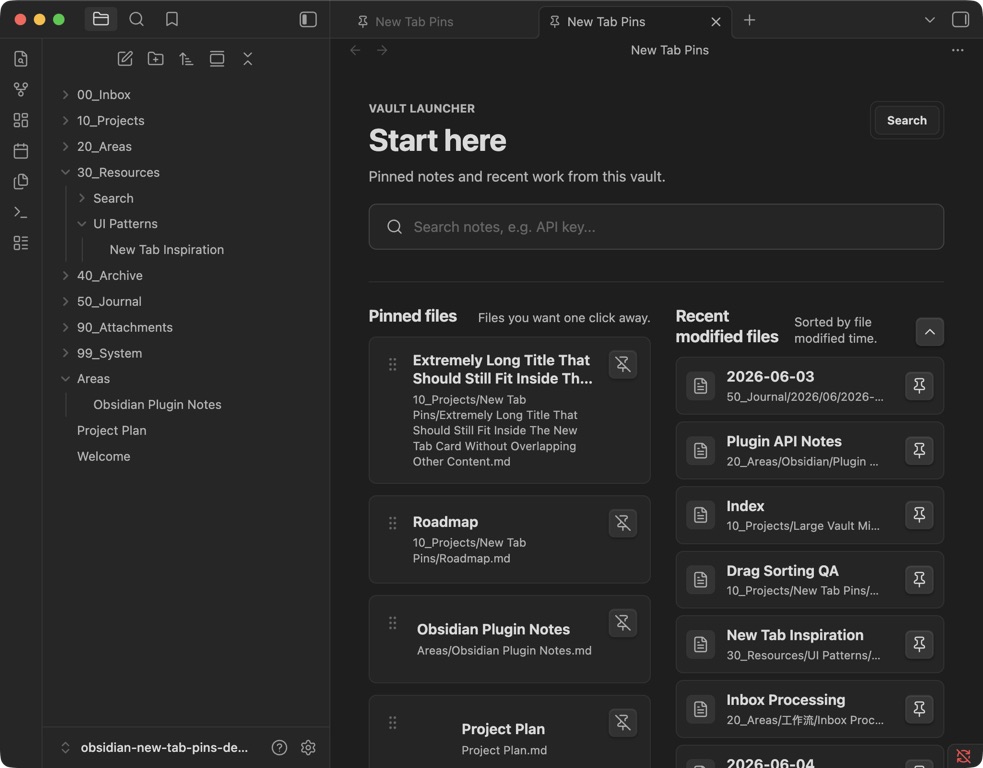
New Tab Pins puts search, important notes, and recent work in one focused home view—without making you build or maintain a dashboard note.
Community review: The plugin has been submitted to the Obsidian Community Plugin directory. Until the review is complete, install it with BRAT or from the latest GitHub release.
Why New Tab Pins
- Keep key notes one click away. Pin a Markdown file from its context menu or drag it onto the home view.
- Find notes immediately. Search Markdown files by title or path.
- Resume recent work. Jump back into recently modified notes.
- Stay focused. No statistics, widgets, or dashboard note to maintain.
- Keep your notes private. The plugin makes no network requests and never modifies note contents.
Install the public beta
BRAT
-
Install and enable the BRAT community plugin.
-
Run BRAT: Add a beta plugin for testing from the command palette.
-
Paste this repository URL:
https://github.com/ptspzy/obsidian-new-tab-pins -
Enable New Tab Pins in Settings → Community plugins.
Manual installation
Download manifest.json, main.js, and styles.css from the latest release, then copy them into:
<your-vault>/.obsidian/plugins/new-tab-pins/
Reload Obsidian and enable New Tab Pins in Settings → Community plugins.
Use it
- Run New Tab Pins: Open home tab from the command palette.
- Pin a note from the file explorer context menu, or drag a Markdown file onto the pinned area.
- Drag pinned notes to reorder them.
- Search your vault or open a recently modified note from the same view.
Available commands:
- Open home tab
- Replace current tab with home
- Pin current file
- Unpin current file
Settings
- Home title and subtitle
- Automatically replace newly focused empty tabs
- Comfortable or compact layout density
- Starter pins used when no notes have been pinned yet
Privacy and data safety
New Tab Pins:
- does not connect to the internet;
- does not collect analytics;
- does not create, edit, rename, or delete notes;
- stores only its settings and pinned file paths in Obsidian's plugin data.
Compatibility
The custom home view and commands use stable Obsidian plugin APIs. Auto-open on empty tabs relies on Obsidian exposing blank tabs as an empty view type; if a future Obsidian update changes that behavior, disable the setting and open the home view from the command palette.
The plugin supports desktop and mobile. Drag-to-pin and drag-to-reorder are designed primarily for desktop use.
Development
This project uses pnpm:
pnpm install
pnpm dev
Run the complete pre-release gate:
pnpm release:check
Run the complete privacy gate, including the pinned Gitleaks binary:
pnpm privacy:full
Installing dependencies configures the versioned pre-commit hook in .githooks/.
The hook blocks unapproved author emails, local absolute paths, credential-shaped
values, private URL parameters, sensitive filenames, and unreviewed image changes.
Approved public identities, URL hosts, and reviewed image hashes live in
privacy-allowlist.json.
Stage the three files required by an Obsidian GitHub release:
pnpm release:stage
The assets are written to dist/.
Feedback
Found a bug or have a focused feature request? Open an issue.
License
For plugin developers
Search results and similarity scores are powered by semantic analysis of your plugin's README. If your plugin isn't appearing for searches you'd expect, try updating your README to clearly describe your plugin's purpose, features, and use cases.