Homepage Dashboard
approvedby pengze
A theme-aware homepage with reorderable widgets for notes, tasks, journals, and projects. - This plugin has not been manually reviewed by Obsidian staff.
Homepage Dashboard
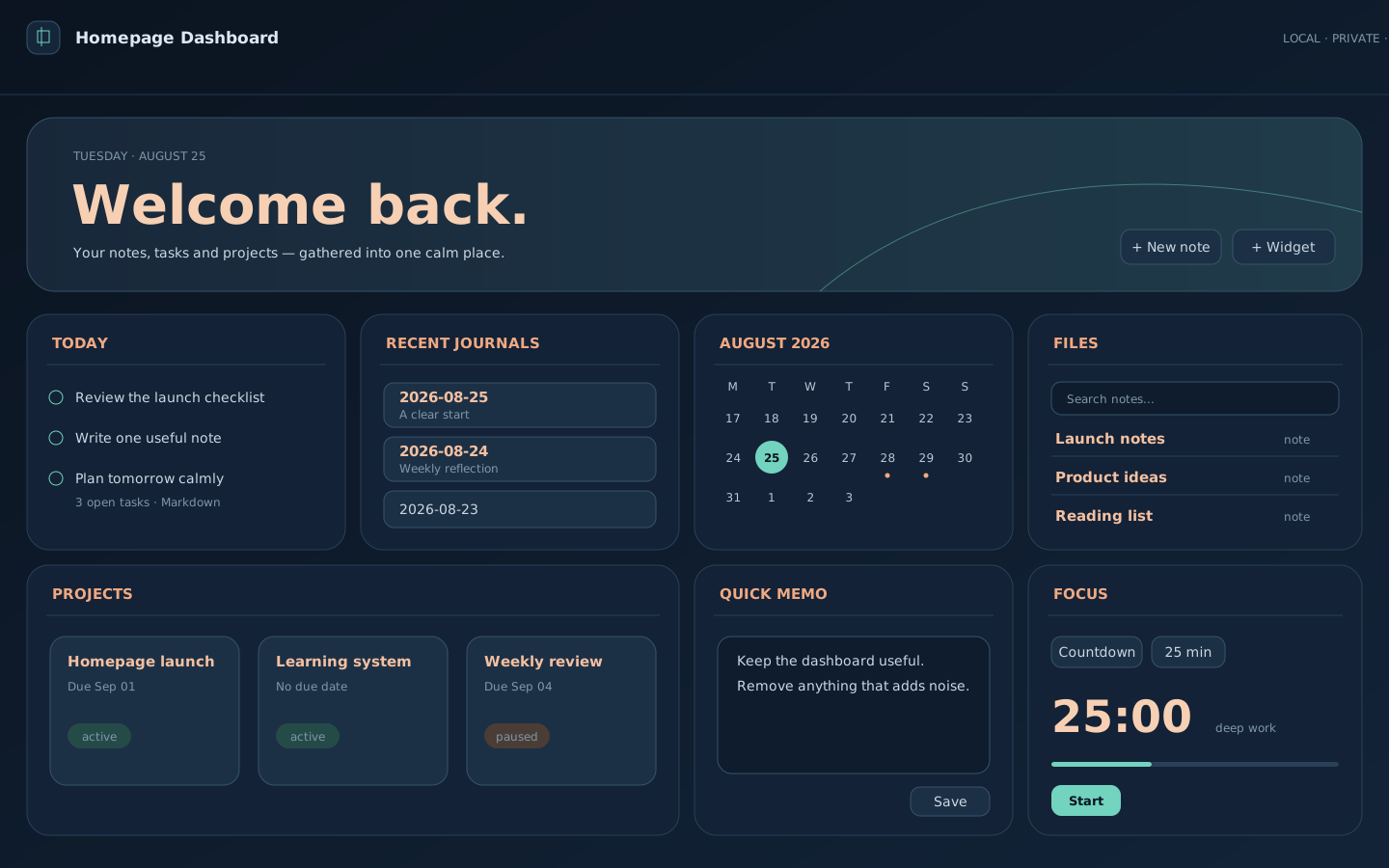
A calm, zero-configuration homepage that turns an existing Obsidian vault into one focused screen.
Homepage Dashboard discovers Markdown notes, tasks, journals, and projects, then lets you work with them without moving data into a proprietary database. It follows the active Obsidian theme and does not require Dataview, Tasks, QuickAdd, an account, or an internet connection.
Highlights
- Opens as a dedicated fullscreen homepage on startup.
- Scans the existing vault automatically—no migration or closed database.
- Keeps the core dashboard visible in a compact responsive grid.
- Reorders widgets by dragging; widgets can be added, hidden, and restored.
- Completes tasks and updates project status in the original Markdown files.
- Opens an existing daily note from the calendar or creates it in the configured journal folder.
- Offers configurable countdown and count-up focus timers from 1 to 180 minutes.
- Follows light, dark, and third-party Obsidian themes.
Widgets
| Widget | Purpose |
|---|---|
| Todo | Lists every open Markdown checkbox and writes completions back safely. |
| Recent journals | Opens the latest detected daily notes. |
| Calendar | Shows journal/task activity and opens or creates a note for any date. |
| File database | Searches notes and displays them as a table, cards, or a list. |
| Projects | Tracks due dates and status; supports reorder, hide, and restore. |
| Memo | Saves quick text to an ordinary Markdown file. |
| Focus | Runs configurable countdown or count-up sessions. |
| Recent notes | Opens recently modified notes. |
Requirements
- Obsidian 1.13.7 or newer.
- Desktop app. Mobile support is not declared for the initial release.
Installation
Community plugins
- Open Settings → Community plugins in Obsidian.
- Search for Homepage Dashboard.
- Select Install, then Enable.
Manual installation
Download main.js, manifest.json, and styles.css from the latest release and place them in:
<vault>/.obsidian/plugins/homepage-dashboard/
Reload Obsidian and enable Homepage Dashboard under Community plugins.
Note conventions
Tasks use standard Markdown checkboxes. An optional due date may use 📅 YYYY-MM-DD:
- [ ] Prepare the weekly review 📅 2026-08-28
Daily notes are detected from YYYY-MM-DD.md filenames. Configure a journal folder in the plugin settings if daily notes are not stored at the vault root.
Projects can live in the configured project folder or use frontmatter:
---
type: project
status: active
due: 2026-09-01
---
Privacy and data safety
- No network requests.
- No accounts, analytics, ads, or telemetry.
- No data is uploaded or stored outside the vault.
- Plugin preferences are stored through Obsidian's standard plugin data API.
- Markdown files are modified only after explicit actions such as completing a task, saving a memo, changing project status, or creating a daily note.
Please back up important vaults as you would when using any plugin that edits notes.
Development
npm install
npm test
npm run typecheck
npm run package
The packaged plugin is written to dist/homepage-dashboard.
Support and security
Report bugs through GitHub Issues. For security reports, see SECURITY.md.
License
For plugin developers
Search results and similarity scores are powered by semantic analysis of your plugin's README. If your plugin isn't appearing for searches you'd expect, try updating your README to clearly describe your plugin's purpose, features, and use cases.