Odaily
approvedby guchang
A schedule-focused Obsidian plugin for capturing ideas, managing notes and tasks, and boosting personal productivity. - This plugin has not been manually reviewed by Obsidian staff.
★ 5 stars↓ 1,538 downloadsUpdated 3mo agoMIT
Odaily
A schedule-focused Obsidian plugin for capturing ideas, managing notes and tasks, and boosting personal productivity.
Screenshots
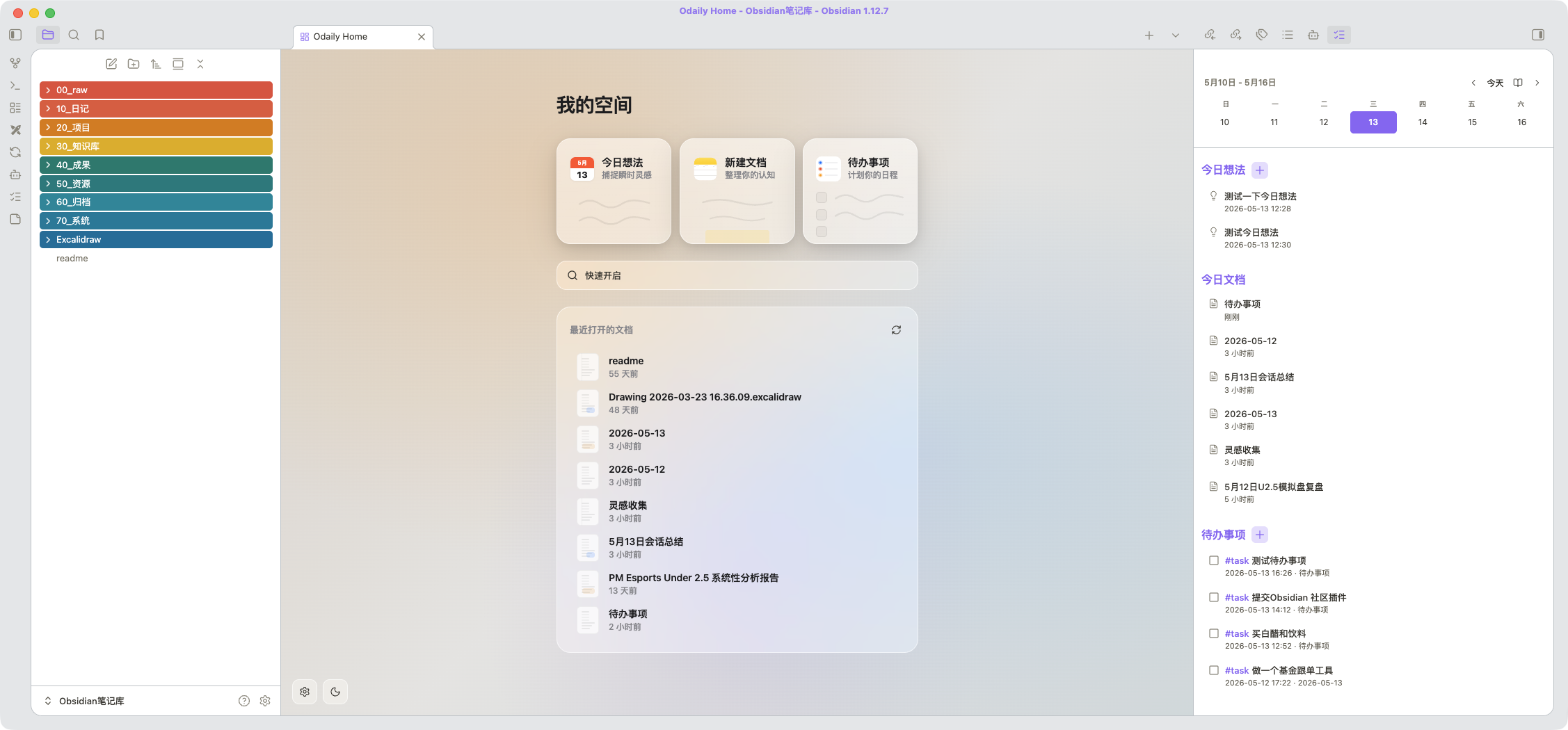
Features
Home View (New Tab Page)
- Quick Note — opens today's daily note in one click
- New Document — creates an untitled document in the vault's configured new note folder
- Todo List — add tasks to your daily note or a dedicated file
- Quick Switcher —
Cmd/Ctrl+Ostyle search from the home screen - Recent Files — shows recently opened or modified notes
- Custom Backgrounds — set per-theme (light/dark) backgrounds from vault images, URLs, or CSS gradients
- Theme Toggle — switch between light and dark mode from the home screen
Sidebar (Overview Panel)
- Calendar Week/Month View — navigate by day, week, or month with a date picker
- Daily Memos — capture
#memotagged thoughts with timestamps - Today's Documents — see files modified today (or selected date)
- Task Management — view and complete open tasks with 1-second undo confirmation
- Completed Tasks — see what was finished today with completion timestamps
- Tag Filtering — filter tasks by custom tags (e.g.,
#todo,#待办) - Copy Day Summary — copy the selected day's memos, docs, tasks, and completed items to clipboard
- Search — search and highlight keywords across all sidebar sections
Commands
Open Odaily home— open the home view in a new tabOpen Odaily sidebar— open the overview panel in the right sidebarOdaily: add memo— capture a quick thought to your daily noteOdaily: add todo— add a task to your configured target file
Settings
- Light/Dark Background: Set custom backgrounds using vault image paths, external URLs, CSS colors, or CSS gradients. Light and dark themes are configured independently.
- Task Tags: Filter the sidebar task list to show only tasks matching specific tags.
- Todo File: Choose where new tasks are saved (leave empty to use daily notes).
- Todo Position: Append new tasks to the top or bottom of the target file.
Installation
From Community Plugins
- Open Obsidian Settings > Community Plugins
- Disable Safe Mode if needed
- Click Browse and search for "Odaily Home"
- Install and enable
Manual Installation
- Download the latest
main.js,manifest.json, andstyles.cssfrom GitHub Releases - Copy them into
<vault>/.obsidian/plugins/odaily-home/ - Restart Obsidian or reload plugins
- Enable the plugin in Settings > Community Plugins
BRAT (Beta)
- Install the BRAT plugin
- Add
guchang/Odailyas a beta plugin - BRAT will keep the plugin updated automatically
Development
git clone https://github.com/guchang/Odaily.git
cd Odaily
npm install
npm run dev    # watch mode
npm run build  # production build
For local testing, symlink the plugin folder:
ln -s $(pwd) "<vault>/.obsidian/plugins/odaily-home"
License
MIT. See LICENSE for details.
For plugin developers
Search results and similarity scores are powered by semantic analysis of your plugin's README. If your plugin isn't appearing for searches you'd expect, try updating your README to clearly describe your plugin's purpose, features, and use cases.