iCal Pro
approvedby liuh886
Sync tasks to Google, Apple, and Outlook calendars via a standards-compliant iCalendar (ICS) feed with smart date inheritance. - This plugin has not been manually reviewed by Obsidian staff.
iCal Pro for Obsidian
Manage your tasks in Markdown and expose them to Google Calendar, Apple Calendar, and Outlook via standards-compliant iCalendar feeds.
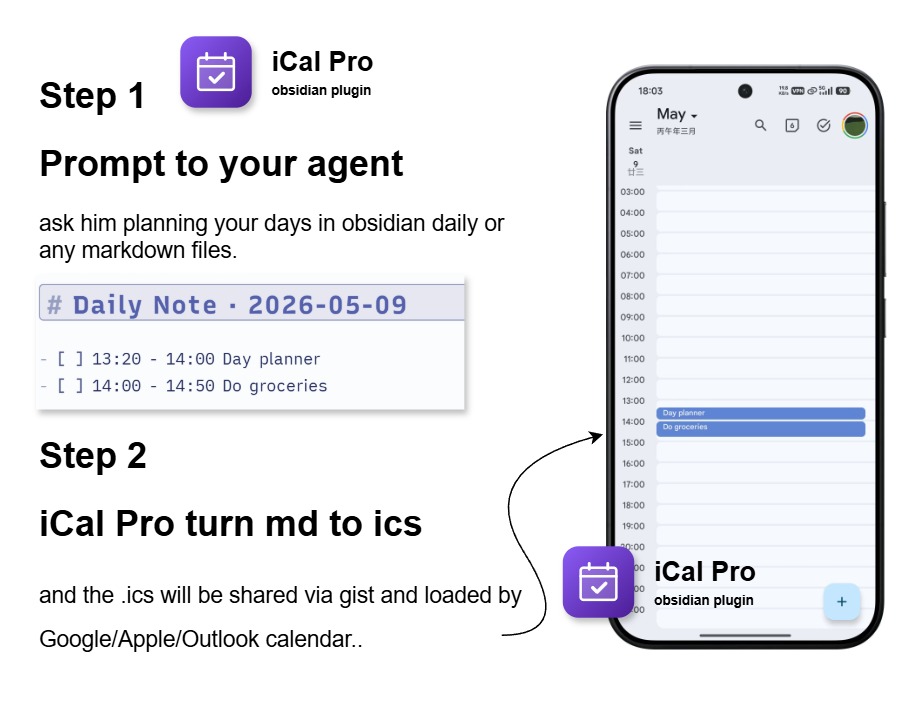
The Professional Standard for Obsidian Calendar Sync.
- High-Fidelity: Strict RFC 5545 compliance (folding, CRLF, escaping).
- Zero Dependency: Works natively with Tasks and Day Planner syntax without requiring those plugins to be installed.
- Privacy First: Local-first architecture with optional GitHub Gist sync.
- Deep Logic: Intelligent
VEVENTvsVTODOsemantic splitting.
Privacy & Security
iCal Pro is built with a local-first philosophy.
- No Data Collection: We do not track your usage or collect any personal data.
- Direct Sync: Your calendar is synced directly from your device to your local file or GitHub Gist.
- Local Storage: Your GitHub PAT is stored locally by Obsidian plugin data (plaintext, not encrypted) and is only used to communicate with the GitHub API.
Core Capabilities
- Intelligent Sync: Automatically splits tasks into
VEVENT(timed) andVTODO(dated/floating). - Zero-Dependency Discovery: Inherits dates from Daily Note filenames or headings without requiring extra plugins.
- Reliable Identity: Stable
UIDgeneration ensures no duplicates when tasks move between files. - Flexible Destinations: Sync to a local vault file or a private GitHub Gist for universal access.
Supported Syntax
iCal Pro intelligently categorizes tasks based on the presence of Time.
| Feature | Syntax Example | Result (iCalendar) |
|---|---|---|
| Event (Timed) | - [ ] 2026-04-01 13:00-14:00 Task | VEVENT (Visible in Grid) |
| Event (Timed) | - [ ] 13:00-14:00 Task | VEVENT in Day Planner mode |
| To-Do (Dated) | - [ ] 2026-04-01 Task | VTODO (Sidebar/Reminders) |
| Priority | ⏫ High / 🔼 Medium / 🔽 Low | PRIORITY: 1 / 5 / 9 |
| Alarms | ⏰ 15 (15 minutes before) | VALARM |
| Recurrence | 🔁 every weekday | RRULE |
| Description | the description under the line - [ ] | Visible in schedule description |
| Day Planner Mode | # 2026-04-01 (Any Heading) | Inherited Date |
[!IMPORTANT] Google Calendar Compatibility: Google Calendar does not support
VTODO. To see date-only tasks in Google Calendar, enable "Show dated tasks as all-day events" in Scheduling settings, or add a time (e.g.,13:00) to each task.
- Multi-Source Rules: Bind specific vault paths to distinct calendar categories.
- Granular Filtering: Include/Exclude by global filters, tags, or categories.
- Task Fidelity: Native support for Priority (
⏫🔼🔽), Recurrence (🔁), and Alarms (⏰). - Rich Context: Full body capture from indented lists or blockquotes mapped to
DESCRIPTION. - Diagnostics: Built-in sync preview, destination reports, and redacted debug bundles.
Compatible Calendars
iCal Pro produces RFC 5545 .ics output intended to work with:
- Google Calendar subscription
- Apple Calendar
- Outlook
- Proton Calendar
- Thunderbird
- Other clients that support iCalendar subscriptions
Client support for VTODO varies. Apple-oriented ecosystems usually handle VTODO better than Google Calendar.
Getting Started
Install
Community Plugins (recommended):
- Open Obsidian Settings > Community Plugins > Browse
- Search for "iCal Pro"
- Click Install, then Enable
Or install directly: Obsidian Community Plugins - iCal Pro
BRAT (beta):
- Install BRAT
- Add
liuh886/obsidian-ical-plugin-proas a beta plugin
Configure
- Open the
iCal Prosettings tab - Add at least one source path rule
- Enable at least one destination:
- local vault file export
- GitHub Gist sync
- If you use GitHub Gist sync:
- Create a secret Gist at gist.github.com and keep the generated
.icsfile there. - Copy the Gist ID from the Gist URL. In
https://gist.github.com/username/gist-id, the final segment is the Gist ID. - Generate a GitHub personal access token with only the
gistscope selected. A classic PAT is recommended for this workflow. - Fill in your GitHub username, Gist ID, and PAT in iCal Pro, then click
Validate.
- Create a secret Gist at gist.github.com and keep the generated
- Click
Sync Now - Subscribe to the generated raw Gist URL or local
.icsfile
Debugging & Logs
If you encounter issues, you can enable verbose logging:
- Open Settings > iCal Pro.
- Scroll to the Advanced & Diagnostics section.
- Toggle Debug Mode to ON.
- Open the Obsidian developer console (press
Ctrl+Shift+Ion Windows/Linux orCmd+Option+Ion macOS). - Look for logs prefixed with
[info][ical]oriCal Pro:.
You can also use the Copy Diagnostics button in the status card to generate a redacted summary of your configuration and recent sync history to include in bug reports.
FAQ
Q: Why don't my To-Dos (VTODO) show up in Google Calendar?
A: Google Calendar natively only supports VEVENT. Enable "Show dated tasks as all-day events" in Scheduling settings to export date-only tasks as all-day events. Floating tasks (no date) will remain as VTODO and still won't appear. For full VTODO support, use Apple Calendar, Microsoft Outlook, or dedicated task managers.
Q: Is it safe to use GitHub Gist? A: Yes. Your Gist is yours. We recommend using a private Gist for maximum privacy. Your Personal Access Token never leaves your machine except to communicate with GitHub.
Compatibility & Troubleshooting
- Google Calendar does not support
VTODO. By default, date-only tasks are exported asVTODO. Enable "Show dated tasks as all-day events" in Scheduling settings to export them as all-dayVEVENTinstead. This is optional and recommended for Google Calendar users. Floating tasks (no date) remainVTODOregardless of this setting. - Calendar clients may refresh subscribed ICS feeds slowly. Most clients cache subscriptions and only refresh periodically (often every 1–24 hours). After syncing, you may need to manually refresh or wait for the next polling cycle.
- Local file export requires a calendar client that can read local ICS files. Not all clients support subscribing to local files. Apple Calendar and Thunderbird work well; some clients may require the file to be served over HTTP.
- Mobile support varies by client and storage workflow. If you use local file export, the
.icsfile lives in your Obsidian vault. Mobile calendar apps may not have direct access to vault storage. GitHub Gist sync is recommended for cross-device use.
Development
npm run buildnpm run typechecknpm run test:smokenpm run validate
Credits
iCal Pro is a significantly enhanced and refactored version of the original obsidian-ical-plugin by Andrew Brereton.
This "Pro" edition maintains the original vision while introducing a completely re-engineered core for better performance, timezone reliability, and advanced task metadata support.
License
MIT
Support
If you find this plugin useful and want to support its development, you can buy me a coffee!

For plugin developers
Search results and similarity scores are powered by semantic analysis of your plugin's README. If your plugin isn't appearing for searches you'd expect, try updating your README to clearly describe your plugin's purpose, features, and use cases.