Jira Issue Manager
approvedby Alamion
Forked from Jira Issue managing
Get Jira issues, create and update them. Issue status and worklog management.
Jira Sync Plugin for Obsidian
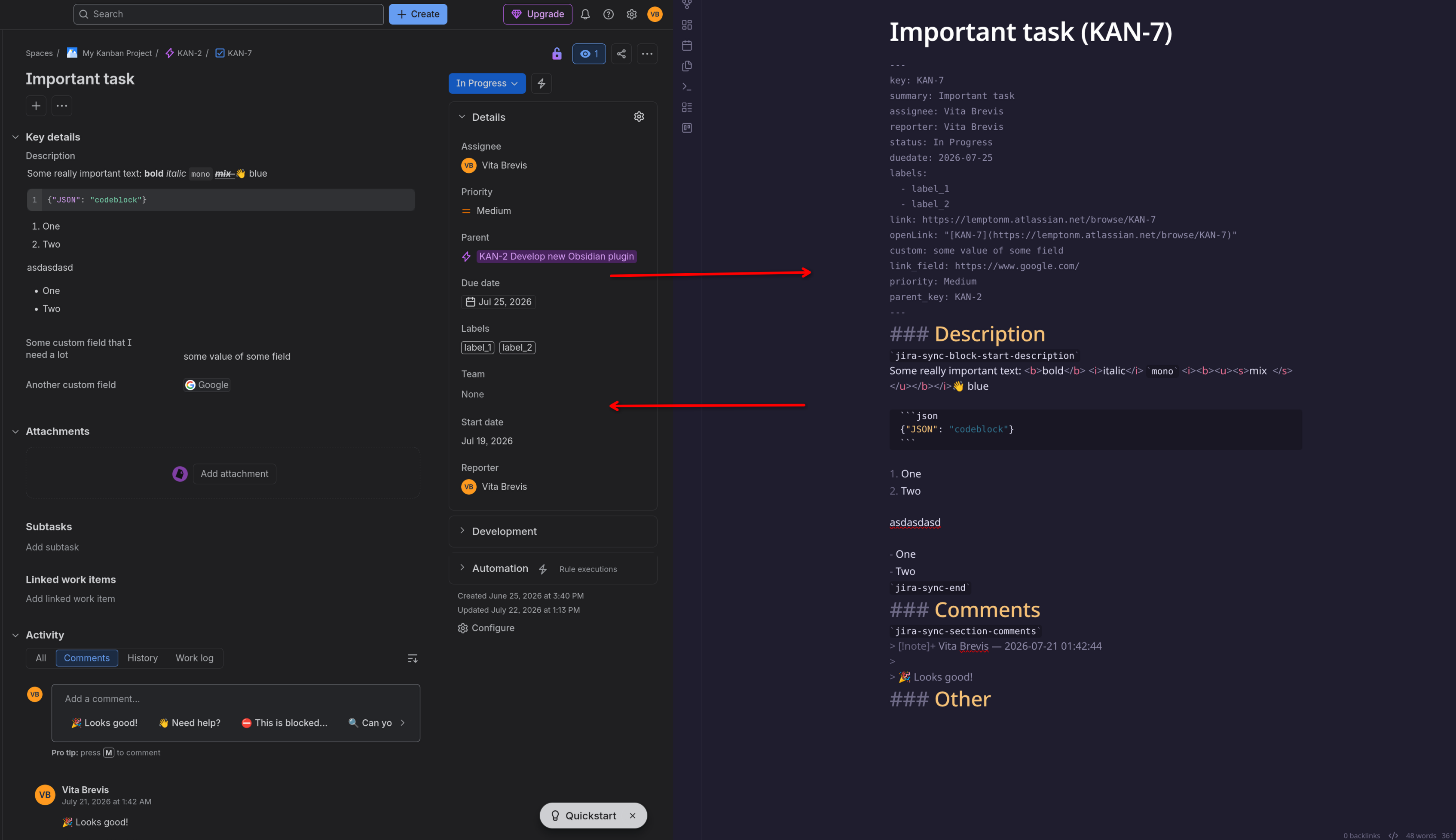
Tired of Jira plugins that only give you basic issue links and descriptions? This one's different. It brings your entire Jira workflow into Obsidian with customizable templates, deep field mapping, and seamless two-way synchronizationβincluding all those custom fields your team added over the years.
Originally forked from obsidian-to-jira, but now packed with features you won't find elsewhere.
Why this plugin exists
Other plugins treat Jira issues as read-only reference material. This one lets you:
- Build full-featured issue templates that mirror your Jira workflow
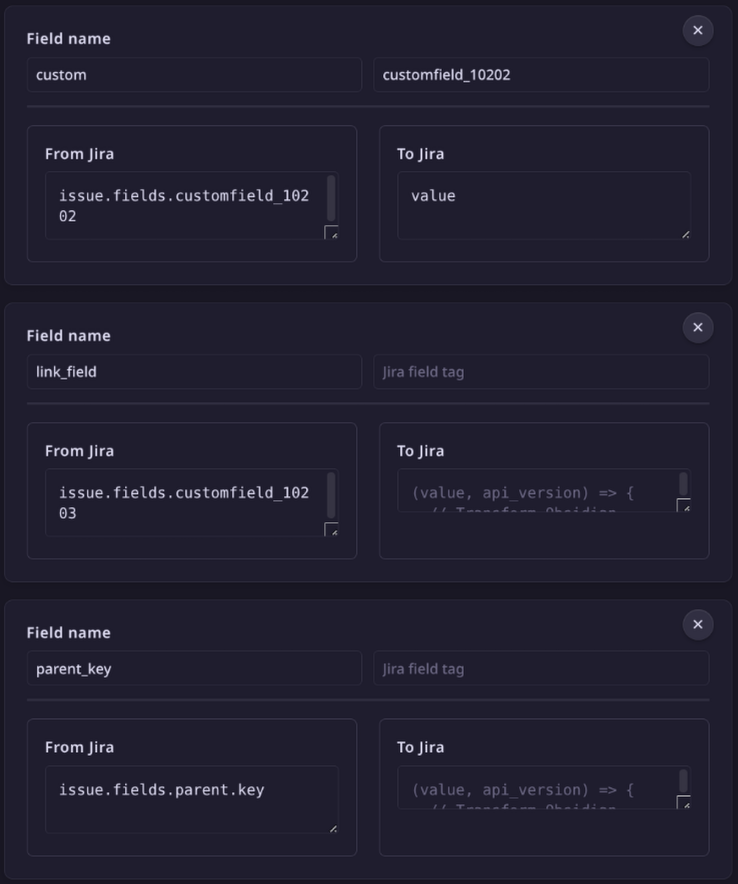
- Sync ANY fieldβeven custom ones from plugins like ScriptRunner or Insight
- Create new fields with dynamic field mapping (e.g. auto-generate browse URLs from
issue.self + issue.keyfrom API response) - Track time seamlessly with integrated work log statistics and batch operations
- Work offline in Obsidian, then sync everything back to Jira when ready
Pro Tip: While TypeScript skills help for advanced mappings, we include ready-made mappings for 90% of basic use cases.
Killer features
π§© Your Jira, your template
Create Obsidian notes that look exactly like your team's Jira workflow. Pull in:
- Standard fields (status, assignee, priority)
- Custom fields (progress bars, sprint IDs, epic links)
- Plugin fields (ScriptRunner outputs, Insight assets)
- Inline indicators that work anywhere in your text
Brief example:
Here is how template can look like:
---
key: ""
status: "" <!-- Built-in field -->
priority: "" <!-- Another built-in field -->
sprint: "" <!-- Custom field -->
epic: "" <!-- Another Custom field -->
link: "" <!-- Built-in auto-generated link -->
---
### Customer Impact `jira-sync-section-customfield_10842` <!-- From your CRM plugin -->
### Other
User `jira-sync-inline-start-assignee``jira-sync-inline-end` should be working on this. <!-- Inline indicator, built-in -->
Expected time spent on the task: `jira-sync-line-originalEstimate` <!-- Line indicator, custom -->
Here is how it will look after syncing:
---
key: JIR-1234
status: In Progress
priority: Medium
sprint: Mobile-Q2-24
epic: API-Overhaul
link: http://jira.local:8000/browse/JIR-1234
---
### Customer Impact `jira-sync-section-customfield_10842`
The current API structure is too fragmented and requires standardization.
### Other
User `jira-sync-inline-start-assignee`Jack A.M.`jira-sync-inline-end` should be working on this.
Expected time spent on the task: `jira-sync-line-originalEstimate`1w 3d
Here is how the user will see it most cases (all indicators are hidden from view):
---
key: JIR-1234
status: In Progress
priority: Medium
sprint: Mobile-Q2-24
epic: API-Overhaul
link: http://jira.local:8000/browse/JIR-1234
---
### Customer Impact
The current API structure is too fragmented and requires standardization.
### Other
User Jack A.M. should be working on this.
Expected time spent on the task: 1w 3d
π Multiple authentication methods
Choose the authentication that fits your security requirements:
- Bearer Token (PAT) - Personal Access Token for secure API access
- Basic Auth (Username + PAT) - Username with Personal Access Token
- Session Cookie (Username + Password) - Traditional authentication
Security Note: When using PAT authentication, ensure
write:jira-workandread:jira-workscopes are enabled.
π Two-way sync that doesn't fight you
- Smart conflict resolution when notes change locally while syncing
- Partial updatesβedit just the fields you care about
- Worklog batching push a week's worth of time entries at once
- Status management update issue status directly from Obsidian
βοΈ Field mapping kitchen
We include mappings for:
- Basic fields (like status, priority, assignee)
- Temporal fields (created, updated, due dates)
- Calculated fields (progress %, time estimates, custom formulas)
- Bring your own for custom integrations and complex transformations
π Integrated work log statistics
- No external plugins required - everything is built-in
- Dynamic time period selection - view stats for days, weeks, or months
- Batch work log submission - send multiple time entries at once
- Visual progress tracking - see your work patterns at a glance
Quick start
- Install: Community plugins β Search "Jira Issue Manager"
- Connect: Settings β Choose authentication method + add your Jira URL + credentials
- Go:
Get issue from Jira with custom keyfrom command palette- Edit like any note using our flexible indicator system
- When you are ready β
Update issue in Jira- changes sync back
What makes us different
- π― No external dependencies - Statistics and work tracking built right in
- π§ Flexible indicators - Use
section,line, orinlinepatterns wherever you need them - π Real-time insights - See your work patterns and productivity trends
- π True two-way sync - Create, update, and manage issues entirely from Obsidian
- β‘ Batch operations - Handle multiple work logs and updates efficiently
Documentation
For detailed setup, configuration, and advanced usage:
Ready to transform your Jira workflow? Install the plugin and start building your perfect issue management system in Obsidian today!
For plugin developers
Search results and similarity scores are powered by semantic analysis of your plugin's README. If your plugin isn't appearing for searches you'd expect, try updating your README to clearly describe your plugin's purpose, features, and use cases.