Jira Issue
approvedby Obsidian-jira-plugin
Forked from marc0l92/obsidian-jira-issue
Track the progress of Atlassian Jira issues from your notes.
Obsidian jira-issue

📢 Maintenance & Acknowledgement
This plugin was originally created and maintained by @marc0l92 (Marc), to whom the entire community is deeply grateful for his dedication and foundational work.
It is now actively maintained and updated by the Obsidian-jira-plugin community team.
This plugin allows you to track the progress of Atlassian Jira issues from your Obsidian.md notes.
🚀 Fork enhancements
This fork adds Android compatibility, safer credentials, flexible Jira links, animated overflow for issue tags, configurable Render Styles, and robust Epic Link/Parent alias resolution.
- Jira responses containing valid JSON are accepted on Android even when the
Content-Typeresponse header is missing or uses different casing. - Jira passwords and API tokens can be moved out of plain-text configuration into Obsidian secure storage, or encrypted with an AES-GCM master passphrase for cross-platform vault synchronization. Existing configurations remain in plain text until the storage method is changed explicitly.
- Each account can define an optional Web Base URL when its browser-facing Jira address differs from the API host.
- Long issue summaries and statuses stay compact and can optionally scroll to reveal their complete text in inline issues,
jira-issueblocks, and list search results. - Render Style Selector: Switch dynamically between Modern (Obsidian-native pastel status badges and borders) and Classic (legacy Bulma tags) from
Settings > Jira Issue > Render stylewith instant live workspace re-rendering. - Epic Link & Parent Aliases: Custom field columns
$Epic Link,$Epic Name,$Parent, and$Parent Linkinjira-searchqueries automatically fall back to Jira's modernparent/epicAPI objects, preserving compatibility with both legacy Jira Server and modern Jira Cloud instances. - Maximum widths are configurable from
Settings > Jira Issue > Renderingand default to20remfor summaries and2remfor statuses. - Overflow animation is disabled by default. It can be enabled from
Settings > Jira Issue > Rendering, only runs when text actually overflows, and respects the operating system's reduced-motion preference.

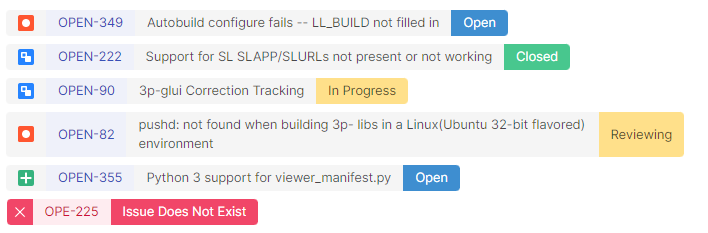
Documentation
Check out the complete documentation to start using Jira-Issue.
Installation
From the obsidian app go in Settings > Third-party plugins > Community Plugins > Browse and search for jira-issue.
Configuration
Use the plugin settings (Settings > Jira Issue) to configure your Atlassian Jira connections, security preferences, and visual styling:
- Security & Credential Storage: Choose between OS Keychain (SecretStorage) (desktop native), Master Passphrase (AES-256-GCM) (encrypted for synced vaults), or Plaintext (
data.json). - Render Style: Choose Modern (soft pastel badges, Obsidian-native) or Classic (legacy Bulma tags).
- Web Base URL: Optional browser-facing base URL used for links rendered in notes (useful when your public web address differs from the internal API endpoint or reverse proxy).
- Disable Icon Fetching: Per-account toggle to disable downloading icons and avatars from the Jira server and instead use upstream official Atlassian SVG icons.
- Use 2025 search api: Account toggle for modern Jira Cloud search API compatibility (prevents HTTP 410 errors).
Markdown Syntax
The plugin support the following components:
📃jira-issue:
- Documentation
- Example:
```jira-issue
AAA-111
AAA-222
https://my.jira-server.com/browse/BBB-333
# This is a comment
```
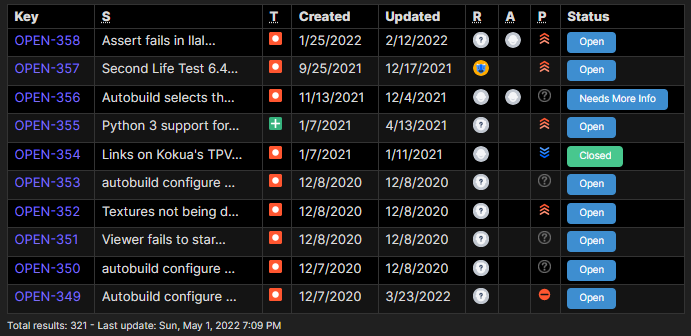
🔎jira-search
- Documentation
- Simple example:
```jira-search
resolution = Unresolved AND assignee = currentUser() AND status = 'In Progress' order by priority DESC
    ```
- Advanced example:
```jira-search
type: TABLE
query: status = 'In Progress' order by priority DESC
limit: 15
columns: KEY, SUMMARY, -ASSIGNEE, -REPORTER, STATUS, NOTES
```
🔢jira-count
- Documentation
- Example:
```jira-count
project = REF AND status changed to (Done, "Won't Fix", Archived, "Can't Reproduce", "PM Validated") after -14d
```
🏷️Inline issues
- Documentation
- Example:
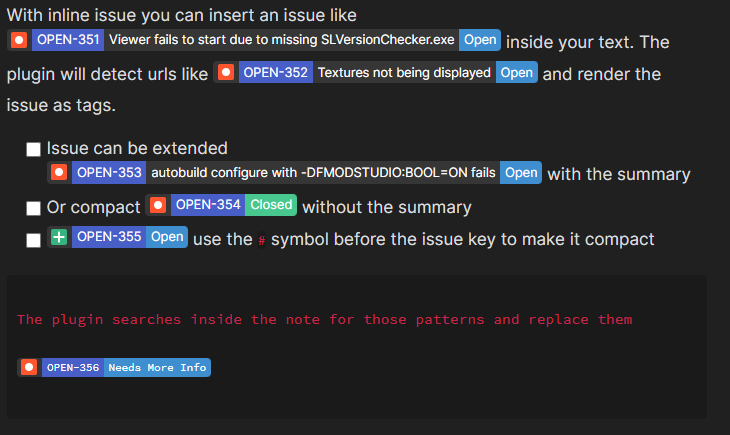
With inline issue you can insert an issue like JIRA:OPEN-351 inside your text.
The plugin will detect urls like https://jira.secondlife.com/browse/OPEN-352 and render the issue as tags.
- [ ] Issue can be extended JIRA:OPEN-353 with the summary
- [x] Or compact JIRA:-OPEN-354 without the summary
- [ ] JIRA:-OPEN-355 use the `-` symbol before the issue key to make it compact
```
The plugin searches inside the note for those patterns and replace them
JIRA:-OPEN-356
```
Contribution and Feedbacks
Feel free to share your experiences, feedbacks and suggestions in the by opening a GitHub issue.
Pull requests are welcome.
License
Jira-Issue is licensed under the GNU AGPLv3 license. Refer to LICENSE for more information.
For plugin developers
Search results and similarity scores are powered by semantic analysis of your plugin's README. If your plugin isn't appearing for searches you'd expect, try updating your README to clearly describe your plugin's purpose, features, and use cases.