Just Simple Teleprompter
approvedby David Hurt
Read any Markdown note as a simple, mobile-friendly teleprompter. - This plugin has not been manually reviewed by Obsidian staff.
Just Simple Teleprompter
A deliberately small, local-first teleprompter for Obsidian on desktop, phone, and tablet.
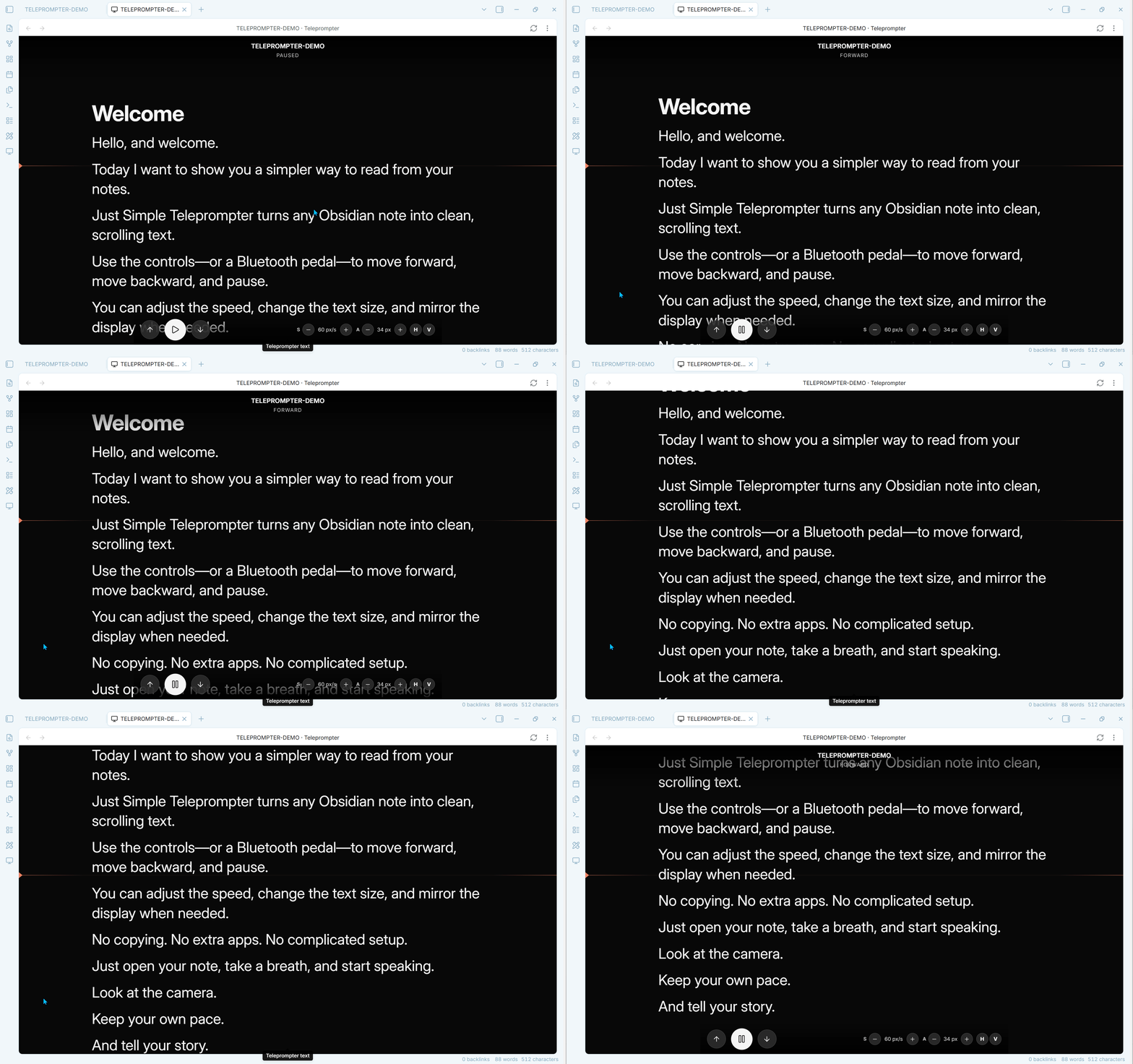
Open any Markdown note, choose a direction, and read. The plugin never modifies the note and makes no network requests.
Features
- Automatic forward and reverse scrolling with pause/resume.
- Compact controls for speed, text size, and playback, plus configurable line spacing.
- Independent horizontal and vertical mirroring, including both at once.
- On-screen, keyboard, and Bluetooth pedal input, including iOS page turners that emulate touch gestures instead of keys.
- Phone, tablet, and desktop support with one responsive control bar.
- Automatic source-note refresh without losing position or playback state.
- A reading cue line and optional screen wake lock.
- Fully local, read-only operation with no accounts, telemetry, or network requests.
Controls
- Forward or the right pedal starts continuous forward scrolling.
- Reverse or the left pedal starts continuous reverse scrolling.
- While the text is moving, pressing either pedal pauses it.
- To change direction, press once to pause and then press the pedal for the new direction.
- Pause/Resume or
Spacepauses and resumes the last direction. ArrowDownacts as the right pedal andArrowUpacts as the left pedal.Escapealways pauses.
Bluetooth pedal compatibility
The plugin supports two independent pedal input paths. Adding iOS touch-pedal support does not replace or change the existing Bluetooth-keyboard support.
| Pedal signal | Recommended setup | Learn required? |
|---|---|---|
Bluetooth keyboard ArrowUp / ArrowDown | Select the pedal's up/down mode. Down moves forward and up moves in reverse. | No |
| Another identifiable keyboard key | Capture each pedal under Settings → Just Simple Teleprompter → Bluetooth pedals. | Yes |
| iOS synthetic horizontal touch gesture | Select the pedal's ← → or touch page-turner mode. A leftward gesture moves forward and a rightward gesture moves in reverse. | No |
Keyboard-style pedals continue to work on desktop and mobile exactly as before. This includes pedals such as the Donner model tested during development. On iPhone and iPad, some page turners do not expose arrow keys to Obsidian at all: they simulate tiny screen swipes instead. Version 0.1.16 adds automatic support for the measured RATSTONE ← → mode without affecting keyboard pedals or the on-screen controls.
The iOS touch-pedal detector is deliberately narrow. It accepts only the fast horizontal edge gesture generated in the top-left two-pixel area by this class of page turner, so ordinary touches and scrolling in the teleprompter are ignored.
Custom keyboard keys can still be learned from the plugin settings. The learning dialog shows the raw key and code reported by the operating system and falls back to a usable legacy value when iOS reports one of them as unidentified.
If Learn reacts but the setting remains on Built-in keys, open Pedal input inspector in the same settings section. It records keyboard, pointer, touch, wheel, and focus events on the actual phone or tablet and provides a Copy diagnostics button. This makes it possible to tell whether a pedal is sending keys, touch gestures, or an input that Obsidian cannot receive.
The commands Press forward control, Press reverse control, Pause or resume, and Pause can also be assigned in Settings → Hotkeys. The plugin does not install default hotkeys.
Use
- Open a Markdown note.
- Run Open current note in teleprompter from the command palette, ribbon, or file menu.
- Select Forward or Reverse.
The screen controls hide while the text is moving and return when the view is touched or paused.
Scroll speed, text size, and horizontal/vertical mirroring can all be changed directly from the compact controls in the teleprompter view. Mirror modes remain independent and can be combined for a 180-degree flip. Mirroring affects only the reader; controls remain normally oriented.
All controls share one horizontal bar: transport on the left and speed, text size, and mirror controls on the right. The bar stays at the top in the mobile app so Obsidian's navigation cannot cover it, and at the bottom on desktop. Narrow phone layouts hide only the numeric readouts and keep every button on the same line; wider layouts show the values too.
If the source note is edited in another Obsidian pane or window, the teleprompter refreshes automatically after a short debounce. It keeps its scroll position, selected direction, and paused/running state.
Mobile support
The runtime uses only Obsidian and browser APIs. It does not depend on Node.js or Electron and declares isDesktopOnly: false.
Privacy
- Network requests: none.
- Accounts, telemetry, ads, and payments: none.
- Vault access: reads only the Markdown note opened in the teleprompter.
- File modifications: none.
Development note
Just Simple Teleprompter was unapologetically vibe-coded: built iteratively with AI assistance, then tested and refined inside a real Obsidian vault.
Development
npm install
npm run check
The release contains exactly main.js, manifest.json, and styles.css.
For plugin developers
Search results and similarity scores are powered by semantic analysis of your plugin's README. If your plugin isn't appearing for searches you'd expect, try updating your README to clearly describe your plugin's purpose, features, and use cases.