Kindle Vocab
approvedby bao-tg
Create the Markdown file from your Kindle Vocab Builder in your vault.
Kindle Vocab Plugin for Obsidian

Kindle Vocab is an Obsidian plugin that lets you import vocabulary lookups from your Kindle device and convert them into structured, interactive Markdown notes.
Ideal for learners who want to build a personal vocabulary library and review it directly within Obsidian.
Developed by: Bao Truong
Features
- Generate Markdown from your Kindle lookups (
vocab.db) - Integrate custom dictionary files (CSV format)
- Mark words as "Learned/Unlearned" using checkboxes
- View statistics such as percentage learned
- Sort words by timestamp or prioritize unlearned items
How to Use
1. Upload Your Vocabulary Database
- Open the command palette (Ctrl + P) and run:
Upload your vocabulary database - Select your
vocab.dbfile.
You can find this file by connecting your Kindle to your computer via USB and searching forKindle (E:)/system/vocabulary/vocab.db.
2. Upload a Dictionary File (CSV)
- Download a public dictionary file:
You may also upload your own dictionary file, provided that it is in CSV format with the structure:
word, information
- Run the command:
Upload your dictionary file
Then select your.csvdictionary file.
ℹ️ Amazon dictionaries are DRM-protected and cannot be used. This plugin uses public alternatives like GCIDE and Wiktionary. The
wiktionary.csvfile is a customized version of data from Wiktionary.
3. Sync and Review Vocabulary
- Click the Sync icon in the ribbon (left sidebar), or run the command:
Sync the vocabulary builder to your Obsidian - In the popup modal, click
Start Sync - A new file named
My Vocabulary Builder.mdwill be created - Switch to Preview mode (Ctrl + E) to interact with checkboxes, and resync to track your learning progress
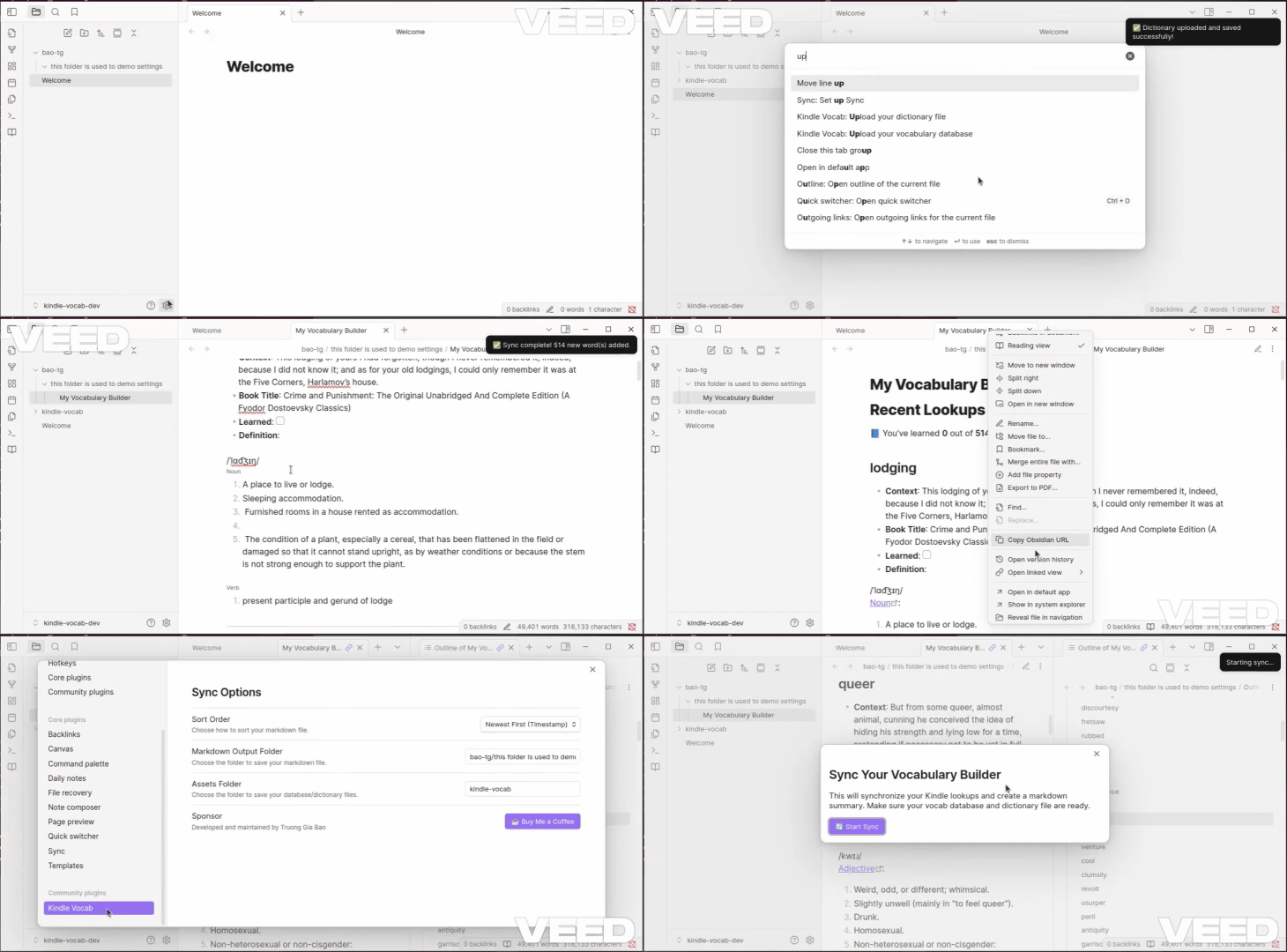
Notices when use
- You shouldn't change the name of the
My Vocabulary Builder.mdfile, since it will affect the checkbox learned/unlearned function. - Ìf you want to change the folder which is used to store the
vocab.db,dictionary.csv, andMy Vocabulary Builder.md, you can change it in Settings Tab.
References
- Obsidian Plugin Developer Docs
- Obsidian API Reference
- TypeScript Handbook
- esbuild Documentation
- GCIDE Dictionary
- Webster’s Dictionary CSV
- Wiktionary
- Microsoft Docs – DRM
- VEED
Additional Tools
Want to sync vocabulary directly to Anki?
Check out: KindleVocab2Anki
⚠️ Note: This tool may require deDRM, which is legally restricted in some regions.
FAQ
Q: Can I log in with my Amazon account and sync the vocab.db automatically?
A: No. You must manually upload the vocab.db file. Amazon does not provide an API or allow access to this file via account login.
License
This project is licensed under the MIT License.
Future developments
- Support other languages beside English
- Better customized dictionary
- Let the user move file, change file name dynamically, not through the settings.
Say Thanks
If you found this plugin useful, you can support its development:

For plugin developers
Search results and similarity scores are powered by semantic analysis of your plugin's README. If your plugin isn't appearing for searches you'd expect, try updating your README to clearly describe your plugin's purpose, features, and use cases.