koncham workspace
approvedby manogna4
Workspace management.
koncham workspace
an obsidian plugin to enhance the workspace
features
'Center-panes' view on sidebar (vertical tabs)
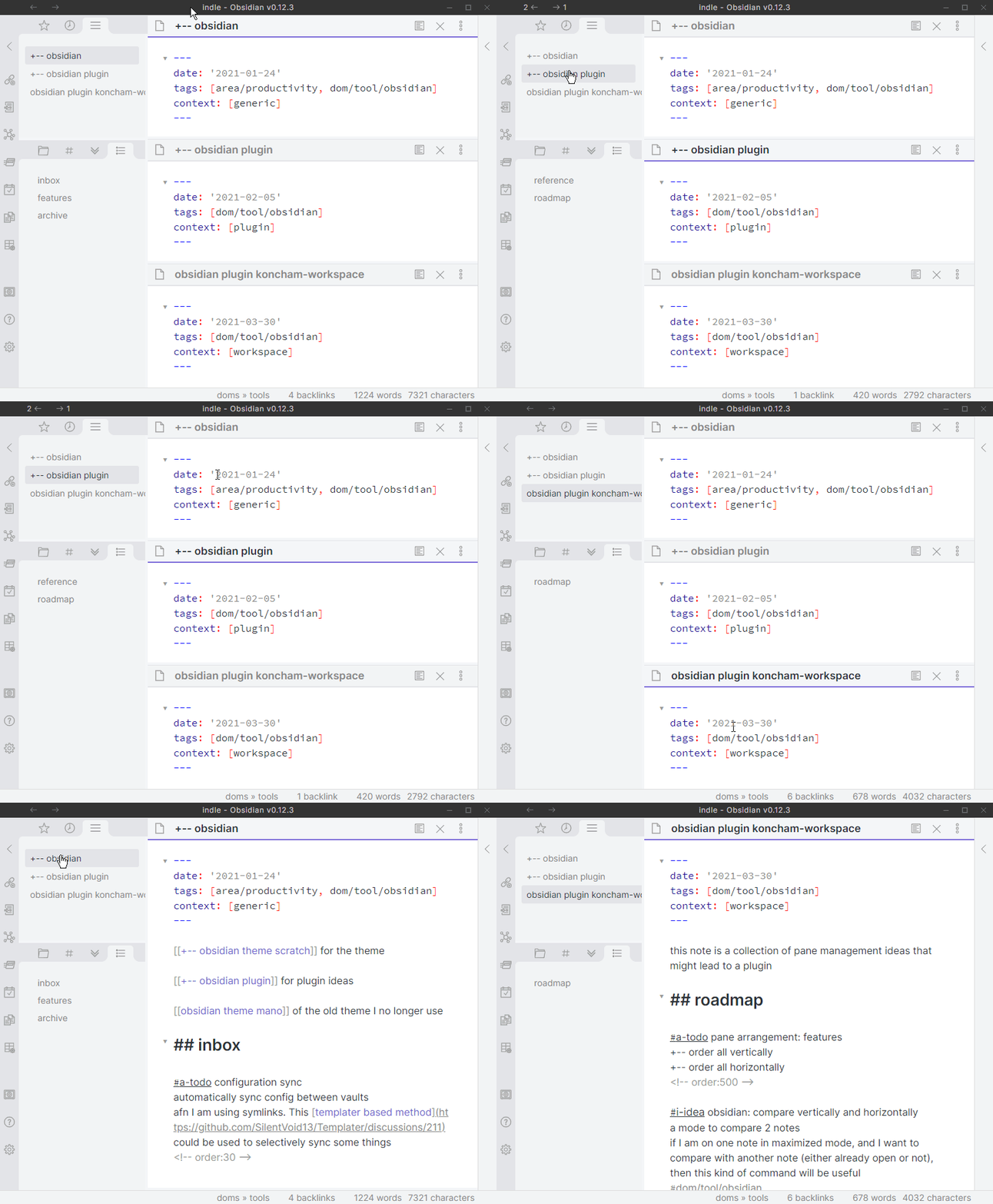
This is a tab on the left side-bar that lists all the panes open in the main area. This works a little like vertical tabs (in vivaldi and edge browsers).
features of this view:
- switch to any pane with one click
- active note is highlighted
- more features exposed through right-clicking the tab header
This view is useful when using obsidian in ways that hide some open panes.
examples of such modes include:
- sliding-panes
- maximize active pane
This screen recording demonstrates usage in the default and maximized modes:
pin/unpin panes
Pinning all panes forces every new note to open in it's own pane. When some external applications open a note in Obsidian, they switch away from the last active un-pinned pane. Pinning prevents losing your existing open notes.
features planned
- more functionality in
center panesview through right click - pane switcher modal
- pane arrangements such as (1+1), (1+2) using commands
- rearrange panes in alphabetical order
known issues
-- none right now --
For plugin developers
Search results and similarity scores are powered by semantic analysis of your plugin's README. If your plugin isn't appearing for searches you'd expect, try updating your README to clearly describe your plugin's purpose, features, and use cases.