Obsidian Liuyao Plugin
This plugin renders six-line divination diagrams in Obsidian from a fenced liuyao code block.
Recent Updates
0.4.1 Released
- Enhanced copyright watermark with author attribution and year
- Improved type declarations for better type safety
- Minor styling improvements to watermark display
0.3.x Released
- Watermark enhancements for proper attribution
0.2.x Released
- Color customization for dynamic Yaos
Supported Syntax
```liuyao
  123123
```
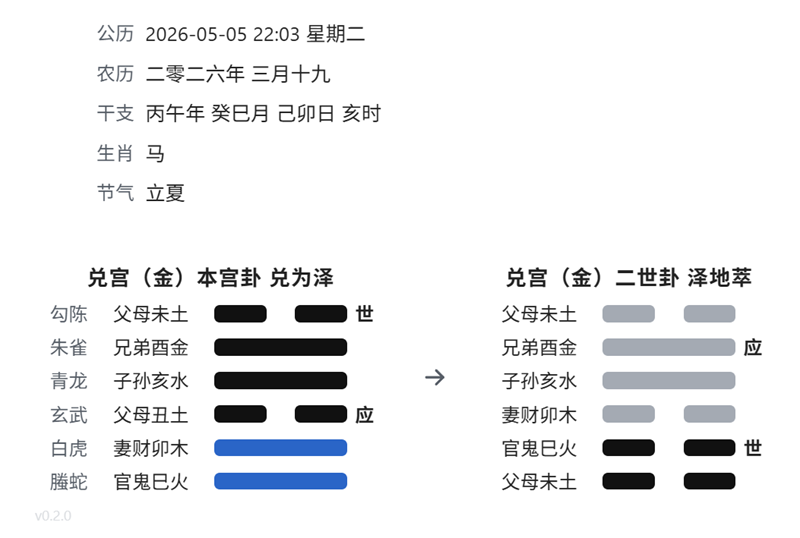
The liuyao block can also include a date on the first non-empty line and the hexagram input on the second line:
```liuyao
  2026-05-05 22:03
  332112
```
It will be rendered like
Rules
- The input must contain exactly 6 digits.
- Each digit must be one of
0,1,2, or3.0: old yin, 老阴1: young yang, 少阳2: young yin, 少阴3: old yang, 老阳
- The first digit is the bottom line, and the sixth digit is the top line.
- The plugin looks up the matching hexagram metadata from
src/core/common.ts. - A
liuyaoblock may optionally use the first non-empty line as a date and the second non-empty line as the hexagram input. - The hexagram input also supports 6 trigram names, such as
坤坎离离震兑.
The rendered card shows:
- The six gods on the far left when a valid date is provided
- The family and hexagram name at the top, such as
乾宫 乾为天 - The line relation text on the left of each line
- The
世or应marker on the right when present - A copyright watermark at the bottom left:
v{VERSION} © {YEAR} Kasukabe Tsumugi. All Rights Reserved.
Watermark
Each rendered divination card includes a copyright watermark in the bottom left corner. The watermark displays:
- The current plugin version
- The current year
- Author attribution: "Kasukabe Tsumugi"
This watermark is styled with the .kasukabe-watermark CSS class and can be customized if needed.
Development
The source entry is src/main.ts, and build artifacts are written to dist/.
- Install dependencies:
pnpm install - Build the plugin:
pnpm build
The build produces:
dist/main.jsdist/manifest.jsondist/styles.css
Copy those three files into your vault at .obsidian/plugins/liuyao/.
For plugin developers
Search results and similarity scores are powered by semantic analysis of your plugin's README. If your plugin isn't appearing for searches you'd expect, try updating your README to clearly describe your plugin's purpose, features, and use cases.