LLM Auto Title
approvedby Darren Zheng
Generate note titles via a local LLM (LMStudio by default; any OpenAI-compat server). Hotkey to title the current note; batch-rename timestamp notes. UI auto-localizes (English / 中文). - This plugin has not been manually reviewed by Obsidian staff.
LLM Auto Title (Obsidian plugin)
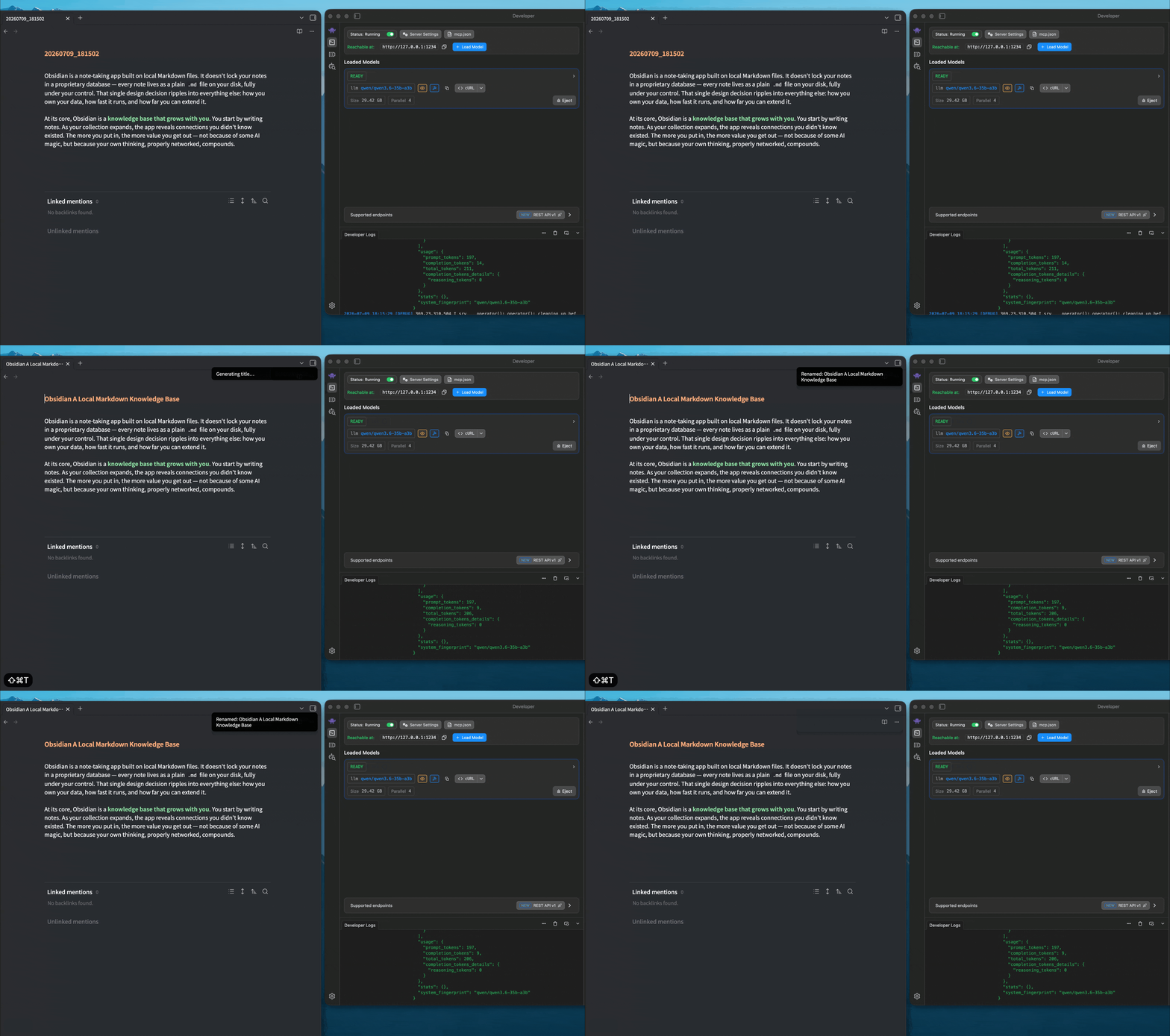
Generate note titles via a local LLM — default LMStudio, works with any OpenAI-compatible server (Ollama, vLLM, …). Renames use fileManager.renameFile, so backlinks update automatically. The UI auto-localizes (English / 中文) based on Obsidian's language.
Features
- Title the current note — command Generate title for current note, default hotkey
Cmd/Ctrl+Shift+T, works on any markdown note. - Batch-rename timestamp notes — command Scan and title all timestamp notes processes notes whose filename matches a timestamp pattern (default
YYYYMMDD_HHmmss, configurable). - No auto-trigger — you decide when it's done; press the hotkey to title.
- Thinking off by default (
reasoning_effort:"none") — fast and stable; can be turned on for reasoning models. - Customizable System prompt (write your own rules); timestamp format / regex / scan folders all configurable.
Privacy & permissions
- Local only. The plugin's only network traffic is to the local LLM server you configure (
http://127.0.0.1:1234by default — LMStudio / Ollama / vLLM). No data leaves your machine; no third-party or cloud service is contacted. - What is read. The Generate title command reads only the current note's content. The Scan and title all timestamp notes command lists markdown filenames (
vault.getMarkdownFiles) to find timestamp-pattern notes, and reads a matched note's content only when generating that note's title. - Why enumeration is needed. Batch-titling timestamp notes requires scanning filenames. It is scoped to your configured scan folders (empty = whole vault) and only filenames are matched against the timestamp pattern.
- What is written. The plugin renames files via
fileManager.renameFile(which also updates links/backlinks). It writes nothing else except its own settings (data.jsonin the plugin folder). - No analytics, no telemetry. Nothing about your vault or usage is collected or transmitted.
Prerequisites
- Install & start LMStudio, enable the local server in the Developer tab (default
http://127.0.0.1:1234), and load a chat model (or enable JIT auto-load). - Other OpenAI-compat servers (Ollama, vLLM, …): just change the Base URL in settings.
Install (dev)
npm install
npm run dev      # watch build
# or: npm run build   (one-shot main.js)
Copy main.js and manifest.json into <vault>/.obsidian/plugins/llm-auto-title/, restart Obsidian, enable under Settings → Community plugins. Then pick a model in the plugin settings (type it or click the list button).
Notes
- Desktop only (
isDesktopOnly) — mobile can't reach a desktop's local server. - If a reasoning model with thinking on fails to converge, simplify the System prompt or turn thinking off.
- The default hotkey is written best-effort to
.obsidian/hotkeys.json; if it doesn't take effect, bind it manually under Settings → Hotkeys.
Test
node test/run.mjs            # pure-logic unit tests
node test/run-integration.mjs # integration tests (needs a running local server + a chat model)
LLM Auto Title(中文)
通过本地 LLM 为 Obsidian 笔记生成标题——默认 LMStudio,兼容任意 OpenAI-compat 服务(Ollama、vLLM 等)。重命名用 fileManager.renameFile,双链自动更新。界面根据 Obsidian 语言自动中英文切换。
功能
- 为当前笔记生成标题——命令「为当前笔记生成标题」,默认热键
Cmd/Ctrl+Shift+T,作用于任意 md 笔记。 - 批量扫描命名——命令「扫描并命名全部时间戳笔记」处理文件名匹配时间戳格式的笔记(默认
YYYYMMDD_HHmmss,可配)。 - 不自动触发——写完再手动按热键,避免给半成品命名。
- 思考默认关闭(
reasoning_effort:none),快且稳;需要时可开启推理。 - System prompt 可自定义(写你的规则);时间戳格式/正则、扫描文件夹均可配。
安装(开发)
npm install
npm run dev      # watch
# 或 npm run build
把 main.js 与 manifest.json 放入 <vault>/.obsidian/plugins/llm-auto-title/,重启 Obsidian,在 设置 → 第三方插件 启用,然后在插件设置里选模型(输入或点列表按钮)。
For plugin developers
Search results and similarity scores are powered by semantic analysis of your plugin's README. If your plugin isn't appearing for searches you'd expect, try updating your README to clearly describe your plugin's purpose, features, and use cases.