Lore Creator
approvedby PancstaR
Design fictional universes: branching timelines, versioned story fragments, custom calendars and structured worldbuilding entities. - This plugin has not been manually reviewed by Obsidian staff.
🌌 Lore Creator
Build fictional universes inside Obsidian
Branching timelines · versioned drafts · your own calendar
English · Türkçe





✨ Features · 🧩 Concepts · 🚀 Getting started · 🏷️ Frontmatter · ⌨️ Commands · 🛠️ Development
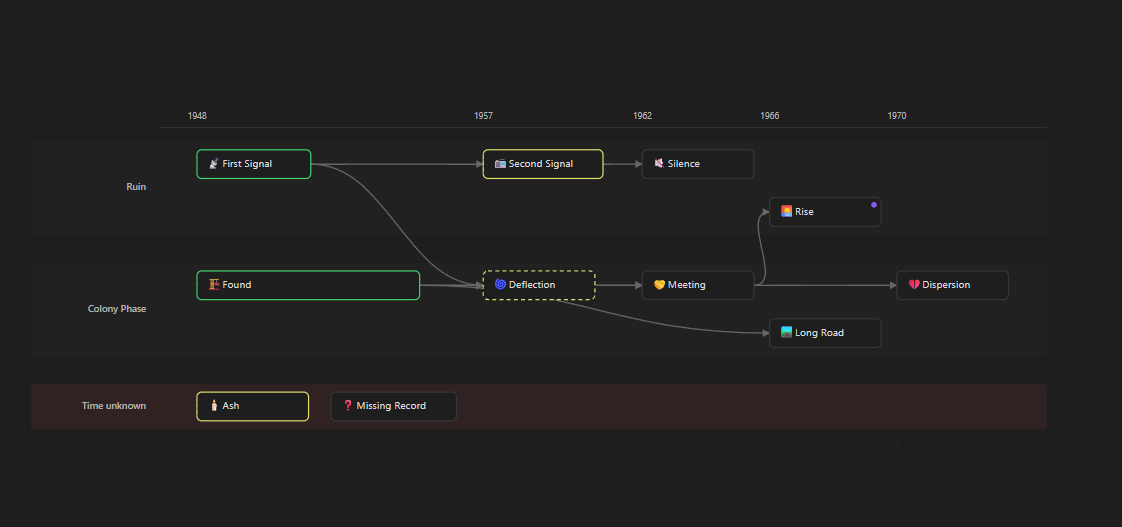
🕒 The timeline canvas — flows as lanes, time across the axis, branches drawn as curves
Status — early but complete. Every feature below works. Interfaces may still shift before 1.0, and the frontmatter schema is not yet frozen.
💡 Why
Worldbuilding notes rarely get written in order. You write part 1, leave it half finished, jump to part 4, then go back to part 0. Later you decide the war started twenty years earlier than you first wrote, and eight notes have to change together — but you want to keep the old draft, because you are not sure yet.
Most tooling assumes you write forwards and never change your mind. This plugin assumes the opposite:
| 🌱 | Unfinished is a normal state, not an error to clear |
| 🌿 | A fragment can lead to different places in different drafts, and switching drafts reshapes the timeline |
| 📦 | Nothing is deleted. Old versions and unused ideas stay where you can find them |
Everything lives in ordinary Markdown with ordinary frontmatter. Uninstall the plugin and your universe is still a readable set of notes.
🧩 Concepts
Four ideas, kept deliberately separate:
flowchart TD
    U["🌌 Universe<br/><i>one vault</i>"] --> T1["🕒 Timeline<br/><i>a reality</i>"]
    U --> T2["🕒 Timeline<br/><i>a parallel reality</i>"]
    T1 --> F1["🧵 Flow<br/><i>a character's lane</i>"]
    T1 --> F2["🧵 Flow<br/><i>another lane</i>"]
    F1 --> N["📄 Note<br/><i>a story fragment</i>"]
    F2 --> N
    N --> V1["📝 v3 · active<br/><i>lives at the note's path</i>"]
    N --> V2["🗄️ v2 · archived"]
    N --> V3["🗄️ v1 · archived"]

    classDef universe fill:#4f46e5,stroke:#3730a3,color:#fff
    classDef timeline fill:#7c3aed,stroke:#5b21b6,color:#fff
    classDef flow fill:#0ea5e9,stroke:#0369a1,color:#fff
    classDef note fill:#22c55e,stroke:#15803d,color:#062e11
    classDef active fill:#f59e0b,stroke:#b45309,color:#3b1d00
    classDef archived fill:#94a3b8,stroke:#475569,color:#0f172a

    class U universe
    class T1,T2 timeline
    class F1,F2 flow
    class N note
    class V1 active
    class V2,V3 archived
| Concept | What it is | Part of the fiction? | |
|---|---|---|---|
| 🕒 | Timeline | A reality — the main universe, or a parallel one | ✅ Yes |
| 🧵 | Flow | A lane inside a timeline, usually one character's thread. Lanes cross, merge, and split again | ✅ Yes |
| 📝 | Version | A draft of one note. Carries its own time, flow and connections | ❌ An authoring tool |
| 🚦 | Status | draft · partial · done | ❌ An authoring tool |
[!IMPORTANT] A parallel universe is a timeline; a second attempt at the same scene is a version. Confusing the two is the fastest way to make a vault incoherent.
✨ Features
| 🌿 | Branching canvas | Time across the x axis, flows as lanes, next/prev drawn as curves |
| 📝 | Versions that reshape the story | Each draft carries its own time, flow and connections |
| 📚 | Version sets | Flip a whole story revision back and forth in one move |
| 📅 | Your own calendar | Any unit, any epoch, optional mapping to Earth years |
| 🗂️ | Types and entities | Characters, species, places, factions, objects, events — defined in a note, not in code |
| ⚖️ | Laws | Universe physics and the entities that break them, linked both ways |
| 💡 | Drafts you can promote | A shelf for homeless ideas, turned into real notes when they earn it |
| 🧭 | Navigation | A bar under each note showing every place it leads, with a hover map |
| 📊 | Dashboard & consistency | Counts, everything unfinished, and an advisory report |
| 🔍 | Search & export | Filter by field, then build one Markdown document from what you choose |
🌿 Branching timeline canvas
Notes carrying a timeline id are laid out with time across the x axis and flows
as lanes. Connections come from next and prev, drawn as curves so converging
threads stay readable.
flowchart LR
    subgraph EXPLORER["🧵 Explorer"]
        direction LR
        A["First Signal"] --> B["Second Signal"] --> C["Silence"]
    end
    subgraph COLONY["🧵 Colony"]
        direction LR
        D["Founding"] --> E["Divergence"] --> F["Convergence"] --> G["Dissolution"]
        D --> H["Long Road"] --> F
    end
    C -.-> I["Ascent"]
    F --> I

    classDef done fill:#22c55e,stroke:#15803d,color:#062e11
    classDef partial fill:#f59e0b,stroke:#b45309,color:#3b1d00
    classDef draft fill:#94a3b8,stroke:#475569,color:#0f172a

    class A,B,D,E,F done
    class C,H,G partial
    class I draft
- Boxes widen to show duration (
time-end) and go dashed when approximate (time-uncertain). - Notes with no time yet get their own lane instead of vanishing.
- Border colour reflects status; a dot marks fragments that have other versions.
- Pan, zoom, click through to any note.
📝 Versions that reshape the story
Each version of a note carries its prose and its time, flow and connections. In one draft a scene leads to a battle; in another it leads somewhere else. Switch versions and the timeline redraws.
flowchart LR
    subgraph BEFORE["Draft A · v2 active"]
        direction LR
        A1["Second Signal"] --> A2["Silence"]
    end
    subgraph AFTER["Draft B · v3 active"]
        direction LR
        B1["Second Signal"] --> B2["Ascent"]
        B1 --> B3["Long Road"]
    end
    BEFORE -->|"switch version"| AFTER

    classDef old fill:#94a3b8,stroke:#475569,color:#0f172a
    classDef new fill:#7c3aed,stroke:#5b21b6,color:#fff
    class A1,A2 old
    class B1,B2,B3 new
The active version always stays at the note's own path, so [[links]] elsewhere
in the vault never break. Older versions wait in an archive folder and are found
by following version-of rather than by a list that could drift out of date.
📚 Version sets name a snapshot of which version of each note is active. One story revision usually touches many notes; without this, going back to the earlier draft means remembering and flipping every one of them by hand.
[!NOTE] Every file move is preceded by a dialog naming the exact paths, ordered so the current content reaches its new home before anything overwrites it.
📅 Your own calendar
A universe does not have to run on Earth years.
time: 134923.4521          # always a single sortable number
time-precision: date       # year · date · datetime
time-label: "Xen Year 134923, day 165"
earth-time: 2050           # optional reference for readers
Define the calendar once — unit name, epoch, days per unit, and how it maps to Earth years — and the time picker fills in the number and the label for you. Or leave the mapping out and write the label yourself.
🗂️ Types and entities
Characters, species, places, factions, objects, events, laws, drafts. Each type brings its own fields, its own template and its own default icon.
The registry lives in a note's frontmatter, so adding a type is editing a note, not editing this plugin — and any AI assistant reading your vault can see what your types mean.
⚖️ Laws that know who breaks them
Universe-wide physics and entity-specific rules, kept as two layers. Entities declare which laws they are subject to and which they break; the laws view inverts those links so a law shows both. Laws can be scoped to particular timelines, for when a parallel reality runs on different physics.
flowchart LR
    L["⚖️ No faster-than-light travel<br/><i>scope: universe</i>"]
    C1["👤 Kyle"] -->|"laws"| L
    C2["👽 Xen envoy"] -->|"breaks-law"| L
    L -->|"the laws view inverts both"| VIEW["📋 Subject to · Breaks"]

    classDef law fill:#7c3aed,stroke:#5b21b6,color:#fff
    classDef entity fill:#0ea5e9,stroke:#0369a1,color:#fff
    classDef view fill:#22c55e,stroke:#15803d,color:#062e11
    class L law
    class C1,C2 entity
    class VIEW view
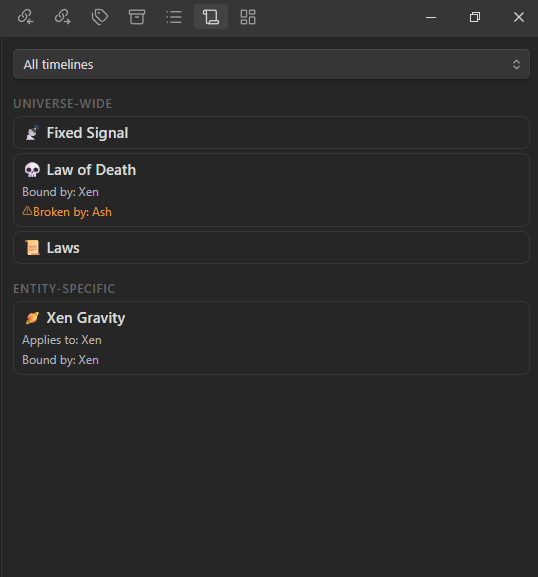
⚖️ Universe-wide laws above, entity-specific below — each one showing who is bound and who breaks it
💡 Drafts you can promote
A shelf for ideas that have no home yet. Open one beside whatever you are writing without losing your place. When an idea earns a place in the story, promote it: pick the type and the folder, and choose whether the draft keeps its text or hands it over. Either way the draft survives and the two notes reference each other.
🧭 Navigation
A bar under each note showing where it leads. Fragments often lead to more than one place, so every destination gets its own button. Hover to preview the destination on a map that can show the whole timeline or just what is one step away — and can be pinned open.
An empty next means the thread ends there. Nothing is invented to fill it.
📊 Dashboard, search and export
| 📊 | Dashboard | Counts by type, everything unfinished (half-written sorted above untouched), and a consistency report |
| 🩺 | Consistency | Broken links, one-sided connections, links that lead backwards in time, notes on a timeline with no date. Advisory only: it corrects nothing and blocks nothing, because most findings are work in progress rather than mistakes |
| 🔍 | Search | Filters by type, status, timeline, flow and time range. Obsidian's own search already covers the words; this answers "every unfinished character in the main universe" |
| 📤 | Export | One Markdown document from the sections you choose. This is why notes carry no privacy flag: what a reader sees is decided when you share, not stored on every note forever |
🚀 Getting started
📥 Install
Not yet in the community plugin browser. Until then:
- Download
main.js,manifest.jsonandstyles.cssfrom the latest release. - Put them in
<vault>/.obsidian/plugins/lore-creator/. - In Obsidian: Settings → Community plugins, turn off Restricted Mode, then enable Lore Creator.
🪄 Set up a vault
Run Set up this vault from the command palette. It creates the folders, templates and type registry the views read from — previewing the exact tree first, and never overwriting a file that already exists.
📁 <vault>
├── 📄 Universe.md            ← calendar, timelines, universe-wide laws
├── 📁 System/
│   ├── 📄 Types.md           ← the type registry: edit a note, not the plugin
│   └── 📄 Version sets.md
├── 📁 Templates/
├── 📁 Versions/              ← archived versions, found via version-of
└── 📁 Exports/
Folder names are chosen separately from the interface language: a universe is written in whatever language its story is, which is not necessarily the language of your menus.
✍️ Write something
flowchart LR
    S1["1️⃣ New lore note<br/>→ Timeline<br/><i>timeline-id: main</i>"]
    S2["2️⃣ New lore note<br/>→ Story<br/><i>set time, timeline, flow</i>"]
    S3["3️⃣ Link notes<br/><i>next / prev</i>"]
    S4["4️⃣ Open the timeline<br/><i>from the ribbon</i>"]
    S1 --> S2 --> S3 --> S4
    S3 -.->|"repeat"| S2

    classDef step fill:#4f46e5,stroke:#3730a3,color:#fff
    classDef last fill:#22c55e,stroke:#15803d,color:#062e11
    class S1,S2,S3 step
    class S4 last
- New lore note → pick Timeline, name it, give it a
timeline-idsuch asmain, and list its flows. - New lore note → pick Story. In the banner at the top, click the time to
place it, and set
timelineandflowin the properties. - Repeat, linking notes with
next. - Open the timeline from the ribbon.
🏷️ How notes are described
Standard fields — on every lore note
| Field | Meaning |
|---|---|
type | Which type this is — the folder is only organisation |
icon / icon-type | An emoji or a Lucide icon name |
status | draft · partial · done |
aliases | Obsidian's own field; resolves [[Lord Kyle]] to this note |
alias-history | When and why a name changed |
related | Free-form links |
🕒 Timeline placement — when a note has one
| Field | Meaning |
|---|---|
timeline | Which reality it belongs to |
flow | Which lane |
time | A single number. Sorting depends only on this. May be empty |
time-precision | year · date · datetime |
time-label | What readers see |
time-end | Set when this spans a period rather than a moment |
time-uncertain | Drawn dashed |
earth-time | Optional reference, computed or written by hand |
next / prev | Connections. More than one means the story branches |
📝 Versioning
| Field | Meaning |
|---|---|
version | v1, v2, … |
version-name | Optional label, also used in the archive filename |
version-note | What is different about this draft |
version-of | Present only on archived versions |
⚖️ Laws and 💡 drafts
| Field | Meaning |
|---|---|
scope | universe or local |
applies-to / timeline-scope | Where a law holds. Empty means everywhere |
laws / breaks-law | Declared on entities; the laws view inverts them |
idea-for | What a draft is an idea for |
promoted-to / promoted-from | The two-way link left by a promotion |
⌨️ Commands
| Command | What it does | |
|---|---|---|
| 🪄 | Set up this vault | Create folders, templates and the type registry |
| 📄 | New lore note | Create a note from a type's template |
| 🪟 | Open timeline / laws / drafts / dashboard | Open a view |
| 📝 | Versions of this note | List, create, switch and archive versions |
| 📚 | Version sets | Capture and apply named snapshots |
| 🧭 | Go to the next / previous fragment | Follow a connection; asks when there are several |
| 💡 | Promote this draft | Turn a sketch into a real note |
| 🔍 | Find in the universe | Search by field rather than by text |
| 📤 | Export the universe | Build a single Markdown document |
⚙️ Settings
Every path is configurable; these are the defaults:
| Setting | Default |
|---|---|
| Universe file | Universe.md |
| Type registry | System/Types.md |
| Versions folder | Versions |
| Templates folder | Templates |
| Version sets file | System/Version sets.md |
| Exports folder | Exports |
Calendar settings are written into the universe note's frontmatter rather than plugin data, so a vault stays self-describing even without the plugin installed. The type registry lives in a note for the same reason.
Interface language follows Obsidian's own, or can be set explicitly. 🇬🇧 English and 🇹🇷 Turkish are included. Frontmatter field names are English in every language — they are data, not interface.
🛠️ Development
npm install
npm run dev     # esbuild watch — rebuilds main.js on save
npm run build   # type-check, then produce a minified main.js
The sources live outside any vault. To work on the plugin, point a vault's plugin folder at this repository — a junction or symlink keeps it to one copy:
# Windows, no administrator rights needed
mklink /J "<vault>\.obsidian\plugins\lore-creator" "<path to this repo>"

# macOS and Linux
ln -s "<path to this repo>" "<vault>/.obsidian/plugins/lore-creator"
Obsidian does not reload plugins by itself. Hot Reload picks up rebuilds automatically; without it, run Reload app without saving after each change.
Releases are tagged with the version number exactly, with no v prefix. Pushing
the tag builds the plugin and publishes main.js, manifest.json and
styles.css as individual assets, which is what Obsidian expects.
There are no runtime dependencies — nothing third-party is bundled into
main.js.
🤝 Contributing
Issues and pull requests are welcome. Two things worth knowing before you start:
- 🗄️ The vault is the source of truth. Anything the plugin knows should be readable from the notes themselves, so a universe survives without it.
- 🛡️ Nothing destructive happens without a dialog naming the exact files, and file moves are ordered so a failure leaves a duplicate rather than a hole.
For plugin developers
Search results and similarity scores are powered by semantic analysis of your plugin's README. If your plugin isn't appearing for searches you'd expect, try updating your README to clearly describe your plugin's purpose, features, and use cases.