Markdown Chat Blocks
approvedby Czeglédy Péter
Chat style blocks for Markdown - This plugin has not been manually reviewed by Obsidian staff.
Markdown Chat Blocks
Chat-style blocks for Obsidian. With this plugin, you can create simple chat-like blocks for any use case. It can be used to improve stories.
Features
- Chat-style UI
- Custome chat title
- Dynamic profile picture
- Left / right bubbles
- An easy to use syntax
- Automatic alternating alignment
Usage
The plugin has a very easy to learn syntax for the ideal user experience.
By default, the bubbles are automatically alternated between the two sides. However, you can override this, by adding l: (for left side), or r: (for right side) in front of a line.
There are multiple parameters you can set for the chat block.
| Name | function | Usage |
|---|---|---|
| Title | Set the title (i.e. the contact's name) of the chat | title = "" |
| Profile picture | Set the profile picture of the contact | pfp = "" |
Example
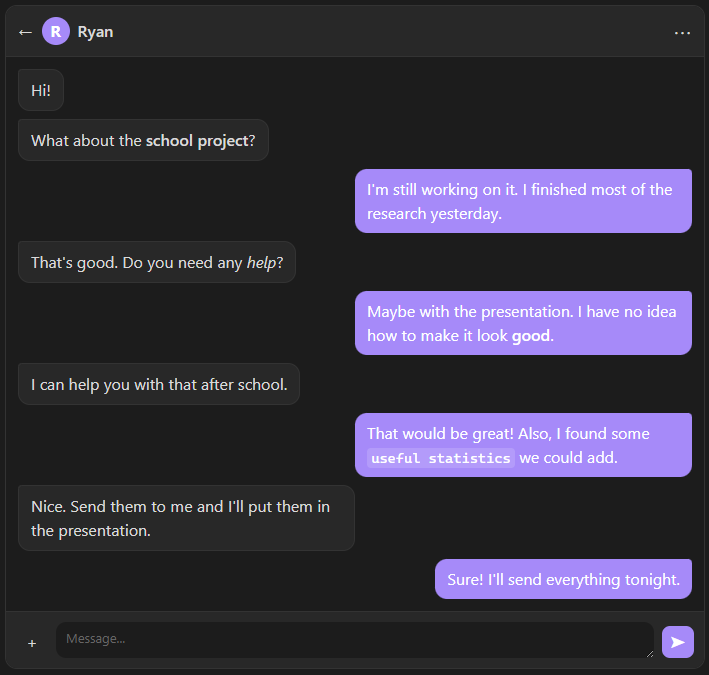
```chat
title = "Ryan"

l: Hi!
l: What about the **school project**?
r: I'm still working on it. I finished most of the research yesterday.
l: That's good. Do you need any *help*?
r: Maybe with the presentation. I have no idea how to make it look **good**.
l: I can help you with that after school.
r: That would be great! Also, I found some `useful statistics` we could add.
l: Nice. Send them to me and I'll put them in the presentation.
r: Sure! I'll send everything tonight.
```
Installation
Install from Obsidian Community Plugins.
Roadmap
- More customization options
For plugin developers
Search results and similarity scores are powered by semantic analysis of your plugin's README. If your plugin isn't appearing for searches you'd expect, try updating your README to clearly describe your plugin's purpose, features, and use cases.