Chat clips
approvedby sleepingraven
Record chat in ordinary markdown list.
★ 3 stars↓ 575 downloadsUpdated 1y agoMIT
Chat Clips
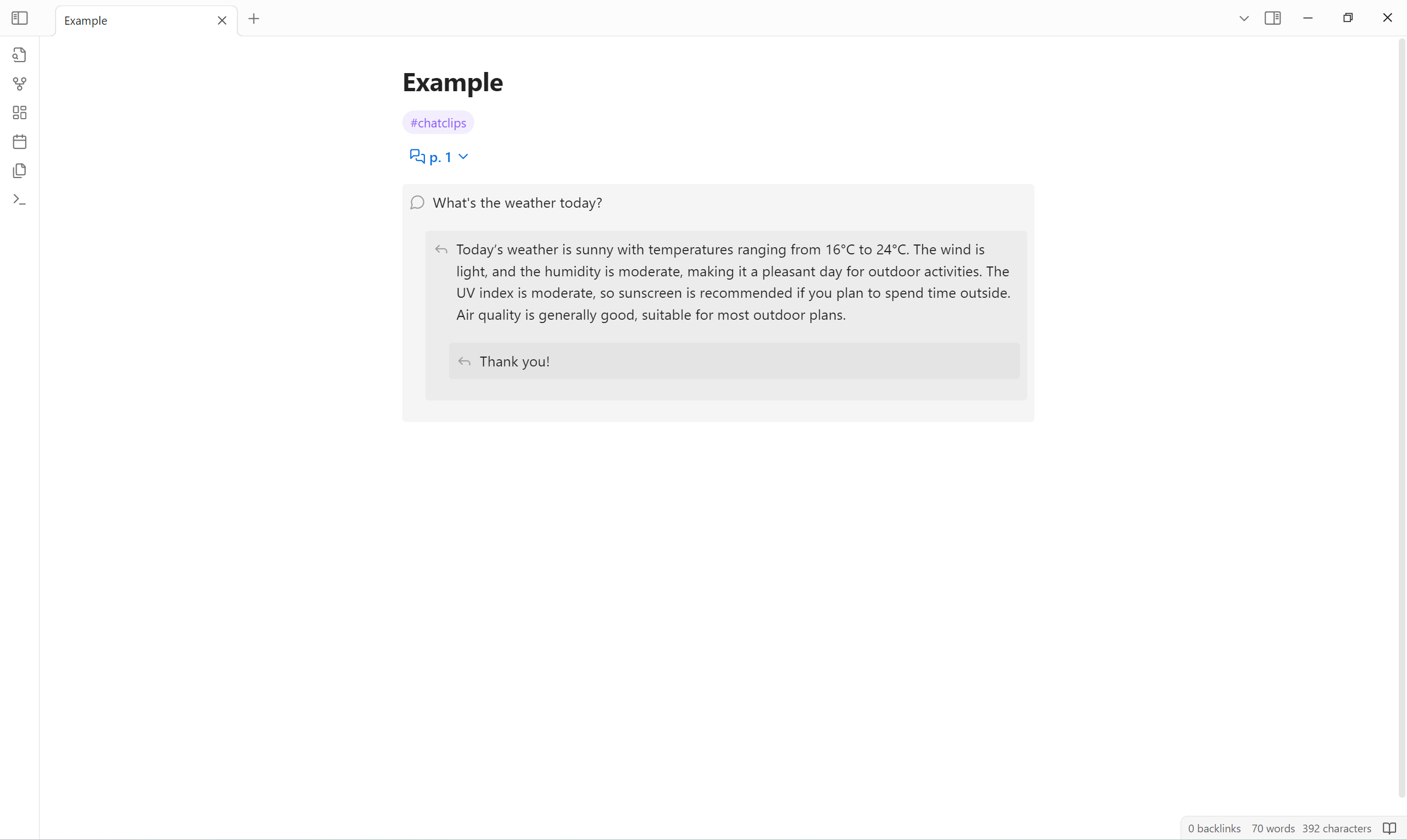
This plugin allows record chat in markdown list in editing view, and display comments-like layout in reading view.
Example
Editing view
1. #chatclips
2. p 1
    - What's the weather today?
        - Today's weather is sunny with a high temperature of 9°C and a low temperature of -2°C. The wind is from the northwest at level 3, and the relative humidity is 22%. The UV index is strong, and the air quality is moderate with an AQI of 54.
            - Thank you!
Reading view
Usage
Define a chat clips list
A chat clips list is defined by:
- An ordered list at first level.
- First list item is to indicate chat clips.
- Followed list items are recognized as chat clips commands.
- Unordered lists that start at the second level.
- Each unordered list item is rendered to a chat clips comment in reading view.
Chat clips commands
| Name | Description | Pattern |
|---|---|---|
| Group | Fold sublists into a group. | <group-title> | "<group-title>" |
| Page | Fold sublists into a page. | p <page-number> |
Customize appearance
You can use CSS snippets to customize the appearance.
Example:
.callout[data-callout^="chat-clips-folder"] {
  background-color: transparent;
}
.callout[data-callout^="chat-clips-comment"] {
  --callout-color: var(--callout-quote);
}
Applicable CSS selectors are as follows:
/* fuzzyly select */
.callout[data-callout^="chat-clips-folder"],
.callout[data-callout^="chat-clips-comment"] {
}

/* precisely select */
.callout[data-callout="chat-clips-folder-group"],
.callout[data-callout="chat-clips-folder-page"],
.callout[data-callout="chat-clips-comment-1"],
.callout[data-callout="chat-clips-comment-2"]/*,
.callout[data-callout="chat-clips-comment-3"],
…… */ {
}
Limitation
- Chat clips comment can not contain unordered list.
Installation
Install from community plugins
Install manually
- Open latest release.
- Download
main.js,manifest.jsonandstyles.cssto<obsidian-vault>/.obsidian/plugins/chat-clips.
For plugin developers
Search results and similarity scores are powered by semantic analysis of your plugin's README. If your plugin isn't appearing for searches you'd expect, try updating your README to clearly describe your plugin's purpose, features, and use cases.