mq
approvedby Takahiro Sato
Run mq (a jq-like query language for Markdown) queries directly in Obsidian: live query blocks, note/vault transforms, and editor support. - This plugin has not been manually reviewed by Obsidian staff.
mq for Obsidian
Run mq (a jq-like query language for Markdown) queries directly inside Obsidian, fully client-side via WebAssembly — no network access required.
Features
Live query blocks
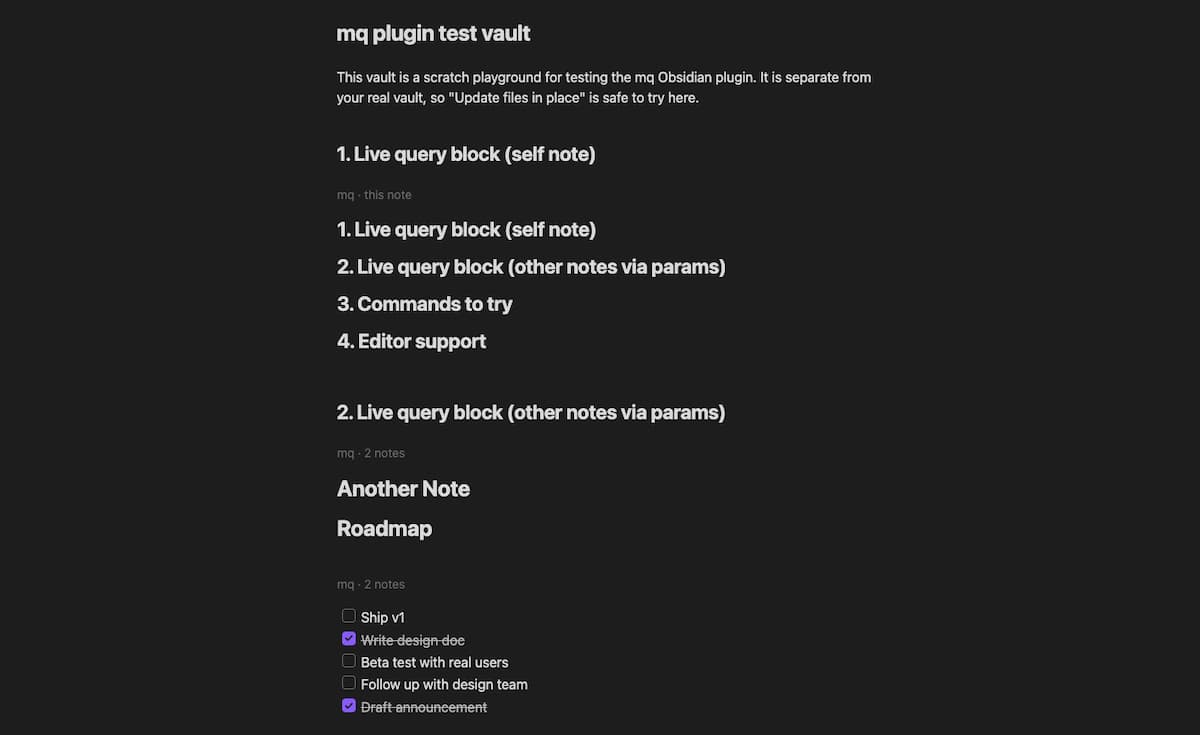
Add a ```mq code block to a note and it renders the query's result inline, right below the block. By default it queries the note it lives in:
```mq
.h1
```
You can point a block at other notes instead of the current one, using params after mq on the fence line:
```mq file="Projects/Roadmap.md, [[Another Note]]"
.todo
```

```mq folder="Projects" tag="#active"
.h1
```

```mq dataview="LIST FROM #project"
.[]
```
| Param | Selects |
|---|---|
file= | Comma-separated notes, by path, name, or [[wikilink]] |
folder= | Comma-separated folders (recursive) |
tag= | Comma-separated tags, with or without # |
dataview= | A Dataview DQL query, rendered to Markdown and used as input (requires the Dataview plugin, toggle in settings) |
file/folder/tag can be combined; their matches are unioned. Blocks re-render automatically when the note(s) they query change (toggle in settings).
Run mq query on current note
Command palette → mq: Run mq query on current note. Enter a query, choose whether it applies to the whole note or just the selection, and whether the result replaces the scope, is inserted below it, or is copied to the clipboard.
Example: select some text and run upcase() with action "Replace" to uppercase it in place. Or run .h1 on the whole note with action "Replace" to reduce the note down to just its top-level headings.
Run mq query across the vault
Command palette → mq: Run mq query across the vault. Scope the query to a folder and/or tag (or leave both empty for the whole vault), then either:
- Report to a new note (default, non-destructive) — collects each note's result into a new report note.
- Update files in place — overwrites each matching note with its query result. This asks for confirmation and shows how many notes will be affected before it touches anything.
Example: folder Projects, query .todo, action "Report to a new note" — collects every open task across the Projects folder into one note.
Editor support
Inside ```mq code blocks, in both Source mode and Live Preview, using the same query language as everywhere else in this plugin (see Example queries below):
- Syntax highlighting
- Diagnostics (parse and type errors) as you type
- Hover for function/variable signatures and docs
- Autocomplete for functions and variables defined earlier in the block
Example queries
mq queries a note as a tree of Markdown nodes; a query is typically a selector (picks nodes) optionally piped into functions (transform or filter what was picked). The full language is documented in the mq book; a few selectors and functions that are especially useful on Obsidian notes:
| Query | Result |
|---|---|
.h1 … .h6, .h | Headings at a specific level, or any level |
.task, .todo, .done | All task list items, only unchecked, only checked |
.link, .wikilink, .image | Markdown links, [[wikilinks]], images |
.code, .code_inline | Fenced code blocks, inline code spans |
.[] | List items (ordered or unordered) |
.text, .p | Paragraphs |
.h1 | upcase() | Top-level headings, uppercased |
.[] | select(test(to_text(), "^TODO")) | List items whose text starts with TODO |
.link | .url | The URL of every link |
Tasks are matched with the .task/.todo/.done selectors above, not a function — select(is_task()) looks plausible but isn't real mq syntax and will error with "is_task" is not defined.
Data access
- Vault read — "Run mq query across the vault" reads note contents via Obsidian's
getMarkdownFiles()API to build its input; it never reads non-Markdown files. Nothing leaves the device — mq runs fully client-side via WebAssembly (see above). - Clipboard write — the "Copy to clipboard" result action for the current-note command writes the query result via
navigator.clipboard.writeText(). The plugin never reads the clipboard.
Settings
- Markdown rendering style for query results (list marker, link title/URL style)
- Query timeout
- Allowed domains for
import/include "https://..."(GitHub/HTTPS modules; see Limitations below) - Auto-refresh for query blocks
- Editor support toggle
- Dataview integration toggle
Installation
Not yet on the Community Plugins list. Until then, install manually:
- Download
main.js,manifest.json, andstyles.cssfrom a release. - Copy them into
<your vault>/.obsidian/plugins/mq/. - Reload Obsidian and enable mq under Settings → Community plugins.
Development
The wasm bindings come from the published mq-web npm package (a regular dependency), so building this plugin needs only Node/pnpm — no Rust toolchain.
pnpm install
pnpm run dev      # watch build, outputs main.js
Symlink (or copy) this directory into <your vault>/.obsidian/plugins/mq/ to test changes live; reload Obsidian (or use the "Hot Reload" community plugin) after each rebuild.
pnpm run build   # production build
pnpm run test    # unit tests
pnpm run lint    # oxlint
License
MIT
For plugin developers
Search results and similarity scores are powered by semantic analysis of your plugin's README. If your plugin isn't appearing for searches you'd expect, try updating your README to clearly describe your plugin's purpose, features, and use cases.